
The Raspberry Pi Zero boards combine the full power of a Linux computer in an ultra-compact, energy-efficient form factor perfect for portable and space-constrained applications. Despite its small size, the Pi Zero delivers impressive performance for projects requiring minimal power consumption, wireless connectivity, and discrete installation. Our curated Raspberry Pi Zero projects showcase the versatility of this tiny computer across applications including wearable technology, hidden surveillance systems, portable gaming devices, and compact IoT solutions.
Each project includes comprehensive tutorials with circuit schematics, Python code examples, and practical implementation guides suitable for makers, students, and professionals looking to maximize functionality while minimizing footprint and power requirements. Apart from these Raspberry Pi Zero projects, you can also check out our Raspberry Pi Projects and Raspberry Pi Pico Projects.

In this tutorial, we are going to interface a 3.5-inch TFT display with Raspberry Pi Zero W development board. Although Raspberry pi zero itself has an HDMI output that can be directly connected to a Monitor, but in projects where space is a constrain, we need smaller displays. This TFT touch screen display can be easily interfaced to the Raspberry Pi to display…

In our previous tutorial Getting Started with the RASPBERRY PI ZERO, we had an overview Raspberry Pi zero W and setup the Pi Zero. In this tutorial we are going to design a simple LED circuit and control it with the Raspberry Pi Zero W by connecting the circuit to its GPIO pins. So lets discuss the basics of the GPIO (general purpose…
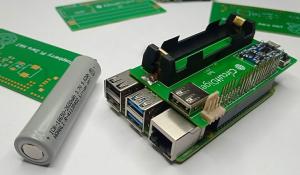
We have been using Raspberry Pi for a long time to create many exciting projects. But, oftentimes we face an issue in selecting the best power source for our projects, and sometimes when the power goes off, our raspberry pi turns off abruptly which might corrupt the OS or in the worst-case damage the board itself. So, today we are building our own Raspberry Pi Zero HAT…
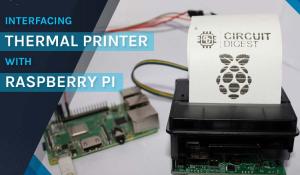
Today, in this project, we will learn how to interface a Thermal Printer with Raspberry Pi using hardware serial communication, to print a test receipt that contains various elements like a Logo, a QR Code, or a barcode, along with various other text and graphical characters. Learning how to connect a thermal printer to Raspberry Pi opens up exciting…
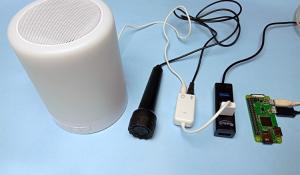
A USB sound card along with the microphone is used to add audio capabilities to Raspberry Pi Zero that lacks an audio connector like other Pi versions. We all know that the Raspberry pi zero W does not have audio hardware and pin-based PWM situation. The USB sound card or bespoke analogue with an ADC (analog-digital converter) can be used to…

Cloud storage has become a need in today's world. The disadvantage is that your data is held on remote servers by an anonymous organization that you must entrust with the privacy and security of your important documents and photographs. However, you can host your data on your own cloud server, which you can run on a computer in your home or business. Nextcloud is one of the…

While online advertising is a major source of money for many of your favorite websites, some people want to avoid it for a variety of reasons, including performance and privacy concerns. You can either install ad-blocking software on each of your devices or you can use other more efficient methods such as Pi-hole. Pi-hole is a general-purpose network-wide ad-blocker,…
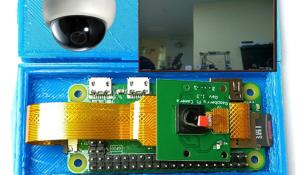
Security is one of the main concerns now days, and there are numerous technologies available to keep your home/office safe and monitored. CCTV and IP cameras are an excellent way to monitor your home or office but setting up these cameras remain prohibitively expensive. So, in this tutorial we are going to build a Surveillance Camera using Raspberry Pi zero W, Pi…

Raspberry Pi camera module is a tiny board that can be interfaced with Raspberry Pi for capturing pictures and streaming videos. In our previous tutorials, we used Pi camera module with Raspberry 3 & 4 to build many OpenCV based projects. In this tutorial, we are going to interface the Pi camera module with Raspberry Pi Zero W and try taking pictures and record…
Kodi is one of the most popular media centre applications available today. It comes with many features like Live TV, PVR/DVR, video player, audio player, image, comic book and games, etc. Talking about Raspberry Pi Zero series, it is ideal for building media centre applications as it is the cheapest Raspberry Pi microcomputer range that costs…

The Raspberry Pi Zero W is the new and improved upgrade of Raspberry Pi Zero family. In this getting started series for Raspberry Pi Zero W, we have previously controlled an LED with Pi GPIO, interfaced a 3.5-inch TFT display with Raspberry Pi Zero W and in this tutorial, we are going to interface I2C 16x2 LCD and 4x4 keyboard with Raspberry Pi zero W. Throughout…

Raspberry Pi zero W is an affordable and compact derivative of Raspberry Pi but if you attach Raspberry Pi zero W with monitor, keyboard, and mouse, it takes up a lot more space. There's no need to connect Reaspberry Pi to a display or input devices if you're only trying to program it or using it to operate electronics like lights, motors, and…
