

Introduction
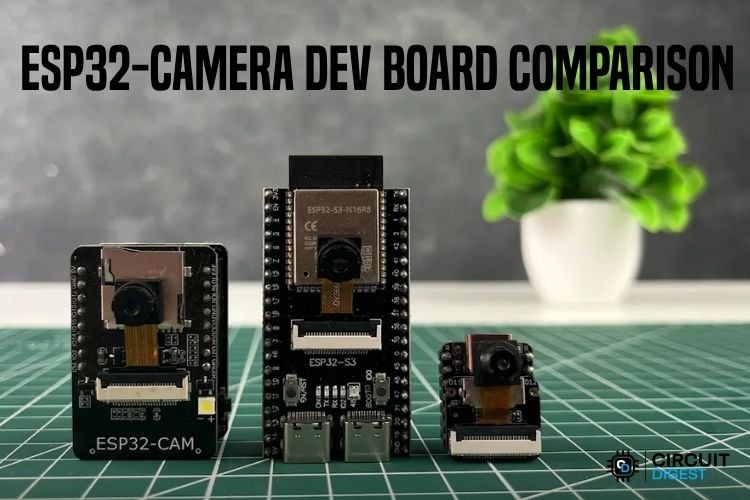
ESP32 Cameras have become a popular choice for building low-cost wireless cameras, smart surveillance systems, and even small AI projects. But today, there are several options available, from the original ESP32-CAM to newer ESP32-S3-based camera boards and compact boards like the XIAO ESP32-S3 Sense. At first glance, they may look similar, but there are some major differences in their processing power, memory, camera sensors, size, and AI capabilities. So, which one should you pick for your next project? In this article, we will compare the ESP32-CAM, ESP32-S3-CAM, and XIAO ESP32-S3 Sense and see which camera board fits in for different types of projects.
ESP32 CAM
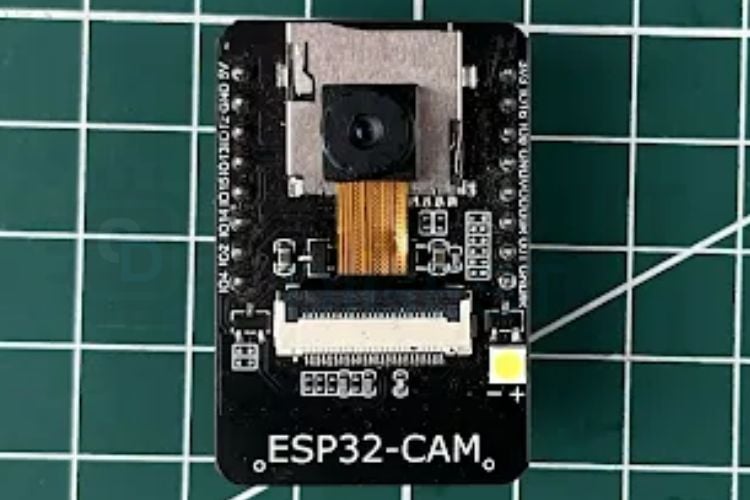
The ESP32-CAM should be the most familiar ESP32 camera board. It is based on the original ESP32 and usually comes with an OV2640, the 2 MP camera from OmniVision, 4 MB Flash, 4MB PSRAM, a microSD card slot, Wi-Fi, and Bluetooth. Its biggest advantage is its simplicity and low cost. The ESP32-CAM can capture images, stream video over Wi-Fi, store photographs on a microSD card, and communicate with a server or cloud service. This makes it a good choice for projects such as Wi-Fi security cameras, Motion detection cameras, Remote monitoring, Simple object detection, etc.
Now, let's see some of the major limitations that come with this board. It just has 4 MB of PSRAM, which is useful for camera frame buffers, but newer ESP32-S3 boards generally provide more memory and are better suited for running image-processing or AI workloads locally. Another inconvenience is programming. Most ESP32-CAM boards do not have a USB interface built into the board, so we will have to use an ESP32 CAM programming module or any of the widely available USB-TTL Converter Modules. Choose ESP32-CAM if the requirement is a cheap and simple Wi-Fi camera and you don't need heavy local AI processing.
ESP32-S3-CAM
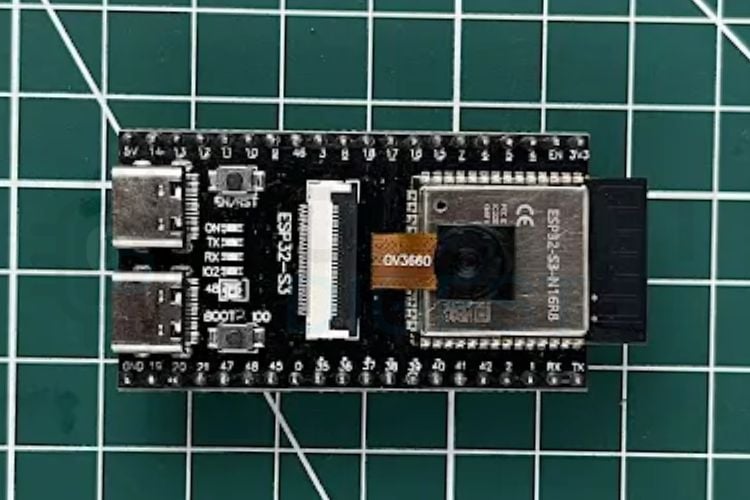
The ESP32-S3-CAM takes advantage of the newer ESP32-S3 chip. The ESP32-S3 uses a dual-core Xtensa LX7 processor running at up to 240 MHz. While the clock speed is similar to the original ESP32, the S3 has several architectural improvements that make it more suitable for applications involving signal processing, machine learning, and computer vision. Many ESP32-S3 camera boards also come with 8 MB of PSRAM, giving the camera application more room for frame buffers and larger programs. This becomes important when you move from a simple camera project to something that involves running an AI model with some image processing and all.
For example, an ESP32-S3 camera can be used for Face detection, Object detection, Image classification, Person detection, TinyML projects, AI-enabled IoT devices, etc. The ESP32-S3 also comes with a USB port, which makes programming and USB-based applications easier on boards that expose the interface. Typically, an ESP32-S3 CAM comes with either 16 MB Flash and 8MB PSRAM or 8 MB Flash and 8MB PSRAM. Also, they come from various 3rd party manufacturers as well. These boards can even support the latest OmniVision 5MP OV5640 sensor as well. Normally, they come with the OV3660 Sensor, the 3 MP sensor from the manufacturer. So, always check the exact specifications before buying one.
We have a detailed article that teaches how to identify the PSRAM and Flash size of your official ESP32 Modules by checking the Specification Identifier Code on them. It also talks about the memory structure and different types of memory that we can see in an ESP32 Module.
XIAO ESP32-S3 Sense
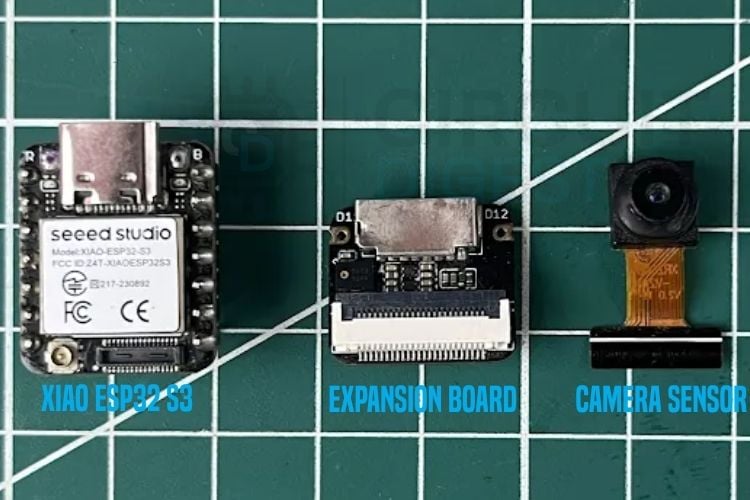
If the ESP32-S3-CAM is designed for more advanced camera applications, the SeedStudio XIAO ESP32-S3 Sense takes a different approach. It focuses on size and integration.
The XIAO ESP32-S3 Sense combines the ESP32-S3 with a camera, microphone, microSD card support, USB connectivity and even a PMIC in a very small package.
The current version uses an OV3660 camera sensor, which offers up to 3 MP resolution. It also comes with 8 MB PSRAM and 8 MB Flash, which is double the capacity of the normal ESP32-CAM module. The Sense also includes a digital microphone, which means you can build a device that can both see and hear without needing a separate audio board. Some example projects that can be done with the XIAO ESP32-S3 Sense are Voice-controlled cameras, AI vision assistants, Smart home sensors, Wearable devices, Voice + vision AI projects, etc. The possibilities are endless due to their processing power and compact size.
The XIAO ESP32-S3 board itself measures only around 21 × 17.8 mm, making it much easier to fit into compact projects. The trade-off is GPIO availability. Because the camera and other onboard hardware use several pins, you don't get the same freedom as you might with a larger ESP32-S3 development board. Choose XIAO ESP32-S3 Sense if the requirement is the smallest package possible and you need camera, audio, storage, and AI capabilities in one board.
Which One Has the Best Image Quality?
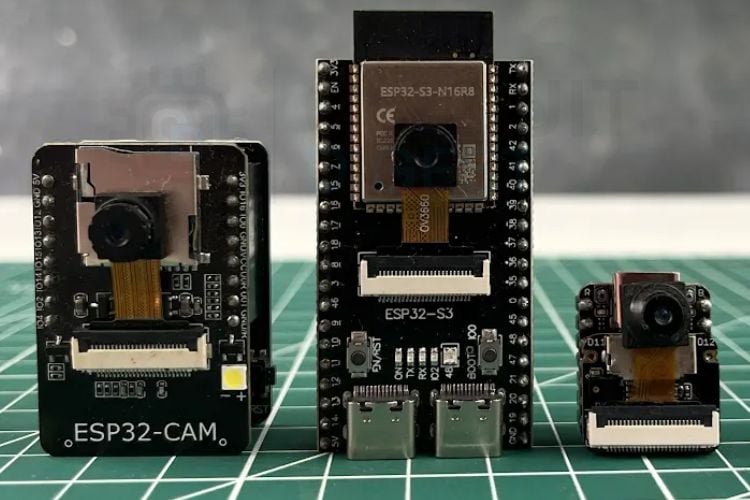
This is where things get a little more complicated. The ESP32 itself doesn't determine the camera's image quality. The camera sensor and lens also play a major role. The classic ESP32-CAM normally uses the OV2640, which has a resolution of up to 2 MP.
The XIAO ESP32-S3 Sense currently uses the OV3660, which can capture up to 3 MP.
Some ESP32-S3-CAM boards use the OV3660, while others may use higher-resolution sensors such as the OV5640. So you shouldn't assume that every ESP32-S3-CAM will have a better camera simply because it uses an ESP32-S3.
The underlying fact is that an ESP32 S3 board, in any way, is not able to do a lot of computer vision applications and run heavy models on it. So, the question is there a need to use a high-quality 5MP sensor on it? An ESP32 S3 with 16 MB Flash and 8 MB PSRAM can do a lot of great jobs with a 3 MP Sensor.
Which One Has the Best Processing Power?
PSRAM and Flash are the ones that make all the difference. When working with camera projects, PSRAM is extremely useful. A camera frame can require a significant amount of memory, especially when using higher resolutions or multiple frame buffers. If it doesn't have any PSRAM, the internal SRAM, which is typically around 520 KB, will not be sufficient to run inferences or do some complex matrix multiplications. So, PSRAM plays a major role if we are leveraging the ESP32 capabilities for AI-based applications.
Another option that is possible but not an ideal practice is that you can run inferences or do the AI workloads on the Flash memory itself, but that is not very efficient, as Flash is not meant for computations and all, but it can store the AI Models, the firmware, code, and stuff like that. But for AI processing or creating buffers for processing, PSRAM is a must. We have tried running a tiny LLM from PSRAM as well as Flash. The results were astonishing. When it was run from PSRAM, we got 22 tokens per second, while when we ran it from Flash Memory, the speed was merely 2 tokens per second. More PSRAM gives your application more room for camera frame buffers, audio buffers, AI models, image processing, etc.
The typical configurations are:
ESP32-CAM - 4MB Flash, 4 MB PSRAM
ESP32-S3-CAM - 16 MB Flash, 8 MB PSRAM
XIAO ESP32-S3 Sense - 8 MB Flash, 8 MB PSRAM
What About AI?
This is probably the biggest reason to consider an ESP32-S3. The original ESP32-CAM is perfectly capable of capturing an image and sending it somewhere else, like a cloud server for processing. But if you want the ESP32 itself to perform more of the processing, the ESP32-S3 is the better platform.
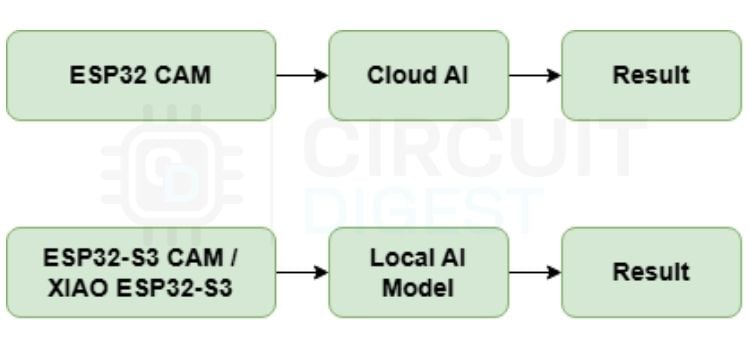
The S3 is designed to accelerate certain vector and signal-processing operations, which are useful for machine-learning workloads. However, it is important to set expectations. An ESP32-S3 is not a replacement for a Raspberry Pi or a Jetson for large computer-vision models. It is best suited to small, optimised edge-AI models.
Conclusion
Below is the overall summary in table format.
| ESP32 Model | Application |
| ESP32-CAM | Best for simple and affordable camera projects |
| ESP32-S3-CAM | Best for AI and advanced vision |
| XIAO ESP32-S3 Sense | Best for compact AI, vision, and audio projects |
If you only need a simple camera, the original ESP32-CAM is still a great choice. If you want to experiment with AI and computer vision, I would go with an ESP32-S3-CAM. But if you want to build a tiny AI device that can see, hear, store data, and connect wirelessly, the XIAO ESP32-S3 Sense is probably the most versatile option of the three.

Add a comment
No account needed. Your comment appears once a moderator has reviewed it.