Agam Robotics is a startup based in Bangalore that builds drone components, including flight controllers, GNSS modules, optical flow sensors, rangefinders, power distribution boards, and power modules. The company's stated focus is on building products from the bottom up within India, with PCB fabrication, assembly, enclosures, plastics, and aluminium heat-sink components all done in India.
The MAX32672FTHR is a compact development platform built around the MAX32672 for embedded evaluation and prototyping. It provides the key hardware resources needed for development, including onboard debugging, power management, user interface peripherals, and Feather-compatible expansion headers.
If you are working on IoT projects, you already know the importance of an M2M IoT SIM card for remote monitoring and tracking. For those who are new and wondering why you need a special M2M SIM card when you can just use your normal SIM card, here are two strong reasons to consider one.
Cost: If you are running a remote IoT device for a year and sending just a few MB of data every month, you will still have to spend at least 300 INR per month recharging your normal SIM cards (assuming Airtel and JIO have not increased their basic plans again). These standard user plans include voice, 2GB data per day, and subscriptions to OTT platforms, but all of this is wasted when using your SIM card with an IoT device. You will hardly consume a few MB of data every day, but still be forced to pay for a full package just to keep your SIM and device active. But with an M2M IoT SIM card, you can get data plans for as low as 30 INR per month if you are only using data.
Scaling: Now, say you are building a small pilot lot to test your own fleet of GPS trackers that you have just built; it is not feasible to manage multiple consumer SIM cards for each of your devices.
Now, apart from solving the above two problems, there are also other benefits in using an M2M SIM card, like better reliability, security, multi-network roaming, eSIM/embedded SIM support, downtime notifications, and centralized management when you are using an M2M SIM card compared to normal consumer SIM cards.
At CircuitDigest, we wanted our GeoLinker GPS modules, like the GL868 ESP32 GSM module, to be sold with M2M IoT SIM cards, so that every maker and small-scale startup can enjoy the benefits of M2M SIM cards. And after spending months figuring out registrations, telecom onboarding, whitelisting, KYC handling, and deployment challenges, we finally got everything set up (more on that later). The journey was quite a ride, so we thought it would make sense to document the entire process for others trying to build connected hardware in India.
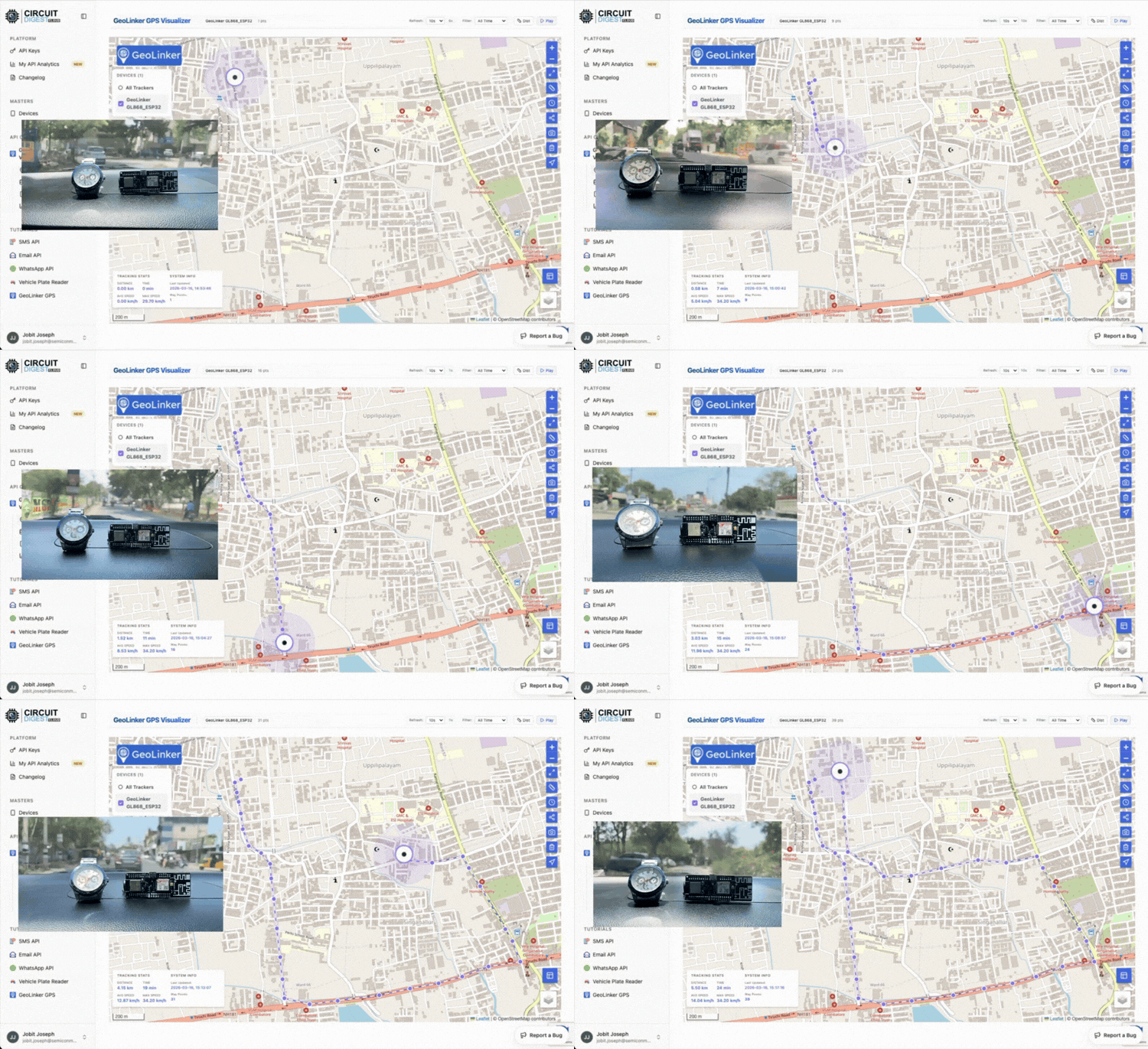
Also, if you are completely new here, GeoLinker is a GPS tracking and cellular monitoring cloud platform with both software and hardware stack from CircuitDigest. Basically, GeoLinker GPS visualizer is a free tool on CircuitDigest Cloud that allows you to store and visualise GPS coordinates on a neat map. GeoLinker also has hardware modules, like the GL868 ESP32 GSM/GPS module that comes with a M2M SIM IoT card and tons of other interesting features. That being said, let’s get back to our story of M2M IoT SIM cards.
What Exactly is an M2M IoT SIM Card?
An M2M (Machine-to-Machine) SIM card is basically a SIM card designed specifically for machines instead of human users. Unlike the SIM card inside your smartphone, these SIMs are meant for devices like GPS trackers, smart meters, industrial sensors, fleet monitoring systems, and other cellular IoT products.
The difference is not just in pricing. The entire network architecture around M2M SIM cards is different. Normal SIM cards are designed assuming a human is using the device for browsing websites, making calls, watching videos, and moving between towers constantly.
But IoT devices behave very differently. For example, a GPS tracker sitting inside a vehicle might only send a few kilobytes every few minutes. A remote sensor might wake up once an hour, upload data, and go back to sleep. Telecom operators treat these deployments differently, which is why M2M infrastructure exists in the first place.
Why Normal SIM Cards Become a Problem in IoT Projects
This is something most tutorials on the internet never really explain properly. Using a normal SIM card for a single prototype is fine, and most people still do it during early testing. But once the project becomes serious, where you want to keep it running 24x7 or scale it across multiple deployed devices, consumer SIM cards slowly become painful to manage.
The biggest issue is that consumer plans are not optimised for IoT usage at all. Imagine paying for 1 GB or 2 GB monthly plans when your actual device only consumes 100 MB. You are essentially paying for voice calls, entertainment bundles, and mobile usage patterns that your hardware will never use.
Then comes the operational side of things. Once you have multiple deployed devices, keeping track of recharges becomes frustrating. Some SIMs expire, some go inactive, and sometimes you discover a device stopped reporting simply because the recharge validity ended weeks ago. Debugging connectivity issues becomes difficult because you are never sure whether the problem is hardware, firmware, server-side, or simply the SIM itself.
We also noticed that some telecom networks behave differently when consumer SIM cards are continuously used inside GSM modules or embedded devices. Again, this is not usually a problem during prototyping, but for long-term deployments, it starts becoming unreliable. This is exactly the problem M2M IoT SIM cards are designed to solve.
Getting an M2M SIM Card in India is Surprisingly Difficult (Until Now)
After understanding the importance of M2M SIM cards, we decided that all GeoLinker boards should eventually be sold along with an M2M SIM card. And honestly, we assumed M2M SIM cards would be easy to obtain. We thought it would be similar to getting a corporate SIM connection or maybe a postpaid enterprise plan. It turned out to be much more complicated.
In India, M2M services are offered by major telecom operators like Bharti Airtel, Reliance Jio, and Vodafone Idea, but directly obtaining these SIM cards as a small company or startup is not straightforward at all.
Even today, if you search online for “M2M IoT SIM Card India,” you mostly end up finding random resellers, unclear IndiaMART listings, enterprise vendors with almost no documentation, and expensive industrial providers. The biggest problem is that nobody clearly explains the actual process.
After bumping around for quite some time, we finally found that we had to work directly with a telecom operator and register ourselves as an M2MSP (M2M Service Provider), after which we would become eligible to get M2M SIM cards and distribute them with our GeoLinker modules.
The SARAL and M2MSP Process
So yes, if you want to directly get M2M IoT SIM cards from telecom operators in India, you should be registered as an M2M Service Provider (M2MSP). And to become an M2MSP, you would need to register through the SARAL Sanchar Portal on the Department of Telecommunications website and obtain your SARAL number.
For this registration, your company should be a registered business in India, and you would typically need to submit a GST certificate, PAN card, Certificate of incorporation, MoA documents, Aadhaar, Company address proof on a company letterhead with seal and signature
After getting the SARAL number approved, you can register with a telecom operator to become an M2MSP. All this might sound easier said than done, but it took us almost 6 months for everything to be completed, so expect some delays if you are planning to go through the process yourself.
From there, you can raise a PO for the type of plans you need on your M2M SIM cards, get the SIM cards issued, activate them, and start using them with your IoT GSM modems. At least, that’s what we thought until we discovered whitelisting.
The Whitelisting Part Nobody Explains
This was honestly one of the most confusing parts when we first started using M2M SIM cards. With a normal mobile SIM, you can access almost anything on the internet without thinking twice. But M2M SIM cards often operate in a more controlled environment.
In simple terms, the SIM card may only allow access to whitelisted servers, domains, IP addresses, or services. Not just internet access, even to send an SMS or make a call from your M2M SIM card, you may have to whitelist the receiver’s number before it works.
At first, this feels restrictive, but after understanding the reason behind it, it actually makes sense. These SIMs are designed for industrial deployments where security and controlled communication matter much more than unrestricted browsing.
For large OEMs building thousands of devices, this is normal. They already know exactly which cloud server or backend infrastructure their device will communicate with. But for makers, startups, and developers experimenting with different platforms, this quickly becomes frustrating.
During development, you constantly switch between services like MQTT brokers, cloud dashboards, automation platforms, and testing servers. Managing whitelisting manually for every deployment becomes painful very quickly.
Why We Built GeoLinker Around This Problem
At some point, we realized we were spending more time solving telecom and deployment problems than actually building hardware. That frustration is honestly what led to GeoLinker.
GeoLinker is part of the CircuitDigest Cloud ecosystem and was built as a GPS tracking and cellular IoT platform that combines both hardware and cloud infrastructure together. Instead of treating connectivity as a separate complicated process, we wanted developers to simply power up a module and start building. That is where the GeoLinker GL868 came in.
The GL868 is an ESP32-based GPS tracking and cellular IoT module built around the SIMCom SIM868 modem. When you purchase the module, it is sold with an M2M IoT SIM card, along with 3 months of free data and voice plans (120MB/month | 200 SMS | 100 outgoing minutes) already included. You can check out the article on how to activate the GeoLinker M2M IoT sim card if you have already purchased a GeoLinker board and are interested in seeing how to activate the sim card and start building.
Since the SIM868 modem already supports GSM and GNSS functionality, the module can handle both cellular communication and location tracking together. Developers can use it for vehicle tracking, remote monitoring, asset tracking, telemetry, and general IoT applications without having to combine multiple separate modules together.
Making the Activation Process Simpler
One thing we wanted to avoid was forcing users through telecom-level paperwork just to test a hardware module with an M2M SIM card. So instead of making developers manually figure out activation workflows, the SIM onboarding process was simplified through the GeoLinker portal itself.
The activation flow is intentionally simple. Users receive the module with the M2M SIM card already included. They can then link the SIM with an existing phone number through OTP verification and activate it through the portal.
In most cases, activation happens within a few minutes or, at worst, a couple of hours. KYC can later be completed to continue long-term usage.
The goal here was not to hide the telecom process completely, because that is still required legally, but rather to remove unnecessary friction for developers trying to build and test products quickly.
Solving the Whitelisting Problem for Developers
One thing we quickly realized is that most developers do not want to spend days dealing with network whitelisting during prototyping. So we pre-whitelisted many commonly used IoT and cloud platforms on the network side itself.
This includes popular services like AWS IoT, Arduino Cloud, Firebase, Adafruit IO, ThingsBoard, Blynk, Google Cloud, IFTTT, and many other commonly used IoT platforms.
For custom deployments, users can also request additional domains or IPs to be approved after verification. Similarly, phone numbers for SMS and voice communication can also be managed through the platform.
Again, the idea here was simple: developers should spend more time building hardware and less time fighting telecom infrastructure.
Recharge Plans for M2M IoT SIM Cards
Just like prepaid SIM cards, IoT M2M SIM cards also have different plans that developers can select based on their requirements. But here is a small catch: these plans have to be pre-approved by the telecom operator before they can be activated.
This means that when you get M2M SIM cards from the telecom provider, you have to raise a PO and specify what plans are needed for those SIM cards. Only the plans mentioned there will be available for activation. However, once a SIM is active, you can later switch between supported plans whenever required.
The image below shows the Airtel M2M plans that can be used with M2M IoT SIM cards.
Another important thing to note here is that, as a registered M2MSP, you will get the M2M IoT SIM cards free of cost from Airtel. But as soon as you activate a SIM under a plan, billing starts from day one. These charges will be added to your account irrespective of whether the SIM is actively being used or not.
Once activated under a monthly plan, recurring deductions will continue automatically.
If you are an M2MSP, you can suspend a SIM card to avoid full charges, but even in the suspended state, you still have to pay around Rs. 10/month. If you want to completely stop charges, the SIM card has to be terminated by the M2MSP. Once terminated, the SIM becomes unusable and cannot be reactivated later.
How to use M2M IoT SIM Card - The Basics
For our GeoLinker range of boards, we are currently using Airtel M2M IoT SIM cards. A typical Airtel IoT SIM card looks like the one shown below.
On top of the SIM card cover, you will find the SIM Number and IMSI Number printed on it. On the actual SIM card itself, you can again find the SIM Number printed. Do note that these numbers should be kept confidential, and they should not be confused with the actual phone number of your M2M IoT SIM card.
For a typical consumer SIM card, the phone number is normally +91 followed by 10 digits. But for IoT M2M SIM cards, you may get a 13-digit number, and this phone number is usually assigned only after activation through the portal and is not printed anywhere on the SIM card.
If you have purchased our GeoLinker board with an M2M IoT SIM card, you can check out our separate article on how to activate an Airtel M2M IoT SIM card using GeoLinker.
Currently, all GeoLinker boards are sold with physical SIM cards from Airtel, but we also have plans to introduce MFF2 SIM cards (SIM cards in VQFN chip packages) and eSIM support with our future radio modules and boards.
Getting MFF2 SIM cards in India still remains slightly confusing for us, and eSIM support is currently limited to a few high-end radio modules from Quectel and Nordic Semiconductor, so that is something we will continue exploring in the future.
Whitelisting, Terminating and Plan Extension on GeoLinker Modules
If you are using the Airtel M2M IoT SIM card from GeoLinker, you get free data, calls, and SMS for the first three months. You can activate it by entering your IMSI number, shown on the SIM cover, along with your personal phone number and verifying the OTP as shown below.
After the SIM is activated, you will be able to use it immediately. However, within a week of activation, you have to complete the KYC process by submitting your ID proof and picture verification through the GeoLinker portal itself.
By default, all popular platforms are already whitelisted by us. If you want to whitelist a particular phone number to send SMS or make calls, you can do that through the GeoLinker dashboard as shown below.
After three months of usage, you will get a notification to recharge your SIM card and extend your plan, which again can be done directly from the GeoLinker dashboard itself. If there is no active recharge, your SIM card will eventually be terminated within a week.
FAQ
1. Can I use a normal SIM card for IoT projects? Yes, for basic prototyping, you can use a normal SIM card. But for long-term deployment, scalability, and industrial reliability, M2M IoT SIM cards are much better.
2. What is the difference between an M2M SIM and a normal SIM? M2M SIM cards are designed specifically for machine communication and industrial deployments, whereas normal SIM cards are optimised for consumer smartphone usage.
3. Why does M2M SIM require whitelisting? Whitelisting improves security, prevents misuse, and allows telecom operators to maintain controlled industrial-grade network access.
4. Can I use M2M SIM with ESP32? Yes. M2M SIM cards work well with ESP32-based GSM and cellular IoT modules.
5. Does the GeoLinker GL868 support GPS? Yes. The module supports GPS, GLONASS, Galileo, and BeiDou GNSS positioning.
6. Can M2M SIM cards send SMS and make calls? Yes. Depending on the selected plan, M2M SIM cards can support Data, SMS, Incoming calls, and Outgoing calls
7. Do I need SARAL registration to get M2M SIM cards? If you want to directly source M2M SIM cards from telecom operators in India, SARAL registration and M2MSP onboarding are generally required.
8. Where can I get M2M IoT SIM cards in India? You can either register directly with telecom operators as an M2MSP, Work with authorised providers or use integrated IoT ecosystems like GeoLinker that simplify onboarding and activation
Related GPS Tracking Projects
Explore these exciting GPS tracking and IoT projects originally built using 2G GSM modules. Now, with Circuit Digest’s M2M IoT SIM solutions, these projects can be upgraded with more reliable connectivity, easier deployment, and better support for real-world IoT applications.
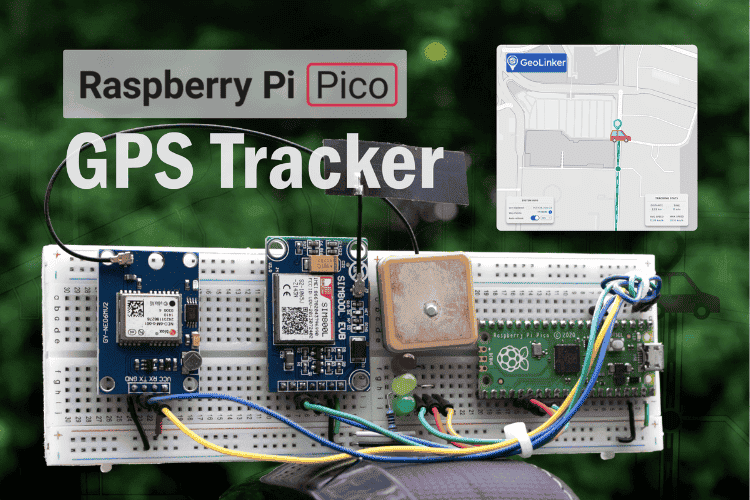
Learn how to build a Raspberry Pi Pico GPS Tracker using the Neo 6M GPS module and SIM800L. This hands-on guide covers interfacing, real-time data logging, and API-based location updates
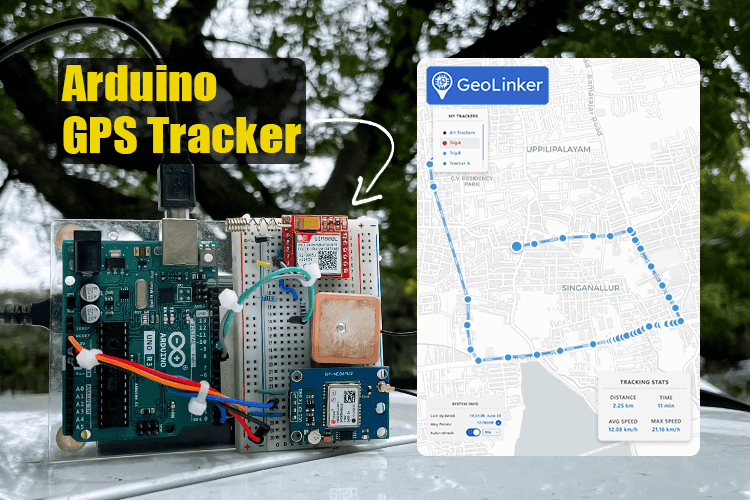
Learn how to build a GPS tracker using Arduino UNO, SIM800L GSM module, and NEO-6M GPS with GeoLinker. This DIY project offers real-time location tracking, historical
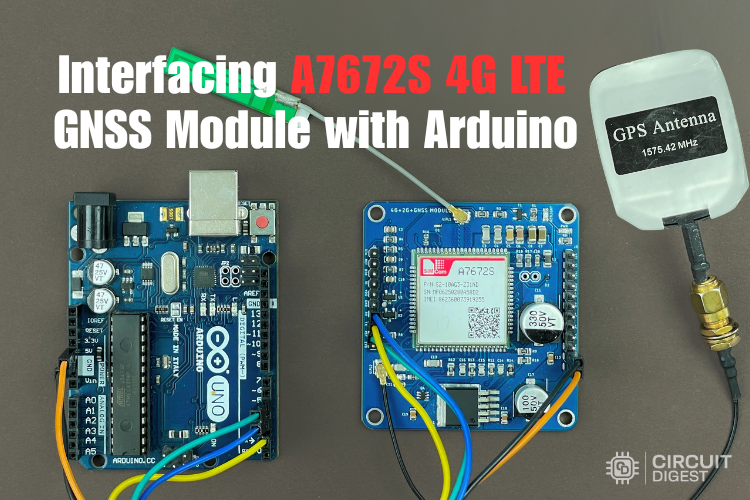
Learn how to use the A7672S 4G LTE GNSS module with Arduino for GPS tracking and IoT communication. This guide covers pinout, interfacing, AT commands, and HTTPS data upload.
In this tutorial, we are going to see how you can create a custom Graphical User Interface(GUI) using LVGL and our favourite Arduino IDE. You can use any kind of microcontroller for this project; the only thing you need to do is to include the right pins in the Arduino code. Here, I’m using an ESP32-C3 based smartwatch for the demonstration. This has a display, touch, controller and everything integrated inside, so we don't want to make any messy wiring. Whether you are a hobbyist building a home-automation dashboard or a product developer prototyping a wearable UI, mastering LVGL on ESP32 with Arduino is one of the highest-leverage skills you can add to your embedded toolkit.
What Is LVGL? - Introduction to the Light and Versatile Graphics Library
LVGL stands for Light and Versatile Graphics Library, which is an open-source library that supports a wide variety of microcontrollers and displays. It’s a collection of components required to build a Graphical User Interface (GUI), mostly in embedded systems where custom UIs are needed. Examples include a Smart Home Automation & Monitoring Hub, a Desk32 Smart Hub for deep work focus, or even a Smart Wellness Clock that shows health metrics at a glance.
You will be able to see GUIs built on top of LVGL around you, like your smartwatch screens or display dashboards of some Attendance Systems in some offices. Developers use LVGL in a wide variety of ways, like some build GUIs using raw code while some others use some Drag-and-Drop visual editors like Square Line Studio or EEZ Studio that support LVGL. Here in this tutorial, we will use example code snippets provided by LVGL in their documentation to build a GUI out of it.
LVGL at a Glance
Feature
Detail
Full name
Light and Versatile Graphics Library
Language
C99 (C++ wrappers available)
License
MIT — free for commercial use
Minimum RAM
~32 kB (typical embedded target)
Minimum Flash
~128 kB
Supported MCUs
ESP32, STM32, RP2040, Arduino, NXP and more
Display interfaces
SPI, Parallel, RGB, MIPI-DSI
Visual editors
SquareLine Studio, EEZ Studio
Arduino library
Available in Arduino Library Manager
Hardware Used - ESP32-2424S012 Round Display Development Board
Let’s talk a little bit about the ESP32 C3 based development board that we use in this tutorial. First of all, it has an ESP32-C3 at its core. It has a 1.28” 240 * 240 round LCD display on top. The display uses the famous GC9A01 display driver, which is seen in many hobby-level round display modules. It uses the 7-pin SPI interface (SCL, SDA, DC, CS, RST, 3V3, GND) for communication. The touch IC used is CST816D. It has a battery charging IC, which is IP5306. You can use any display or controller for this tutorial; the only thing you need to do is modify the configurations to match your device.
What Do You Need Before Getting Started?
An ESP32-based development board that has either SPI or a parallel display connection.
Capacitive/Resistive Touch Controller – optional but strongly advised.
USB-C or Micro-USB cable for programming.
3.7V LiPo Battery – optional (in case of standalone functionality).
Software Prerequisites
Arduino IDE 2.x – download from Arduino.cc.
ESP32 board package – available on Arduino Boards Manager (https://raw.githubusercontent.com/espressif/arduino-esp32/gh pages/package_esp32_index.json).
LVGL for Arduino library – available from Arduino Library Manager ("lvgl").
Driver files of the display and touch controller - CST816D.h, CST816D.cpp – obtain from project GitHub repo.
Knowledge Prerequisites
Basic syntax of Arduino C++ code – setup/loop methods.
I²C/SPI protocol knowledge.
GPIO mapping knowledge of the ESP32 board.
ESP32-2424S012 Full Specifications
Model
ESP32-C3 1.28" IPS Round Display
ESP32 Series
ESP32-2424S012
Processor
ESP32-C3 is a Single-Core RISC-V
Display Driver
GC9A01
Touch Driver
CST816S
Frequency
up to 240MHz
Wi-Fi
Supports 2.4GHz
Display
1.28inch
Touch display
Capacitive
Resolution
240×240
Dimensions(D*H)
45.5*11mm
Weight
20g
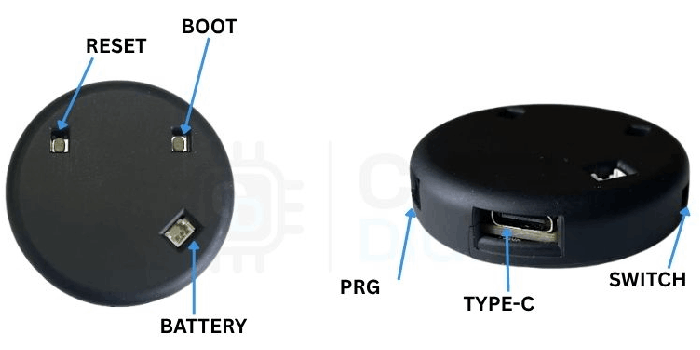
You can power the module either via the Type-C connector that’s available on board or using a 3.7V LiPo battery by connecting it to the 2-pin JST connector in the back of the module.
Step-by-Step Setup: LVGL Arduino GUI on ESP32
Step 1 ⇒ Install the LVGL Library in Arduino IDE
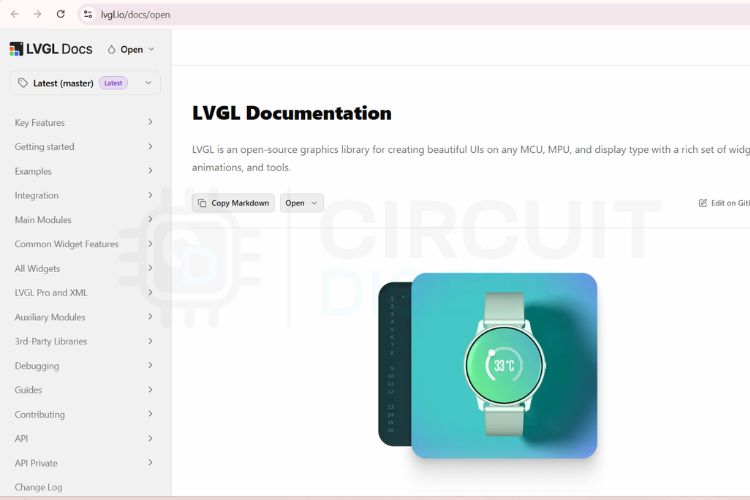
You need to go to the Arduino Library Manager and search for lvgl. Install the latest release by kisvegabor.Now, you need to head over to the official documentation of LVGL.
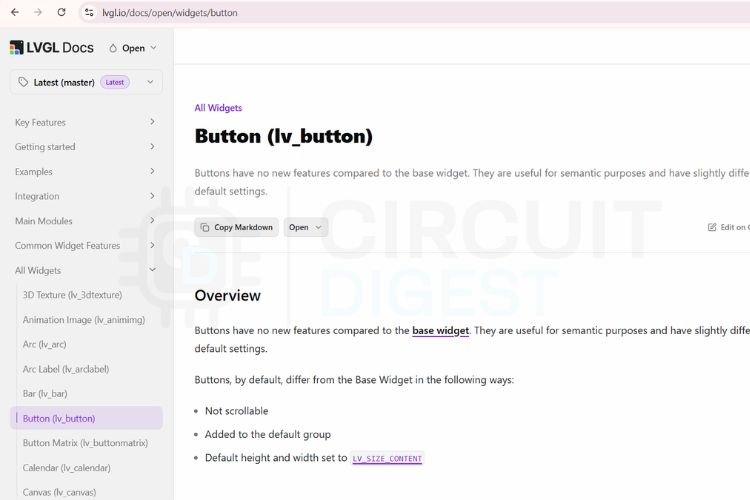
Step 2 ⇒ Browse the LVGL Widget Documentation
In this tutorial, we are going to build a simple switch project using LVGL and Arduino IDE. We can make this project in several different ways - meaning using LVGL and without using LVGL. From my experience, if we build a custom GUI using LVGL, we get a smartphone app kind of quality for the UI. This is because LVGL has a mature set of design components and animations that outperform any other competitors like TFT_eSPI. Now, let’s go to All Widgets > Button This opens the button widgets available in LVGL. You can see a lot of example widgets for buttons.
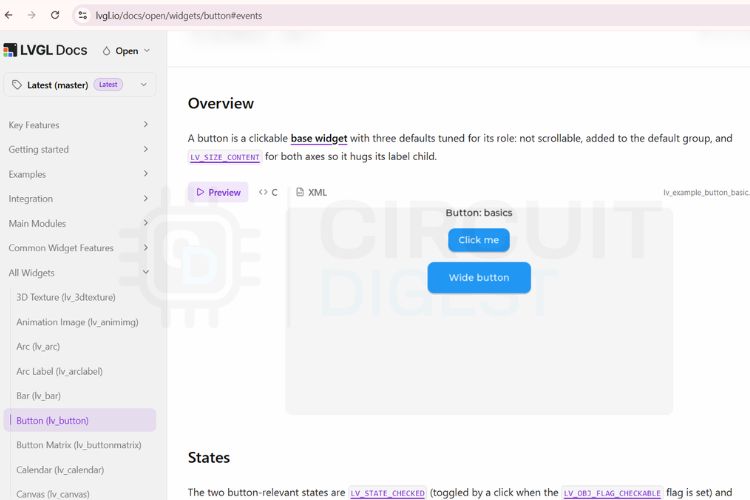
Let’s scroll down and go to the first example. You can see options for Preview - meaning see how the button functions, and Code - meaning see the code snippet for that particular button.
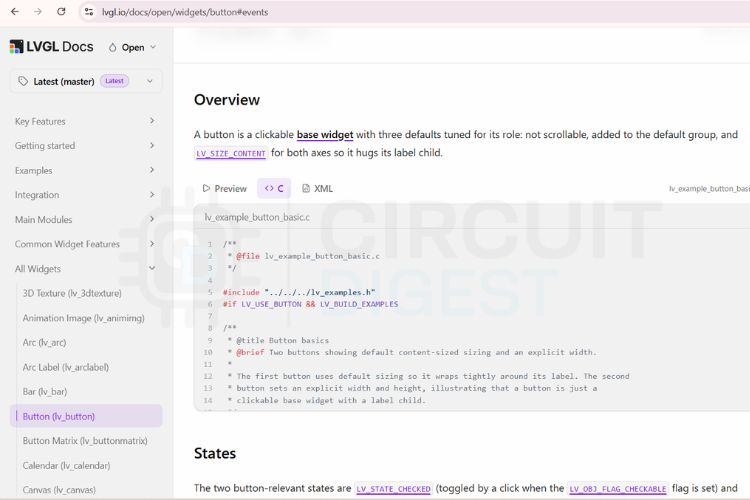
Step 3⇒ Copy the Code Snippet
Let’s open the code snippet part of the example, which reveals the code behind the preview.
Step 4⇒ Understand the Project Folder Structure
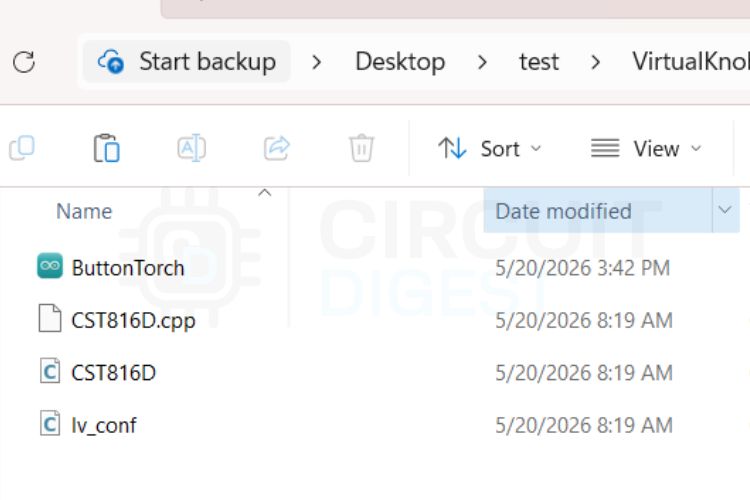
Let’s copy the code from that section. If you check out the GitHub repo mentioned below, you will be able to download all the code for this project. You will be able to see three files along with the main Arduino code, as shown below.
You have the main Arduino code, then the LVGL configuration file named lv_conf and then the touch configuration files, which are CST816D.cpp and CST816D.h. For this tutorial, we just need to modify the main Arduino code with the code snippet that we just copied. You may need to modify the pin configurations as per your setup.
Step 5⇒ Paste the Snippet into the Arduino Sketch
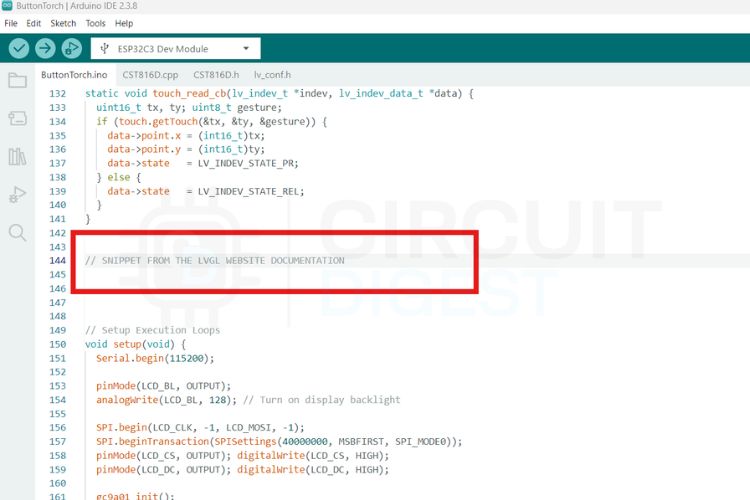
Once the Arduino code is opened, you can see a section asking for “SNIPPET FROM THE LVGL WEBSITE DOCUMENTATION”. Paste the code snippet in this section. This code now gives the same button transitions in the display as we saw in the preview in the documentation.
The modified code snippet is attached to the code provided on GitHub. Select the right board and right port in your Arduino IDE and hit the upload button.
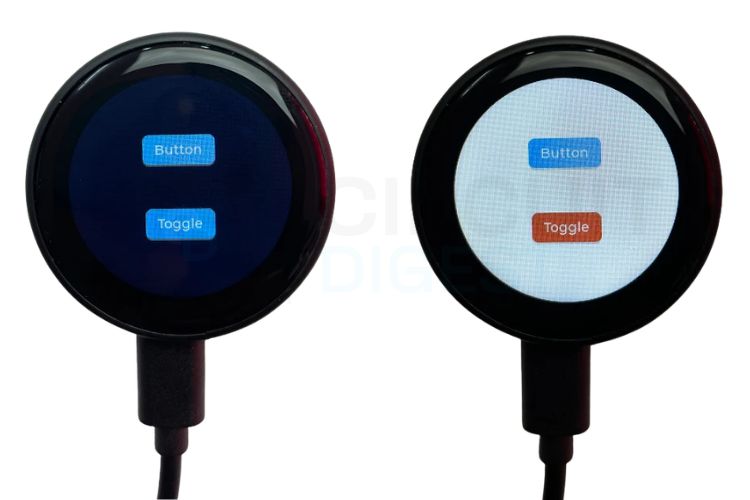
Step 7 ⇒ Test the Result Once the code is successfully uploaded, you can see the screen displaying the buttons exactly in the same way as shown in the preview in the LVGL documentation. You can see the button animations as well when you press the buttons. As we modified the code to change the screen background to white when the toggle button is turned on, you can see the background colour turning to white and black when we turn on and off the toggle button, as shown below. This is an excellent LVGL ESP32 project to study after completing the basic tutorial.
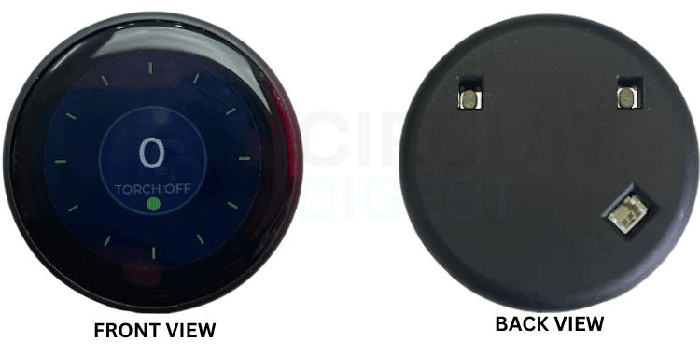
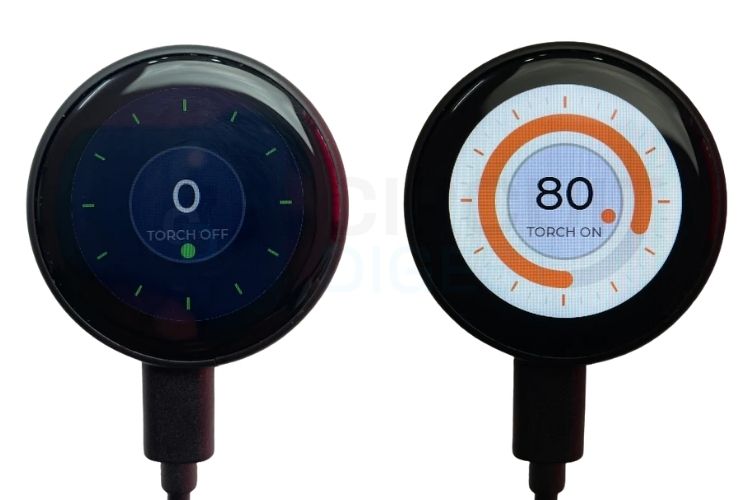
You can see another folder in the same repo named VirtualTorch. This project is shared for your future reference. It’s an advanced version of this tutorial that has a button for the torch and a slider around the button to adjust the brightness, too. Below are the two screens of the VirtualTorch project, before the button is pressed and after the button is pressed and the slider adjusted.
Code Explanation: How the LVGL Arduino Sketch Works
Above is the LVGL interface layer, which interfaces our hardware, the ESP32 display and touch with THE LVGL library.
5. Event Handler and Button Widget (LVGL Snippet)
static void event_handler(lv_event_t * e)
{
   lv_event_code_t code = lv_event_get_code(e);
   lv_obj_t * target = (lv_obj_t *)lv_event_get_target(e); // Get which widget was interacted with
   if(code == LV_EVENT_CLICKED) {
       Serial.println("Clicked");
   }
   else if(code == LV_EVENT_VALUE_CHANGED) {
       Serial.println("Toggled");
       // Check if the widget that fired the event is currently checked (turned ON)
       if(lv_obj_has_state(target, LV_STATE_CHECKED)) {
           // Toggle is ON -> Turn active screen background to White
           lv_obj_set_style_bg_color(lv_screen_active(), lv_color_white(), LV_PART_MAIN);
       } else {
           // Toggle is OFF -> Turn active screen background back to Black/Dark slate
           lv_obj_set_style_bg_color(lv_screen_active(), lv_color_hex(0x151525), LV_PART_MAIN);
       }
   }
}
void lv_example_button_1(void)
{
   lv_obj_t * label;
   lv_obj_t * btn1 = lv_button_create(lv_screen_active());
   lv_obj_add_event_cb(btn1, event_handler, LV_EVENT_ALL, NULL);
   lv_obj_align(btn1, LV_ALIGN_CENTER, 0, -40);
   lv_obj_remove_flag(btn1, LV_OBJ_FLAG_PRESS_LOCK);
   label = lv_label_create(btn1);
   lv_label_set_text(label, "Button");
   lv_obj_center(label);
   lv_obj_t * btn2 = lv_button_create(lv_screen_active());
   lv_obj_add_event_cb(btn2, event_handler, LV_EVENT_ALL, NULL);
   lv_obj_align(btn2, LV_ALIGN_CENTER, 0, 40);
   lv_obj_add_flag(btn2, LV_OBJ_FLAG_CHECKABLE);
   lv_obj_set_height(btn2, LV_SIZE_CONTENT);
   label = lv_label_create(btn2);
   lv_label_set_text(label, "Toggle");
   lv_obj_center(label);
}
Above is the snippet that we copied from the LVGL Documentation. It has two parts or two functions. First is an event_handler(), which is the UI part of the snippet. It builds the two buttons using the same widget template that we chose from the documentation.
6. setup() - Hardware and LVGL Initialisation The second part is the lv_example_button_1(), which performs the whole logic of the two buttons.
This is the setup() loop that fires exactly once when the device boots. It initialises the hardware in a sequential order, like turning on the display backlight, then initialising the display engine, then the touch.
Check TP_SDA / TP_SCL defines; ensure touch.begin(); is inside setup()
lv_conf.h: No such file or directory
lv_conf.h missing from sketch folder
Copy lv_conf_template.h to the sketch folder, rename to lv_conf.h, set #if 1
Sketch too big / out of flash
Unused LVGL widgets are consuming flash
Disable unused widgets in lv_conf.h: #define LV_USE_CHART 0
Display colours wrong/ inverted
Incorrect colour format setting
Try LV_COLOR_FORMAT_RGB565 instead of LV_COLOR_FORMAT_RGB565_SWAPPED
Touch coordinates mirrored
Display and touch orientation mismatch
Swap X/Y or negate the axis in touch_read_cb()
LVGL vs TFT_eSPI
Factor
LVGL
TFT_eSPI
Widget system
Full widget library (buttons, sliders, charts…)
None — manual drawing only
Animation engine
Built-in, hardware-accelerated
None built-in
Touch input handling
Built-in input device abstraction
Manual polling required
Memory overhead
Higher (frame buffer + widget tree)
Lower
Learning curve
Moderate (port layer setup required)
Low (simple API)
UI quality ceiling
Smartphone-grade
Basic / custom shapes
Visual editors
SquareLine Studio, EEZ Studio
None
Best for
Product UIs, dashboards, wearables
Simple graphics, gauges, fonts
Arduino LVGL GitHub
Explore open-source Arduino and LVGL projects on GitHub to build modern embedded GUI applications with touch-enabled displays. Find libraries, sample interfaces, and hardware integration examples that simplify creating responsive and visually rich IoT dashboards.
Conclusion
From this tutorial, we came to understand how to properly use the free and open-source graphical library called LVGL, which is used to develop GUIs for embedded systems. We can use our own hobby-level microcontrollers like the ESP32 or similar ones to run such programs. The future is endless, you can create your own embedded systems projects, home automations or any other projects requiring custom GUIs. You can refer to the codes provided in the GitHub repo for any future references. If you would like to see how we can implement LVGL in a real-life project, check out our Voice-Activated LED Controller using ESP32S3 project. For inspiration, take a look at how display-based interfaces can be applied in a radar-based human presence and fall detection system, a great example of combining sensor data with a meaningful on-screen interface.
Frequently Asked Questions
⇥ Why is LVGL used with Arduino? The LVGL (Light and Versatile Graphics Library), which is an open-source C library for developing touch-interactive GUIs on microcontrollers, can be used with Arduino, as it integrates well with the Arduino platform; is compatible with the ESP32 and many other popular boards; and produces smartphone-quality animations and widgets without a separate GPU.
⇥ Can I use LVGL with Arduino IDE? Yes, LVGL works with Arduino IDE. You just need the LVGL Library installed.
⇥ What is lv_conf.h? lv_conf.h is the LVGL configuration file.
⇥ Why do we need CST816D.cpp and CST816D.h? These files are the touch controller driver. They help the ESP32 communicate with the CST816D touch IC using I2C.
⇥ Which communication protocols are used here? SPI for display communication, I2C for touch communication and UART for serial programming.
⇥ Can I use another display instead of GC9A01? Yes, you only need the correct display driver and pin configurations of your display.
⇥ Can I make custom UIs instead of using widgets? Yes, LVGL allows custom drawing, animations, gradients, gauges, etc...
Touch-Based GUI Projects
Explore interactive touch-enabled GUI projects built using modern microcontrollers and display modules for smart control, automation, and real-time monitoring applications. These projects demonstrate intuitive user interfaces with responsive controls, animations, and sensor integration for a seamless embedded experience.
MATLAB can perform many advanced image processing operations, but for getting started with Image processing in MATLAB, here we will explain some basic operations like RGB to Grey, rotating the image, binary conversion, etc.
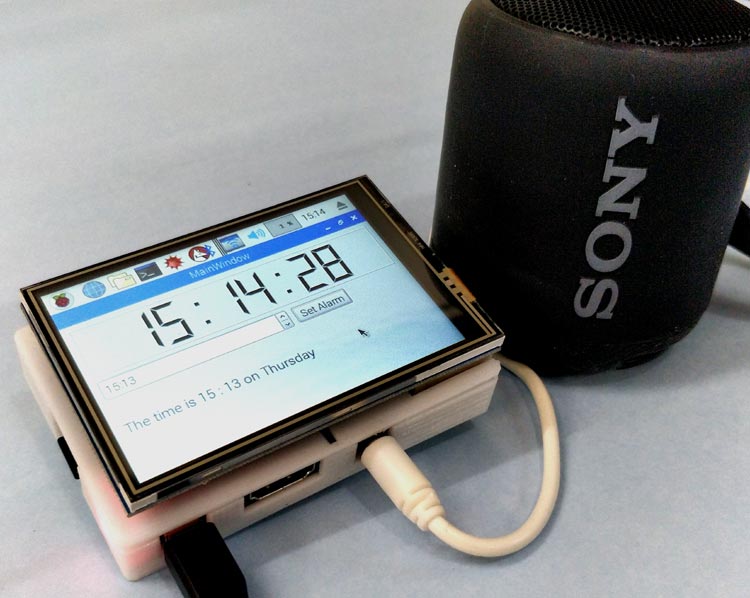
At the end of this project, we will create a very basic GUI using which we can set an alarm and when the alarm goes off, we will have a voice which tells us the current time and day with some pre-defined text. Sounds cool, right!! So let us build one.
If your Raspberry Pi IP address static configuration is changing too often, this complete guide is going to demonstrate how to configure a Raspberry Pi to use static IP through NetworkManager (using nmcli) and desktop GUI methods.
At Electronica 2026, while exploring the Silicon Labs booth, I came across a wireless networking technology that was surprisingly new to me, Wi-SUN. As embedded engineers, most of us are already familiar with technologies like BLE, Zigbee, Matter, Thread, and LoRa when it comes to IoT connectivity.
At a recent community webinar focused on building robotics companies in India, Raghvendra Sutar, founder of Kikobot, discussed how he started the company, the products it has developed, the challenges of manufacturing robotics hardware, and the company’s plans to expand into industrial robotics.
Adviteey Mehaindroo, the founder and CEO of Zinikus, credits CircuitDigest as one of his earliest learning grounds. Now he's sitting down with the same platform, talking about running a robotics company with a half-million-dollar valuation. He describes Zinikus as “a robotics company focused mainly on humanoids, but also catering to the advertising and hospitality sectors with robotics.”
As I sit down to write this piece, I notice the fan whirring above and, for the first time, it occurs to me that it runs on an induction motor. So does every other fan in my office and my home. These motors have been around for a long time, not because they’re the best options out there, but because they’re cheap and do the job. BLDC motors have gained a bit of popularity, but are pricier and usually come with an import dependency problem.
Divya Sambhayanamath, Kumudini Balobal, Mahantesh Hosur, Shivanand G Holi
Guide & Review
Sandeep Patil, CTO at RedNerds
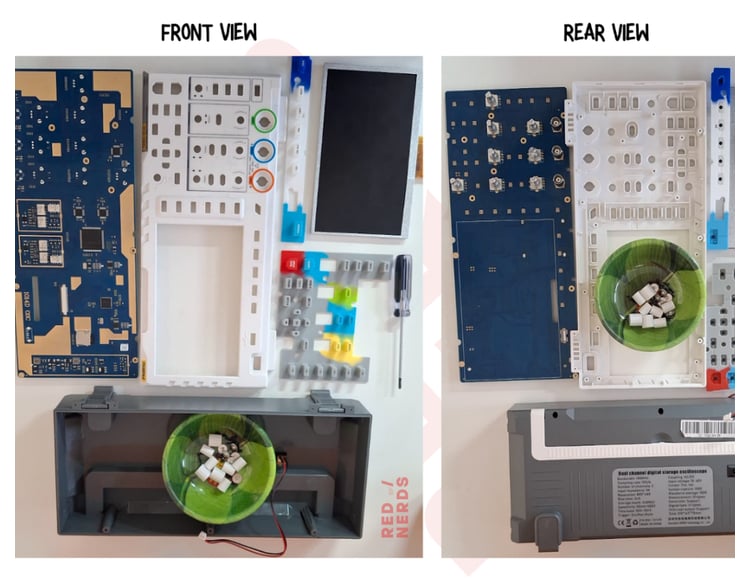
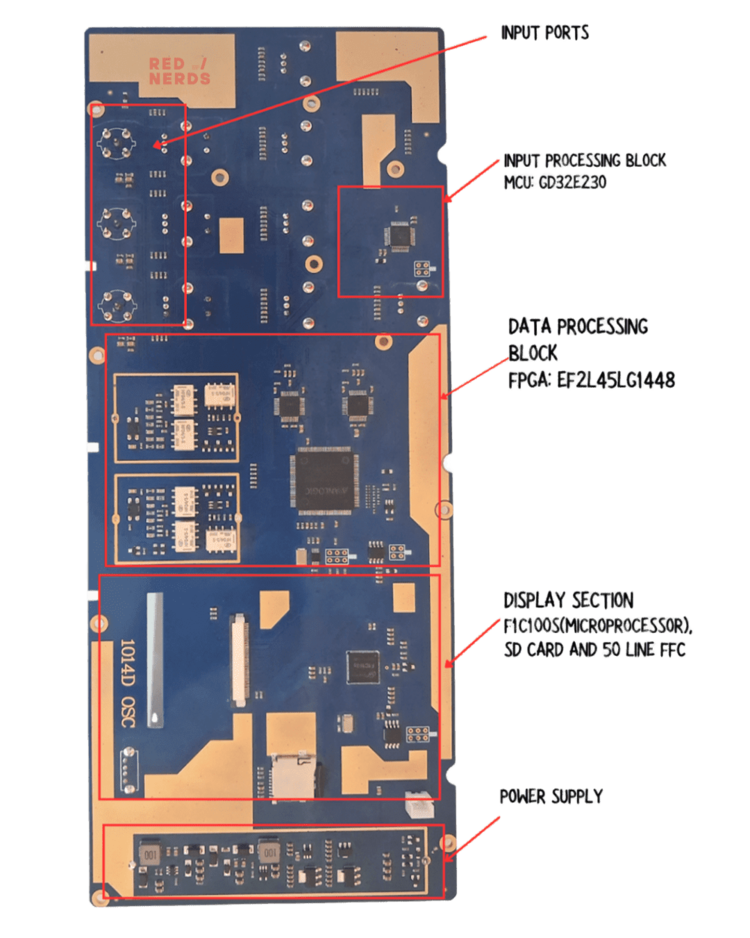
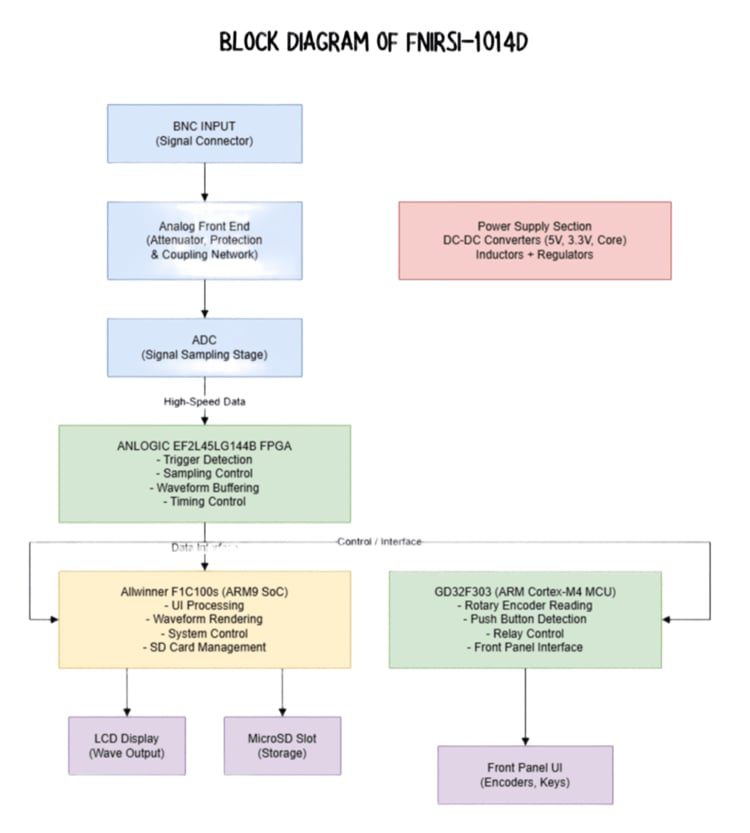
Model Name: FNIRSI-1014D Abstract : An oscilloscope that retails at INR 13K basically covers all of the hands-on subjects a 4-year engineering syllabus teaches in theory. The only issue is that none of this is practiced. We barely get past MCUs hands-on. This oscilloscope though has 1. MCU: GD32E230. Well, the pattern is repeating. Any guesses as to which other MCU family this resembles? 2. FPGA: EF2L45LG144 FPGA for heavy-duty processing. 3. SoC: Allwinner F1C100s CPU + RAM + video + audio in one chip 4. Power supply Check this teardown to get insights into the build, how it all comes together, tool chain for development and what the ballpark cost at 100K volume.
A digital storage oscilloscope (DSO) is a critical instrument used in electronics for analyzing electrical signals over time. Modern oscilloscopes integrate high-speed analog front-ends, digital signal processing hardware, and graphical user interfaces to provide accurate waveform visualization and measurement.
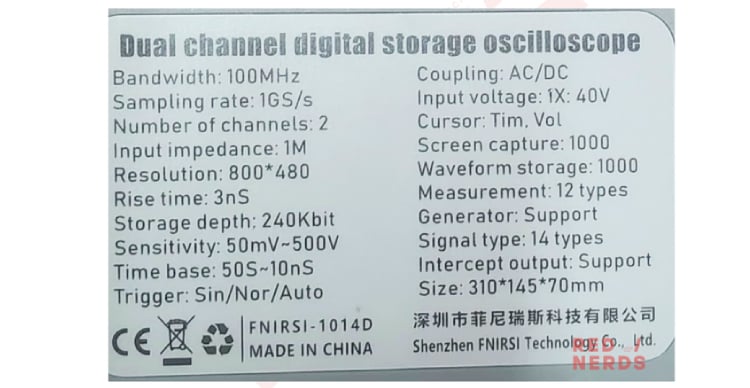
The FNIRSI-1014D is a dual-channel digital storage oscilloscope designed for portable measurement and educational use. It features a 100 MHz bandwidth, a 1 GS/s sampling rate, and dual input channels, allowing simultaneous measurement of two signals. The device integrates multiple embedded subsystems, including an FPGA for high-speed signal processing, an ARM-based system controller, and a microcontroller dedicated to user interface management.
This teardown study aims to analyze the internal structure of the FNIRSI-1014D oscilloscope by physically disassembling the device and examining the internal hardware architecture. The report explores the following aspects:
Mechanical structure of the oscilloscope
PCB layout and internal subsystems
Signal processing architecture
Display system structure
User interface hardware
Firmware architecture
Estimated component cost
The analysis helps understand how modern oscilloscopes integrate analog electronics, digital processing, and embedded computing systems to perform high-speed signal measurement.
2. External Overview of the Oscilloscope
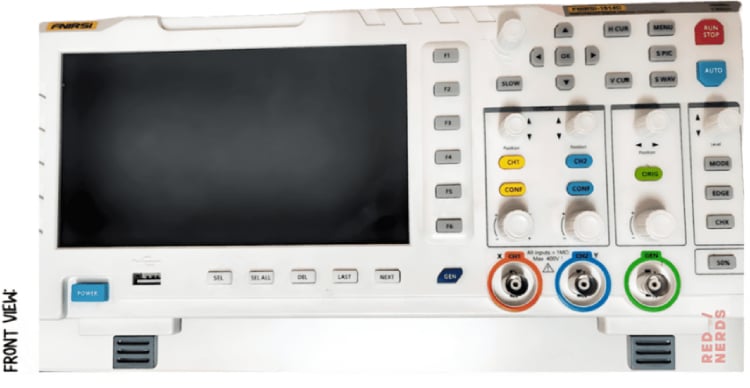
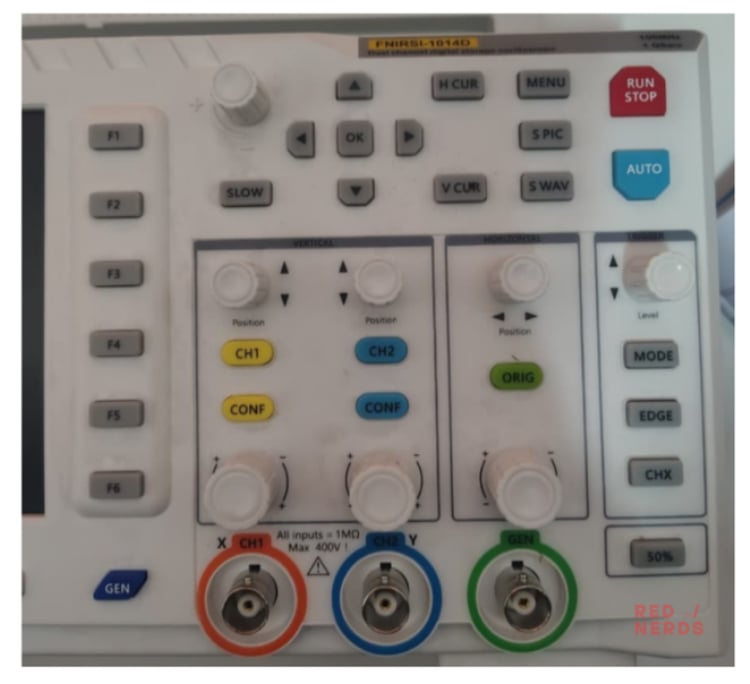
The FNIRSI-1014D oscilloscope is housed in a plastic enclosure designed for handheld or bench operation. The front panel contains the display, input connectors, and control knobs. The rear panel contains labeling and structural support elements.
The device is designed for ergonomic operation with dedicated controls for waveform scaling, triggering, and signal acquisition.
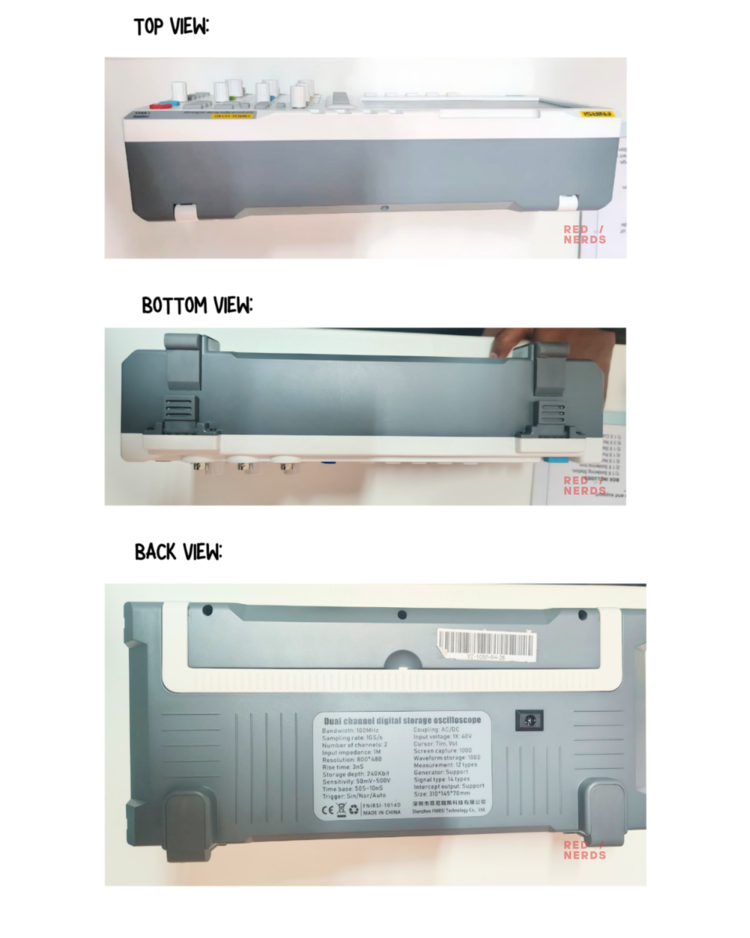
External Structural Views
The device was inspected from multiple orientations to understand its mechanical design.
Front View – Contains display, knobs, and connectors
Top View—Houses' ventilation and structural support
Bottom View – Contains mounting points and base supports
Back View – Includes product information and identification labels
3. Technical Specifications
The FNIRSI-1014D oscilloscope includes several performance parameters that define its signal acquisition capability.
PARAMETER
SPECIFICATION
Model
FNIRSI-1014D
Bandwidth
100 MHz
Sampling Rate
1 GS/s
Number of Channels
2
Input Impedance
1 MΩ
Rise Time
3 ns
Storage Depth
240 Kbit
Sensitivity Range
50 mV – 500 V
Time Base
50 s – 10 ns
Trigger Modes
Single / Normal / Auto
These specifications determine the oscilloscope's ability to capture fast signals while maintaining accurate timing and voltage measurement.
4. PCB Architecture and Internal Hardware Layout
The oscilloscope uses a multi-layer FR-4 printed circuit board integrating analog, digital, and power subsystems on a single board. The PCB can be divided into five major subsystems:
Input Signal Interface
Analog Front End and Sampling System
FPGA-based Signal Processing Unit
System Control Processor
Power Regulation Network
The board design includes extensive ground planes, copper pours, and via stitching to reduce electromagnetic interference and maintain signal integrity during high-speed operation.
5. Input Processing Architecture
The input processing block is responsible for receiving external signals and preparing them for digital conversion.
The block consists of:
BNC input connectors
Analog front-end conditioning circuits
Relay-based voltage range selection
Signal attenuation networks
Trigger detection logic
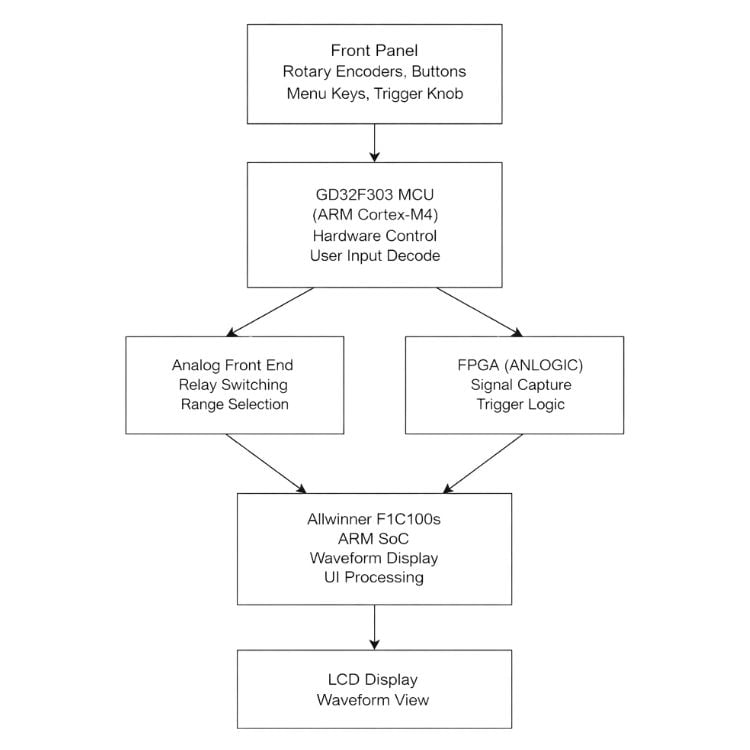
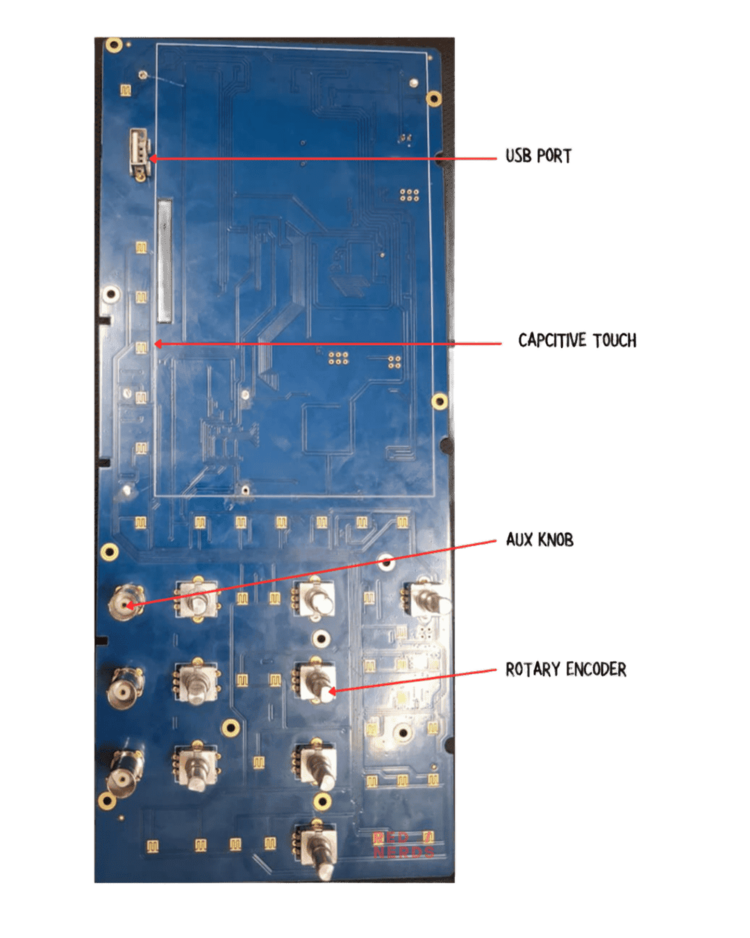
The front panel includes rotary encoders and buttons, which are read by a GD32E303 microcontroller responsible for interpreting user commands.
The decoded commands are then forwarded to the FPGA and system controller.
Flow of Input Processing
The user rotates knobs or presses buttons.
MCU interprets user inputs.
Analog signal enters through BNC connectors.
The analog front-end conditions the signal.
FPGA receives sampled data.
Data is sent to the system processor for display.
This architecture allows the oscilloscope to respond quickly to user commands while maintaining high-speed signal acquisition.
6. FPGA-Based Data Processing
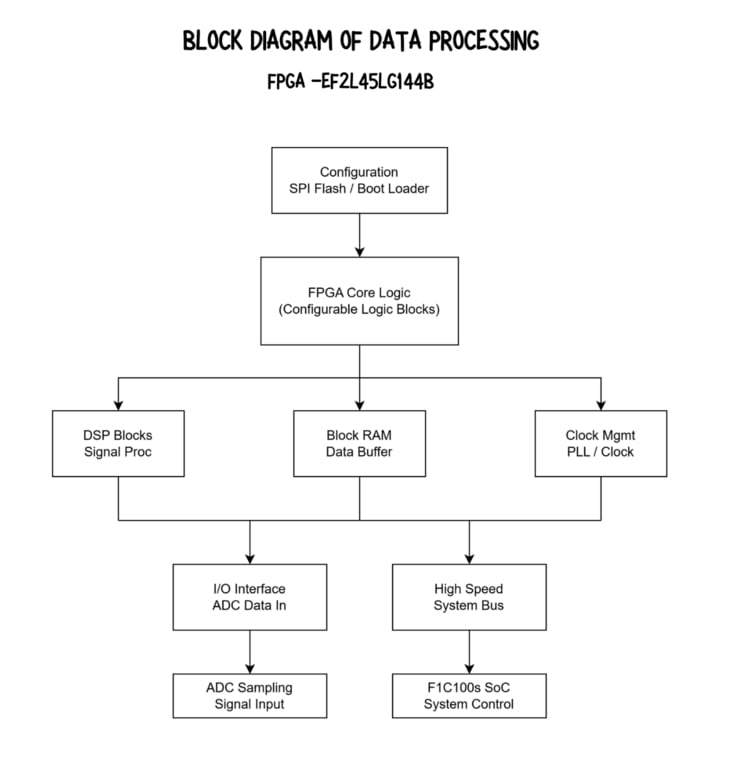
The core signal processing engine of the oscilloscope is the ANLOGIC EF2L45 FPGA. Field Programmable Gate Arrays are widely used in oscilloscopes because they can process signals in parallel hardware logic, enabling extremely high processing speeds.
The FPGA performs several critical operations:
High-speed signal acquisition
Trigger detection
Timing synchronization
Waveform buffering
Digital signal processing
Internal FPGA resources include:
DSP blocks
Block RAM buffers
Clock management units
High-speed system buses
Data Processing Flow
ADC samples incoming signal
FPGA receives digital samples
Trigger logic detects capture condition
Waveform data stored in memory buffers
Data transferred to system controller
This hardware-level parallel processing enables real-time waveform acquisition.
7. Display and User Interface Processing
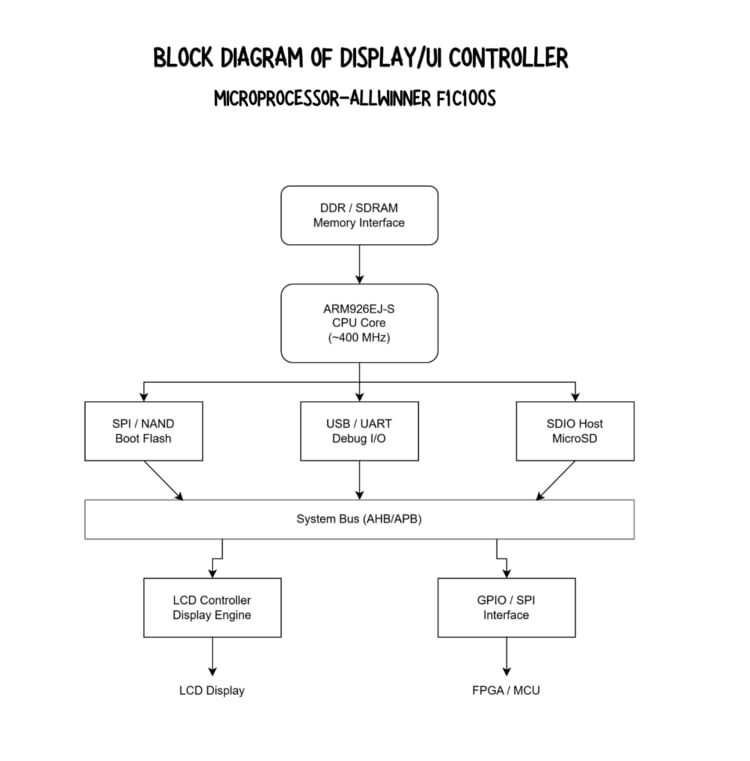
The Allwinner F1C100s system-on-chip serves as the main system controller. This processor performs the following functions:
User interface management
Waveform rendering
Menu system control
Storage management
System communication
The processor includes several hardware interfaces, such as:
SPI
UART
USB
GPIO
SDIO
The SoC converts waveform samples received from the FPGA into graphical waveform plots displayed on the LCD screen.
8. LCD Display System Architecture
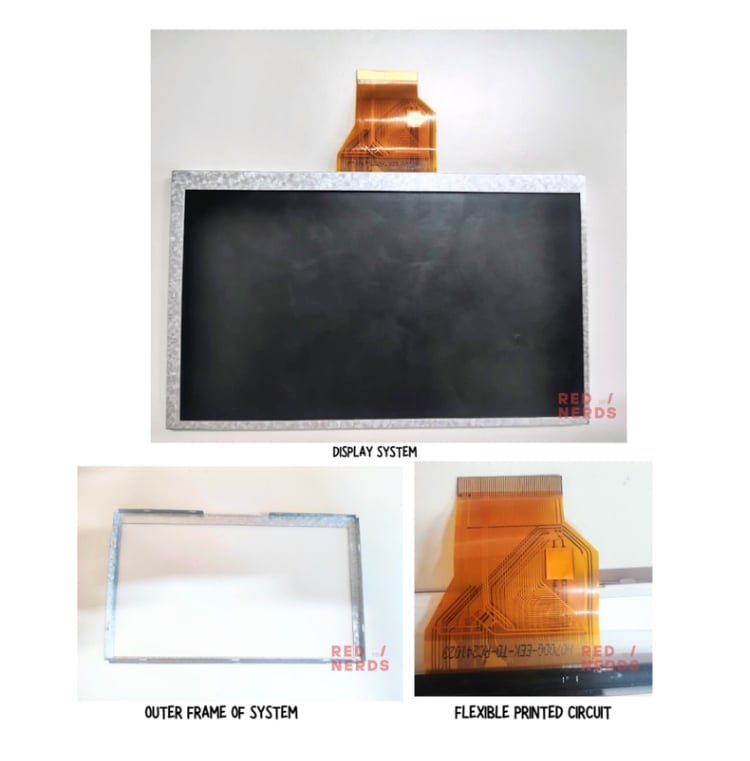
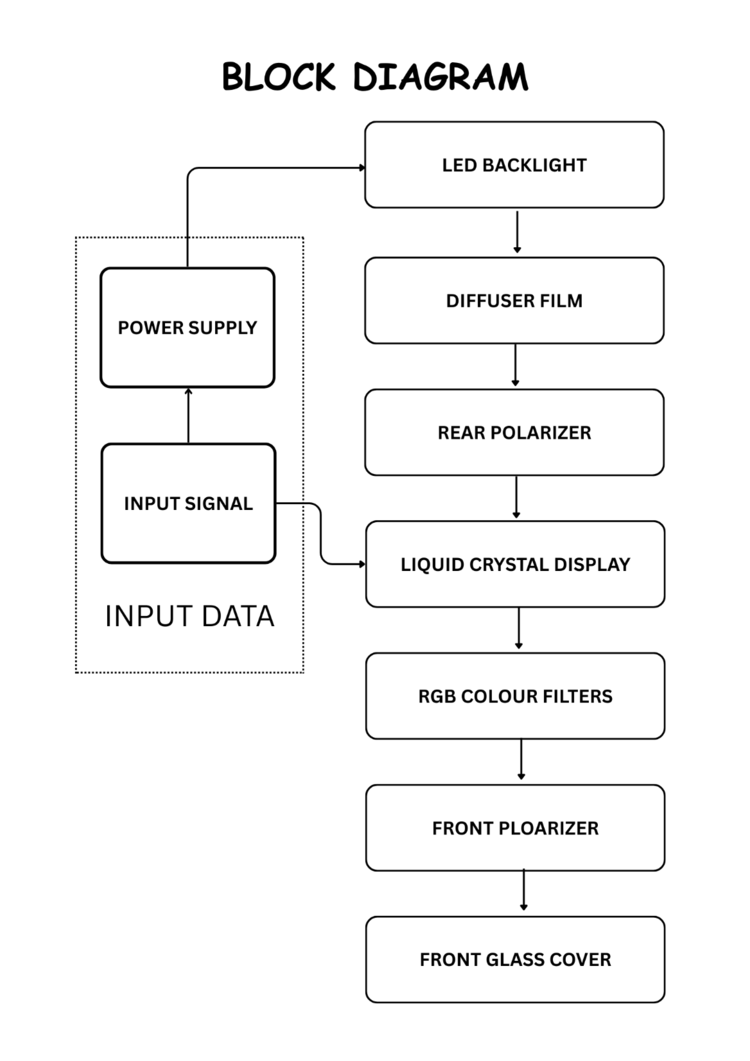
The oscilloscope uses a 7-inch TFT LCD display with a resolution of 800×480 pixels. The display is composed of several layered optical structures that allow light modulation to form visible images.
LCD Layer Structure
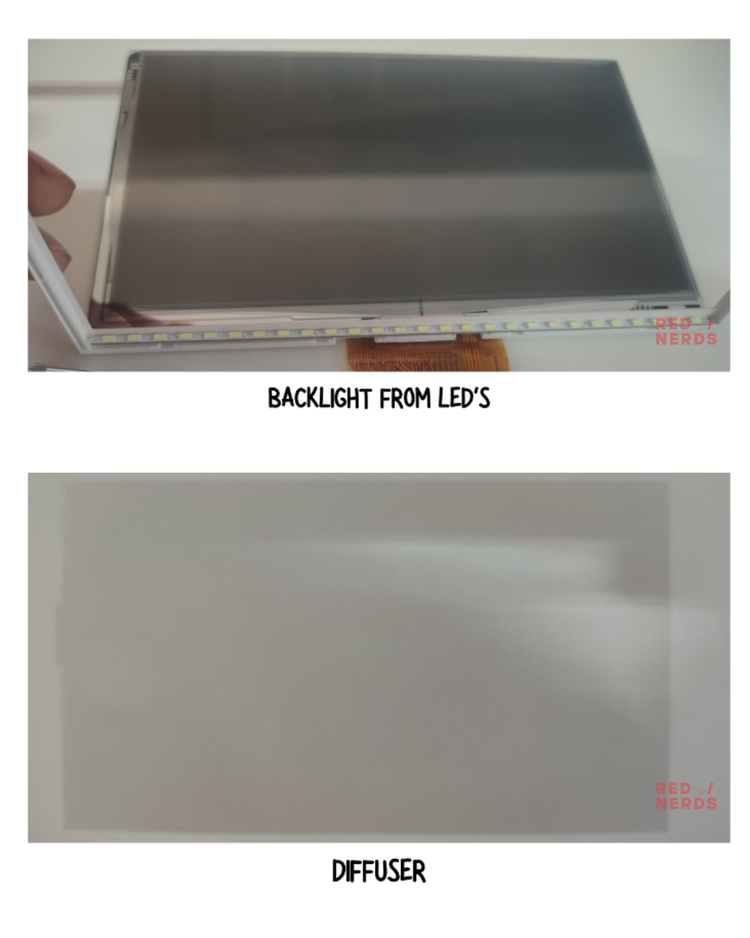
The display consists of multiple layers arranged from back to front:
LED Backlight
Diffuser Layer
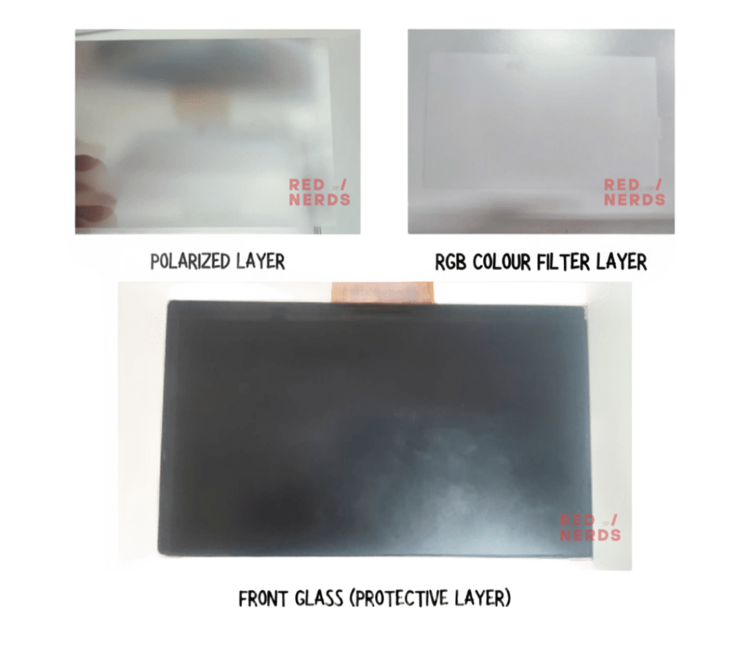
Rear Polarizer
Liquid Crystal Layer
RGB Color Filters
Front Polarizer
Protective Glass Layer
9. LCD Display Working Principle
The TFT LCD operates using the principle of polarized light modulation through liquid crystal molecules.
Display Operation
An LED backlight generates white light.
A diffuser spreads light uniformly.
The rear polarizer aligns light polarization.
Liquid crystal molecules rotate polarization when voltage is applied.
RGB filters create colored pixels.
Front polarizer controls light transmission.
Glass cover protects the display.
This process converts electrical signals into visible graphical waveforms.
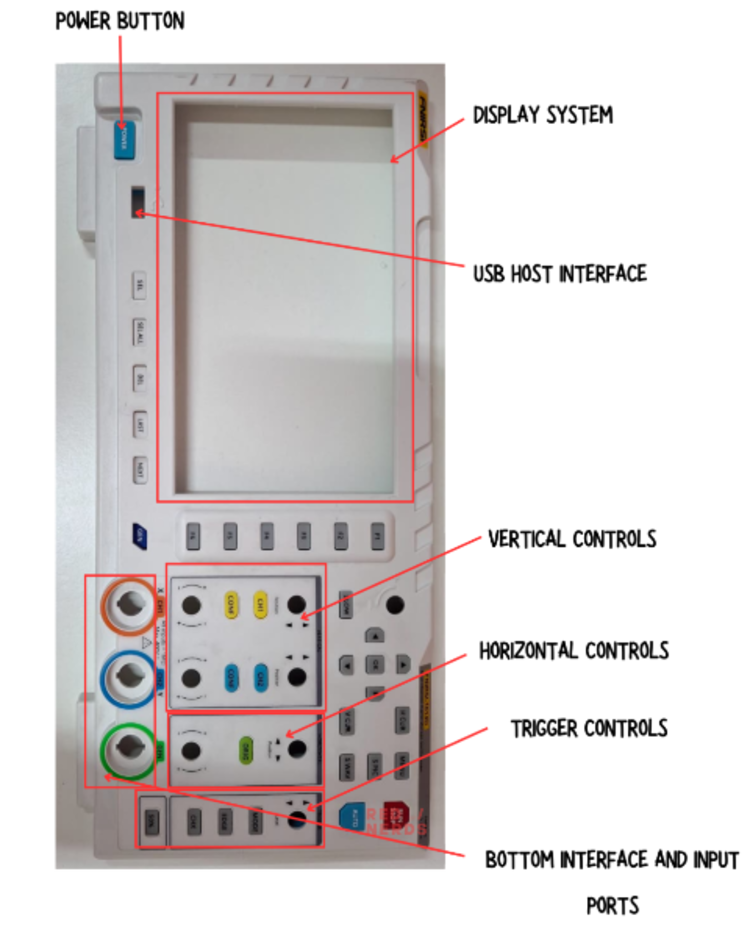
10. Front Panel Control System
The oscilloscope includes several user interface controls that allow the user to interact with the measurement system.
Main Controls
Power Button Activates the device and powers the internal electronics. USB Host Interface Used for exporting captured waveform images and measurement data. Vertical Controls Adjust voltage scaling (V/div) and channel positioning. Horizontal Controls Control time base (s/div) and waveform scrolling. Trigger Controls Determine the starting point for waveform capture. Input Ports BNC connectors provide electrical signal input.
11. Rotary Encoder Control Mechanism
The control knobs use incremental rotary encoders that generate quadrature pulses when rotated.
Encoder Operation
Encoder rotation generates digital pulses.
MCU reads pulse direction and count.
MCU converts movement into parameter adjustments.
Commands sent to FPGA.
FPGA modifies signal processing parameters
12. Complete System Architecture
The complete oscilloscope system integrates multiple hardware subsystems working together.
Signal Flow
The signal enters through BNC input connector
The analog front-end conditions the signal
ADC samples a signal.
FPGA processes waveform data
ARM SoC renders a waveform.
LCD displays the waveform.
This architecture separates high-speed hardware processing from user interface control, improving overall performance.
13. Firmware Architecture
The oscilloscope uses a multiprocessor firmware architecture.
Microcontroller Firmware (GD32F303)
Reads knobs and buttons
Controls relay switching
Sends control commands to FPGA
FPGA Logic
High-speed signal acquisition
Trigger detection
Waveform buffering
System Processor Software
Runs embedded Linux
Manages display graphics
Handles file storage
14. Cost Analysis of Components
Based on an estimated production volume of 100,000 units, the approximate component cost is:
COMPONENT
ESTIMATED COST
FPGA
₹950
Soc Processer
₹270
Microcontroller
₹140
Power Management
₹135
PCB
₹625
External Parts
₹550
TFT LCD Display
₹1950
Total Estimated Cost: ₹4620 per unit
15. Conclusion
The teardown analysis of the FNIRSI-1014D oscilloscope reveals a well-integrated embedded measurement system combining analog electronics, digital hardware, and embedded software.
The architecture uses three main processing elements:
FPGA for high-speed signal processing
ARM SoC for display and system control
Microcontroller for user interface management
This distributed architecture enables the oscilloscope to achieve high sampling rates while maintaining responsive user interaction.
The multi-layer PCB design, controlled impedance routing, and dedicated power regulation ensure stable operation and accurate signal acquisition. The FNIRSI-1014D demonstrates how modern oscilloscopes integrate multiple computing platforms and specialized hardware to deliver high-performance measurement capabilities at relatively low manufacturing cost.
An Airtel M2M SIM card is specifically developed for communicating from one machine to another using the cellular networks. The Airtel M2M SIM is designed specifically for IoT and embedded devices that do not require a human operator or user to operate autonomously.
Feature
Airtel M2M SIM
Regular SIM
Primary Use
IoT devices, GPS trackers, automation
Personal voice and data use
Number Regulation
DoT-mandated whitelisting (max 4 numbers)
Open communication with all numbers
KYC Requirement
Mandatory within 7 days of activation
Required at purchase
Management
Remote via Circuit Digest Cloud platform
Via carrier app or store
Included Plan
3-month free plan (GeoLinker bundle)
Varies by plan
Accessing the Airtel M2M SIM Dashboard on Circuit Digest Cloud
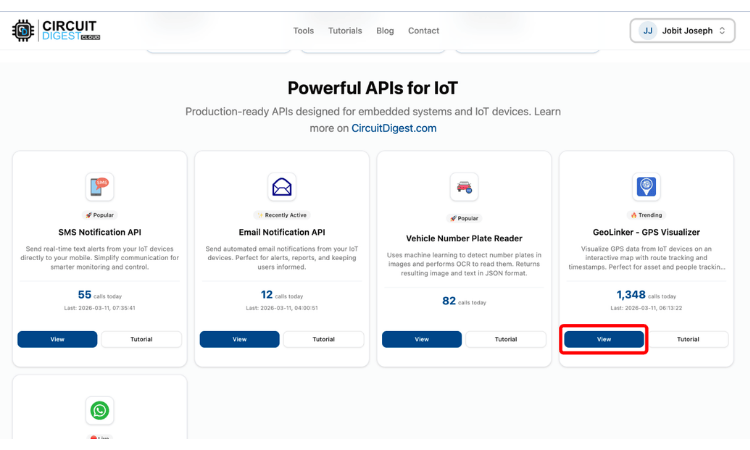
The Airtel SIM Management feature allows you to manage your IoT SIM cards directly from the Circuit Digest Cloud Platform. You can view SIM details, monitor data usage, submit KYC documents, and track device connectivity. To access the Airtel M2M dashboard, log in to your Circuit Digest Cloud Account. Once logged in, you can click on the view button under the GeoLinker section. The Airtel M2M SIM card is a specialised IoT SIM designed for machine-to-machine communication over India's cellular network. This makes it ideal for secure, internet-independent projects such as GPS trackers, remote automation systems, and GSM-based IoT devices. Before you can use the SIM for voice calls, SMS, or data, you need to complete the Airtel M2M SIM activation process through the Circuit Digest Cloud platform.
Step 1 ⇒ How to Activate Your Airtel M2M IoT SIM Card
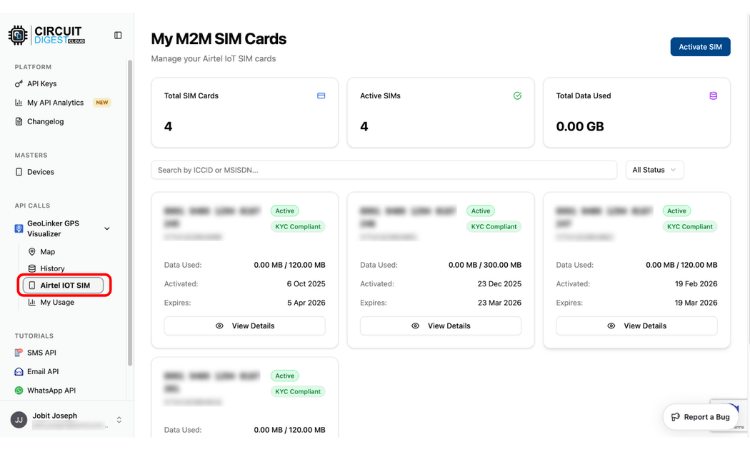
Once you are in the GeoLinker Dashboard, click on the Airtel IOT SIM, which will redirect you to the Airtel IOT SIM dashboard. This is where you can see all the activated SIM card details. To activate a SIM card, click on the Activate SIM button in the top right corner.
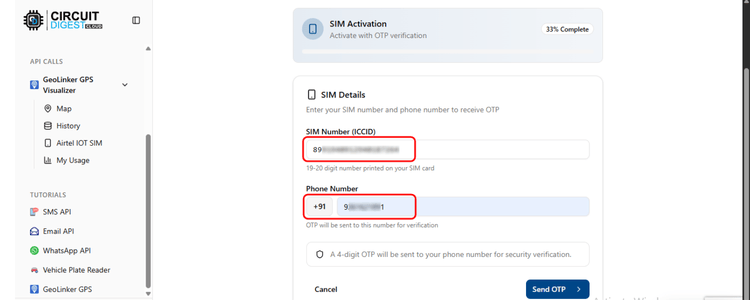
In the activation page, enter the ICCID and your mobile number. The ICCID can be found on the SIM package, mentioned as SIM number, or you can get it from the serial output when you insert the SIM into the GL868_ESP32 with factory firmware. Check the Factory firmware section for more details. If you are using the number from the package, avoid the last alphabet; only the numeric number is needed. Click on send OTP to receive the OTP on your entered mobile number.
Once the OTP is verified, you will be redirected to the KYC submission page.
Step 2 ⇒ Completing KYC for Your Airtel M2M SIM Card
IMPORTANT: While you can start using the SIM immediately after OTP verification, you must complete the full KYC process within 7 days to avoid deactivation.
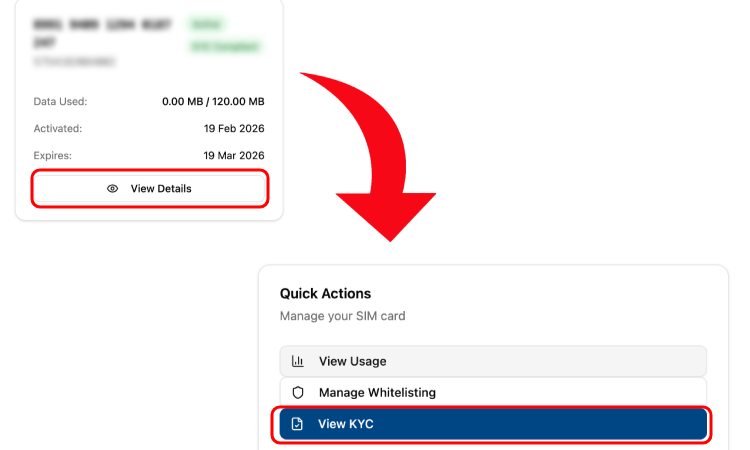
For KYC, you can use any of the KYC documents given in the table below. Once the KYC is completed, you can continue using the Airtel IOT M2M SIM card with the GL868_ESP32. If you choose to submit the KYC documents later, you can access the KYC submission page by going to the SIM details page and then clicking on the View KYC button.
Required Documents
Allowed Documents
Identity Proof
- Aadhaar Card - PAN Card - Passport - Driving License - Voter ID
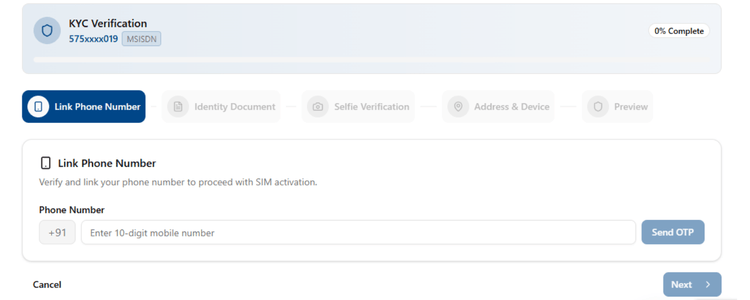
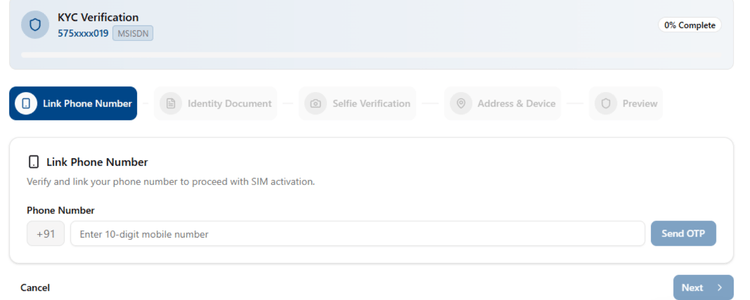
Enter your mobile number to receive OTP.
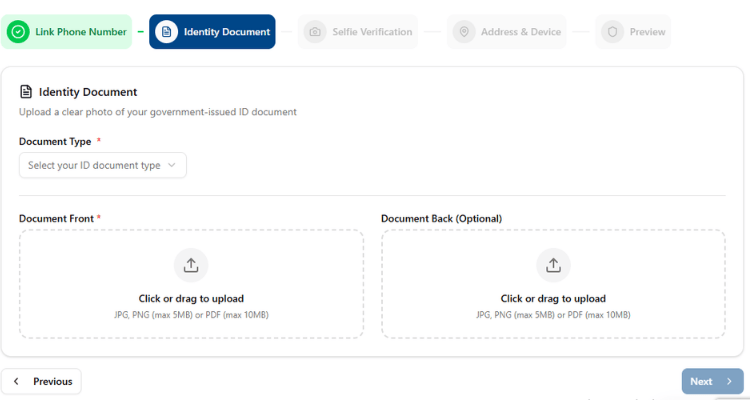
Once the OTP is verified, you will be asked to upload your identity proof. Select document type and upload front and back images.
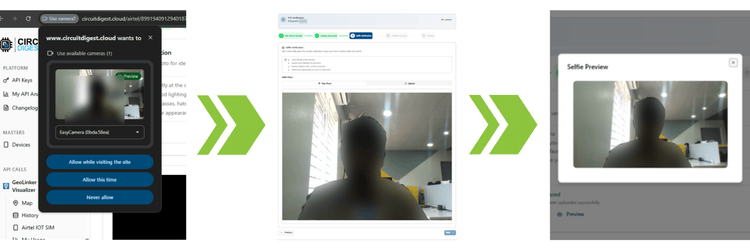
In the next stage, you will have to upload a live selfie.
Note: Your browser will ask for camera permission; please click "Allow" to proceed.
Once the selfie is captured, provide your current residential address, and finally review your details, accept the consent declaration and click on Submit KYC Documents. The KYC verification will be done within 28-48 hours.
TIP: You have a 7-day window from the initial activation to submit these documents. We recommend doing it immediately to ensure uninterrupted service. "Allow" to proceed.
Step 3 ⇒Viewing Your Airtel IoT SIM Card Details
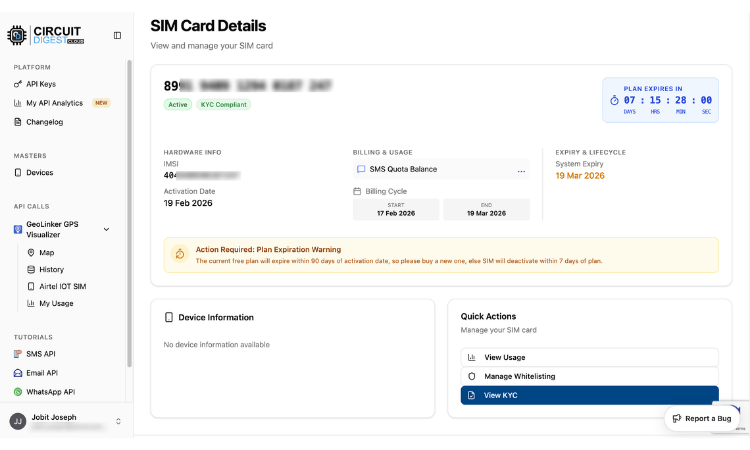
In the SIM card details page, you can see all the details related to your Airtel IOT M2M SIM card, like whether it's active or not, KYC status, ICCID and IMSI, start and end dates of your plan and the remaining time until your plan expires.
Step 4 ⇒ Setting Up SMS and Voice Whitelisting for Airtel M2M SIM
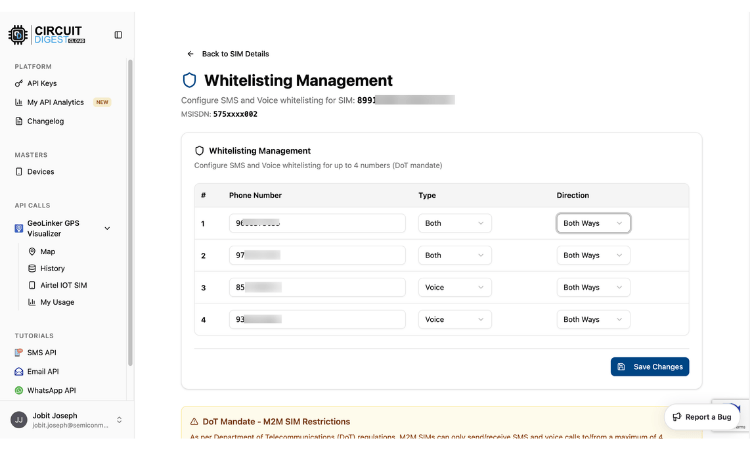
As per DoT regulations, IoT SIMs are restricted to communicating only with whitelisted numbers. So mobile number whitelisting is required to enable calls to and from the M2M number, as well as to send and receive SMS messages. With an Airtel M2M SIM, you can whitelist up to four numbers. To white list numbers, click on the Manage Whitelisting button on the SIM Card Details page.
In the Whitelisting Management page, enter the number you want to whitelist, select the type (Voice,SMS or Both) and direction(Incoming,Outgoing or Both Ways) and click on Save Changes. The whitelisting will immediately take effect, and you can use the SMS and voice services.
Note: The Airtel IoT SIM card includes a 3-month promotional plan. After the promotional period ends, you can recharge the SIM card from here (link will be updated soon).
Airtel M2M SIM Whitelisting Options at a Glance
Option
Choices Available
Communication Type
Voice / SMS / Both
Direction
Incoming / Outgoing / Both Ways
Maximum Numbers
Up to 4 mobile numbers
Effect
Immediately after Save Changes
Frequently Asked Questions
⇥ Where can I find my Airtel M2M SIM card ICCID? The ICCID is located on the package, with the SIM number listed as the SIM Number. If using GeoLinker GL868, insert the SIM and check the Serial Monitor; factory firmware will show the ICCID automatically when powered on. When you read the ICCID from the package, only enter the numerals and do not include the letter(s) at the end of the number.
⇥ How long does it take for Airtel to verify KYC (Know Your Customer) for M2M SIM Cards? Airtel will complete verification of your KYC document submission through the Circuit Digest Cloud platform within 48 to 28 hours after submission. You may continue to use the SIM during this time, provided that your KYC document submission occurred within 7 days of the SIM's initial activation.
⇥ What is the maximum number of phone numbers that I can whitelist on the Airtel M2M SIM Card? Whitelisting for up to 4 mobile numbers is available on your Airtel M2M IoT SIM. By using Whitelisting of each number, you also choose how you want to communicate (Voice, SMS or Both) and which way (Incoming, Outgoing or Both Ways). Whitelisting is effective immediately after you click Save Changes on the Circuit Digest Cloud dashboard.
⇥ Where can I find my Airtel M2M SIM card ICCID? The ICCID is located on the package, with the SIM number listed as the SIM Number. If using GeoLinker GL868, insert the SIM and check the Serial Monitor; the factory firmware will show ICCID automatically when powered on. When you read the ICCID from the package, only enter the numerals and do not include the letter(s) at the end of the number.
⇥ How long does it take for Airtel to verify KYC (Know Your Customer) for M2M SIM Cards? Airtel will complete verification of your KYC document submission through the Circuit Digest Cloud platform within 48 to 28 hours after submission. You may continue to use the SIM during this time, provided that your KYC document submission occurred within 7 days of the SIM's initial activation.
⇥ What is the maximum number of phone numbers that I can whitelist on the Airtel M2M SIM Card? Whitelisting for up to 4 mobile numbers is available on your Airtel M2M IoT SIM. By using Whitelisting of each number, you also choose how you want to communicate (Voice, SMS or Both) and which way (Incoming, Outgoing or Both Ways). Whitelisting is effective immediately after you click Save Changes on the Circuit Digest Cloud dashboard.