

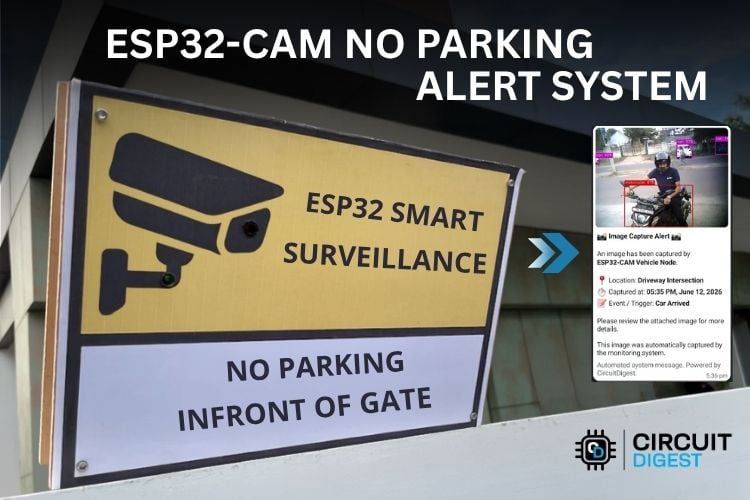
In modern day, the need for surveillance systems is increasing rapidly. We have a lot of recognized brands that offer such solutions. But can we extend the capabilities of a $5 ESP32-CAM module to build something similar?
In this project, we are going to build an AI-Based No Parking Alert System using ESP32-CAM, in which, if someone parks their vehicle in front of the gate, the ESP32-CAM recognizes it and sends an alert to our WhatsApp and also powers on a buzzer and indicator LED onboard as well. We are using a combination of IoT(Internet of Things) and Cloud computing. Since the ESP32-CAM isn’t capable of running heavy computer vision programs directly on it, we are using CircuitDigest Cloud for all the heavy computations. Let’s see how the system works.
Table of Contents
What is an IoT No Parking Alert System?
IoT No Parking Alert System is an inexpensive IoT surveillance system that consists of an ESP32-CAM camera that is used to capture images of moving vehicles and carry out the AI-based object detection process in the cloud and notify the owner instantly through WhatsApp and a local buzzer. Unlike conventional systems that require PIR, ultrasonic, or infrared sensors, this does not require any of these methods to detect movement since the camera itself compares two consecutive pictures to collect data on traffic movement.
How Does the IoT No Parking Alert System Work?
Here is the full plan and working of this no parking alert system using the ESP32-CAM. Let’s explore it with this Flow Chart. The first part is the ESP32-CAM itself scanning for motion by comparing consecutive frames. Once motion is detected, it captures the live frame and sends it to the CircuitDigest Cloud Object Detection API to detect any Vehicles in the frame. If no motion is detected, it keeps on repeating the same step until motion is detected.
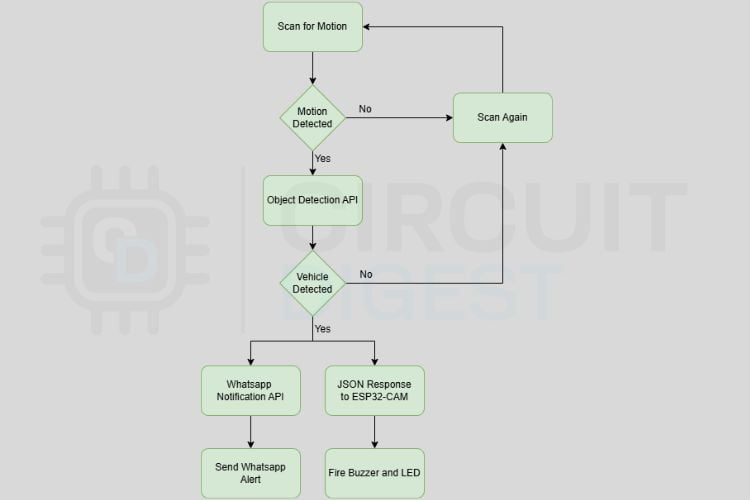
Now, let’s say the device detected motion and the captured image reached CircuitDigest Cloud’s Object Detection API. It looks for any vehicles in the image, and once a vehicle is detected, the WhatsApp Notification API is triggered, and we get an alert message in our WhatsApp with the captured image. Additionally, the buzzer and LED that we connected to the ESP32 cam also get triggered for 2 seconds for a local alert thanks to the JSON response sent from CircuitDigest Cloud to our ESP32-CAM. So, we have just seen how an ESP32-CAM can detect motion and, with the help of the cloud, detect a targeted object and take an action. Now, let’s take a look at a different approach by which we can detect some targeted objects and do some actions. This is by building our own ML model. If you need to learn how, explore our Object Detection using ESP32-CAM and Edge Impulse tutorial.
Components Required for the ESP32-CAM No Parking Alert System
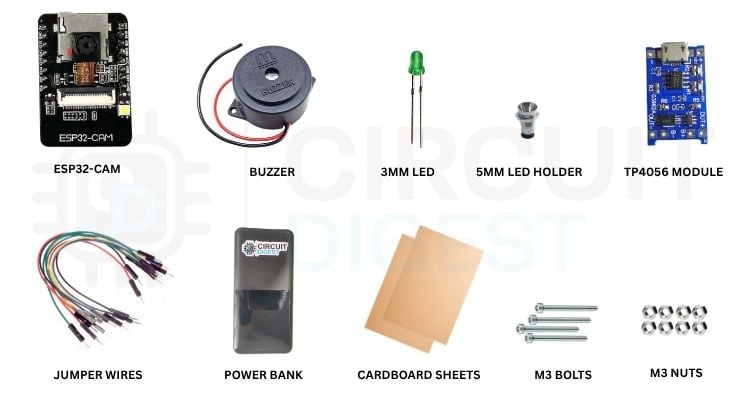
Below is the list of components required to make this project.
| S No | Component | Description | Quantity |
| 1. | ESP32-CAM | The main local processor | 1 |
| 2. | Buzzer | For local feedback | 1 |
| 3. | 3mm/5mm LED | For local feedback | 1 |
| 4. | 5mm LED Holder | To mount the LED to the cardboard | 1 |
| 5. | Power Bank / Battery | To power the circuit | 1 |
| 6. | DC Connector / TP4056 Module | Interface for ESP32-CAM to power supply | 1 |
| 7. | Jumper Wires | To wire up the components | as required |
| 8. | Cardboard Sheet | To mount the whole assembly | 2 |
Circuit Diagram of the ESP32-CAM No Parking Alert System
Below is the detailed circuit diagram of the ESP32-CAM No Parking Alert System.

First of all, you need to connect all the components as per this circuit diagram. You can use any normal 5-volt adaptor or even a power bank to power the circuit. I have used a power bank to power the circuit. Here, a DC socket is attached to the 5V and GND pins of ESP32-CAM for input power supply. An LED is connected to GPIO2 and a buzzer to GPIO4 for local feedback. That’s it about the circuit. The interesting thing to note here is that we haven’t used any kind of sensors like the ultrasonic sensor or PIR sensor to detect motion. The ESP32-CAM module is programmed in such a way that it compares consecutive frames to detect variations in the pixel colours. Variation means motion.
Circuit diagrams for most ESP32-CAM based projects are very easy and simple, as it already integrates the camera sensor connections with it. Now, if you like to see more such simple ESP32-CAM based circuits and cloud connected projects, explore the limits.
Here are some of our ESP32-CAM + CircuitDigest Cloud based projects :
ESP32 Cam waste detection - Automatically identify and classify waste materials for smart waste management systems.
ESP32 Cam Indian Currency Recognition - Recognise and differentiate Indian currency notes using computer vision and AI.
ESP32 Cam parking space detection - Monitor parking availability in real time and provide smart parking insights through cloud connectivity.
These projects showcase the versatility of the ESP32-CAM and demonstrate how seamlessly it can be integrated with CircuitDigest Cloud to create intelligent, connected vision-based applications.
Hardware Overview
Below is the full hardware setup of the project. All the components are properly mounted onto a 2.5mm cardboard. The whole circuitry sits between two such cardboards separated by four M3 40mm long nuts and respective bolts. For power, a standard 10,000 mAh power bank is used. A Type-C to Micro USB cable connects the power bank to ESP32-CAM via a micro USB TP4056 module. Here, the module is used as a connector. The buzzer is glued onto the cardboard while the 3mm LED is mounted using an LED holder for a standard look.
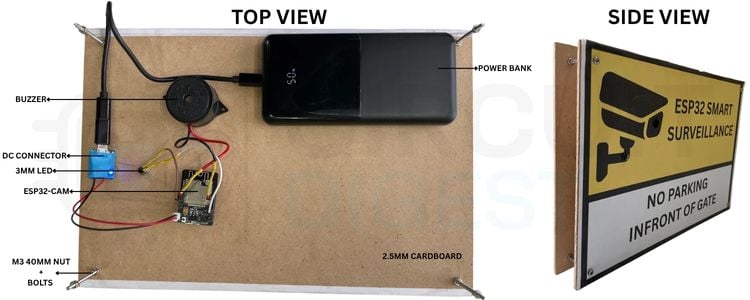
The full structure can be understood from the side view. For the final look, we pasted a printout onto the front face showing “ESP32 SMART SURVEILLANCE” and “NO PARKING IN FRONT OF GATE”. Now that we have seen how to build a No Parking Alert System using ESP32-CAM, let's take a look at our tutorial on building a full security camera using ESP32-CAM.
Programming ESP32-CAM
Below is the detailed pin diagram used in this tutorial for programming the ESP32-CAM
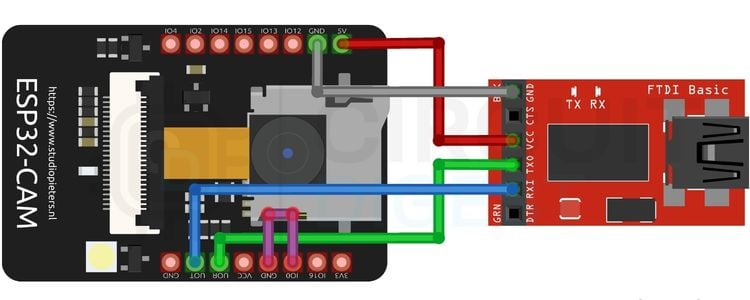
For programming the ESP32 camera, since it doesn’t come with dedicated USB ports for flashing, we will have to use some external programmers for this. There are several ways to program the ESP32-CAM. Here in this tutorial, I have used a USB-to-TTL converter to program the module. All you have to make sure of is that the VCC and GND of the USB-to-TTL converter are connected to 5V and GND of the ESP32-CAM, and the TX and RX of the USB-to-TTL are connected to RX and TX of the ESP32-CAM. If the TX and RX pins are connected in the reverse order, it won’t flash the code. Also, GPIO 0 and GND of the ESP32-CAM should be connected to keep the ESP32-CAM in flashing mode.
Let’s just take a look at some other most common ways used by makers around the world to program ESP32-CAM modules. One other way is to use the ESP32-CAM Programmer. Just plug your ESP32-CAM into this programmer, just like you plug in a shield to an Arduino UNO and flash the code. Another way is by using a normal development board like the Arduino UNO, bypassing its Atmega328p chip by connecting RESET to GND and then connecting the ESP32-CAM’s RX and TX pins to the UNO’s RX and TX pins. In this method, the RX is connected to RX and TX to TX because we are bypassing its internal microcontroller chip and using the ESP32-CAM in place of it. You can follow any of the above methods; all will work.
If you need a very thorough understanding of programming an ESP32-CAM using all the above-mentioned ways, do check out our How to Program ESP32 CAM using Arduino IDE tutorial.
How to get CircuitDigest Cloud Credentials
For this project, we need one credential from CircuitDigest Cloud, which is the API Key.
Let’s see how to get your API Key.
In this project, the API Key is needed to access two separate API services from CircuitDigest Cloud, which are the Object Detection API and the WhatsApp Notification API. First, let's log in to CircuitDigest Cloud and navigate to WhatsApp Notification.
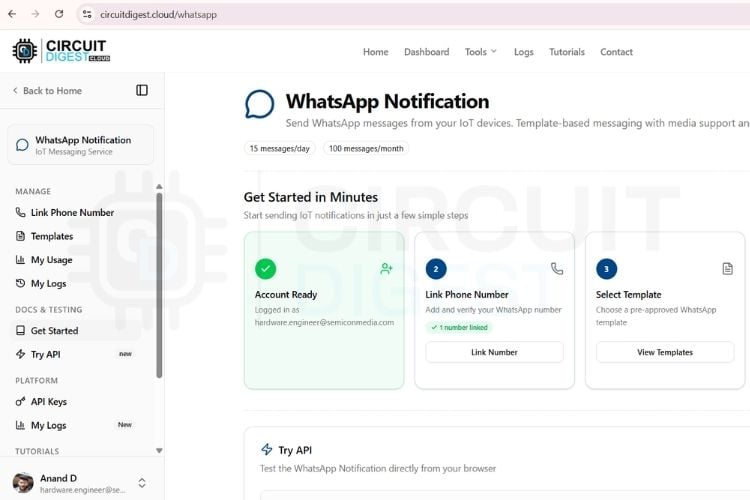
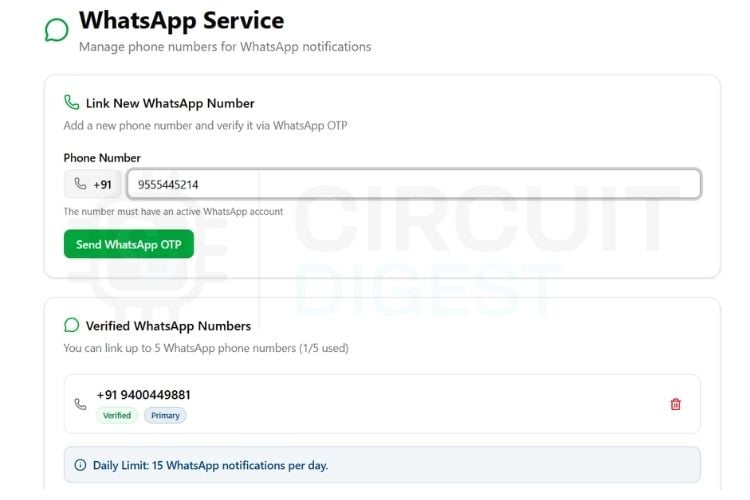
Step 1⇒ Click on Link a Number > Verify your WhatsApp number using WhatsApp OTP.
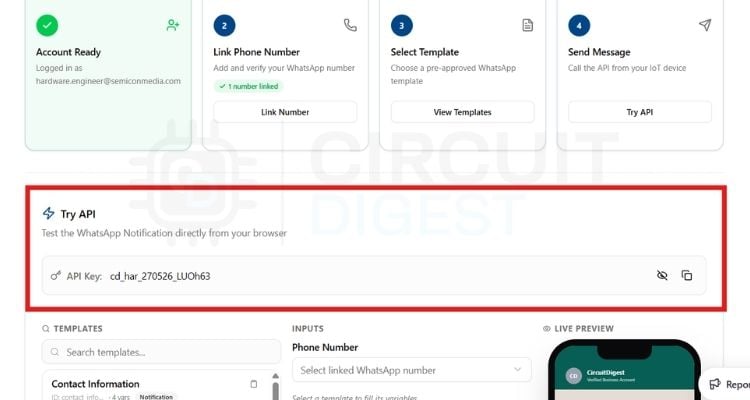
Step 2⇒ Scroll down; under the Try API section, you can see your API Key. Copy it from there and paste in the Arduino code. Also enter the verified WhatsApp number as well in the code, followed by 91 for it to work. The thing to note is that we don’t have to worry about any template creation and all, as we are already using available templates for both Object detection and WhatsApp notification.
Code Explanation
Let’s take a look at the whole code for this project. A detailed explanation is provided below.
Includes, Credentials, and Tuning Parameters
#include "esp_camera.h"
#include "esp_tls.h"
#include "esp_crt_bundle.h"
#include "esp_sntp.h"
#include <WiFi.h>
#include <time.h>
#include "freertos/FreeRTOS.h"
#include "freertos/task.h"
#include "freertos/semphr.h"
const char* WIFI_SSID = "your_ssid";
const char* WIFI_PASS = "your_password";
const char* API_KEY   = "your_api_key";
const char* PHONE     = "91---------";
// ─── Tuning Parameters ────────────────────────────────────────────
#define PIXEL_DIFF_THRESHOLD  30
#define MOTION_THRESHOLD      350
#define UPLOAD_COOLDOWN_MS    10000UL
#define BUZZER_PIN            4   //  Assigned to GPIO 4
#define LED_PIN               2   // Added external/flash LED to GPIO 2
#define PWDN_GPIO_NUM  32
#define RESET_GPIO_NUM -1
#define XCLK_GPIO_NUM   0
#define SIOD_GPIO_NUM  26
#define SIOC_GPIO_NUM  27
#define Y9_GPIO_NUM    35
#define Y8_GPIO_NUM    34
#define Y7_GPIO_NUM    39
#define Y6_GPIO_NUM    36
#define Y5_GPIO_NUM    21
#define Y4_GPIO_NUM    19
#define Y3_GPIO_NUM    18
#define Y2_GPIO_NUM     5
#define VSYNC_GPIO_NUM 25
#define HREF_GPIO_NUM  23
#define PCLK_GPIO_NUM  22
// ─── Shared State ─────────────────────────────────────────────────
static uint8_t* g_imgBuf   = nullptr;
static size_t   g_imgLen   = 0;
static uint8_t* previousFrame = NULL;
static size_t   motionFrameSize = 0;
static char     g_status[64]    = "Unknown Vehicle";
static char     g_imageUrl[256] = "";
static char     g_jsonBuf[2048] = {};
static SemaphoreHandle_t g_startSem = nullptr;
static SemaphoreHandle_t g_doneSem  = nullptr;
static unsigned long lastUploadTime = 0;
These are all the essential code imports and specialized libraries required for this project to work. The credential and pin configurations also come under this section. These values are to be altered according to your custom setup. The important value to note here is “MOTION_THRESHOLD”, which is currently set to 350. You can adjust this parameter to adjust the sensitivity of motion for capturing an image.
setupMotionBaseline() - Frame Baseline Management
static bool setupMotionBaseline()
 {
 camera_fb_t *fb = esp_camera_fb_get();
 if (!fb) {
   Serial.println("[CAM] Warning: Failed to acquire baseline frame. Retrying...");
   return false;
 }
 motionFrameSize = fb->len;
 if (previousFrame != NULL) {
   free(previousFrame);
   previousFrame = NULL;
 }
 previousFrame = (uint8_t *)malloc(motionFrameSize);
 if (previousFrame) {
   memcpy(previousFrame, fb->buf, motionFrameSize);
 }
 esp_camera_fb_return(fb);
 return (previousFrame != NULL);
}
We know that the motion is detected with a difference in frames that is calculated in the loop(). This function, setupMotionBaseline() acts as the frame management engine for this task.
static bool tlsWriteAll(esp_tls_t* tls, const uint8_t* buf, size_t len) {
 size_t sent = 0;
 while (sent < len) {
   int n = esp_tls_conn_write(tls, buf + sent, len - sent);
   if (n < 0) return false;
   sent += n;
 }
 return true;
}
static size_t tlsReadAll(esp_tls_t* tls, char* buf, size_t maxLen) {
 size_t total = 0;
 uint32_t t = millis();
 while (total < maxLen - 1) {
   if (millis() - t > 15000) break;
   int n = esp_tls_conn_read(tls, buf + total, maxLen - 1 - total);
   if (n == 0) break;
   if (n == ESP_TLS_ERR_SSL_WANT_READ) { vTaskDelay(pdMS_TO_TICKS(10)); continue; }
   if (n < 0) break;
   total += n; t = millis();
 }
 buf[total] = '\0';
 return total;
}
static esp_tls_t* openTLS(const char* host, int port) {
 esp_tls_cfg_t cfg = {};
 cfg.crt_bundle_attach = esp_crt_bundle_attach;
 esp_tls_t* tls = esp_tls_init();
 if (!tls) return nullptr;
 if (esp_tls_conn_new_sync(host, strlen(host), port, &cfg, tls) == 1) return tls;
 esp_tls_conn_destroy(tls);
 return nullptr;
}
Low-level stream streaming helpers. They wrap around standard raw socket channels to ensure that multi-kilobyte JPEG image fragments are written sequentially to the secure TLS pipeline without packet dropping, and read data back safely using timeouts.
detectVehicle() - CircuitDigest Cloud Object Detection API Call
static bool detectVehicle() {
 const char* host = "www.circuitdigest.cloud";
 const char* bnd  = "----ESP32Boundary";
 const char* classesParam = "[\"car\",\"truck\",\"bus\",\"motorcycle\"]";
 const char* confidenceParam = "0.40";
 char phHead[256];
 int phLen = snprintf(phHead, sizeof(phHead),
   "--%s\r\nContent-Disposition: form-data; name=\"imageFile\"; filename=\"photo.jpg\"\r\nContent-Type: image/jpeg\r\n\r\n", bnd);
 char classesPart[256];
 int cpLen = snprintf(classesPart, sizeof(classesPart),
   "\r\n--%s\r\nContent-Disposition: form-data; name=\"classes\"\r\n\r\n%s\r\n", bnd, classesParam);
 char confPart[128];
 int coLen = snprintf(confPart, sizeof(confPart),
   "--%s\r\nContent-Disposition: form-data; name=\"confidence\"\r\n\r\n%s\r\n", bnd, confidenceParam);
 char ptTail[64];
 int ptLen = snprintf(ptTail, sizeof(ptTail), "--%s--\r\n", bnd);
 size_t contentLen = phLen + g_imgLen + cpLen + coLen + ptLen;
 char reqHdr[512];
 int reqLen = snprintf(reqHdr, sizeof(reqHdr),
   "POST /api/v1/object-detection/detect HTTP/1.1\r\n"
   "Host: %s\r\nAuthorization: %s\r\n"
   "Content-Type: multipart/form-data; boundary=%s\r\n"
   "Content-Length: %u\r\nConnection: close\r\n\r\n",
   host, API_KEY, bnd, (unsigned)contentLen);
 esp_tls_t* tls = openTLS(host, 443);
 if (!tls) return false;
 bool ok =
   tlsWriteAll(tls, (const uint8_t*)reqHdr, reqLen) &&
   tlsWriteAll(tls, (const uint8_t*)phHead, phLen) &&
   tlsWriteAll(tls, g_imgBuf, g_imgLen) &&
   tlsWriteAll(tls, (const uint8_t*)classesPart, cpLen) &&
   tlsWriteAll(tls, (const uint8_t*)confPart, coLen) &&
   tlsWriteAll(tls, (const uint8_t*)ptTail, ptLen);
 static char respBuf[3072];
 if (ok) tlsReadAll(tls, respBuf, sizeof(respBuf));
 esp_tls_conn_destroy(tls);
 if (!ok) return false;
 char* bodyStart = strstr(respBuf, "\r\n\r\n");
 if (!bodyStart) return false;
 bodyStart += 4;
 while (*bodyStart && ((*bodyStart >= '0' && *bodyStart <= '9') || (*bodyStart >= 'a' && *bodyStart <= 'f') || (*bodyStart >= 'A' && *bodyStart <= 'F'))) bodyStart++;
 if (*bodyStart == '\r') bodyStart += 2;
 size_t bodyLen = strlen(bodyStart);
 if (bodyLen >= sizeof(g_jsonBuf)) bodyLen = sizeof(g_jsonBuf) - 1;
 memcpy(g_jsonBuf, bodyStart, bodyLen);
 g_jsonBuf[bodyLen] = '\0';
 Serial.printf("[API Response] %s\n", g_jsonBuf);
 return g_jsonBuf[0] != '\0';
}
The primary API driver. It formats a raw HTTP multipart/form-data POST request body manually, appends boundary markers, injects the image memory buffer, specifies confidence filters (40%), and pushes it to the CircuitDigest Cloud API. It receives the text response and stores it inside g_jsonBuf.
parseVehicleDetails() - Parsing the API Response
static bool parseVehicleDetails() {
 const char* j = g_jsonBuf;
 g_imageUrl[0] = '\0';
 bool vehicleFound = false;

 if (strstr(j, "\"class_name\":\"car\""))        { strncpy(g_status, "Car Arrived", sizeof(g_status));        vehicleFound = true; }
 else if (strstr(j, "\"class_name\":\"truck\""))   { strncpy(g_status, "Truck Arrived", sizeof(g_status));      vehicleFound = true; }
 else if (strstr(j, "\"class_name\":\"bus\""))     { strncpy(g_status, "Bus Arrived", sizeof(g_status));        vehicleFound = true; }
 else if (strstr(j, "\"class_name\":\"motorcycle\"")){ strncpy(g_status, "Motorcycle Arrived", sizeof(g_status)); vehicleFound = true; }
 if (!vehicleFound) {
   return false;
 }
 const char* url_key = "\"annotated_image_url\":\"";
 const char* ui = strstr(j, url_key);
 if (ui) {
   const char* vs = ui + strlen(url_key);
   const char* ve = strchr(vs, '"');
   if (ve && ve > vs) {
     size_t len = ve - vs;
     if (len >= sizeof(g_imageUrl)) len = sizeof(g_imageUrl) - 1;
     strncpy(g_imageUrl, vs, len);
     g_imageUrl[len] = '\0';
     char* p = g_imageUrl; char* q = g_imageUrl;
     while(*p) { if(*p == '\\' && *(p+1) == '/') p++; *q++ = *p++; }
     *q = '\0';
   }
 }
 return true;
}
Here, the raw JSON returned by CircuitDigest Cloud gets parsed, and this parsed text is analyzed for target class names(car, truck, bus, motorcycle). If found, the next part is sending the image to WhatsApp.For this, the ESP32-CAM creates a simple payload URL containing the destination number and the cloud-hosted image URL.
sendWhatsApp() - Triggering the WhatsApp Notification API
static void sendWhatsApp() {
 const char* host = "www.circuitdigest.cloud";
 char ts[64] = "Time Unknown";
 struct tm ti;
 if (getLocalTime(&ti, 500)) strftime(ts, sizeof(ts), "%I:%M %p, %B %d, %Y", &ti);
 char reqBody[1024];
 int bodyLen = snprintf(reqBody, sizeof(reqBody),
   "{"
     "\"phone_number\":\"%s\","
     "\"template_id\":\"image_capture_alert\","
     "\"variables\":{"
       "\"event_type\":\"%s\","
       "\"location\":\"Driveway Intersection\","
       "\"device_name\":\"ESP32-CAM Vehicle Node\","
       "\"captured_time\":\"%s\","
       "\"image_link\":\"%s\""
     "}"
   "}",
   PHONE, g_status, ts, g_imageUrl);
 char reqHdr[512];
 int reqLen = snprintf(reqHdr, sizeof(reqHdr),
   "POST /api/v1/whatsapp/send HTTP/1.1\r\n"
   "Host: %s\r\nAuthorization: %s\r\n"
   "Content-Type: application/json\r\n"
   "Content-Length: %u\r\nConnection: close\r\n\r\n",
   host, API_KEY, (unsigned)bodyLen);
 esp_tls_t* tls = openTLS(host, 443);
 if (!tls) return;
 tlsWriteAll(tls, (const uint8_t*)reqHdr, reqLen);
 tlsWriteAll(tls, (const uint8_t*)reqBody, bodyLen);
 static char respBuf[512];
 tlsReadAll(tls, respBuf, sizeof(respBuf));
 esp_tls_conn_destroy(tls);

 Serial.printf("[WhatsApp Gateway Status] Success transmission logged\n");
}
The WhatsApp function takes the payload URL that was created by the previous function, packages it into a precise format that the messaging gateway understands, and physically pushes it out over the internet.
setup() - Boot Sequence
void setup() {
 Serial.begin(115200);
 vTaskDelay(pdMS_TO_TICKS(500));
 Serial.println("\n=== Async Vehicle Tracker Deployed ===");
 // Setup both Alert Pins cleanly
 pinMode(BUZZER_PIN, OUTPUT);
 pinMode(LED_PIN, OUTPUT);
 digitalWrite(BUZZER_PIN, LOW);
 digitalWrite(LED_PIN, LOW);
 WiFi.mode(WIFI_STA);
 WiFi.setSleep(false);
 WiFi.begin(WIFI_SSID, WIFI_PASS);
 while (WiFi.status() != WL_CONNECTED) { vTaskDelay(pdMS_TO_TICKS(500)); Serial.print("."); }
 Serial.printf("\n[Network Connected] IP: %s\n", WiFi.localIP().toString().c_str());
 configTime(19800, 0, "pool.ntp.org", "time.nist.gov");
 struct tm timeinfo;
 getLocalTime(&timeinfo, 5000);
 g_startSem = xSemaphoreCreateBinary();
 g_doneSem  = xSemaphoreCreateBinary();
 if (setCameraSensingMode(PIXFORMAT_GRAYSCALE, FRAMESIZE_QQVGA, 12)) {
   Serial.println("[System Status] Waking up camera engine...");
   vTaskDelay(pdMS_TO_TICKS(1000));
   while (!setupMotionBaseline()) {
     vTaskDelay(pdMS_TO_TICKS(500));
   }
   Serial.println("[System Status] Low-power scanning baseline monitoring armed...");
 }
 xTaskCreatePinnedToCore(networkTask, "net_task", 8192, nullptr, 5, nullptr, 0);
}
The setup() gets executed sequentially at device boot. Configures the local buzzer and LED pins as outputs and sets them low. Connects the device to the local Wi-Fi router and establishes internal time variables by communicating with global SNTP time servers.
loop() - Motion Detection and Capture Logic
void loop() {
 if (previousFrame == NULL || motionFrameSize == 0) {
   vTaskDelay(pdMS_TO_TICKS(100));
   return;
 }
 camera_fb_t *fb = esp_camera_fb_get();
 if (!fb) { vTaskDelay(pdMS_TO_TICKS(100)); return; }
 int changedPixels = 0;
 for (size_t i = 0; i < motionFrameSize; i += 8) {
   int diff = abs((int)fb->buf[i] - (int)previousFrame[i]);
   if (diff > PIXEL_DIFF_THRESHOLD) { changedPixels++; }
 }
 bool coolingDown = (millis() - lastUploadTime < UPLOAD_COOLDOWN_MS);
 if (!coolingDown && (changedPixels > MOTION_THRESHOLD)) {
   esp_camera_fb_return(fb);

   Serial.printf("\n[Alert] Tripwire activated (%d). Locking scan engine.\n", changedPixels);
   Serial.println("Holding 2 seconds for target stabilization...");
   vTaskDelay(pdMS_TO_TICKS(2000));
   if (setCameraSensingMode(PIXFORMAT_JPEG, FRAMESIZE_VGA, 10)) {
     vTaskDelay(pdMS_TO_TICKS(600));
     camera_fb_t* flushFb = esp_camera_fb_get();
     if(flushFb) esp_camera_fb_return(flushFb);
     camera_fb_t* captureFb = esp_camera_fb_get();
     if (captureFb) {
       g_imgLen = captureFb->len;
       g_imgBuf = (uint8_t*)malloc(g_imgLen);
       if (g_imgBuf) {
         memcpy(g_imgBuf, captureFb->buf, g_imgLen);
         esp_camera_fb_return(captureFb);
         xSemaphoreGive(g_startSem);
         xSemaphoreTake(g_doneSem, portMAX_DELAY);
         return;
       }
       esp_camera_fb_return(captureFb);
     }
   }
   setCameraSensingMode(PIXFORMAT_GRAYSCALE, FRAMESIZE_QQVGA, 12);
   while (!setupMotionBaseline()) { vTaskDelay(pdMS_TO_TICKS(200)); }
 } else {
   if (motionFrameSize == fb->len) {
     memcpy(previousFrame, fb->buf, motionFrameSize);
   }
   esp_camera_fb_return(fb);
   vTaskDelay(pdMS_TO_TICKS(150));
 }
}
This function runs infinitely. It captures the frames and compares them with a threshold value of 350 to detect motion with an 8-pixel jump index. The 8-pixel jump index is used to reduce computation and make the code run much more efficiently. Once motion is detected with that set threshold (8-pixel jump), there is a delay of 2 seconds for the vehicle to come to a resting position. This 2-second delay can be adjusted according to your situation. The goal is we need to capture the vehicle once it’s settled in front of the gate. To capture the image, the camera switches to high-res JPEG mode.
Full Tutorial with Video
The following is the full video tutorial and demonstration of the whole project. For more details and full working code, this document can be referred to.
Troubleshooting the IoT No Parking Alert System
| Issue | Likely Cause | Fix |
| Serial monitor shows "Failed to acquire baseline frame" | Loose camera ribbon or poor voltage regulation | Remove the camera FPC ribbon cable; use a stable external 5V supply |
| Motion detected but no vehicle found by AI | Vehicle moving too fast, too far from lens, or poor lighting | Lower PIXEL_DIFF_THRESHOLD and MOTION_THRESHOLD; improve lighting, especially at night |
IoT No Parking Alert System GitHub
This GitHub project presents an IoT-based No Parking Alert System that detects unauthorised vehicle parking and sends real-time notifications to users or authorities. It uses sensors and a microcontroller to automate parking monitoring, improving traffic management and reducing manual supervision.


Conclusion
The ESP32 series of microcontrollers is just awesome; we have a wide variety of them with different cores, storage configurations and all that fit the right projects. Here we were exploring the ESP32 that comes with a camera integrated with it, which is the ESP32-CAM module. It’s worth taking a look at our collection of ESP32 based projects as well, from where you can explore and learn a lot of things.
This IoT no parking alert system project is a perfect example to follow to learn how modern day cloud connected devices work. The components used were beginner-friendly and readily available everywhere. With a combination of a local IoT setup with ESP32-CAM and CircuitDigest Cloud, we were able to build a full no parking alert system using ESP32-CAM. The project can be considered a reference point for any of your future builds. Find more cloud and AI Projects featuring ESP32, Raspberry Pi, Arduino, and other development boards in our AI section.
Frequently Asked Questions
⇥ Can I use a regular passive buzzer instead of an active buzzer?
No, it is recommended to use an active buzzer. An active buzzer only needs a steady high voltage signal(3.3V) at the configured GPIO pin.
⇥ Why does the onboard flash LED blink when the external alert LED fires?
On the ESP32-CAM board, the onboard white flash LED is hardwired directly to GPIO 2. Because our code assigns LED_PIN to GPIO 2 to drive our external LED, both will trigger at the same time by design.
⇥ Can I control any other external devices just like the LED and Buzzer?
Yes, absolutely. You can connect the 3.3V-tolerant output devices to the available GPIO pins of the ESP32-CAM.
⇥ Is the CircuitDigest Cloud free to use?
Yes, it’s free to use with 100 API requests per month for each service, with a limit of 15 requests per day.
⇥ Where can I find the source code of this project?
The GitHub link to the project is provided in this document. Anyone can download and use the code.
⇥ Can I use a DC Adaptor instead of a battery or powerbank to power the circuit?
Yes, absolutely. Make sure it’s a 5V adaptor and connect it to the 5V and GND pins of ESP32-CAM.
ESP32-CAM Projects using CircuitDigest Cloud
Explore AI-powered computer vision projects with the ESP32-CAM, including face detection, helmet detection, and object detection, all integrated with the CircuitDigest Cloud platform for real-time monitoring and control.

How to Use ESP32-CAM for Face Detection Using CircuitDigest Cloud
In this project, we take that movie-like idea and turn it into a real working system using just a small ESP32-CAM module, no external camera, no bulky setup. By simply uploading the code, the device can capture images and detect human faces in real time.
How to Do Helmet Detection with ESP32-CAM Using CircuitDigest Cloud
Rather than relying on expensive hardware or complex on-device machine learning, this smart helmet detection system takes a cloud-first approach. A compact ESP32-CAM captures the image and sends it securely to the CircuitDigest Cloud, where powerful AI models do the real work, analyzing the image and detecting helmet usage within seconds.
How to Do Object Detection With ESP32-Cam Using CircuitDigest Cloud
This tutorial shows you how to build a real-time object detection system using the ESP32-CAM module and the CircuitDigest Cloud Object Detection API. The system captures an image on button press, sends it to the cloud via wireless or internet connection, retrieves the identified objects with name(s), how many there were and how confident (how much certainty the algorithm has) the object identification.
Complete Project Code
#include "esp_camera.h"
#include "esp_tls.h"
#include "esp_crt_bundle.h"
#include "esp_sntp.h"
#include <WiFi.h>
#include <time.h>
#include "freertos/FreeRTOS.h"
#include "freertos/task.h"
#include "freertos/semphr.h"
// ─── Credentials ──────────────────────────────────────────────────
const char* WIFI_SSID = "your_ssid";
const char* WIFI_PASS = "your_password";
const char* API_KEY   = "your_api";
const char* PHONE     = "91----------";
// ─── Tuning Parameters ────────────────────────────────────────────
#define PIXEL_DIFF_THRESHOLD  30
#define MOTION_THRESHOLD      350
#define UPLOAD_COOLDOWN_MS    10000UL
// ─── Hardware Pins ────────────────────────────────────────────────
#define BUZZER_PIN            4   //  Assigned to GPIO 4
#define LED_PIN               2   // Added external/flash LED to GPIO 2
// Camera Pins (AI-Thinker ESP32-CAM)
#define PWDN_GPIO_NUM  32
#define RESET_GPIO_NUM -1
#define XCLK_GPIO_NUM   0
#define SIOD_GPIO_NUM  26
#define SIOC_GPIO_NUM  27
#define Y9_GPIO_NUM    35
#define Y8_GPIO_NUM    34
#define Y7_GPIO_NUM    39
#define Y6_GPIO_NUM    36
#define Y5_GPIO_NUM    21
#define Y4_GPIO_NUM    19
#define Y3_GPIO_NUM    18
#define Y2_GPIO_NUM     5
#define VSYNC_GPIO_NUM 25
#define HREF_GPIO_NUM  23
#define PCLK_GPIO_NUM  22
// ─── Shared State ─────────────────────────────────────────────────
static uint8_t* g_imgBuf   = nullptr;
static size_t   g_imgLen   = 0;
static uint8_t* previousFrame = NULL;
static size_t   motionFrameSize = 0;
static char     g_status[64]    = "Unknown Vehicle";
static char     g_imageUrl[256] = "";
static char     g_jsonBuf[2048] = {};
static SemaphoreHandle_t g_startSem = nullptr;
static SemaphoreHandle_t g_doneSem  = nullptr;
static unsigned long lastUploadTime = 0;
// ─── Camera Configuration Helpers ─────────────────────────────────
static camera_config_t getBaseCameraConfig() {
 camera_config_t cfg = {};
 cfg.ledc_channel = LEDC_CHANNEL_0; cfg.ledc_timer = LEDC_TIMER_0;
 cfg.pin_d0=Y2_GPIO_NUM; cfg.pin_d1=Y3_GPIO_NUM; cfg.pin_d2=Y4_GPIO_NUM;
 cfg.pin_d3=Y5_GPIO_NUM; cfg.pin_d4=Y6_GPIO_NUM; cfg.pin_d5=Y7_GPIO_NUM;
 cfg.pin_d6=Y8_GPIO_NUM; cfg.pin_d7=Y9_GPIO_NUM;
 cfg.pin_xclk=XCLK_GPIO_NUM;   cfg.pin_pclk=PCLK_GPIO_NUM;
 cfg.pin_vsync=VSYNC_GPIO_NUM; cfg.pin_href=HREF_GPIO_NUM;
 cfg.pin_sscb_sda=SIOD_GPIO_NUM; cfg.pin_sscb_scl=SIOC_GPIO_NUM;
 cfg.pin_pwdn=PWDN_GPIO_NUM;   cfg.pin_reset=RESET_GPIO_NUM;
 cfg.xclk_freq_hz = 20000000;
 return cfg;
}
static bool setCameraSensingMode(pixformat_t format, framesize_t size, int quality) {
 esp_camera_deinit();
 vTaskDelay(pdMS_TO_TICKS(100));

 camera_config_t cfg = getBaseCameraConfig();
 cfg.pixel_format = format;
 cfg.frame_size = size;
 cfg.jpeg_quality = quality;

 if (format == PIXFORMAT_JPEG) {
   cfg.fb_count = 1; cfg.fb_location = CAMERA_FB_IN_PSRAM;
   cfg.grab_mode = CAMERA_GRAB_LATEST;
 } else {
   cfg.fb_count = 1; cfg.fb_location = CAMERA_FB_IN_DRAM;
   cfg.grab_mode = CAMERA_GRAB_WHEN_EMPTY;
 }

 esp_err_t err = esp_camera_init(&cfg);
 if (err != ESP_OK) return false;

 sensor_t* s = esp_camera_sensor_get();
 if (s) {
   if (format == PIXFORMAT_GRAYSCALE) {
     s->set_whitebal(s, 1); s->set_exposure_ctrl(s, 1); s->set_gain_ctrl(s, 1);
     vTaskDelay(pdMS_TO_TICKS(500));
     s->set_exposure_ctrl(s, 0); s->set_gain_ctrl(s, 0);
   } else {
     s->set_brightness(s, 1); s->set_contrast(s, 1);
     s->set_whitebal(s, 1); s->set_exposure_ctrl(s, 1); s->set_gain_ctrl(s, 1);
   }
 }
 return true;
}
static bool setupMotionBaseline() {
 camera_fb_t *fb = esp_camera_fb_get();
 if (!fb) {
   Serial.println("[CAM] Warning: Failed to acquire baseline frame. Retrying...");
   return false;
 }

 motionFrameSize = fb->len;
 if (previousFrame != NULL) {
   free(previousFrame);
   previousFrame = NULL;
 }

 previousFrame = (uint8_t *)malloc(motionFrameSize);
 if (previousFrame) {
   memcpy(previousFrame, fb->buf, motionFrameSize);
 }

 esp_camera_fb_return(fb);
 return (previousFrame != NULL);
}
// ─── Network TLS Streaming Utilities ──────────────────────────────
static bool tlsWriteAll(esp_tls_t* tls, const uint8_t* buf, size_t len) {
 size_t sent = 0;
 while (sent < len) {
   int n = esp_tls_conn_write(tls, buf + sent, len - sent);
   if (n < 0) return false;
   sent += n;
 }
 return true;
}
static size_t tlsReadAll(esp_tls_t* tls, char* buf, size_t maxLen) {
 size_t total = 0;
 uint32_t t = millis();
 while (total < maxLen - 1) {
   if (millis() - t > 15000) break;
   int n = esp_tls_conn_read(tls, buf + total, maxLen - 1 - total);
   if (n == 0) break;
   if (n == ESP_TLS_ERR_SSL_WANT_READ) { vTaskDelay(pdMS_TO_TICKS(10)); continue; }
   if (n < 0) break;
   total += n; t = millis();
 }
 buf[total] = '\0';
 return total;
}
static esp_tls_t* openTLS(const char* host, int port) {
 esp_tls_cfg_t cfg = {};
 cfg.crt_bundle_attach = esp_crt_bundle_attach;
 esp_tls_t* tls = esp_tls_init();
 if (!tls) return nullptr;
 if (esp_tls_conn_new_sync(host, strlen(host), port, &cfg, tls) == 1) return tls;
 esp_tls_conn_destroy(tls);
 return nullptr;
}
// ─── Object Detection API Handler ─────────────────────────────────
static bool detectVehicle() {
 const char* host = "www.circuitdigest.cloud";
 const char* bnd  = "----ESP32Boundary";
 const char* classesParam = "[\"car\",\"truck\",\"bus\",\"motorcycle\"]";
 const char* confidenceParam = "0.40";
 char phHead[256];
 int phLen = snprintf(phHead, sizeof(phHead),
   "--%s\r\nContent-Disposition: form-data; name=\"imageFile\"; filename=\"photo.jpg\"\r\nContent-Type: image/jpeg\r\n\r\n", bnd);
 char classesPart[256];
 int cpLen = snprintf(classesPart, sizeof(classesPart),
   "\r\n--%s\r\nContent-Disposition: form-data; name=\"classes\"\r\n\r\n%s\r\n", bnd, classesParam);
 char confPart[128];
 int coLen = snprintf(confPart, sizeof(confPart),
   "--%s\r\nContent-Disposition: form-data; name=\"confidence\"\r\n\r\n%s\r\n", bnd, confidenceParam);
 char ptTail[64];
 int ptLen = snprintf(ptTail, sizeof(ptTail), "--%s--\r\n", bnd);
 size_t contentLen = phLen + g_imgLen + cpLen + coLen + ptLen;
 char reqHdr[512];
 int reqLen = snprintf(reqHdr, sizeof(reqHdr),
   "POST /api/v1/object-detection/detect HTTP/1.1\r\n"
   "Host: %s\r\nAuthorization: %s\r\n"
   "Content-Type: multipart/form-data; boundary=%s\r\n"
   "Content-Length: %u\r\nConnection: close\r\n\r\n",
   host, API_KEY, bnd, (unsigned)contentLen);
 esp_tls_t* tls = openTLS(host, 443);
 if (!tls) return false;
 bool ok =
   tlsWriteAll(tls, (const uint8_t*)reqHdr, reqLen) &&
   tlsWriteAll(tls, (const uint8_t*)phHead, phLen) &&
   tlsWriteAll(tls, g_imgBuf, g_imgLen) &&
   tlsWriteAll(tls, (const uint8_t*)classesPart, cpLen) &&
   tlsWriteAll(tls, (const uint8_t*)confPart, coLen) &&
   tlsWriteAll(tls, (const uint8_t*)ptTail, ptLen);
 static char respBuf[3072];
 if (ok) tlsReadAll(tls, respBuf, sizeof(respBuf));
 esp_tls_conn_destroy(tls);
 if (!ok) return false;
 char* bodyStart = strstr(respBuf, "\r\n\r\n");
 if (!bodyStart) return false;
 bodyStart += 4;
 while (*bodyStart && ((*bodyStart >= '0' && *bodyStart <= '9') || (*bodyStart >= 'a' && *bodyStart <= 'f') || (*bodyStart >= 'A' && *bodyStart <= 'F'))) bodyStart++;
 if (*bodyStart == '\r') bodyStart += 2;
 size_t bodyLen = strlen(bodyStart);
 if (bodyLen >= sizeof(g_jsonBuf)) bodyLen = sizeof(g_jsonBuf) - 1;
 memcpy(g_jsonBuf, bodyStart, bodyLen);
 g_jsonBuf[bodyLen] = '\0';
 Serial.printf("[API Response] %s\n", g_jsonBuf);
 return g_jsonBuf[0] != '\0';
}
// ─── Extract Response Context ──────────────────────────────────────
static bool parseVehicleDetails() {
 const char* j = g_jsonBuf;
 g_imageUrl[0] = '\0';
 bool vehicleFound = false;

 if (strstr(j, "\"class_name\":\"car\""))        { strncpy(g_status, "Car Arrived", sizeof(g_status));        vehicleFound = true; }
 else if (strstr(j, "\"class_name\":\"truck\""))   { strncpy(g_status, "Truck Arrived", sizeof(g_status));      vehicleFound = true; }
 else if (strstr(j, "\"class_name\":\"bus\""))     { strncpy(g_status, "Bus Arrived", sizeof(g_status));        vehicleFound = true; }
 else if (strstr(j, "\"class_name\":\"motorcycle\"")){ strncpy(g_status, "Motorcycle Arrived", sizeof(g_status)); vehicleFound = true; }
 if (!vehicleFound) {
   return false;
 }
 const char* url_key = "\"annotated_image_url\":\"";
 const char* ui = strstr(j, url_key);
 if (ui) {
   const char* vs = ui + strlen(url_key);
   const char* ve = strchr(vs, '"');
   if (ve && ve > vs) {
     size_t len = ve - vs;
     if (len >= sizeof(g_imageUrl)) len = sizeof(g_imageUrl) - 1;
     strncpy(g_imageUrl, vs, len);
     g_imageUrl[len] = '\0';
     char* p = g_imageUrl; char* q = g_imageUrl;
     while(*p) { if(*p == '\\' && *(p+1) == '/') p++; *q++ = *p++; }
     *q = '\0';
   }
 }
 return true;
}
// ─── WhatsApp Media Template Integration ──────────────────────────
static void sendWhatsApp() {
 const char* host = "www.circuitdigest.cloud";
 char ts[64] = "Time Unknown";
 struct tm ti;
 if (getLocalTime(&ti, 500)) strftime(ts, sizeof(ts), "%I:%M %p, %B %d, %Y", &ti);
 char reqBody[1024];
 int bodyLen = snprintf(reqBody, sizeof(reqBody),
   "{"
     "\"phone_number\":\"%s\","
     "\"template_id\":\"image_capture_alert\","
     "\"variables\":{"
       "\"event_type\":\"%s\","
       "\"location\":\"Driveway Intersection\","
       "\"device_name\":\"ESP32-CAM Vehicle Node\","
       "\"captured_time\":\"%s\","
       "\"image_link\":\"%s\""
     "}"
   "}",
   PHONE, g_status, ts, g_imageUrl);
 char reqHdr[512];
 int reqLen = snprintf(reqHdr, sizeof(reqHdr),
   "POST /api/v1/whatsapp/send HTTP/1.1\r\n"
   "Host: %s\r\nAuthorization: %s\r\n"
   "Content-Type: application/json\r\n"
   "Content-Length: %u\r\nConnection: close\r\n\r\n",
   host, API_KEY, (unsigned)bodyLen);
 esp_tls_t* tls = openTLS(host, 443);
 if (!tls) return;
 tlsWriteAll(tls, (const uint8_t*)reqHdr, reqLen);
 tlsWriteAll(tls, (const uint8_t*)reqBody, bodyLen);
 static char respBuf[512];
 tlsReadAll(tls, respBuf, sizeof(respBuf));
 esp_tls_conn_destroy(tls);

 Serial.printf("[WhatsApp Gateway Status] Success transmission logged\n");
}
// ─── FreeRTOS Async Network Worker ─────────────────────────────────
static void networkTask(void* /*arg*/) {
 for (;;) {
   xSemaphoreTake(g_startSem, portMAX_DELAY);

   if (WiFi.status() != WL_CONNECTED) {
     WiFi.disconnect();
     WiFi.begin(WIFI_SSID, WIFI_PASS);
     vTaskDelay(pdMS_TO_TICKS(2000));
   }
   if (detectVehicle()) {
     if (parseVehicleDetails()) {

       // ─── ACTIVATE BOTH OUTPUT PERIPHERALS ────────────────────────
       Serial.printf("[ALERT] Target Verified (%s). Blasting Buzzer (IO4) & LED (IO2)...\n", g_status);
       digitalWrite(BUZZER_PIN, HIGH);
       digitalWrite(LED_PIN, HIGH);

       sendWhatsApp();

       vTaskDelay(pdMS_TO_TICKS(2000)); // Maintain alert for exactly 2 seconds

       digitalWrite(BUZZER_PIN, LOW);
       digitalWrite(LED_PIN, LOW);
       Serial.println("[ALERT] Alert sequence complete. Hardware silenced.");
       // ─────────────────────────────────────────────────────────────

     } else {
       Serial.println("[FILTERED] Motion detected, but AI found no target vehicles. Alert skipped.");
     }
   }

   if (g_imgBuf) { free(g_imgBuf); g_imgBuf = nullptr; }

   setCameraSensingMode(PIXFORMAT_GRAYSCALE, FRAMESIZE_QQVGA, 12);
   vTaskDelay(pdMS_TO_TICKS(1000));

   while (!setupMotionBaseline()) {
     vTaskDelay(pdMS_TO_TICKS(200));
   }

   lastUploadTime = millis();
   xSemaphoreGive(g_doneSem);
 }
}
// ─── Setup ────────────────────────────────────────────────────────
void setup() {
 Serial.begin(115200);
 vTaskDelay(pdMS_TO_TICKS(500));
 Serial.println("\n=== Async Vehicle Tracker Deployed ===");
 // Setup both Alert Pins cleanly
 pinMode(BUZZER_PIN, OUTPUT);
 pinMode(LED_PIN, OUTPUT);
 digitalWrite(BUZZER_PIN, LOW);
 digitalWrite(LED_PIN, LOW);
 WiFi.mode(WIFI_STA);
 WiFi.setSleep(false);
 WiFi.begin(WIFI_SSID, WIFI_PASS);
 while (WiFi.status() != WL_CONNECTED) { vTaskDelay(pdMS_TO_TICKS(500)); Serial.print("."); }
 Serial.printf("\n[Network Connected] IP: %s\n", WiFi.localIP().toString().c_str());
 configTime(19800, 0, "pool.ntp.org", "time.nist.gov");
 struct tm timeinfo;
 getLocalTime(&timeinfo, 5000);
 g_startSem = xSemaphoreCreateBinary();
 g_doneSem  = xSemaphoreCreateBinary();

 if (setCameraSensingMode(PIXFORMAT_GRAYSCALE, FRAMESIZE_QQVGA, 12)) {
   Serial.println("[System Status] Waking up camera engine...");
   vTaskDelay(pdMS_TO_TICKS(1000));

   while (!setupMotionBaseline()) {
     vTaskDelay(pdMS_TO_TICKS(500));
   }
   Serial.println("[System Status] Low-power scanning baseline monitoring armed...");
 }
 xTaskCreatePinnedToCore(networkTask, "net_task", 8192, nullptr, 5, nullptr, 0);
}
// ─── Core Executive Loop ──────────────────────────────────────────
void loop() {
 if (previousFrame == NULL || motionFrameSize == 0) {
   vTaskDelay(pdMS_TO_TICKS(100));
   return;
 }
 camera_fb_t *fb = esp_camera_fb_get();
 if (!fb) { vTaskDelay(pdMS_TO_TICKS(100)); return; }
 int changedPixels = 0;
 for (size_t i = 0; i < motionFrameSize; i += 8) {
   int diff = abs((int)fb->buf[i] - (int)previousFrame[i]);
   if (diff > PIXEL_DIFF_THRESHOLD) { changedPixels++; }
 }
 bool coolingDown = (millis() - lastUploadTime < UPLOAD_COOLDOWN_MS);
 if (!coolingDown && (changedPixels > MOTION_THRESHOLD)) {
   esp_camera_fb_return(fb);

   Serial.printf("\n[Alert] Tripwire activated (%d). Locking scan engine.\n", changedPixels);
   Serial.println("Holding 2 seconds for target stabilization...");
   vTaskDelay(pdMS_TO_TICKS(2000));
   if (setCameraSensingMode(PIXFORMAT_JPEG, FRAMESIZE_VGA, 10)) {
     vTaskDelay(pdMS_TO_TICKS(600));

     camera_fb_t* flushFb = esp_camera_fb_get();
     if(flushFb) esp_camera_fb_return(flushFb);

     camera_fb_t* captureFb = esp_camera_fb_get();
     if (captureFb) {
       g_imgLen = captureFb->len;
       g_imgBuf = (uint8_t*)malloc(g_imgLen);
       if (g_imgBuf) {
         memcpy(g_imgBuf, captureFb->buf, g_imgLen);
         esp_camera_fb_return(captureFb);

         xSemaphoreGive(g_startSem);
         xSemaphoreTake(g_doneSem, portMAX_DELAY);
         return;
       }
       esp_camera_fb_return(captureFb);
     }
   }
   setCameraSensingMode(PIXFORMAT_GRAYSCALE, FRAMESIZE_QQVGA, 12);
   while (!setupMotionBaseline()) { vTaskDelay(pdMS_TO_TICKS(200)); }
 } else {
   if (motionFrameSize == fb->len) {
     memcpy(previousFrame, fb->buf, motionFrameSize);
   }
   esp_camera_fb_return(fb);
   vTaskDelay(pdMS_TO_TICKS(150));
 }
}

Add a comment
No account needed. Your comment appears once a moderator has reviewed it.