

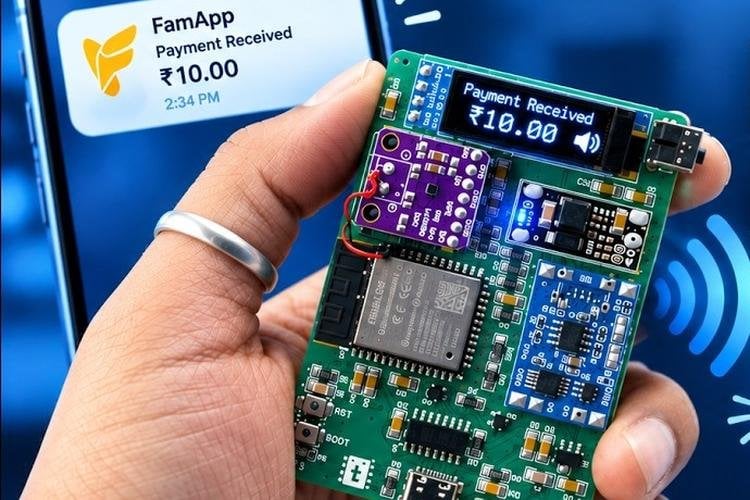
Walk into almost any shop in India and you will hear it: a small speaker on the counter calling out "Rs 10 received" the moment a customer pays by UPI. Makers have built their own versions before, but almost all of them need a merchant account with a payment gateway, which most students and hobbyists simply don't have. Now techiesms has built an ESP32 payment soundbox that skips the merchant account completely. It receives real money through the FamApp wallet, reads the payment alert from Gmail and speaks the amount out loud, in about two seconds in their demo.
How a normal soundbox works, and why this one is different
The video starts with a clear explanation of the usual setup. The customer scans a QR code, and the payment goes to a payment gateway such as Paytm, Razorpay or PhonePe. The gateway then calls a webhook (a web address that a service calls automatically whenever an event happens, here "payment received"), which pushes the details to an MQTT broker (a lightweight message server that IoT devices subscribe to). The ESP32 listens to that broker, picks out the amount and speaks it using text-to-speech. The catch is the webhook: gateways only offer it to verified merchant accounts.
FamApp works differently. It is a wallet that can receive money by UPI and spend it again by UPI, without needing a bank account linked to it. It has no API or webhook, but one of the techiesms team members noticed that it emails you every time money arrives. So the ESP32 simply watches the Gmail inbox for those alerts. In the team's test, the email landed within 2 to 3 seconds of paying.
The hardware
The custom PCB is built around an ESP32 module, with a USB-to-serial chip so it can be programmed over USB-C. A TP4056 charger handles the battery, a low-dropout regulator steps the battery down to 3.3 V, and two resistors let the ESP32 read the battery level. A 0.91-inch OLED shows the last payment. The voice comes from a MAX98357 I2S amplifier (a small class-D amplifier that takes digital audio straight from the microcontroller, so no separate DAC is needed), powered by a 5 V boost converter, with the speaker tucked under the amplifier. A user button replays the last payment, just like the commercial boxes.
Setting it up
- Flashing: a browser-based web flasher in Chrome or Edge, no software to install, about 2 minutes
- FamApp side: create an account, complete KYC (Aadhaar via DigiLocker, PAN and a video call), link a Gmail address and switch on email alerts
- Device side: the soundbox starts its own Wi-Fi hotspot. Connect to it, open 192.168.4.1 and enter your Wi-Fi name and password, your Gmail address and a Google app password
- Reset: hold the BOOT button for about 10 seconds to wipe the credentials and start setup again
Our take
This is a smart workaround, and the explanation of how real soundboxes work is worth watching on its own. Two things to keep in mind before you build one. First, the Google app password (a 16-character password Google generates so a device can sign in to your account without your main password) gives the soundbox access to read that Gmail inbox. If you can, link FamApp to a Gmail account that you use only for this. Second, the box is only as fast as the email. The team says clearly that this is a DIY learning project and not a commercial product, and if an alert email arrives late, the announcement will be late too.
If you want to build the voice side from scratch, our ESP32 text to speech tutorial shows how an ESP32 can speak any text. Some time back we also covered the techiesms team's tiny ESP32-S3 UPI payment receiver with an AMOLED display. That one worked the traditional way. This new build removes the biggest hurdle, the merchant account, so anyone with a FamApp wallet can try it.
Image credit: techiesms, YouTube thumbnail, cropped and resized.
About the author: Aswinth Raj is an electronics engineer and the editor of CircuitDigest, where he has published more than 150 hands-on projects and tutorials across Arduino, PIC, ESP32, Raspberry Pi and EV battery systems. He selects the stories on this page for what engineers and makers can actually learn or build from. Connect on LinkedIn

Add a comment
No account needed. Your comment appears once a moderator has reviewed it.