
Text-to-Speech, or TTS, is a technology that converts written text into spoken audio. It is widely used in voice assistants, accessibility tools, alert systems, kiosks, and smart devices. Today, ESP32 Text to Speech using AI has become a common approach for adding voice output to small electronic projects. On computers and smartphones, TTS works smoothly because these devices have enough processing power and memory to handle speech generation internally. Microcontrollers are different. They have limited speed, limited memory, and no native support for complex audio processing, which makes text-to-speech in ESP32 difficult to perform locally. Explore our additional example and resources on our ESP32 Projects hub.
The ESP32 is more capable than many other microcontrollers, but generating natural speech directly on the device is still not practical for real-world use. Because of this, cloud-based solutions are often used. The ESP32 sends text to an ESP32 Text to Speech online AI-based service, which converts the text into speech and sends the audio back. The ESP32 then plays the received sound through a speaker. This method allows text-to-speech conversion using ESP32 to work reliably, giving small devices a clear voice output without overloading the hardware or increasing system complexity. A similar concept has also been explored in an earlier project using Arduino based offline TTS approach with the Talkie library. The complete guide demonstrates the process of implementing ESP32 text to speech online using Wit.ai cloud AI service. The document explains all aspects of IoT voice output implementation through hardware setup demonstration, ESP32 TTS library usage, circuit connection details and complete code implementation. The AI Projects and Tutorials curates a variety of real-world AI and machine learning project guides like ESP32 voice systems, smart parking, and robot builds to help makers and engineers apply practical AI concepts.
Table of Contents
- What is ESP32 Text to Speech and Why Use AI-Based Solutions?
- Why ESP32 Needs Cloud-Based TTS
- What is Wit.ai?
- Required Hardware Components
- Circuit Diagram and Wiring
- Pin Connection Table
- Setting Up Your Wit.ai Account
- Installing the WitAITTS Library
- Understanding Audio Streaming and Playback Quality
- └ Audio Streaming and Playback
- └ Factors Affecting Playback Quality
- Troubleshooting
- GitHub Repository
What is ESP32 Text to Speech and Why Use AI-Based Solutions?
Text-to-speech may look simple, but it requires several important steps. Initially, the text is prepared for speech by converting numbers into words, expanding abbreviations, and making symbols into readable characters. For microcontroller projects, ESP32 text to speech using AI has become the preferred approach due to hardware limitations. Next, the system analyzes the text and divides it into individual speech sounds. It also determines how the voice should sound, including where to pause, which words to emphasize, and what tone to use, ensuring the spoken audio sounds natural. Following this, the processed speech is converted into digital audio and sent to the speaker for playback.
On computers, these steps occur quickly and efficiently. But microcontrollers such as the ESP32 have certain limitations. They lack sufficient memory to store large speech models, and their processors aren't fast enough to generate high-quality speech in real time. Also, they have limited storage space. Because of these challenges, a cloud-based ESP32 Text to Speech online approach is used. The main processing tasks are handled by remote servers, while the ESP32 simply sends the text and plays the received audio.
Why ESP32 Needs Cloud-Based TTS
Text-to-speech may appear simple, but it involves several important steps. First, the text is prepared for speech. Numbers are changed into words, abbreviations are expanded, and symbols are converted into readable text. Next, the system breaks the text into speech sounds and decides how the voice should sound. This includes pauses, emphasis, and tone so the speech feels natural. Finally, the processed speech is converted into digital audio and sent to a speaker for playback.
- Natural-sounding voices powered by advanced AI algorithms
- The ESP32 device uses very small memory resources for its operations.
- The system works without any need for complex audio processing libraries, which run on local machines.
- The system provides a scalable solution which supports commercial use cases.
- The system receives automatic updates and improvements, which are managed from the server.
On computers, these steps happen quickly because there is enough memory and processing power. Microcontrollers like the ESP32 are more limited. They do not have enough memory to store large speech models, and their processors are not fast enough to create natural speech in real time. Storage space is also limited. Because of this, ESP32 Text to Speech using AI is commonly implemented through cloud-based services. In setups such as esp32 text to speech arduino, the ESP32 sends text to an online service that handles all speech processing. The generated audio is then returned to the ESP32 and played through a speaker, allowing speech output without overloading the device. These limitations make cloud-based ESP32 text to speech online services the optimal solution.
| Resource | Limitation | Impact on TTS |
| RAM Memory | ~520KB total | Insufficient for large speech synthesis models |
| Processing Speed | 240MHz dual-core | Too slow for real-time high-quality speech generation |
| Storage Space | 4MB typical flash | Cannot store comprehensive voice databases |
| Audio Processing | No dedicated DSP | Complex audio synthesis creates performance bottlenecks |
Understanding Text-to-Speech Technology for Microcontrollers
The ESP32 implementation of modern Text-to-Speech (TTS) has many different levels of complex processing during the TTS processing pipeline, including:
∗ Text Normalisation – Conversion of numeric to word representation, Abbreviation expansion and Representation of symbols as human-readable characters.
∗ Linguistic Analysis – Breaking down the text into multiple phonemes (speech sounds) and determining how each phoneme is to be pronounced according to the rules of Linguistics.
∗ Prosody Generation – Determining where to use natural pauses, how to stress specific words with variances in pitch and rhythm when speaking.
∗ Audio Synthesis – Transforming the processed Speech Data into a form that can be stored in a digital audio format.
∗ Audio Playback – Delivering the generated digital audio through the speakers on the ESP32.
What is Wit.ai?
Wit.ai is a cloud-based AI platform created by Meta Platforms, Inc. It provides speech and language processing through simple HTTP-based APIs. The platform supports features such as Text-to-Speech, Speech-to-Text, and basic language understanding. In an ESP32 text-to-speech library, this service is commonly used to convert text into spoken audio.
For Text-to-Speech, the process is straightforward. Text is sent to the Wit.ai servers using a secure HTTPS request with authentication. The service returns the generated speech in WAV or MPEG audio format. The audio can be streamed while it is being received, allowing playback to begin before the full file is downloaded, which results in smoother audio output.
Wit.ai offers a free usage tier that is suitable for learning, testing, and early-stage development. Request limits are applied, so applications that send frequent requests should be designed with these limits in mind. All speech processing and language analysis are handled on Wit.ai's servers. The ESP32 only sends text data and plays back the received audio. This separation allows an ESP32 TTS library to deliver speech features on low-power hardware without increasing system complexity.
Required Hardware Components for ESP32 Text to Speech Using AI
The image shows the list of components required for converting Text to Speech.
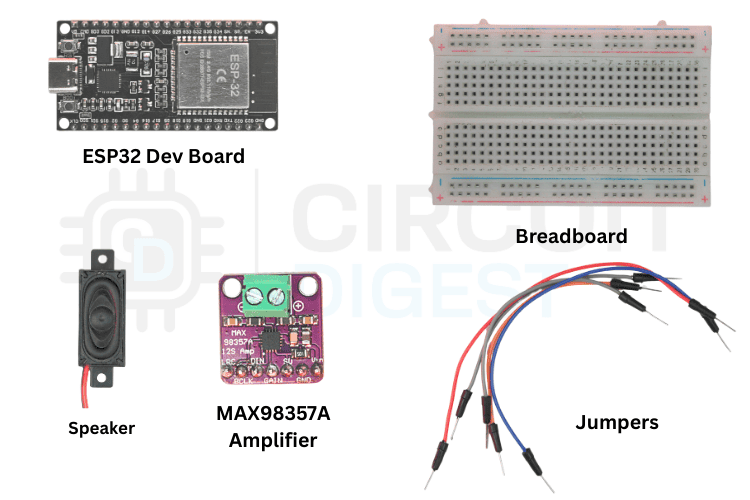
The table below shows the list of components to make the ESP32 speak
| Component | Quantity | Notes |
| ESP32 Development Board | 1 | Generic ESP32 with Wi-Fi support |
| MAX98357A Amplifier | 1 | Digital audio amplifier module |
| Speaker | 1 | 4Ω or 8Ω impedance speaker to play audio |
| Breadboard | 1 | For prototyping connections |
| Jumper Wires | Several | Male-to-female or male-to-male as needed |
| USB Cable | 1 | To power and programming |
ESP32 to MAX98357A Circuit Diagram and Wiring
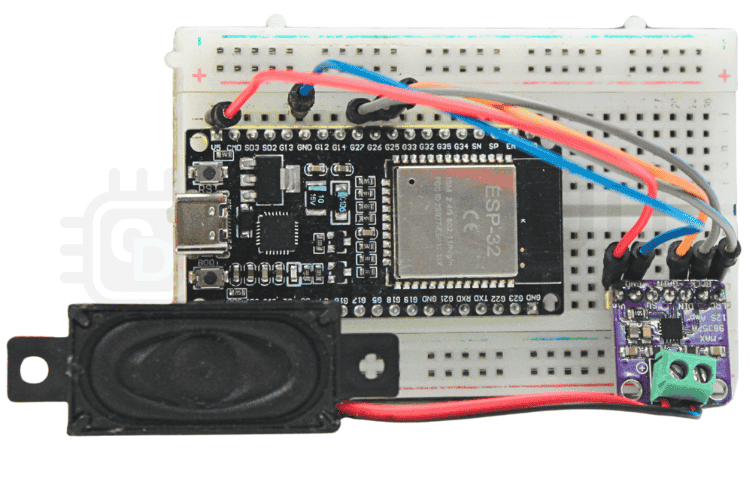
Follow the wiring layout below to connect your ESP32 to the I2S amplifier and speaker. Double-check your connections before powering up to avoid any short circuits. We have also completed projects using I2S audio communication that provide detailed setup guidance.

Pin Connection Table to Connect ESP32 with MAX98357A Amplifier
The pinout used in the library to make Text-to-Speech is given below
| ESP32 Pin | MAX98357A Pin | Connection Type |
| GPIO27 | BCLK | Bit Clock |
| GPIO26 | LRC | Left/Right Clock |
| GPIO25 | DIN | Data Input |
| 5V | VIN | Power Supply |
| GND | GND | Ground |
The image below shows the breadboard connection of the ESP32 microcontroller with the MAX98357A Amplifier
Setting Up Your Wit.ai Account for ESP32 Text to Speech
Before implementing the ESP32 text to speech library, you need to configure Wit.ai authentication. Follow these steps carefully:
⇒ Step 1: Create Your Account
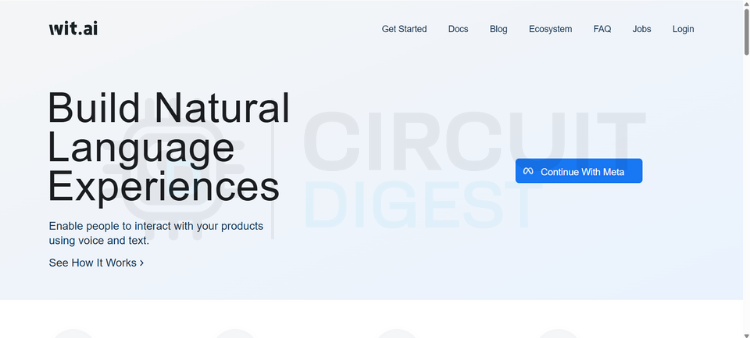
Go to the Wit.ai website and click to sign in through Meta. You'll have a few options for authentication, but email is the simplest and keeps things separate from your other accounts. Fill in your date of birth, create a password, and verify your email address with the six-digit code they send you. Once that's done, you're in.
⇒ Step 2: Create a New App
From the dashboard, you need to create a new app before you can perform any useful actions. This is where naming matters; pick something meaningful because this name will follow you through logs, training data, and integrations. Also, choose your language carefully, since it affects how well the system understands intents and extracts information.
⇒ Step 3: Get Your Server Access Token
Navigate to the Management section and click on Settings. Look for the HTTP API section where you'll find your Server Access Token (it's listed as a Bearer token). This token is critical; it's how your application talks to Wit.ai.
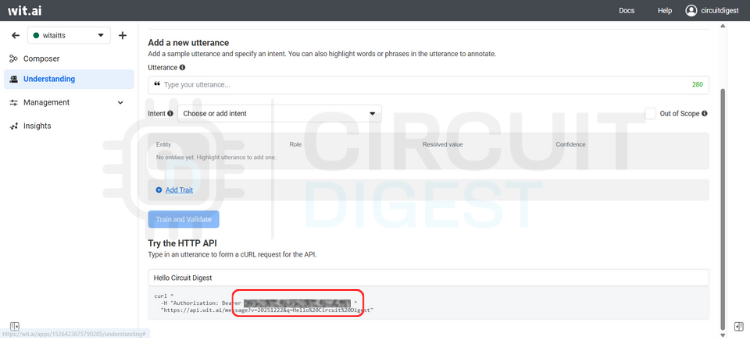
⇒ Step 4: Secure Your Token
Copy the Server Access Token and store it somewhere safe. Avoid hardcoding it directly into your code or committing it to version control. Instead, use environment variables or a secure configuration system. Once you're running in production, avoid regenerating this token unless necessary.
⇒ Step 5: You're Ready
That's it. Your Wit.ai account is set up and ready to integrate with your embedded devices, backend services, or any other system you're building. You shouldn't need to touch these settings again unless something changes in your project.
Installing the WitAITTS Library for ESP32
Open Arduino IDE, go to the Library Manager icon on the left sidebar, type "WitAITTS" into the search bar, and click Install when it pops up.
The Output window shows whether the library is successfully installed or not.
Instead of writing everything from scratch, let's use the example sketch. Go to File > Examples > WitAITTS and select ESP32_Basic. This will open the ESP32-based example sketch.
Replace the YourWiFiSSID and YourWiFiPassword with the actual network details. Paste that Server Access Token you copied earlier into the YOUR_WIT_AI_TOKEN_HERE spot.
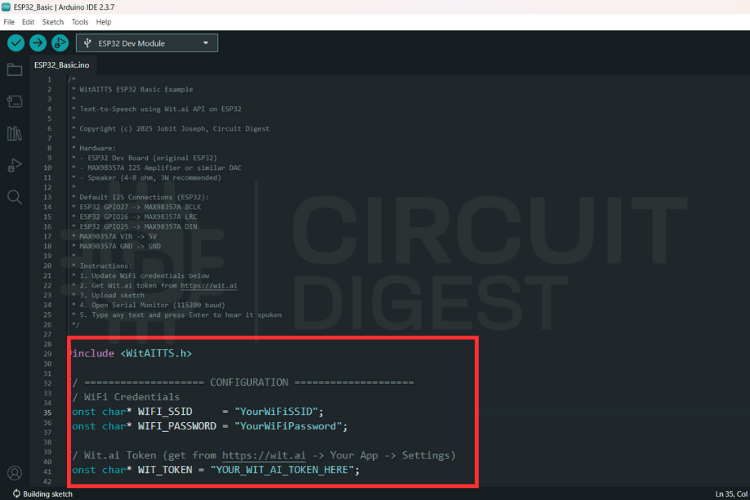
ESP32 Text to Speech Source Code Explanation
This program converts typed text into spoken audio by using an online text-to-speech service and playing the sound through an audio output on the board. The system depends on WiFi and a valid cloud token. When text is sent, the board requests speech from the server, receives digital audio, and plays it through the I2S interface. The design stays simple and blocking, which suits demos and maker projects.
WitAITTS tts;This line creates the main text-to-speech engine. The object manages the entire workflow, including WiFi handling, secure communication with the Wit.ai server, audio decoding, and sound output to the speaker. All speech-related features depend on this object.
tts.begin(WIFI_SSID, WIFI_PASSWORD, WIT_TOKEN);This line connects the board to the WiFi network and authenticates with the Wit.ai service using the access token. The program verifies network access and service availability at this stage. If this step fails, the system cannot request or play any speech.
tts.setVoice("wit$Remi");This line selects the voice used for speech output. The chosen voice defines the tone, gender, and character of the sound. Changing this value directly changes how the device sounds to the user.
tts.setSpeed(100);
tts.setPitch(100);
These lines control how fast and how high the voice speaks. Normal values keep the speech clear and natural. Adjusting these settings helps tune clarity, comfort, and listening experience.
tts.speak(text);This line sends the text to the cloud service for conversion into audio. The board waits while the server generates speech and streams the audio back. The system plays the audio immediately and pauses all other work until playback finishes.
Understanding Audio Streaming and Playback Quality
The WitAITTS library implements efficient audio streaming to optimize memory usage and reduce latency in your ESP32 text to speech online projects.
Before uploading, click the Verify icon in the top-left corner to ensure your code and credentials are typed correctly.
Keep an eye on the Notifications tab at the bottom right; once it says "Done compiling," you know the library and code are ready for the hardware.
Connect your board to your computer and hit the Upload arrow icon to send the sketch to your ESP32.
Check the Output window at the bottom of the screen. You will see the writing progress says 100% along with the "Hard resetting via RTS pin..." message.
Click the magnifying glass icon in the top right to open the Serial Monitor.
The serial monitor shows a log of the WitAITTS Configuration, including your WiFi and IP status.
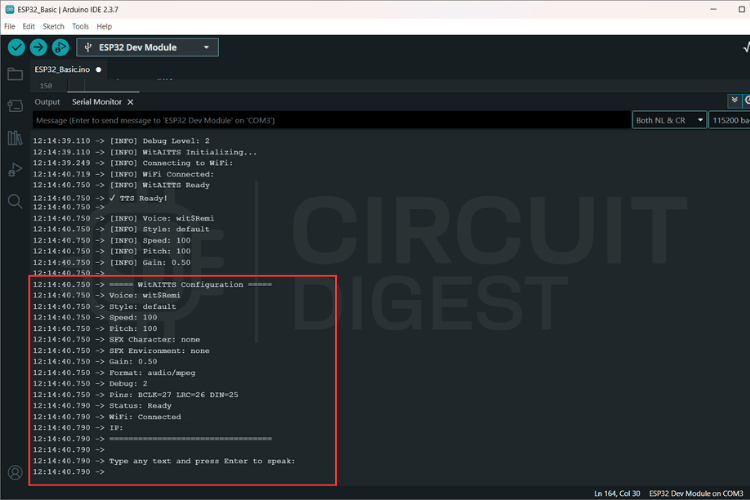
Type a sentence into the input bar at the top of the Serial Monitor and hit Enter to send it to the Wit.ai API.
The console will log "Requesting TTS" followed by "Buffer ready, starting playback," confirming that your ESP32 is successfully receiving audio data.
Audio Streaming and Playback
Audio is received as an MP3 stream and processed incrementally.
Advantages:
- Reduced memory usage
- Faster perceived response
- No need for full file buffering
Playback quality depends heavily on:
- Network latency
- Power stability
- Speaker quality
Factors Affecting Playback Quality
| Factor | Impact | Optimization Tips |
| Network Latency | Delays between text input and audio start | Use stable WiFi connection, position ESP32 near router |
| Power Stability | Audio distortion or crackling | Use quality 5V power supply, add decoupling capacitors |
| Speaker Quality | Voice clarity and intelligibility | Choose speakers with good mid-range frequency response |
| WiFi Signal Strength | Streaming interruptions or stuttering | Ensure strong WiFi signal (-60 dBm or better) |
| I2S Configuration | Sample rate and bit depth accuracy | Use library defaults unless specific requirements exist |
Troubleshooting Common ESP32 TTS Issues
It was determined that hardware integrity must be validated prior to the commencement of software-level debugging.
| Category | Observed Issue | Potential Root Cause |
| Audio Output | No Sound Output | • Incorrect wiring configurations • Absence of amplifier power supply • Erroneous I2S pin assignments |
| Communication | HTTP Errors | • 400: Provision of invalid or empty text strings • 401: Utilization of an invalid access token • Network Timeout: Presence of Wi-Fi instability |
| Signal Quality | Distorted Audio | • Insufficient power supply voltage • Mismatch in speaker impedance • Improper clock configuration settings |
ESP32 Text to Speech Library GitHub Repository
The library file, along with the required example sketches and connections are uploaded to the ESP32 Text to Speech GitHub repository.


Frequently Asked Questions About ESP32 Text to Speech Using AI
⇥ Is it possible for ESP32 to convert text to an audio signal when not connected to the Internet?
Yes, it is technically possible for the ESP32 to perform text to speech (TTS) functions offline; however, the results will usually be very robotic-sounding and have a limited vocabulary. Libraries such as Talkie and eSpeak are used to perform ESP32-based offline TTS. In addition, cloud-based services such as Wit.ai provide much higher-quality natural voice over the Internet when using the ESP32 for text-to-speech functionality.
⇥ What type of audio quality can be expected from ESP32?
Using AI TTS service offerings (e.g. Wit.ai), you can expect high-quality, natural-sounding voice samples that are comparable in many ways to those produced by commercial voice assistants. Due to WiFi connectivity issues, power supply quality and speaker specs, the quality of the audio produced will depend on these factors. To maintain a clean digital audio signal to the amplifier (e.g. MAX98357A), use the I2S protocol.
⇥ Can I use more than one voice or language with ESP32 TTS?
When building an application with Wit.ai, you will have the option to configure multiple languages. The selected language will determine the way the voice sounds and how the pronunciation is made, and you cannot switch between different voices while the software is running. However, the same software can connect to additional Wit.ai apps that support additional languages, and would therefore allow you to use the ESP32 TTS library for additional TTS implementations that use the Wit.ai API.
⇥ Are the WiTaitts compatible with ESP32 S2 and C3?
Yes, it will support the library used for ESP32 text-to-speech applications supports all ESP32 series boards (ESP32, ESP32-S2, ESP32-S3, ESP32-C3). All ESP32 family members use the same pinout and I2S audio protocols, but pin assignments on each board may differ. Make sure you check your board’s data sheet for GPIO capability.
⇥ What internet requirements are necessary to use an ESP32 TTS (text-to-speech) service?
The ESP32 TTS service requires a stable internet connection with a minimum bandwidth of 1 Mbps. The Wi-Fi signal should have a strength of -60 dBm or greater in order to stream the audio accurately and consistently. Wi-Fi networks must use WPA2/WPA3 encryption for safe and secure access. The ESP32 only supports connections over the 2.4 GHz frequency band, while connections made on the 5 GHz frequency band can only be made with ESP32-S2 or newer model ESP32s.
⇥ How long does it take to process an ESP32 TTS input?
Depending upon how much text you enter into the ESP32, the speed of your Wi-Fi connection and how busy the server is, it can take from 1 to 3 seconds before the audio output is produced after inputting the text. While the input text is being processed, the ESP32 will stream audio to your device as it downloads the audio, which helps to reduce the amount of time it takes for you to perceive the delay. Network latency accounts for most of the delay, and not how long it actually takes for the ESP32 to process the input.
Conclusion: Building Reliable ESP32 Text to Speech Systems
The WitAITTS library adds dependable Text-to-Speech features to your ESP32 by using Wit.ai's online speech synthesis service. This method aligns with standard practices for embedded systems, where running AI locally isn't really feasible. Once everything is properly set up, you get steady audio results, less complicated firmware, and speech features that can expand as your project grows. Taking time to get the setup right from the beginning will save you a lot of time when trying to fix issues later. Special thanks to Meta Platforms, Inc. for providing the Wit.ai platform that powers this implementation. This cloud-based approach represents current best practices for ESP32 text to speech Online applications where local AI processing isn't feasible. Discover practical electronics implementations and step-by-step guides at CircuitDigest Electronics Projects for beginners.
Related Projects
If you’re interested in exploring practical microcontroller projects and tutorials, check these out.
There are many free and paid Text-to-Speech applications, such as Cepstral and eSpeak. So we compare different open-source TTS applications by installing them on a Raspberry Pi.
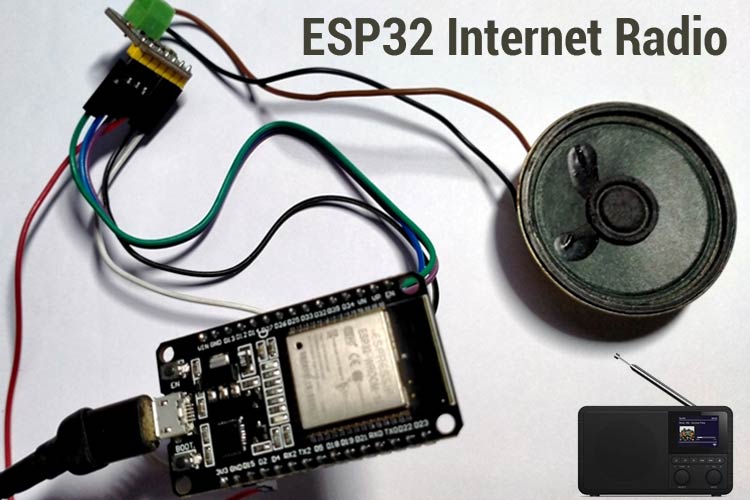
ESP32 Based Internet Radio using MAX98357A I2S Amplifier Board
To build our ESP32 web radio, we have chosen the ESP32 development board (obviously) and the MAX98357A I2S Amplifier board.
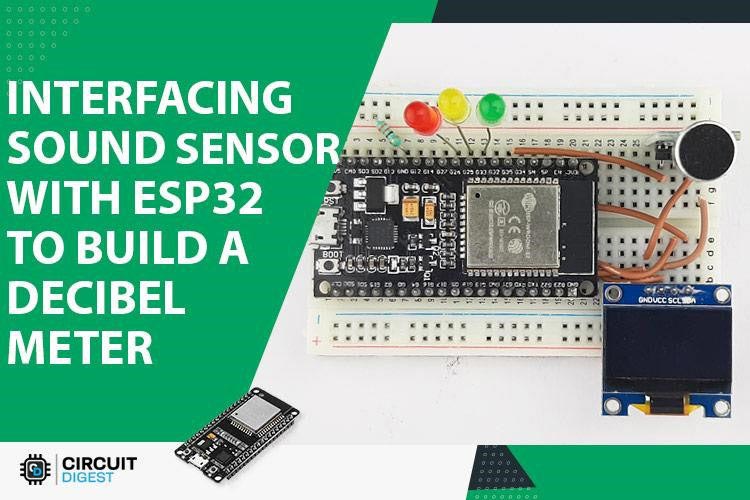
How a KY-038 Sound Sensor works and how to interface it with ESP32?
In this article, we interface a KY-038 sensor with ESP32 and build a simple decibel meter out of it. In the process, we will let you know how a sound sensor works and the pros and cons of it.
Complete Project Code
#include <WitAITTS.h>
const char* WIFI_SSID     = "YourWiFiSSID";
const char* WIFI_PASSWORD = "YourWiFiPassword";
const char* WIT_TOKEN = "YOUR_WIT_AI_TOKEN_HERE";
WitAITTS tts;
void setup() {
  Serial.begin(115200);
  delay(1000);

  Serial.println("\n\n========================================");
  Serial.println("   WitAITTS ESP32 Basic Example");
  Serial.println("   Copyright (c) 2025 Jobit Joseph");
  Serial.println("           Circuit Digest");
  Serial.println("========================================\n");

  tts.setDebugLevel(DEBUG_INFO);

  if (tts.begin(WIFI_SSID, WIFI_PASSWORD, WIT_TOKEN)) {
      Serial.println("✓ TTS Ready!\n");
      tts.setVoice("wit$Remi");

      tts.setStyle("default");
      tts.setSpeed(100);
      tts.setPitch(100);
      tts.setGain(0.5);
      tts.printConfig();

      Serial.println("Type any text and press Enter to speak:\n");

  } else {
      Serial.println("✗ TTS initialization failed!");
      Serial.println("Check WiFi credentials and Wit.ai token");
  }
}
void loop() {
  tts.loop();
  if (Serial.available()) {
      String text = Serial.readStringUntil('\n');
      text.trim();

      if (text.length() > 0) {
          Serial.println("Speaking: " + text);
          tts.speak(text);
      }
  }
}

Comments 2
Your library is dependent upon the BackgroundAudio library by Earl F. Philhower - you should update your documentation to reflect that!
Credits and dependencies were already mentioned in the library documentation.
Add a comment
No account needed. Your comment appears once a moderator has reviewed it.