

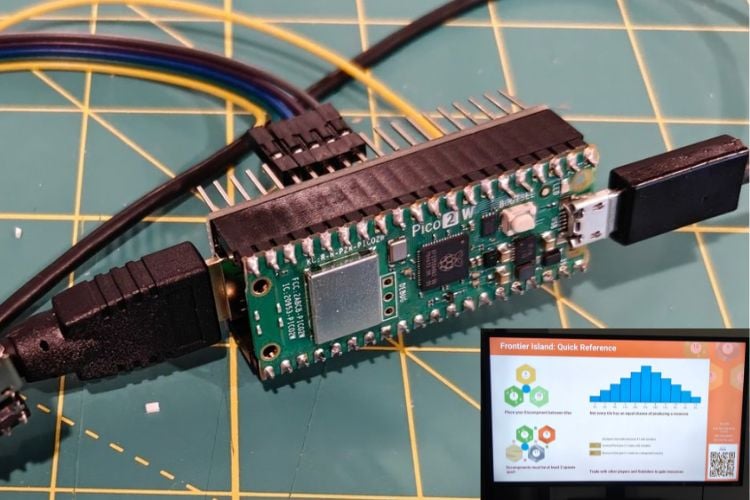
Aaron Gayle’s TV‑Top Kiosk project shows how to squeeze a full 1920×1080 HDMI signal out of a RP2350 microcontroller, which is seen in the popular Raspberry Pi RP2350 development board. To reach 1080p, he overclocked the RP2350 to 372 MHz and used its faster peripherals to generate a DVI/HDMI signal at up to 30 Hz in 24‑bit color. The result is a tiny, low‑cost “console” stick, something like the Amazon Fire stick that can drive a TV as a shared game board while players use their phones over Wi‑Fi.
The big constraint is memory. A normal 1080p framebuffer at 24‑bit color needs almost 6 MB, but the RP2350 has only about 520 KB of RAM, so storing even one full frame is impossible. Instead of a framebuffer, the firmware generates the picture one scanline at a time, a technique 1980s 8‑bit computers used. Each line tells the HDMI output what color to send and for how long. This on‑the‑fly approach is what lets the RP2350 hit 1080p despite its tiny RAM budget.
The 1080p code lives inside the TV‑Top Kiosk firmware, which targets RP2040/RP2350 boards like the Pico 2 W. The project also includes an ESP32 (ESP32‑C3) to handle Wi‑Fi and TLS for the game server, leaving the RP2350 free to focus on video. After building and flashing the code, you connect the RP2350’s HSTX/DVI outputs to an HDMI connector, power the board, and use the on‑screen setup to join Wi‑Fi and pair with the TV‑Top server. For beginners, starting at a lower mode like 720p60 or 480p60 and using short, well‑shielded HDMI wiring can make it easier to get a stable picture before pushing the chip to 372 MHz for 1080p.

Add a comment
No account needed. Your comment appears once a moderator has reviewed it.