

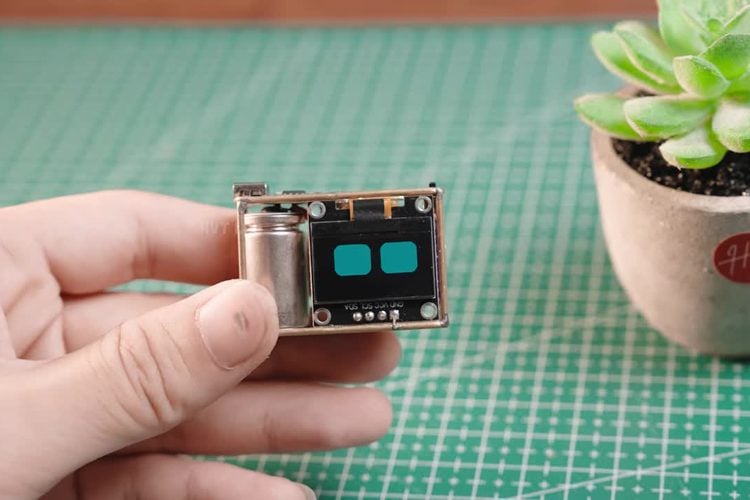
Most DIY AI voice assistants end up as a dev board in a plastic box. Huy Vector of HVT Lab went the other way and built a talking assistant about the size of two fingers, soldered into an open frame of brass wire and tubing. An ESP32-C3, a 0.96-inch OLED face, a microphone, a smartphone speaker and a rechargeable battery are all it takes to hold a spoken conversation.
How a C3 can talk to an AI
The assistant is configured through Xiaozhi, an open-source ESP32 chatbot project whose server runs the speech recognition, language model and voice reply, so the small RISC-V C3 only has to stream audio over Wi-Fi and animate the eyes on the OLED. That is how it can answer questions, tell jokes, check the weather and switch between many languages with a custom personality.
The frame is hand-formed from 1 mm brass wire and 1.5 mm brass tubing, so the wiring is also the structure.
Key details
- Brain: ESP32-C3 over Wi-Fi
- Display: 0.96-inch OLED with animated eyes
- Audio: microphone and a small smartphone speaker
- Power: rechargeable battery
- Extras: multiple languages, music playback, optional smart home control through ESPHome
- Guide: materials, wiring diagram and setup
Our take
Because the thinking happens on a server, this one needs Wi-Fi and is not an offline assistant. But it shows how far a $2-class chip goes when you let the cloud do the heavy lifting. To try AI speech on the same chip, see our ESP32-C3 text to speech using AI project.
Image credit: HVT Lab, frame from the YouTube video, cropped and resized.
About the author: Aswinth Raj is an electronics engineer and the editor of CircuitDigest, where he has published more than 150 hands-on projects and tutorials across Arduino, PIC, ESP32, Raspberry Pi and EV battery systems. He selects the stories on this page for what engineers and makers can actually learn or build from. Connect on LinkedIn

Add a comment
No account needed. Your comment appears once a moderator has reviewed it.