

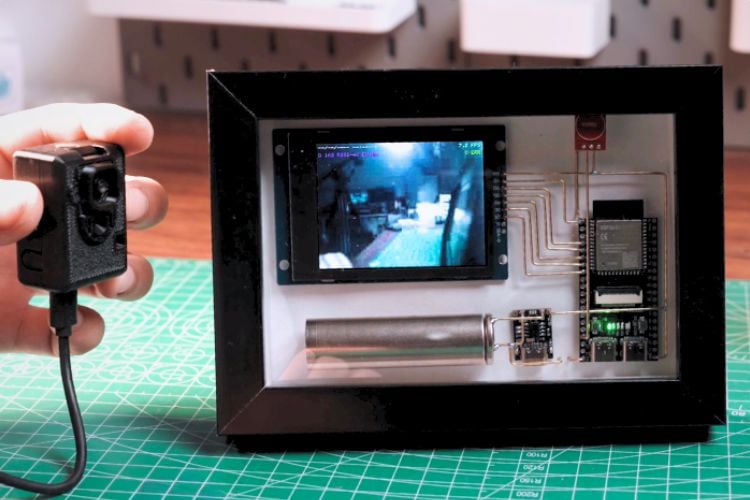
Building a custom, low-cost home security setup no longer requires expensive commercial hardware or subscription fees. Using two inexpensive ESP32 microcontroller boards, HVT Lab and Huy Vector from Youtube recently built a fully functional, self-contained wireless video surveillance system. The setup features a dedicated ESP32-CAM module mounted at an entry point such as a front gate which streams live footage wirelessly over a local network. The camera unit can record video directly to onboard micro SD card for local footage archiving, giving you full control over your privacy and data.
To monitor the stream in real time without needing a smartphone or computer screen open, the camera pairs with a custom-built, battery-powered desk monitor. Constructed around an ESP32-S3 board with an integrated 2.8-inch display, a touch switch, and an 18650 rechargeable battery, this dedicated viewer automatically discovers and pairs with the camera feed over Wi-Fi. The viewer unit can operate either on direct local device-to-device communication or via your existing home Wi-Fi network depending on signal strength, ensuring a stable connection wherever you place it in your house. The viewer also has a micro SD card so that it can save the feeds to it and they can be viewed whenever required.
What elevates this build beyond a standard breadboard project is its striking aesthetic presentation. Instead of hidden wiring, the visual layout uses exposed 1-millimeter solid brass wire to route electrical connections across a clean paper background, all mounted inside a decorative 3D picture frame. Enclosed with a custom 3D-printed housing for the camera unit, a toggle power switch, and USB-C charging for the internal battery, the end result is a stylish, functional piece of home tech that seamlessly keeps an eye on your property.

Add a comment
No account needed. Your comment appears once a moderator has reviewed it.