

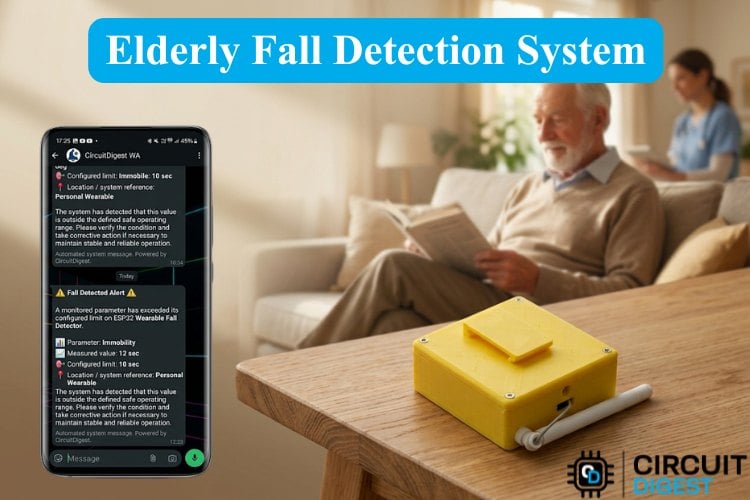
When an ageing parent falls at home, the immediate injury is usually only half the danger. The real danger begins during the critical time they spend waiting on the floor for help. Lying immobile for extended periods can rapidly lead to severe dehydration, hypothermia, and muscle breakdown, even in homes where family members are regularly around. Expecting an injured person to reach for a phone during an emergency creates a critical safety risk.
To solve this problem, we built an elderly fall detection and alert system, which is a wearable elderly fall detection system. The device automatically monitors body movements in real time to spot impacts or extended periods of no movement. The moment a real fall is detected, this elderly fall detection and alert system sends an instant emergency message over WhatsApp via CircuitDigest Cloud to family members, making it a practical elderly care fall detection system for homes where checking in constantly is difficult. If you're interested in similar builds, you can explore our collection of ESP32 projects and IoT projects previously published on Circuit Digest.
Table of Contents
How Does This Fall Detection System for Elderly Users Work?
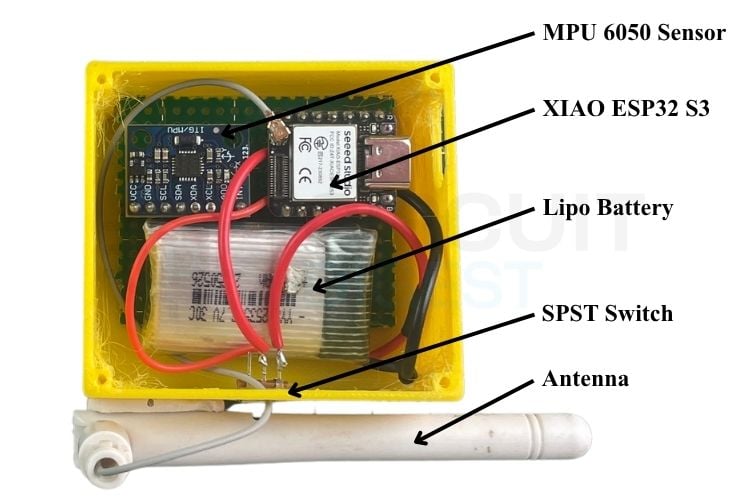
The system continuously tracks the elder's movements using an MPU6050 6-axis motion sensor with a XIAO ESP32-S3 microcontroller. The sensor measures physical movement in real time, calculating total impact force (g-force) and body orientation angle
A fall is detected through a 3-stage logic: first, the device detects a sudden impact exceeding 4.5 g, immediately followed by a horizontal body tilt greater than 60 degrees. If these threshold conditions are met, the board monitors body movement; if the elder remains stationary below ~45°/s gyro motion for 10 continuous seconds, the ESP32-S3 uses its Wi-Fi connection to send an automated WhatsApp emergency alert to the family member and stream fall diagnostics to a cloud dashboard. If you are new to working with MPU-6050 motion sensors, check out our guide on Interfacing MPU6050 Module with Arduino on Circuit Digest. It covers I2C wiring and raw 6-axis motion readings, displayed step-by-step.
Components Required
Below is the list of components required to build this fall detector for elderly users.
| S.No | Components | Specification | Quantity |
| 1. | Microcontroller | XIAO ESP32-S3 | 1 |
| 2. | Lipo Battery | 3.7 V,800 mAh | 1 |
| 3. | IMU Sensor | MPU-6050 | 1 |
| 4. | Antenna | 2.4 GHz Rod Antenna | 1 |
| 5. | Resistor | 10kΩ | 2 |
Circuit Diagram
Below is the wiring diagram of the elderly fall detection system

The positive terminal of the battery is connected to the B+ pad of the XIAO ESP32-S3, while the negative terminal connects to the B- pad. For the voltage divider, the top resistor connects to the positive terminal of the battery. The bottom resistor connects to the GND pin of the XIAO ESP32-S3. Finally, the centre junction between the two resistors connects to GPIO 1 (D0) of the XIAO ESP32-S3. For another compact wearable project using the same motion sensor, check out our project on building a Portable Step Counter using ATtiny85 and MPU6050 on Circuit Digest. It demonstrates how to calculate motion vectors and step counts on a RISC microcontroller.
The table below shows the wiring of the IMU sensor with the XIAO ESP32-S3
| MPU 6050 Sensor | XIAO ESP32-S3 Pin |
| VCC | 3.3V |
| GND | GND |
| SDA | GPIO 5 (D4) |
| SCL | GPIO 6 (D5) |
3D Print Enclosure Design for the Fall Detector
This project has a 2-part enclosure designed in Fusion 360. The overall dimensions are 60mm length, 55mm width, and 25 mm height. The enclosure has cutouts for hardware peripherals, like a slot for Type-C charging, space for an SPST switch, and a hole for an antenna wire.
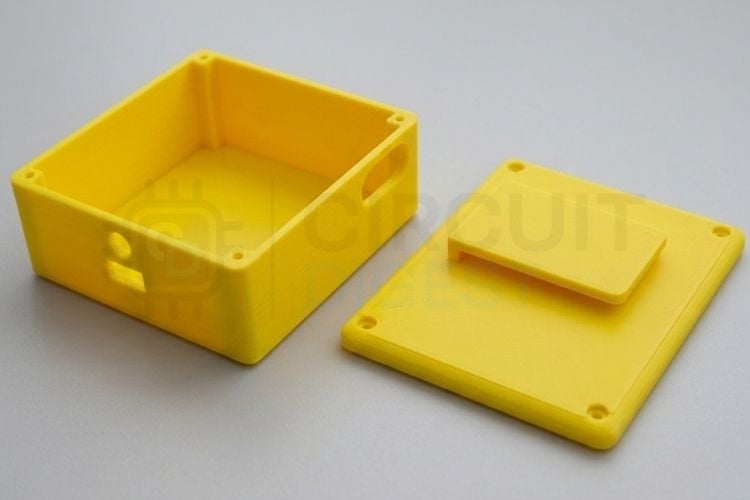
To print the enclosure, simply download the STL files for both enclosure parts and import them into any standard 3D slicer application like Cura or PrusaSlicer. Configure your preferred slicing profiles: 0.2 mm layer height and 20 infill to prepare the model for your machine. Finally, send the generated G-code to your 3D printer to create an enclosure.
Step-by-Step CircuitDigest Cloud Setup Guide
A step-by-step CircuitDigest Cloud guide for this elderly fall detection system is listed below.
Step 1- Sign Up / Login
Sign up or login into your account CircuitDigest Cloud by giving valid email and password.

Step 2- Adding New Device
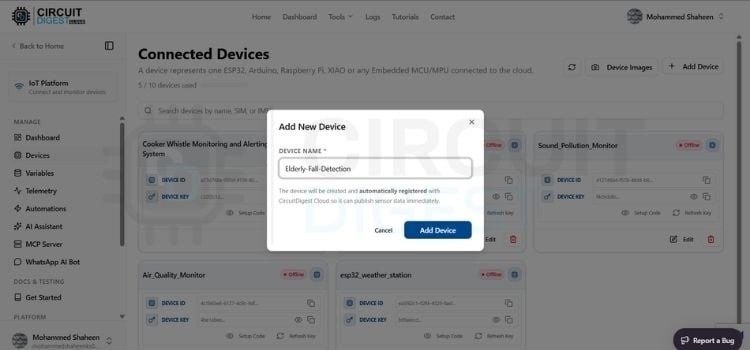
After logging in, click Dashboard at the top, click the device option on the left side of the website, click Add New Device and enter what you want for your project. For us, we have given it the name Elderly Fall Detection. You can give the name you want to display for this device and click the Add Device button in blue.
Step 3-Adding New Variables
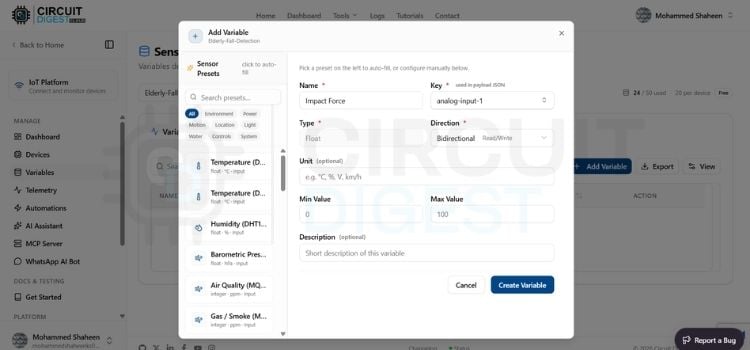
After creating a new device, click Variables on the left side of the website. Now select the device you created from the drop-down option. Click the Add Variable option. You will see a pop-up in the name section. First, we will create a variable for Impact Force. Give the name you want to display for the variable. We have named it Impact Force. Select the key you want for this variable. We have selected analog-input-1, set the direction to bidirectional, and pressed Create Variable. The variable will be created. Do the same for 5 more variables.
Step 4-Variable List
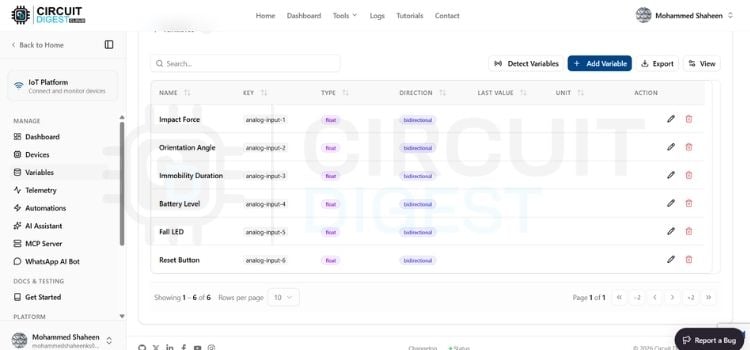
These 6 variable names allow us to choose the key we want: analog-input-1 for the IMPACT FORCE, analog-input-2 for the Orientation Angle, analog-input-3 for the IMMOBILITY DURATION, analog-input-4 for the BATTERY LEVEL. analog-input-5 for the FALL LED, analog-input-6 for the Reset Button.
Step 5-Adding Widget
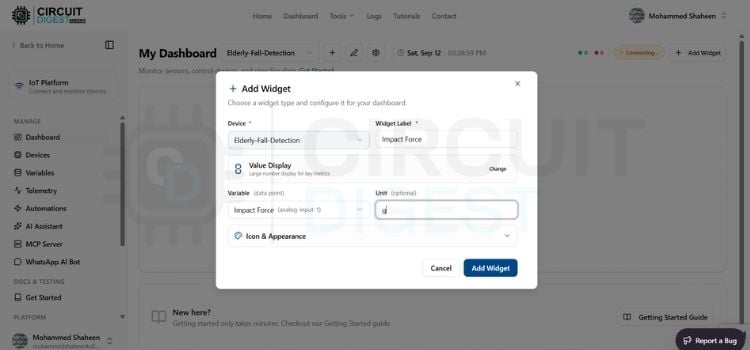
After adding the variable, click the dashboard on the left side of the website and select the device you created from the drop-down. First, we will create a widget for impact force. Click Add Widget, then click Value Display Widget. A menu bar will pop up. Select the device you created from the drop-down, and name it Impact Force. Set the variable as analog-input-1and click Add Widget. Do the same for the other 5 widgets, but select the proper variable for the widget placed. Now the dashboard setup is over.
Step 6-WhatsApp API Integration
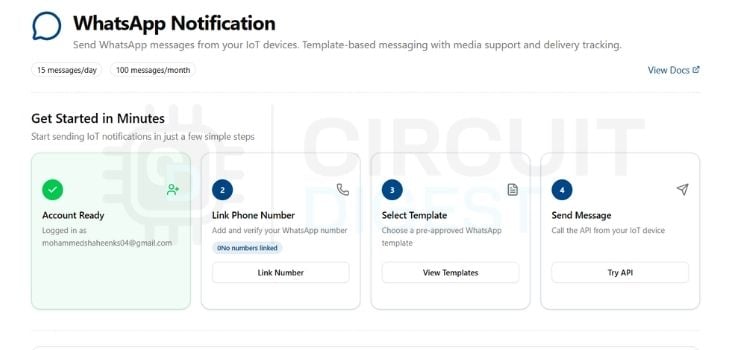
Click the Home tab at the top, scroll down, and you will see the WhatsApp notification; click it. There, you will see the link number option; click it, then enter your number. An OTP will be sent to your number; verify it, and your WhatsApp API setup is complete. For another advanced application of the MPU6050 sensor, check out our guide on building an Arduino-Based Self-Balancing Robot on Circuit Digest. It showcases how to use real-time tilt and angle calculations for active system balance.
Code Explanation
The code is written in the Arduino IDE for this elderly fall detection system using the XIAO ESP32 S3.
#include <CircuitDigestCloud.h>
#include <WiFi.h>
#include <WiFiClientSecure.h>
#include <Adafruit_MPU6050.h>
#include <Adafruit_Sensor.h>
#include <Wire.h>
// ── Credentials ─────────────────────────────────────────────────────────
#define WIFI_SSID       "xxxxxxxxxxxx" //Your Wi-Fi name
#define WIFI_PASS       "xxxxxxxxxxxx" //Your Wi-Fi password
#define DEVICE_ID       "xxxxxxxxxxxxxxxxxxxxxxxxxxxxxxxxx"//Your Device ID
#define CONNECTION_KEY "xxxxxxxxxxxxxxxxxxxxxxxxxxxx"//Your Connection Key
#define API_KEY        "xxxxxxxxxxxxxxxxxxx"//Your API key
#define PHONE_NUMBER   "xxxxxxxxxxxx"//Your mobile phone number
// ── Dashboard Key Mapping ───────────────────────────────────────────────
#define KEY_IMPACT_FORCE   "analog-input-1"
#define KEY_ORIENTATION    "analog-input-2"
#define KEY_IMMOBILITY     "analog-input-3"
#define KEY_BATTERY        "analog-input-4"
#define KEY_FALL_LED       "analog-input-5"
#define KEY_RESET_BTN      "analog-input-6"
// ── XIAO ESP32-S3 Hardware Pinouts ─────────────────────────────────────
#define XIAO_SDA_PIN      5  // D4 / GPIO 5
#define XIAO_SCL_PIN      6  // D5 / GPIO 6
#define BATTERY_ADC_PIN   1  // D0 / GPIO 1 (A0)
// ── Battery Calibration ─────────────────────────────────────────────────
// factor = true_voltage_from_multimeter / reconstructed_voltage_from_serial
// RECALIBRATE per-board using the steps in the header comment above.
#define BATTERY_CAL_FACTOR 1.008f
// ── Detection Thresholds ────────────────────────────────────────────────
#define FALL_G_THRESHOLD    4.5f    // Impact threshold (g)
#define FALL_ANGLE_LIMIT    60.0f   // Horizontal orientation threshold (degrees)
#define IMMOBILITY_GYRO_MAX 45.0f   // Deg/s noise limit to qualify as stationary
const char* host = "www.circuitdigest.cloud";
This section imports necessary hardware driver libraries for Wi-Fi, cloud communication, and MPU6050 sensor interfacing. It defines network credentials, API keys, dashboard topics, and critical detection parameters, including the 4.5g impact force and 60° tilt limits. Additionally, it initializes tracking variables for peak acceleration, orientation angle, immobility timing, and cloud synchronization timers. Change the network credentials and CircuitDigest Cloud credentials to yours.
// ── Battery Calculation for XIAO ESP32-S3 ──────────────────────────────
float readBatteryPercentage() {
 // Force 11dB attenuation on GPIO 1 to allow reading full 0-3.1V range
 analogSetPinAttenuation(BATTERY_ADC_PIN, ADC_11db);
 uint32_t sumMv = 0;
 for (int i = 0; i < 20; i++) {
   sumMv += analogReadMilliVolts(BATTERY_ADC_PIN);
   delay(1);
 }
 float pinMv = sumMv / 20.0f;
 // Reconstruct battery voltage (10k/10k divider = pin voltage * 2)
 float batteryVolts = (pinMv * 2.0f) / 1000.0f;
 // Apply per-board calibration to correct for residual ADC offset
 // (divider ratio itself already confirmed accurate on this board).
 batteryVolts *= BATTERY_CAL_FACTOR;
 Serial.print("[BATTERY DEBUG] Pin mV: ");
 Serial.print(pinMv);
 Serial.print(" | Reconstructed Battery Volts (calibrated): ");
 Serial.println(batteryVolts, 2);
 float pct = 0.0f;
 if (batteryVolts >= 4.15f)      pct = 100.0f;
 else if (batteryVolts >= 3.95f) pct = 80.0f + ((batteryVolts - 3.95f) / 0.20f) * 20.0f;
 else if (batteryVolts >= 3.75f) pct = 40.0f + ((batteryVolts - 3.75f) / 0.20f) * 40.0f;
 else if (batteryVolts >= 3.50f) pct = 10.0f + ((batteryVolts - 3.50f) / 0.25f) * 30.0f;
 else if (batteryVolts >= 3.20f) pct = 0.0f  + ((batteryVolts - 3.20f) / 0.30f) * 10.0f;
 else                            pct = 0.0f;
 return pct;
}
This function measures system power using GPIO 1 to read inputs safely up to 3.1V without clipping. To reconstruct the original 3.7V LiPo battery voltage across the 10k/10k resistor divider, the measured ADC voltage is multiplied by 2. The BATTERY_CAL_FACTOR (set to 1.008f) is a software calibration multiplier used to compensate for internal ESP32-S3 ADC non-linearities. Multiplying the raw calculated voltage by this factor ensures precise real-world battery readings before mapping the result to a non-linear 0–100% capacity.
// ── WhatsApp Emergency Alert ─────────────────────────────────────────────
void sendWhatsAppFallAlert(float impactG, float angle, float immobilitySec) {
 WiFiClientSecure client;
 client.setInsecure();
 client.setTimeout(5000);
 Serial.println("Connecting to CircuitDigest Cloud WhatsApp Gateway...");
 if (!client.connect(host, 443)) {
   Serial.println("WhatsApp API Connection FAILED");
   return;
 }
 String payload =
   "{\"phone_number\":\"" + String(PHONE_NUMBER) + "\","
   "\"template_id\":\"threshold_violation_alert\","
   "\"variables\":{"
   "\"device_name\":\"XIAO ESP32-S3 Fall Node\","
   "\"parameter\":\"Fall Event\","
   "\"measured_value\":\"" + String(impactG, 2) + "g Impact / " + String(angle, 1) + " deg\","
   "\"limit\":\"Immobile: " + String((int)immobilitySec) + " sec\","
   "\"location\":\"Personal Wearable\"}}";
 client.println("POST /api/v1/whatsapp/send HTTP/1.1");
 client.println("Host: www.circuitdigest.cloud");
 client.println("X-API-Key: " + String(API_KEY));
 client.println("Content-Type: application/json");
 client.println("Connection: close");
 client.print("Content-Length: ");
 client.println(payload.length());
 client.println();
 client.print(payload);
 unsigned long responseStart = millis();
 while (client.connected() && !client.available()) {
   if (millis() - responseStart > 5000) {
     Serial.println("WhatsApp response TIMEOUT");
     client.stop();
     return;
   }
   delay(10);
 }
 Serial.println("WhatsApp Alert Request Dispatched Successfully.");
 client.stop();
}
This function creates a secure TLS connection to the CircuitDigest Cloud API gateway. It packages real-time fall metrics including peak g-force, tilt angle, and total stationary duration into a structured JSON payload. The payload is sent via an HTTPS POST request, which triggers the backend server to deliver an immediate emergency notification to the designated WhatsApp phone number.
void setup() {
 Serial.begin(115200);
 delay(1000);
 pinMode(BATTERY_ADC_PIN, INPUT);
 analogSetPinAttenuation(BATTERY_ADC_PIN, ADC_11db);
 Wire.begin(XIAO_SDA_PIN, XIAO_SCL_PIN);
 if (!mpu.begin()) {
   Serial.println("Failed to find MPU6050 chip on XIAO I2C bus!");
   while (1) delay(10);
 }
 mpu.setAccelerometerRange(MPU6050_RANGE_8_G);
 mpu.setGyroRange(MPU6050_RANGE_500_DEG);
 mpu.setFilterBandwidth(MPU6050_BAND_260_HZ);
 CDcloud.subscribe(KEY_RESET_BTN, onResetButton);
 Serial.println("Connecting XIAO ESP32-S3 to Wi-Fi & CircuitDigest Cloud...");
 if (!CDcloud.begin(WIFI_SSID, WIFI_PASS, DEVICE_ID, CONNECTION_KEY, API_KEY)) {
   Serial.println("CDcloud begin() failed — Rebooting...");
   delay(2000);
   ESP.restart();
 }
 for (int i = 0; i < 10; i++) {
   CDcloud.loop();
   delay(100);
 }
 float initBattery = readBatteryPercentage();
 Serial.println("[INIT PUBLISH] Sending initial dashboard state...");
 CDcloud.publish({{KEY_IMPACT_FORCE, 1.0f},
                  {KEY_ORIENTATION,  0.0f},
                  {KEY_IMMOBILITY,   0.0f},
                  {KEY_BATTERY,      initBattery},
                  {KEY_FALL_LED,     0.0f}});
 CDcloud.publish({{KEY_RESET_BTN, 0.0f}});
 Serial.println("System Ready. Fall detection active on XIAO ESP32-S3.");
}
The setup loop configures the hardware pin modes, sets up I2C communication on GPIO 5 (SDA) and GPIO 6 (SCL), and configures the MPU6050 sensor to an 8g range. It binds the remote cloud reset button callback function (onResetButton) so the family members can clear false alarms remotely. Finally, it establishes Wi-Fi connectivity, logs into the cloud platform, and publishes the fall metrics.
float instantG = sqrt(ax_g * ax_g + ay_g * ay_g + az_g * az_g);
 if (instantG > peakImpactG_Window) {
   peakImpactG_Window = instantG;
 }
 if (instantG > 0.05f) {
   float ratio = fabs(ax_g) / instantG;
   if (ratio > 1.0f) ratio = 1.0f;
   filteredAngle = acos(ratio) * (180.0f / M_PI);
 }
 if (peakImpactG_Window >= FALL_G_THRESHOLD && filteredAngle >= FALL_ANGLE_LIMIT) {
   if (!isFallDetected) {
     isFallDetected = true;
     fallStartMs = millis();
     alertSent = false;
     Serial.println(">>> IMPACT & HORIZONTAL POSTURE DETECTED! <<<");
   }
 }
Inside this section, raw accelerometer readings are normalized into gravitational acceleration units (g) to calculate the total 3D vector magnitude (G). The algorithm simultaneously computes postural tilt angle relative to a vertical viewpoint using inverse cosine calculations on primary axis acceleration. If the peak g-force crosses 4.5g concurrently with a body tilt angle exceeding 60°, the system detects a fall event and starts tracking post-impact movement.
float totalGyroMotion = (fabs(g.gyro.x) + fabs(g.gyro.y) + fabs(g.gyro.z)) * (180.0f / M_PI);
 if (isFallDetected) {
   if (totalGyroMotion < IMMOBILITY_GYRO_MAX) {
     currentImmobility = (millis() - fallStartMs) / 1000.0f;
   } else {
     isFallDetected = false;
     currentImmobility = 0.0f;
     alertSent = false;
     CDcloud.publish({{KEY_FALL_LED, 0.0f}});
     Serial.println("Motion detected post-fall — Alert auto-cleared.");
   }
   if (currentImmobility >= 10.0f && !alertSent) {
     sendWhatsAppFallAlert(peakImpactG_Window, filteredAngle, currentImmobility);
     alertSent = true;
   }
 } else {
   currentImmobility = 0.0f;
 }
After an impact is detected, the code sums 3-axis gyroscope angular velocities to verify if the elders remain stationary below a threshold of 45°. If movement is detected, the fall detection automatically clears; if they remain immobile for 10 seconds consecutively, the WhatsApp emergency alert is dispatched.
Fall Detection and Alert System: Working Demo
This video demonstrates the working of our elderly fall detection system built using the XIAO ESP32-S3 and MPU6050. It detects potential falls, tracks immobility, and sends real-time alerts to family members through WhatsApp.
Output
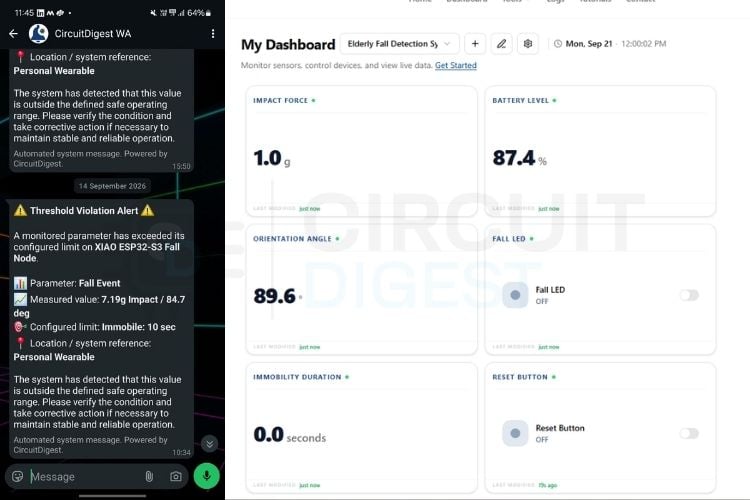
The system was tested by dropping the device onto a table to simulate forward trips, backward slips, and side falls on the mat to check trigger accuracy across different directions. The logic was verified by applying a sharp shock to cross the 4.5g mark, tilting the sensor flat above 60°, and keeping it still for 10 seconds. This confirmed that the XIAO ESP32-S3 detects real fall events, sends out automated emergency WhatsApp alerts, and streams live data to the CircuitDigest cloud dashboard.
Troubleshooting
| Issue | Fix |
| How should the MPU6050 sensor be mounted in an elderly fall detector? | Mount the MPU6050 accelerometer and gyroscope flat against the wearer’s body. Keep the X-axis pointing vertically up or down along the spine, while the Z-axis faces outward from the waist. Correct sensor orientation is important for accurate fall detection. |
| Where should the SPST switch be connected in the fall detector circuit? | Connect the SPST power switch between the positive terminal of the 3.7V LiPo battery and the B+ terminal of the XIAO ESP32-S3. This allows the wearable fall detector to be switched on and off safely. |
| Why is the XIAO ESP32-S3 not connecting to Wi-Fi? | Check that the correct Wi-Fi SSID and password are entered in the program. Also make sure the device is connected to a 2.4 GHz Wi-Fi network, as the ESP32-S3 does not support 5 GHz Wi-Fi. |
| What battery should be used for the wearable elderly fall detector? | Use a 3.7 V 800 mAh LiPo battery. Its compact form factor and capacity make it suitable for a portable and wearable fall detection device. |
GitHub Repository
The complete source code and project files for this Elderly Fall Detection System are available in our GitHub repository. You can access the Arduino code, hardware details, and implementation resources to build the project yourself. Download, explore, and modify the code to customise the fall detection and WhatsApp alert system for your application.


More IoT Projects with CircuitDigest Cloud
Explore more projects built with CircuitDigest Cloud, featuring practical applications of IoT, AI, and embedded systems. From indoor weather monitoring and real-time sensor data to AI-powered vision and object detection, these projects demonstrate how CircuitDigest Cloud can connect devices.
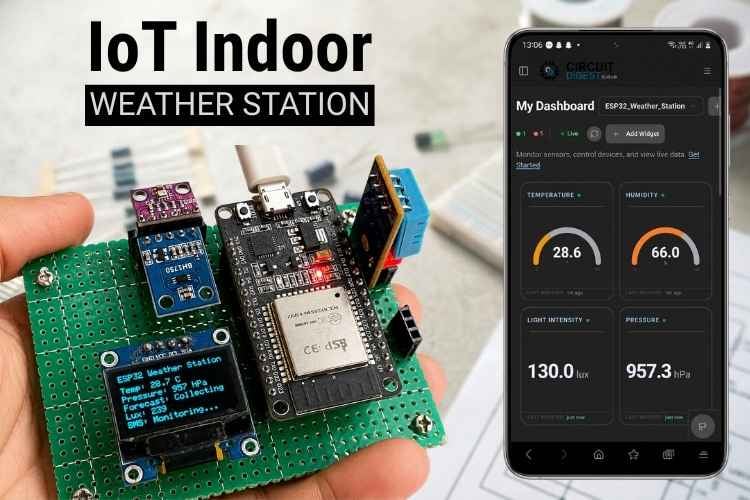
How to Build an IoT Indoor Weather Station Using CircuitDigest Cloud
In this tutorial, we are going to build an IoT indoor weather monitoring system by ourselves. This DIY IoT indoor weather monitoring system senses the weather parameters and displays the data on an OLED and also in CircuitDigest Cloud to monitor the weather from your phone anywhere.
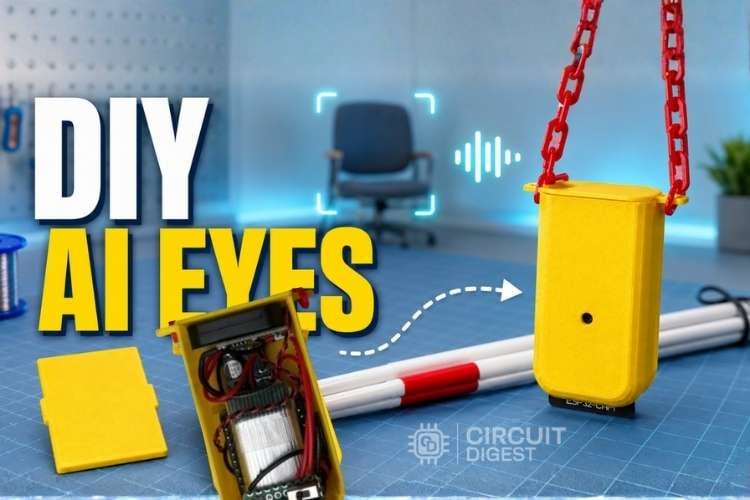
ESP32-CAM AI Vision Assistant Pendant for the Visually Impaired
We are going to explore an AI Vision Assistant for Visually Impaired People using an ESP32-CAM. In a nutshell, the ESP32-CAM captures an image of the surroundings upon a button click, uploads it to the CircuitDigest cloud, gets a detailed description of it, sends it to Sarvam AI for TTS conversion and plays the audio loudly so that the user can hear it.
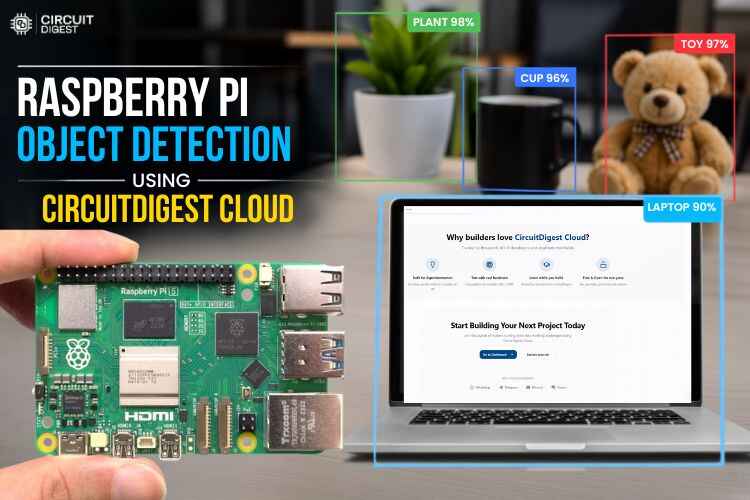
How to do Object Detection with Raspberry Pi Using CircuitDigest Cloud
That is exactly what this Raspberry Pi object detection project demonstrates. You can build a fully working object detection system on a Raspberry Pi without collecting a dataset, labelling images, or training any machine learning model.
Complete Project Code
/*
 IoT Elderly Fall Detection System with WhatsApp Alert
 Target Hardware: Seeed Studio XIAO ESP32-S3 + MPU6050

 Board Wiring:
   MPU6050 SDA      -> XIAO D4 (GPIO 5)
   MPU6050 SCL      -> XIAO D5 (GPIO 6)
   MPU6050 VCC      -> XIAO 3V3 Pin
   MPU6050 GND      -> XIAO GND Pin
   Battery Divider  -> XIAO D0 (GPIO 1) [10k/10k Divider from BAT+ to GND]
   3.7V Battery     -> Solder directly to BAT+ / BAT- pads on underside of XIAO
 Dashboard Keys:
   analog-input-1 (Gauge/Number, output) -> Live Peak Impact Force (g)
   analog-input-2 (Gauge/Number, output) -> Live Orientation Angle (deg, 0 = upright)
   analog-input-3 (Gauge/Number, output) -> Live Immobility Duration (sec)
   analog-input-4 (Gauge/Number, output) -> Live Battery Level (%)
   analog-input-5 (LED/Switch, output)   -> Fall Alert LED (1.0 = RED, 0.0 = NORMAL)
   analog-input-6 (Button/Switch, input) -> False Alarm Reset Command (Cloud -> Device)
*/
#include <CircuitDigestCloud.h>
#include <WiFi.h>
#include <WiFiClientSecure.h>
#include <Adafruit_MPU6050.h>
#include <Adafruit_Sensor.h>
#include <Wire.h>
// ── Credentials ─────────────────────────────────────────────────────────
#define WIFI_SSID       "YOUR_WIFI_SSID"
#define WIFI_PASS       "YOUR_WIFI_PASSWORD"
#define DEVICE_ID       "YOUR_DEVICE_ID"
#define CONNECTION_KEY "YOUR_CONNECTION_KEY"
#define API_KEY        "YOUR_API_KEY"
#define PHONE_NUMBER   "YOUR_PHONE_NUMBER"
// ── Dashboard Key Mapping ───────────────────────────────────────────────
#define KEY_IMPACT_FORCE   "analog-input-1"
#define KEY_ORIENTATION    "analog-input-2"
#define KEY_IMMOBILITY     "analog-input-3"
#define KEY_BATTERY        "analog-input-4"
#define KEY_FALL_LED       "analog-input-5"
#define KEY_RESET_BTN      "analog-input-6"
// ── XIAO ESP32-S3 Hardware Pinouts ─────────────────────────────────────
#define XIAO_SDA_PIN      5  // D4 / GPIO 5
#define XIAO_SCL_PIN      6  // D5 / GPIO 6
#define BATTERY_ADC_PIN   1  // D0 / GPIO 1 (A0)
// ── Battery Calibration ─────────────────────────────────────────────────
// factor = true_voltage_from_multimeter / reconstructed_voltage_from_serial
#define BATTERY_CAL_FACTOR 1.008f
// ── Detection Thresholds ────────────────────────────────────────────────
#define FALL_G_THRESHOLD    4.5f    // Impact threshold (g)
#define FALL_ANGLE_LIMIT    60.0f   // Horizontal orientation threshold (degrees)
#define IMMOBILITY_GYRO_MAX 45.0f   // Deg/s noise limit to qualify as stationary
const char* host = "www.circuitdigest.cloud";
CircuitDigestCloud CDcloud;
Adafruit_MPU6050 mpu;
// ── State Variables ─────────────────────────────────────────────────────
float peakImpactG_Window = 0.0f;
float filteredAngle      = 0.0f;
bool  isFallDetected     = false;
bool  alertSent          = false;
unsigned long fallStartMs = 0;
float currentImmobility  = 0.0f;
#define CLOUD_PUBLISH_MS 1000UL
unsigned long lastCloudPublish = 0;
// ── Battery Calculation for XIAO ESP32-S3 ──────────────────────────────
float readBatteryPercentage() {
 // Force 11dB attenuation on GPIO 1 to allow reading full 0-3.1V range
 analogSetPinAttenuation(BATTERY_ADC_PIN, ADC_11db);
 uint32_t sumMv = 0;
 for (int i = 0; i < 20; i++) {
   sumMv += analogReadMilliVolts(BATTERY_ADC_PIN);
   delay(1);
 }
 float pinMv = sumMv / 20.0f;

 // Reconstruct battery voltage (10k/10k divider = pin voltage * 2)
 float batteryVolts = (pinMv * 2.0f) / 1000.0f;
 // Apply per-board calibration to correct for residual ADC offset
 batteryVolts *= BATTERY_CAL_FACTOR;
 Serial.print("[BATTERY DEBUG] Pin mV: ");
 Serial.print(pinMv);
 Serial.print(" | Reconstructed Battery Volts (calibrated): ");
 Serial.println(batteryVolts, 2);
 float pct = 0.0f;
 if (batteryVolts >= 4.15f)      pct = 100.0f;
 else if (batteryVolts >= 3.95f) pct = 80.0f + ((batteryVolts - 3.95f) / 0.20f) * 20.0f;
 else if (batteryVolts >= 3.75f) pct = 40.0f + ((batteryVolts - 3.75f) / 0.20f) * 40.0f;
 else if (batteryVolts >= 3.50f) pct = 10.0f + ((batteryVolts - 3.50f) / 0.25f) * 30.0f;
 else if (batteryVolts >= 3.20f) pct = 0.0f  + ((batteryVolts - 3.20f) / 0.30f) * 10.0f;
 else                            pct = 0.0f;
 return pct;
}
// ── WhatsApp Emergency Alert ─────────────────────────────────────────────
void sendWhatsAppFallAlert(float impactG, float angle, float immobilitySec) {
 WiFiClientSecure client;
 client.setInsecure();
 client.setTimeout(5000);
 Serial.println("Connecting to CircuitDigest Cloud WhatsApp Gateway...");
 if (!client.connect(host, 443)) {
   Serial.println("WhatsApp API Connection FAILED");
   return;
 }
 String payload =
   "{\"phone_number\":\"" + String(PHONE_NUMBER) + "\","
   "\"template_id\":\"threshold_violation_alert\","
   "\"variables\":{"
   "\"device_name\":\"XIAO ESP32-S3 Fall Node\","
   "\"parameter\":\"Fall Event\","
   "\"measured_value\":\"" + String(impactG, 2) + "g Impact / " + String(angle, 1) + " deg\","
   "\"limit\":\"Immobile: " + String((int)immobilitySec) + " sec\","
   "\"location\":\"Personal Wearable\"}}";
 client.println("POST /api/v1/whatsapp/send HTTP/1.1");
 client.println("Host: www.circuitdigest.cloud");
 client.println("X-API-Key: " + String(API_KEY));
 client.println("Content-Type: application/json");
 client.println("Connection: close");
 client.print("Content-Length: ");
 client.println(payload.length());
 client.println();
 client.print(payload);
 unsigned long responseStart = millis();
 while (client.connected() && !client.available()) {
   if (millis() - responseStart > 5000) {
     Serial.println("WhatsApp response TIMEOUT");
     client.stop();
     return;
   }
   delay(10);
 }
 Serial.println("WhatsApp Alert Request Dispatched Successfully.");
 client.stop();
}
// ── Cloud Reset Callback ─────────────────────────────────────────────────
void onResetButton(float v) {
 if (v > 0.5f) {
   isFallDetected = false;
   alertSent = false;
   currentImmobility = 0.0f;
   peakImpactG_Window = 1.0f;
   CDcloud.publish({{KEY_FALL_LED,   0.0f},
                    {KEY_IMMOBILITY, 0.0f}});
   CDcloud.publish({{KEY_RESET_BTN, 0.0f}});
   Serial.println(">>> RESET COMMAND RECEIVED: Fall Alert Cleared! <<<");
 }
}
// ── Setup ───────────────────────────────────────────────────────────────
void setup() {
 Serial.begin(115200);
 delay(1000);
 pinMode(BATTERY_ADC_PIN, INPUT);
 analogSetPinAttenuation(BATTERY_ADC_PIN, ADC_11db);
 Wire.begin(XIAO_SDA_PIN, XIAO_SCL_PIN);

 if (!mpu.begin()) {
   Serial.println("Failed to find MPU6050 chip on XIAO I2C bus!");
   while (1) delay(10);
 }

 mpu.setAccelerometerRange(MPU6050_RANGE_8_G);
 mpu.setGyroRange(MPU6050_RANGE_500_DEG);
 mpu.setFilterBandwidth(MPU6050_BAND_260_HZ);
 CDcloud.subscribe(KEY_RESET_BTN, onResetButton);
 Serial.println("Connecting XIAO ESP32-S3 to Wi-Fi & CircuitDigest Cloud...");
 if (!CDcloud.begin(WIFI_SSID, WIFI_PASS, DEVICE_ID, CONNECTION_KEY, API_KEY)) {
   Serial.println("CDcloud begin() failed — Rebooting...");
   delay(2000);
   ESP.restart();
 }
 for (int i = 0; i < 10; i++) {
   CDcloud.loop();
   delay(100);
 }
 float initBattery = readBatteryPercentage();
 Serial.println("[INIT PUBLISH] Sending initial dashboard state...");
 CDcloud.publish({{KEY_IMPACT_FORCE, 1.0f},
                  {KEY_ORIENTATION,  0.0f},
                  {KEY_IMMOBILITY,   0.0f},
                  {KEY_BATTERY,      initBattery},
                  {KEY_FALL_LED,     0.0f}});
 CDcloud.publish({{KEY_RESET_BTN, 0.0f}});
 Serial.println("System Ready. Fall detection active on XIAO ESP32-S3.");
}
// ── Main Loop ────────────────────────────────────────────────────────────
void loop() {
 CDcloud.loop();
 if (WiFi.status() != WL_CONNECTED) {
   Serial.println("Wi-Fi Lost! Restarting XIAO ESP32-S3...");
   delay(2000);
   ESP.restart();
 }
 sensors_event_t a, g, temp;
 mpu.getEvent(&a, &g, &temp);
 float ax_g = a.acceleration.x / 9.80665f;
 float ay_g = a.acceleration.y / 9.80665f;
 float az_g = a.acceleration.z / 9.80665f;
 float instantG = sqrt(ax_g * ax_g + ay_g * ay_g + az_g * az_g);
 if (instantG > peakImpactG_Window) {
   peakImpactG_Window = instantG;
 }
 if (instantG > 0.05f) {
   float ratio = fabs(ax_g) / instantG;
   if (ratio > 1.0f) ratio = 1.0f;
   filteredAngle = acos(ratio) * (180.0f / M_PI);
 }
 if (peakImpactG_Window >= FALL_G_THRESHOLD && filteredAngle >= FALL_ANGLE_LIMIT) {
   if (!isFallDetected) {
     isFallDetected = true;
     fallStartMs = millis();
     alertSent = false;
     Serial.println(">>> IMPACT & HORIZONTAL POSTURE DETECTED! <<<");
   }
 }
 float totalGyroMotion = (fabs(g.gyro.x) + fabs(g.gyro.y) + fabs(g.gyro.z)) * (180.0f / M_PI);
 if (isFallDetected) {
   if (totalGyroMotion < IMMOBILITY_GYRO_MAX) {
     currentImmobility = (millis() - fallStartMs) / 1000.0f;
   } else {
     isFallDetected = false;
     currentImmobility = 0.0f;
     alertSent = false;
     CDcloud.publish({{KEY_FALL_LED, 0.0f}});
     Serial.println("Motion detected post-fall — Alert auto-cleared.");
   }
   if (currentImmobility >= 10.0f && !alertSent) {
     sendWhatsAppFallAlert(peakImpactG_Window, filteredAngle, currentImmobility);
     alertSent = true;
   }
 } else {
   currentImmobility = 0.0f;
 }
 unsigned long now = millis();
 if (now - lastCloudPublish >= CLOUD_PUBLISH_MS) {
   lastCloudPublish = now;
   float batteryPct = readBatteryPercentage();
   CDcloud.publish({{KEY_IMPACT_FORCE, peakImpactG_Window},
                    {KEY_ORIENTATION,  filteredAngle},
                    {KEY_IMMOBILITY,   currentImmobility},
                    {KEY_BATTERY,      batteryPct},
                    {KEY_FALL_LED,     isFallDetected ? 1.0f : 0.0f}});
   Serial.print("Peak Impact: ");
   Serial.print(peakImpactG_Window, 2);
   Serial.print("g | Angle: ");
   Serial.print(filteredAngle, 1);
   Serial.print("° | Still: ");
   Serial.print(currentImmobility, 1);
   Serial.print("s | Bat: ");
   Serial.print(batteryPct, 0);
   Serial.print("% | Fall LED: ");
   Serial.println(isFallDetected ? "ON [RED]" : "OFF [NORMAL]");
   if (!isFallDetected) {
     peakImpactG_Window = 1.0f;
   }
 }
}

Add a comment
No account needed. Your comment appears once a moderator has reviewed it.