

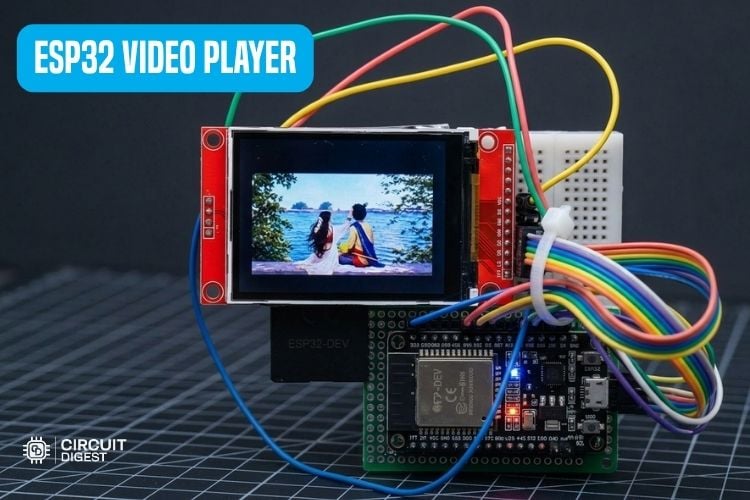
Playing smooth, full-motion video on low-power microcontrollers has been challenging due to memory and processing limitations. But with the dual-core speed, high SPI clock rates and an optimized decoding library on the ESP32, you can turn a simple development board into a working video player. If you want to create custom animations or add dynamic visual UI elements to your hardware projects, building this video player is a great way to push your hardware to its limits.
In this tutorial, we are building an ESP32 video player that streams Motion JPEG (.mjpeg) files directly from a MicroSD card and displays them on a TFT display. We’ll walk you through all the hardware setup, video file formatting and code implementation needed to get your video running smoothly. You can also check out similar ESP32 Projects done previously here at Circuit Digest.
How Does This ESP32 Video Player Work?
Below is the block diagram of the ESP32 video player

1. SD Card
Stores the video as a Motion JPEG (.mjpeg) file—a simple sequence of individual JPEG images packed back-to-back.
The ESP32 reads this raw file stream continuously over the SPI bus.
2. RAM Buffer
Reads data in 4KB chunks into memory instead of byte-by-byte to prevent lag.
Scans incoming data to locate frame boundary markers and assemble complete JPEG images in RAM.
3. JPEG Decoder
Uses the lightweight JPEGDEC library to decompress the JPEG image directly in memory.
Converts the JPEG data into a 16-bit RGB565 pixel format that the screen can render.
4. TFT Display
Receives pixel data over a high-speed 40MHz SPI bus to update the ILI9341 screen.
Applies small timing delays to keep playback smooth and locked at a steady 15 FPS. Here is another Arduino touch screen calculator using a TFT LCD project where we showcased how to make a calculator with a TFT display and Arduino.
Converting Video to MJPEG Format:
To prepare your video file for the ESP32, you need to convert standard formats like .mp4 into a .mjpeg (Motion JPEG) file using a free web-based converter tool.
Paste the converted video file to the MicroSD card root directory. The file name should be video, and the format should be mjpeg. If we want to change the file name, we need to change the name in the code too to match the file name we choose.
The table shows the video conversion settings.
| Settings | Value |
| Resolution | 320x240 |
| File Format | MJPEG |
| FPS | 15 |
| Quality | Medium |
Components Required
Below is the list of components required to build this project
| S.No | Components | Specification | Quantity |
| 1. | Microcontroller | ESP32 Dev Module | 1 |
| 2. | TFT Display | 2.4 TFT SPI 240*320 (TJCTM24024-SPI) | 1 |
Circuit Diagram
The following is the circuit diagram of the ESP32 video player
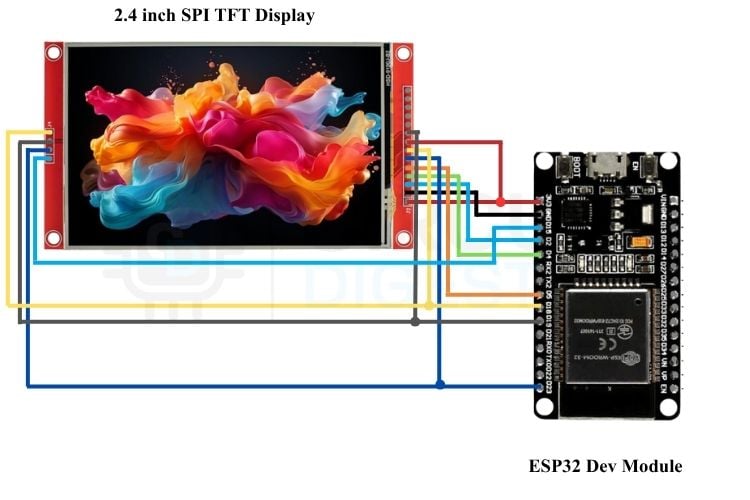
Connect the circuit as per the table below
| TFT Display pins | ESP32 Dev Module Pins |
| VCC | 3.3V |
| GND | GND |
| CS | GPIO 2 |
| RST | GPIO 4 |
| D/C | GPIO 5 |
| MOSI | GPIO 23 |
| SCK | GPIO 18 |
| LED | 3.3V |
| MISO | GPIO 19 |
| SD_CS | GPIO 15 |
| SD_MOSI | GPIO 23 |
| SD_MISO | GPIO 19 |
| SD_SCK | GPIO 18 |
Coding
#include <SPI.h>
#include <SD.h>
#include <Adafruit_GFX.h>
#include <Adafruit_ILI9341.h>
#include <JPEGDEC.h>
// --- TFT Display Pins ---
#define TFT_CS   2
#define TFT_DC   5
#define TFT_RST  4
// --- SD Card Pin ---
#define SD_CS    15
// --- Frame buffer for one JPEG frame ---
// Increase if your frames are larger than this; watch ESP32 RAM limits.
#define FRAME_BUF_SIZE (80 * 1024)
static uint8_t *frameBuf = nullptr;
// --- Target playback rate ---
#define TARGET_FPS 15
#define FRAME_INTERVAL_MS (1000 / TARGET_FPS)
Adafruit_ILI9341 tft = Adafruit_ILI9341(TFT_CS, TFT_DC, TFT_RST);
JPEGDEC jpeg;
File videoFile;
// Drawing callback function
int JPEGDraw(JPEGDRAW *pDraw) {
 tft.drawRGBBitmap(pDraw->x, pDraw->y, pDraw->pPixels, pDraw->iWidth, pDraw->iHeight);
 return 1;
}
// Reads one JPEG frame (SOI 0xFFD8 ... EOI 0xFFD9) from videoFile into frameBuf.
// Returns frame size in bytes, or 0 if no more frames / error.
size_t readNextFrame() {
 // 1. Find SOI marker (0xFF 0xD8)
 int b1 = -1, b2 = -1;
 bool foundSOI = false;
 while (videoFile.available() >= 2) {
   b1 = videoFile.read();
   if (b1 == 0xFF) {
     b2 = videoFile.peek();
     if (b2 == 0xD8) {
       videoFile.read(); // consume the 0xD8
       foundSOI = true;
       break;
     }
   }
 }
 if (!foundSOI) return 0; // EOF reached without finding a new frame
 frameBuf[0] = 0xFF;
 frameBuf[1] = 0xD8;
 size_t idx = 2;
 // 2. Read bytes until EOI marker (0xFF 0xD9) is found
 int prevByte = 0;
 while (videoFile.available() && idx < FRAME_BUF_SIZE) {
   int curByte = videoFile.read();
   frameBuf[idx++] = (uint8_t)curByte;
   if (prevByte == 0xFF && curByte == 0xD9) {
     return idx; // complete frame captured
   }
   prevByte = curByte;
 }
 // Ran out of buffer space or file ended mid-frame
 Serial.print("WARN: frame incomplete or buffer too small, got ");
 Serial.print(idx);
 Serial.println(" bytes before running out of buffer/file");
 return 0;
}
void setup() {
 Serial.begin(115200);
 delay(1000);
 Serial.println("\n--- ESP32 Video Player Initializing ---");
 frameBuf = (uint8_t *)malloc(FRAME_BUF_SIZE);
 if (!frameBuf) {
   Serial.println("ERROR: Could not allocate frame buffer! Reduce FRAME_BUF_SIZE.");
   while (1) delay(1000);
 }
 Serial.print("Free heap after buffer alloc: ");
 Serial.println(ESP.getFreeHeap());
 tft.begin(27000000);
 tft.setRotation(1); // Landscape orientation
 tft.fillScreen(ILI9341_BLACK);
 Serial.println("Display Initialized.");
 if (!SD.begin(SD_CS)) {
   Serial.println("ERROR: SD Card initialization failed!");
   while (1) delay(1000);
 }
 Serial.println("SD Card initialized successfully!");
 if (!SD.exists("/video.mjpeg")) {
   Serial.println("ERROR: /video.mjpeg not found on SD card!");
   while (1) delay(1000);
 }
 videoFile = SD.open("/video.mjpeg", FILE_READ);
 if (!videoFile) {
   Serial.println("ERROR: Could not open /video.mjpeg!");
   while (1) delay(1000);
 }
 Serial.println("Found and opened /video.mjpeg on SD card!");
}
void loop() {
 unsigned long frameStart = millis();
 size_t frameSize = readNextFrame();
 if (frameSize == 0) {
   // End of file (or bad frame) — loop the video back to the start
   Serial.println("End of video, looping...");
   videoFile.seek(0);
   return;
 }
 if (jpeg.openRAM(frameBuf, frameSize, JPEGDraw)) {
   jpeg.decode(0, 0, 0);
   jpeg.close();
 } else {
   Serial.print("ERROR: jpeg.openRAM failed on this frame, size=");
   Serial.println(frameSize);
 }
 // Pace playback to target FPS
 unsigned long elapsed = millis() - frameStart;
 if (elapsed < FRAME_INTERVAL_MS) {
   delay(FRAME_INTERVAL_MS - elapsed);
 }
}
Add a comment
No account needed. Your comment appears once a moderator has reviewed it.