

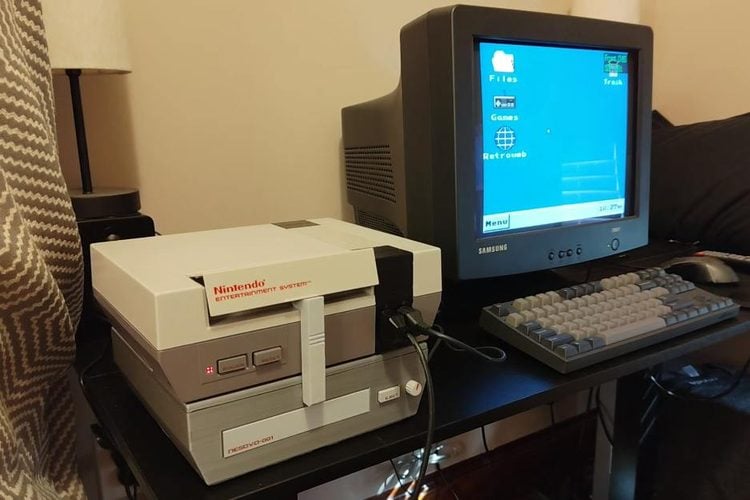
The Nintendo Entertainment System was never meant to be a computer. It has a 6502-based CPU, 2 KB of RAM and two controller ports. Yet Throaty Mumbo has turned his NES into something that looks and behaves a lot like a 1990s desktop PC: a Windows-style desktop with a start menu, files and a trash bin, a USB keyboard and mouse, a MIDI keyboard, CD and DVD playback, and a web browser that can open Wikipedia and even play YouTube videos in 8-bit black and white. The build video has passed 116,000 views since 17 October.
Why a cartridge can do this
The trick is that an NES cartridge is not just storage like a CD. It sits directly on the console's bus, so the CPU runs code straight from it. Throaty Mumbo uses an Everdrive N8 Pro, a flash cartridge built around a Cyclone IV FPGA, and leans on that FPGA heavily. His first attempt, the existing NES86 project that emulates an x86 PC on the NES CPU, worked but was painfully slow. So he moved the x86 side into the FPGA using a core called next286, which runs a Linux command line fast enough to use.
The desktop itself is a separate NES program he wrote, called NESPC. It replaces the Everdrive's normal game menu, so it can still launch NES games. Because the NES has so little memory, apps are not really running in the background. Each one is saved as a save state when you switch away and restored when you reopen it, a bit like a phone does. He also added a Game Boy core so Game Boy games show up in the same games window.
Keyboard, mouse and Wi-Fi
The NES has no USB, so he built an adapter around an RP2350 microcontroller that plugs into the controller port. The port has seven pins, including a clock, three data lines in and one line out, and the adapter only needs one data bit to send key presses and mouse movement. A keyboard with a built-in USB hub lets the mouse and keyboard share one port. The same adapter even takes a MIDI keyboard for a small sequencer app called Choco Chip.
The controller-port link tops out at about 70 KB per second, which is far too slow for web pages. So for internet access he added an ESP32-S3 inside his earlier NESCD add-on. The ESP32-S3 handles all of the TCP networking and talks to the NESCD over SPI for downloads, about 4 MB per second, and over a UART line for requests, about 90 KB per second. The NESCD does the heavy lifting of the browser, and the NES simply draws the result. An optional proxy on a laptop makes modern websites easier to render.
Key details
- Cartridge: Everdrive N8 Pro with a Cyclone IV FPGA running a next286 x86 core and Linux
- Desktop: NESPC, a custom NES ROM that replaces the Everdrive menu
- Input: RP2350-based USB adapter on the controller port for keyboard, mouse and MIDI
- Network: ESP32-S3 in the NESCD add-on, about 4 MB/s down and 90 KB/s up
- Extras: CD audio and game discs, DVD playback through an IDE drive, Game Boy core, and a Super Mario Bros. speedrun screensaver
- Code: NESPC on GitHub
Our take
None of this is practical, and Throaty Mumbo says so himself. But it is a very good lesson in how much a cartridge port really exposes, and in splitting work sensibly between chips: the FPGA does the computing, the RP2350 handles USB, the ESP32-S3 handles the network, and the 40-year-old console just handles the screen and input. He also points out that the Everdrive alone is enough to try the desktop, with the NES controller acting as the mouse.
Image credit: Throaty Mumbo, frame from the YouTube video, resized.
About the author: Aswinth Raj is an electronics engineer and the editor of CircuitDigest, where he has published more than 150 hands-on projects and tutorials across Arduino, PIC, ESP32, Raspberry Pi and EV battery systems. He selects the stories on this page for what engineers and makers can actually learn or build from. Connect on LinkedIn

Add a comment
No account needed. Your comment appears once a moderator has reviewed it.