
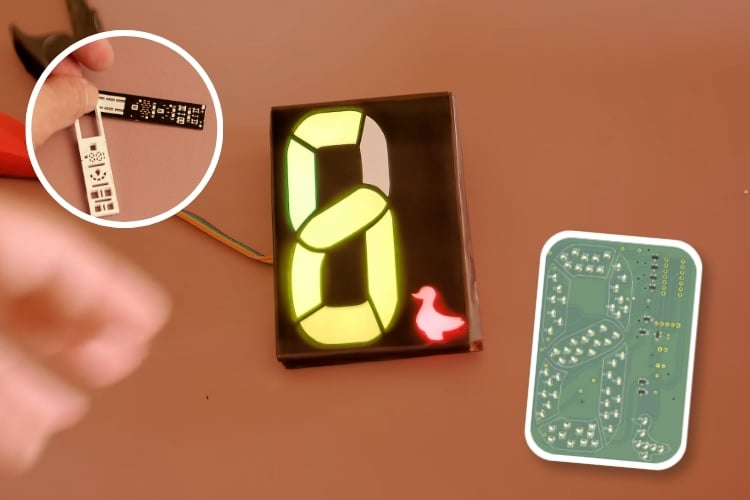
Maker's Fun Duck has published a video that pairs a hands-on teardown of a commercial custom LED display with the release of an open-source Python tool, the Custom LED Display Generator, that automates the design of similar displays from scratch.
The video opens with a physical dissection of a commercial unit, the kind used for glowing logo signs. Removing the outer plastic membrane revealed a simple structure underneath: a plastic sheet with segment shapes printed in white, backed by individual SMD LEDs on a bare PCB. Smaller segments used a single LED each, larger ones used several, and the board itself contained only LEDs and resistors, with brightness set through resistor values or supply voltage and no dedicated driver ICs.
From there, the creator ran a series of diffusion experiments to understand how to replicate the display's even, crisp segment lighting. Using a test rig built from a cut copper plate and 3D-printed spacers, they compared 3mm and 5mm gap thicknesses, several LED packages (0805, 0603, and 0402), and diffuser materials including regular paper, photo paper, silicone, and adhesive sticker paper. Sticker paper was chosen as the final diffuser for being cheap and easy to print on with a standard home printer.
These findings were then built into the Custom LED Display Generator. The tool takes any image as input, detects segment contours, and lets users assign borders, names, and colors to each shape, along with the MCU and LED-driving setup. It then generates a 3D-extruded housing model for 3D printing, a matching PDF template for the diffuser layer, and a full KiCad project with schematic and PCB files, calculating LED placement automatically.
To validate the process, the creator built a display based on an existing 8-segment layout by another creator, adding their own channel logo, then produced the PCB through home etching and drove it with an MSP430 microcontroller and MOSFETs. The prototype worked, though uneven brightness across LEDs, due to the absence of a proper LED driver, required manual resistor adjustments. The tool's source code is available on GitHub.

Add a comment
No account needed. Your comment appears once a moderator has reviewed it.