

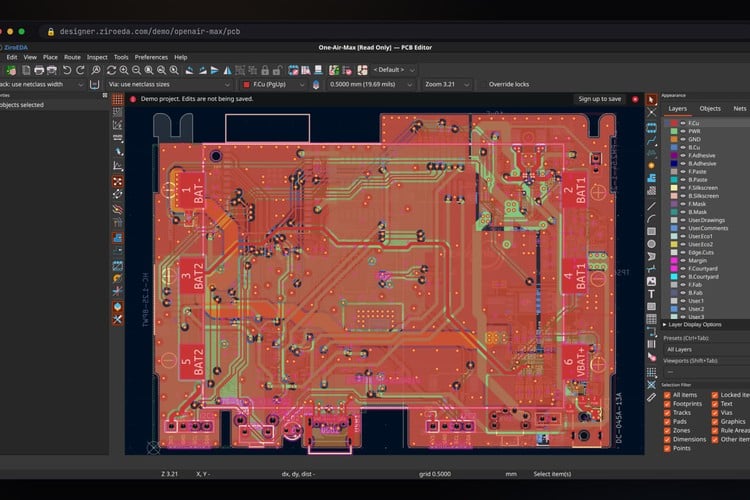
If you have ever wanted to fix a footprint on a college lab PC or a Chromebook where you cannot install anything, this one is for you. Akshay Rukade and the ZiroEDA project have ported KiCad 10's C++ source to TypeScript, so KiCad's schematic editor, PCB editor, interactive router, ERC and DRC run in a normal browser tab. It opens and saves native .kicad_pro projects directly, with no import step, and a board saved in ZiroEDA opens back in desktop KiCad unchanged.
What works today
- Schematic editor: symbols, wires, buses, hierarchical sheets, annotation, ERC, plot and print
- PCB editor: footprints, interactive router, zones with KiCad's own fill algorithm, DRC, 3D viewer and fabrication outputs
- Library tools: symbol and footprint editors and Assign Footprints (CvPcb), with KiCad's official libraries served from the cloud
- Extras: Gerber viewer, PCB calculator, image converter and drawing sheet editor
- Open from GitHub: any public KiCad repository opens read-only at
designer.ziroeda.com/gh/<owner>/<repo>
The port is ongoing, and the project says some dialogs and rarely used tools are still missing. There is a demo project you can open without signing up.
How do you check a port this big?
The approach is what makes this credible. The TypeScript code mirrors KiCad's source file for file against the KiCad 10.0.6 tag, so behaviour can be compared line by line, and KiCad's own kicad-cli is used as a test oracle: file writers, zone fills and plots are compared against what real KiCad produces. According to Akshay, zone fills come out vertex-identical to KiCad's. Rendering is WebGL with KiCad's own fonts, the 3D viewer uses three.js, and the repo has more than 1,500 test files.
Cloud projects are end-to-end encrypted in the browser before upload (AES-256-GCM with a random key per project, and account keys wrapped by a password-derived Argon2id key), so the server only stores ciphertext. The flip side, which the project states plainly: lose both your password and your recovery key and nobody can recover those projects.
Why it matters
ZiroEDA is careful to say it extends KiCad rather than replacing it, and that big, heavy designs still belong in desktop KiCad. Where it helps is everything around that: students on locked-down machines, sending a reviewer a link instead of a zip, or poking through an open-hardware board straight from its GitHub page. It is GPL-3.0, the same as KiCad, and it is built in India, which is good to see for an EDA tool.
The source is on GitHub, and you can try it at designer.ziroeda.com.
Image credit: ZiroEDA, screenshot of the PCB editor from the project's GitHub repository, cropped and resized.
About the author: Aswinth Raj is an electronics engineer and the editor of CircuitDigest, where he has published more than 150 hands-on projects and tutorials across Arduino, PIC, ESP32, Raspberry Pi and EV battery systems. He selects the stories on this page for what engineers and makers can actually learn or build from. Connect on LinkedIn

Add a comment
No account needed. Your comment appears once a moderator has reviewed it.