

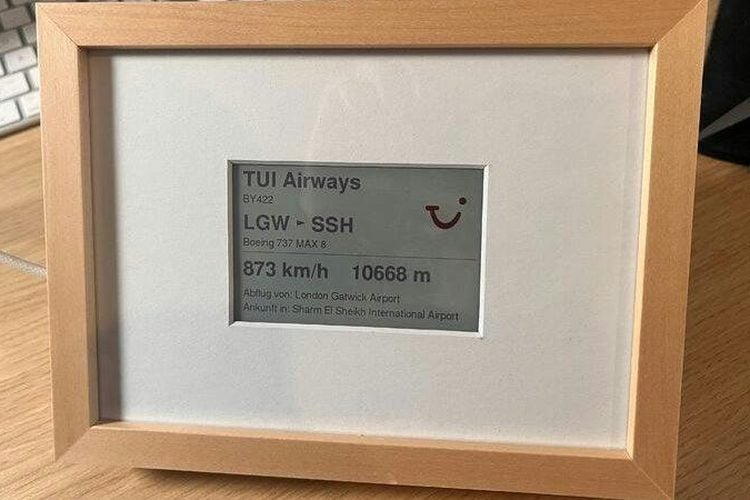
Daniel Zellhuber's father lives in the Bavarian mountains, loves watching planes cross the sky, and does not use the internet. So instead of showing him a flight-tracking app, Daniel built him a small flight tracker in a picture frame. Whenever an airliner passes overhead, the colour e-paper screen shows the airline with its logo, flight number, route, aircraft type, speed and altitude. There is nothing to tap or log into. It just sits on the shelf and quietly tells him what he is looking at.
The hardware
The whole build is one off-the-shelf board: an M5Stack PaperColor, which combines an ESP32-S3 with a 4-inch, 600x400 colour e-paper display. It runs from a USB-C phone charger, because the built-in battery only lasts a few hours. A microSD card of up to 32 GB is optional and holds airline logos and standby pictures. Daniel mounted the display behind the mat of a 13 x 18 cm photo frame and held it in place with tape.
Where the data comes from
The ESP32-S3 pulls live aircraft positions around a set home location from the OpenSky Network, which allows 400 anonymous requests per day, and then looks up the airline, route and aircraft type for each flight from adsbdb. Neither service needs an account. On first boot, the device opens its own Wi-Fi hotspot called Flighttracker-Setup so the Wi-Fi details can be entered from a phone. The location is set as latitude and longitude in the sketch.
Nice touches
- Standby screens: separate pictures for connecting, for when no plane is in sight, and for quiet hours from 23:00 to 07:00
- Logos: a Python script converts airline logos to BMP for the display, which only supports 6 colours, and another logs which airlines actually fly over your location so you only prepare the logos you need
- Software: Arduino IDE with the Espressif ESP32 board package and the M5Unified, WiFiManager and ArduinoJson libraries
Build it yourself
Daniel has written a step-by-step build guide in English and German that assumes no prior knowledge. He estimates 2 to 3 hours and about 80 to 120 euros. Two things to watch: the device only works on 2.4 GHz Wi-Fi, and the on-screen text is in German unless you change it in the code. The code comments are in German too, and he notes it was built with a little help from AI.
Our take
This is one of the most practical ESP32-S3 gift projects we have seen. There is no soldering, the data is free, and an e-paper screen in a frame looks like a picture rather than a gadget. It is also an easy one to adapt: point it at an airport approach path, change the language, or swap planes for trains or ships if your parents prefer those.
Image credit: Daniel Zellhuber, via Hackster, cropped and resized.
About the author: Aswinth Raj is an electronics engineer and the editor of CircuitDigest, where he has published more than 150 hands-on projects and tutorials across Arduino, PIC, ESP32, Raspberry Pi and EV battery systems. He selects the stories on this page for what engineers and makers can actually learn or build from. Connect on LinkedIn

Add a comment
No account needed. Your comment appears once a moderator has reviewed it.