

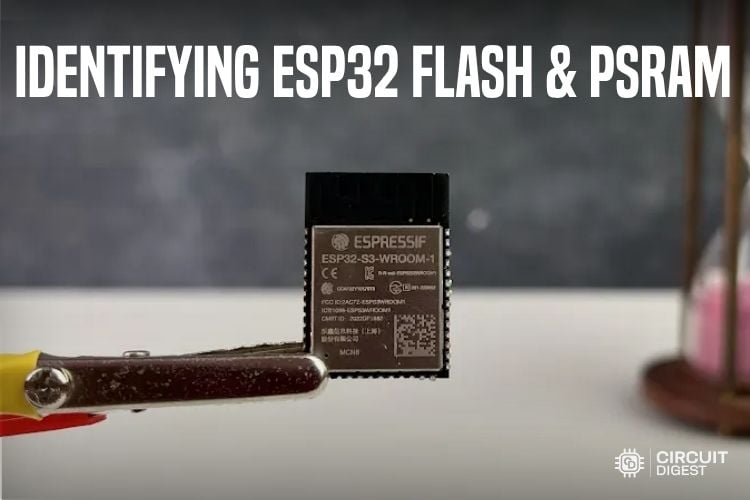
ESP32 development boards have been around for years, and we all have been doing a lot of projects with them. They come in various models, with different peripherals, and they perform different levels of tasks. If we are to check into a simple example, we have the normal ESP32 WROOM development boards as well as the same ESP32 with a camera sensor mounted onboard, the ESP32-CAM. The same way, we have the board with an onboard MIC, much more processing power, different power consumption, and memory capacities.
We pick the ESP32 modules for various projects based on their memory capacities, like ESP32 flash memory size, PSRAM, cores, power consumption, etc... In this tutorial, we will see how the ESP32 memory is classified and see the most easy and straight forward method of identifying the Flash and PSRAM size of an ESP32 module. But before that, let's understand the ESP32 Memory Architecture with the block diagram below.
ESP32 Memory Architecture
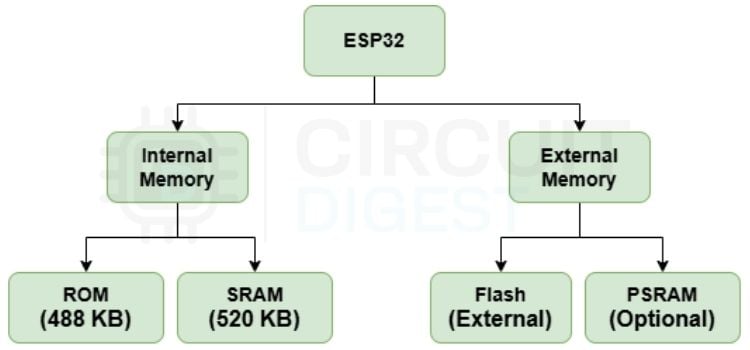
Let's explore the memory classification. All of the ESP32s fall under one combination as per this architecture. Basically, the ESP32’s memory is classified into Internal and External. In the Internal Memory, we have the ROM and SRAM(Static RAM). The ROM stores permanent code such as the bootloader/ROM routines. The SRAM is the main working memory. The ESP32 SRAM size matters most for real-time performance, since it is used by our applications, FreeRTOS, Wi-Fi/Bluetooth stacks, buffers, etc.
A standard ESP32 development module comes with 4MB of Flash. It stores our program/code/firmware, files, web pages, configuration data, etc. Unlike SRAM, it retains data when power is removed. Our ESP32 runs the code whenever we power it on, right? That is due to this Flash Memory. We can see ESP32 modules with 2MB, 4MB, an ESP32 PSRAM 8mb varian, 16MB and 32MB Flash variants. Then we have PSRAM (Pseudo Static RAM). It's an additional RAM connected externally to the ESP32. Common sizes include 2 MB, 4 MB and 8 MB, depending on the module. It is mainly used in applications involving video streaming, image processing, AI, LVGL and large buffers. Now. Let's try to learn how we can identify the Flash and PSRAM Size of an ESP32 Development Module.
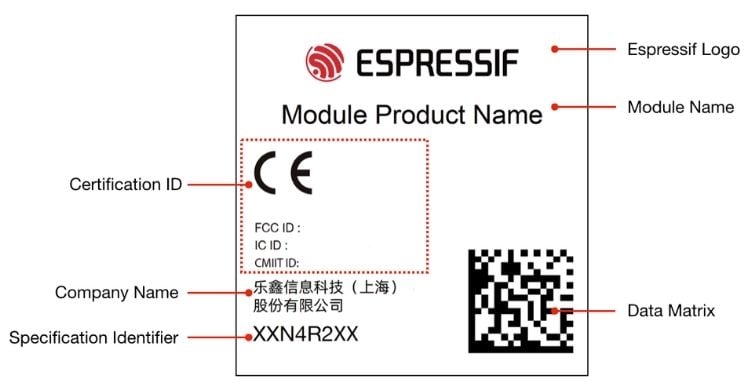
This is how Espressif Systems, the official manufacturer of the ESP32 chips and modules, classifies their products. On the RF shielding of the ESP32 WROOM modules, we can see some details that describe what's inside. They are the Espressif logo, the Module Name, the Certification ID that indicates the certification this module has passed, the Company Name, usually Espressif Systems (Shanghai) Co., Ltd, mostly written in Chinese, and a Data Matrix scanning which returns an 18-character code that conveys the Production Date Code and the Module MAC ID. Then we have the Specification Identifier, which tells a lot of details about the module. Let's try to understand the Specification Identifier Code and learn to identify the Flash and PSRAM of an ESP32 Module.
Specification Identifier Code in ESP32
The Specification Identifier is defined by Espressif to indicate the product status, operating temperature, and the memory capacity of Espressif modules.
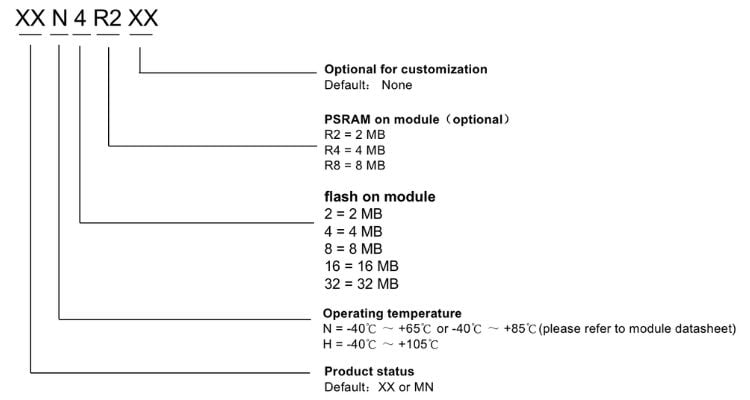
The above details are clearly shown below in a table format so that we can easily understand them.
| Status | Temperature | Flash | PSRAM | Reserved |
| XX | N: 85 °C/65 °C | 2: 2 MB | R2: 2 MB | XX |
| MN | H: 105 °C | 4: 4 MB | R8: 8 MB | |
| 8: 8 MB | ||||
| 16: 16 MB | ||||
| 32: 32 MB |
As seen above, in the XX/MN, the first two prefix characters identify the product status; N indicates the operating temperature is 85 °C/65 °C, and H indicates the operating temperature is 105 °C.
We have 2MB, 4MB, 8MB, 16MB and 32MB Flash memory variants as indicated in the specification Indicator Code. If there is an ‘R’ in the code, it suggests that the variant that we have has PSRAM. Mostly, we can see 2MB and ESP32 PSRAM 8mb variants. The last two characters are optional or left free for customisation.
Checking the Memory Capacities
Now, let's take a look at the Specification Identifier Codes of some real ESP32 Modules and try to identify the Memory Capacities of them.
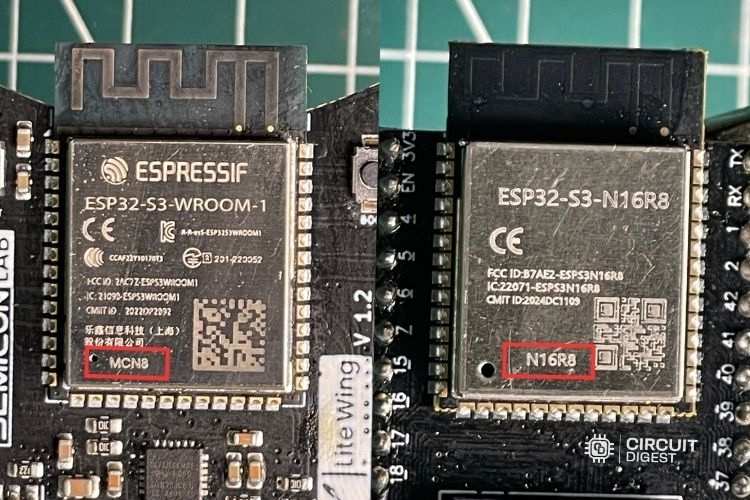
In the above image, the 1st module is the genuine ESP32-S3-WROOM-1 used in our LiteWing Drone. You can see that it has 8MB of Flash and no PSRAM. The second one is a module that is seen on most of the ESP32 S3 development boards. This particular model has 16MB of Flash and 8MB of PSRAM, denoted by N16R8. You may not be able to see these kinds of details in every module, as a lot of 3rd party manufacturers also manufacture these modules other than the original Espressif Systems.
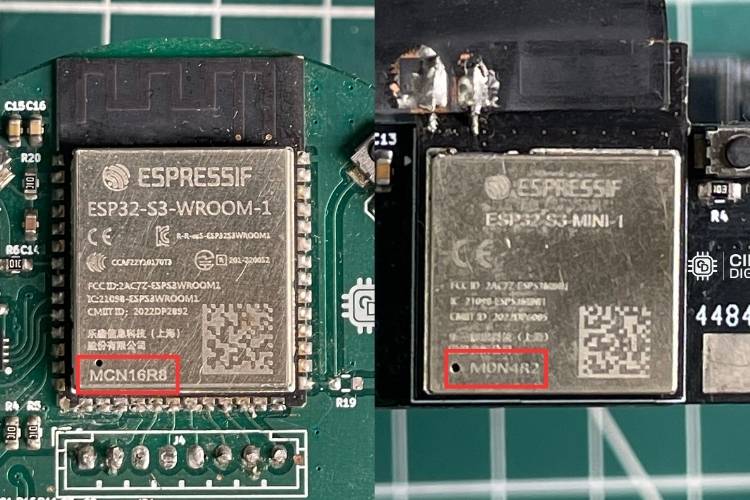
In the above image, the 1st module is the genuine ESP32-S3-WROOM-1 used in our AI Voice Assistant Project. You can clearly see that it has 16MB of Flash and 8MB of PSRAM. We picked this ESP32 flash memory size because real-time audio processing requires a lot of computational power while also offering Wi-Fi and Bluetooth connectivity. The dual-core architecture is particularly valuable there, as one core handles network communication and system tasks, while the other focuses on audio processing and wake-word detection, ensuring smooth, responsive operation.
The second module in the above image is the ESP32-S3-MINI-1 used in our ESP32 AI Smart Glass Project. From its Specification Identifier Code, it's clear that it has 4MB of Flash and 2MB of PSRAM. We picked the dual-core architecture as we had to run the camera while uploading images and sending commands to the cloud all at the same time efficiently.
Conclusion
ESP32 Module Specification Identifier Code may look like some random letters and numbers, but they can give you useful information about the memory configuration. By learning how to read codes such as MCN8, MCN16R8, M0N4R2, and N16R8, one can quickly identify the Flash and PSRAM capacity of an ESP32 module without relying only on the product name or datasheet. This is a very helpful method for every Embedded Systems Engineer.
This article also teaches how to pick the right ESP32 variant based on the memory classification as well as the cores. We have mentioned how we picked the right ESP32 module for some of our projects as well. It's very clear that the next time you start an ESP32-based project, you’ll surely check and pick the right variant that suits your project requirements.

Add a comment
No account needed. Your comment appears once a moderator has reviewed it.