




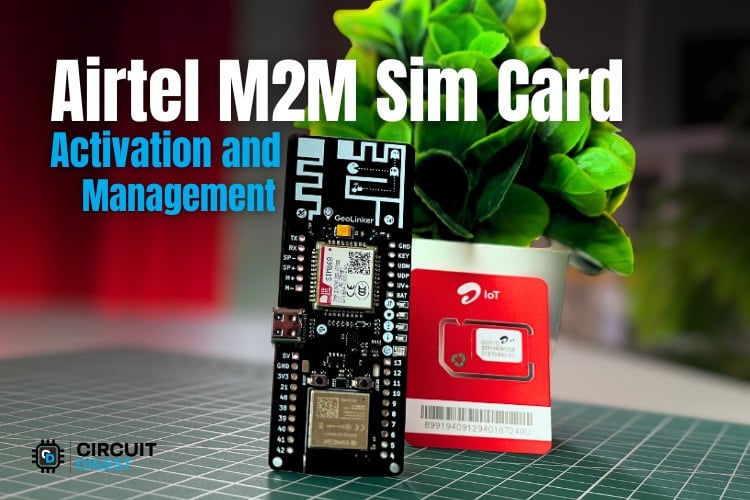
Airtel M2M IoT SIM Activation – Quick Overview
- Log in to Circuit Digest Cloud & open the GeoLinker dashboard
- Enter ICCID and mobile number, verify OTP.
- Submit KYC documents (within 7 days)
- KYC verified by Airtel
- Whitelist up to 4 numbers for SMS/Voice
Table of Contents
- What is an Airtel M2M SIM Card?
- Accessing the Airtel M2M SIM Dashboard on Circuit Digest Cloud
- Step 1 ⇒ How to Activate Your Airtel M2M IoT SIM Card
- Step 2 ⇒ Completing KYC for Your Airtel M2M SIM Card
- Step 3 ⇒Viewing Your Airtel IoT SIM Card Details
- Step 4 ⇒ Setting Up SMS and Voice Whitelisting for Airtel M2M SIM
- └ Airtel M2M SIM Whitelisting Options at a Glance
What is an Airtel M2M SIM Card?
An Airtel M2M SIM card is specifically developed for communicating from one machine to another using the cellular networks. The Airtel M2M SIM is designed specifically for IoT and embedded devices that do not require a human operator or user to operate autonomously.
| Feature | Airtel M2M SIM | Regular SIM |
| Primary Use | IoT devices, GPS trackers, automation | Personal voice and data use |
| Number Regulation | DoT-mandated whitelisting (max 4 numbers) | Open communication with all numbers |
| KYC Requirement | Mandatory within 7 days of activation | Required at purchase |
| Management | Remote via Circuit Digest Cloud platform | Via carrier app or store |
| Included Plan | 3-month free plan (GeoLinker bundle) | Varies by plan |
Accessing the Airtel M2M SIM Dashboard on Circuit Digest Cloud
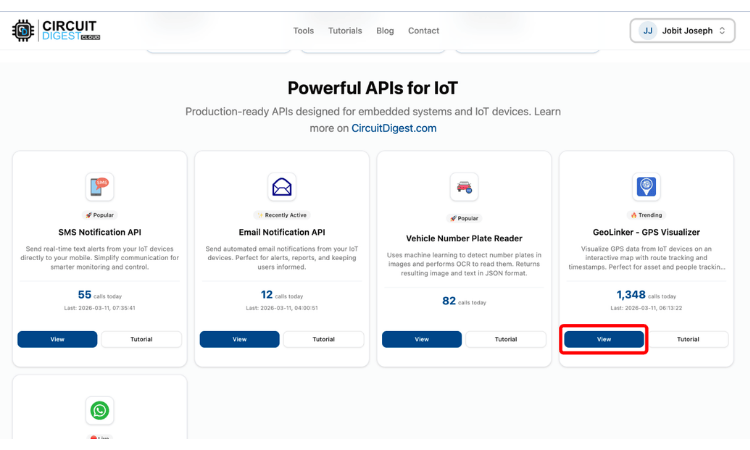
The Airtel SIM Management feature allows you to manage your IoT SIM cards directly from the Circuit Digest Cloud Platform. You can view SIM details, monitor data usage, submit KYC documents, and track device connectivity. To access the Airtel M2M dashboard, log in to your Circuit Digest Cloud Account. Once logged in, you can click on the view button under the GeoLinker section. The Airtel M2M SIM card is a specialised IoT SIM designed for machine-to-machine communication over India's cellular network. This makes it ideal for secure, internet-independent projects such as GPS trackers, remote automation systems, and GSM-based IoT devices. Before you can use the SIM for voice calls, SMS, or data, you need to complete the Airtel M2M SIM activation process through the Circuit Digest Cloud platform.
Step 1 ⇒ How to Activate Your Airtel M2M IoT SIM Card
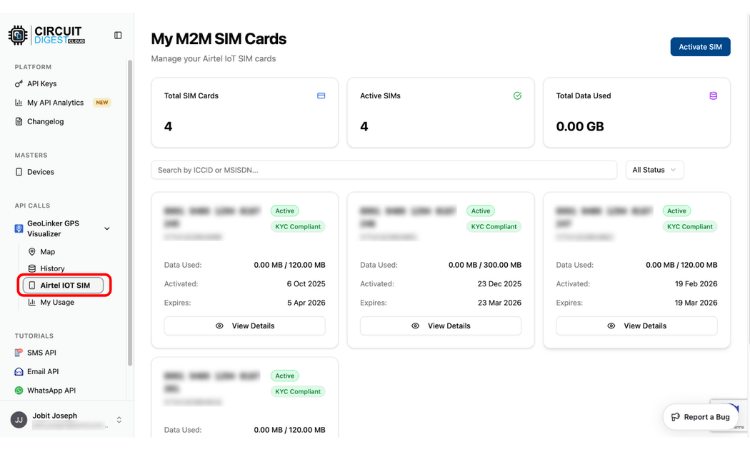
Once you are in the GeoLinker Dashboard, click on the Airtel IOT SIM, which will redirect you to the Airtel IOT SIM dashboard. This is where you can see all the activated SIM card details. To activate a SIM card, click on the Activate SIM button in the top right corner.
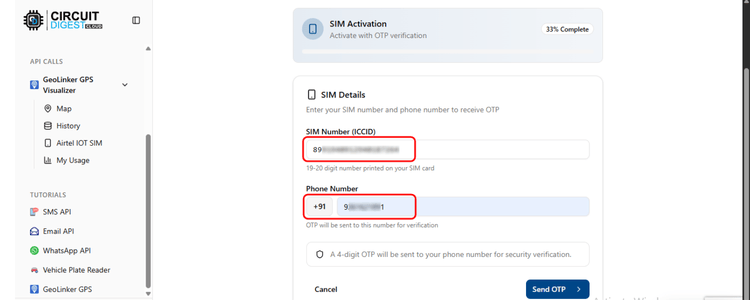
In the activation page, enter the ICCID and your mobile number. The ICCID can be found on the SIM package, mentioned as SIM number, or you can get it from the serial output when you insert the SIM into the GL868_ESP32 with factory firmware. Check the Factory firmware section for more details. If you are using the number from the package, avoid the last alphabet; only the numeric number is needed. Click on send OTP to receive the OTP on your entered mobile number.
Once the OTP is verified, you will be redirected to the KYC submission page.
Step 2 ⇒ Completing KYC for Your Airtel M2M SIM Card
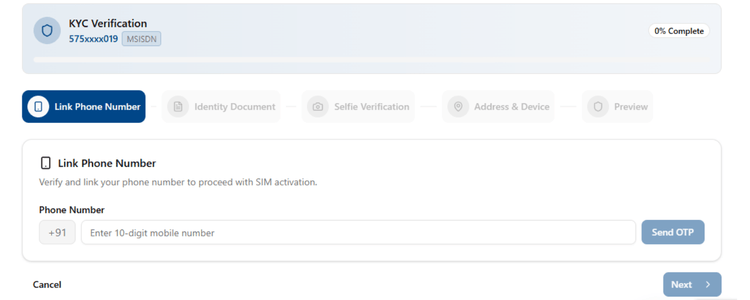
IMPORTANT: While you can start using the SIM immediately after OTP verification, you must complete the full KYC process within 7 days to avoid deactivation.
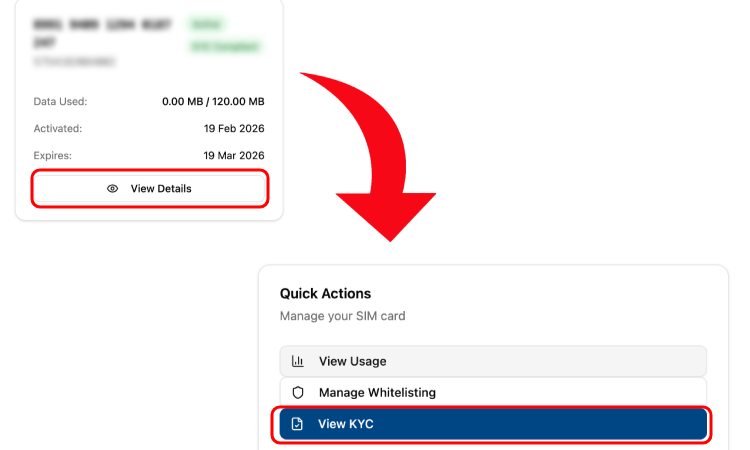
For KYC, you can use any of the KYC documents given in the table below. Once the KYC is completed, you can continue using the Airtel IOT M2M SIM card with the GL868_ESP32. If you choose to submit the KYC documents later, you can access the KYC submission page by going to the SIM details page and then clicking on the View KYC button.
| Required Documents | Allowed Documents |
| Identity Proof | - Aadhaar Card - PAN Card - Passport - Driving License - Voter ID |
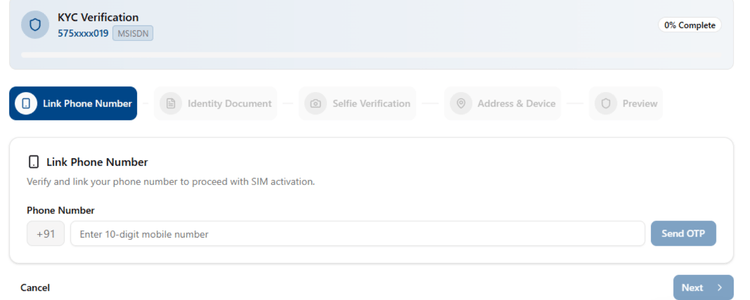
Enter your mobile number to receive OTP.
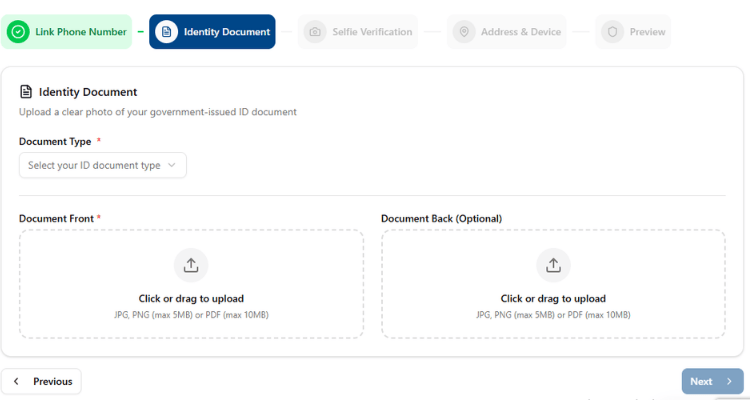
Once the OTP is verified, you will be asked to upload your identity proof. Select document type and upload front and back images.
In the next stage, you will have to upload a live selfie.
Note: Your browser will ask for camera permission; please click "Allow" to proceed.
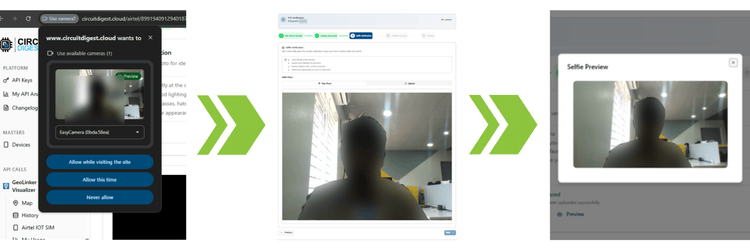
Once the selfie is captured, provide your current residential address, and finally review your details, accept the consent declaration and click on Submit KYC Documents. The KYC verification will be done within 28-48 hours.
TIP: You have a 7-day window from the initial activation to submit these documents. We recommend doing it immediately to ensure uninterrupted service. "Allow" to proceed.
Step 3 ⇒Viewing Your Airtel IoT SIM Card Details
In the SIM card details page, you can see all the details related to your Airtel IOT M2M SIM card, like whether it's active or not, KYC status, ICCID and IMSI, start and end dates of your plan and the remaining time until your plan expires.
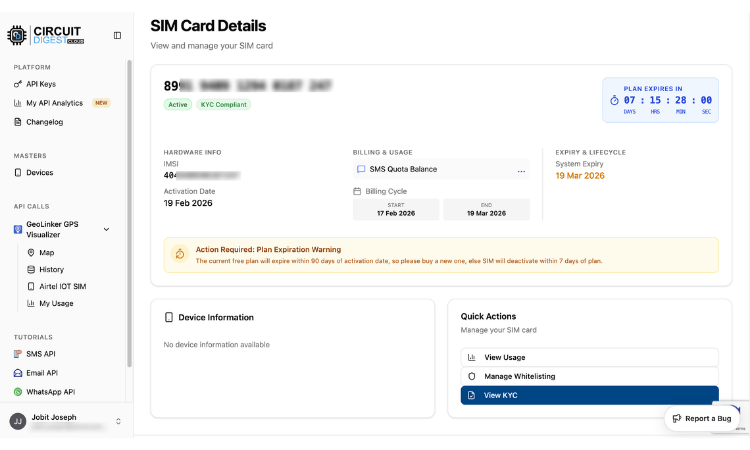
Step 4 ⇒ Setting Up SMS and Voice Whitelisting for Airtel M2M SIM
As per DoT regulations, IoT SIMs are restricted to communicating only with whitelisted numbers. So mobile number whitelisting is required to enable calls to and from the M2M number, as well as to send and receive SMS messages. With an Airtel M2M SIM, you can whitelist up to four numbers. To white list numbers, click on the Manage Whitelisting button on the SIM Card Details page.
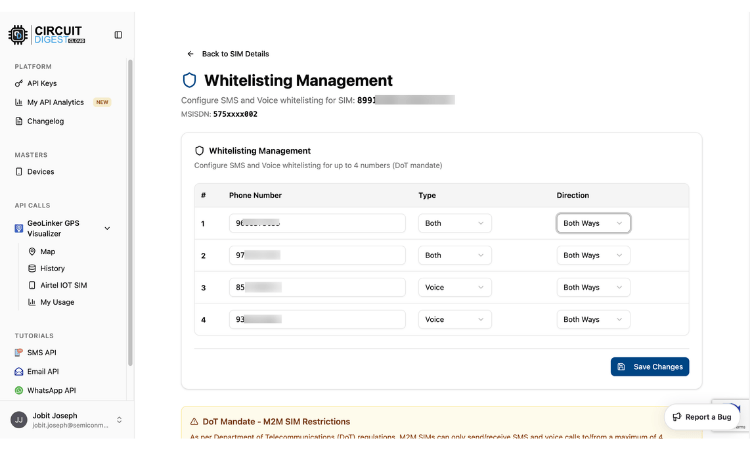
In the Whitelisting Management page, enter the number you want to whitelist, select the type (Voice, SMS or Both) and direction(Incoming, Outgoing or Both Ways) and click on Save Changes. The whitelisting will immediately take effect, and you can use the SMS and voice services.
Note: The Airtel IoT SIM card includes a 3-month promotional plan. After the promotional period ends, you can recharge the SIM card from here (link will be updated soon).
Airtel M2M SIM Whitelisting Options at a Glance
| Option | Choices Available |
| Communication Type | Voice / SMS / Both |
| Direction | Incoming / Outgoing / Both Ways |
| Maximum Numbers | Up to 4 mobile numbers |
| Effect | Immediately after Save Changes |
Frequently Asked Questions
⇥ Where can I find my Airtel M2M SIM card ICCID?
The ICCID is located on the package, with the SIM number listed as the SIM Number. If using GeoLinker GL868, insert the SIM and check the Serial Monitor; factory firmware will show the ICCID automatically when powered on. When you read the ICCID from the package, only enter the numerals and do not include the letter(s) at the end of the number.
⇥ How long does it take for Airtel to verify KYC (Know Your Customer) for M2M SIM Cards?
Airtel will complete verification of your KYC document submission through the Circuit Digest Cloud platform within 48 to 28 hours after submission. You may continue to use the SIM during this time, provided that your KYC document submission occurred within 7 days of the SIM's initial activation.
⇥ What is the maximum number of phone numbers that I can whitelist on the Airtel M2M SIM Card?
Whitelisting for up to 4 mobile numbers is available on your Airtel M2M IoT SIM. By using Whitelisting of each number, you also choose how you want to communicate (Voice, SMS or Both) and which way (Incoming, Outgoing or Both Ways). Whitelisting is effective immediately after you click Save Changes on the Circuit Digest Cloud dashboard.
⇥ Where can I find my Airtel M2M SIM card ICCID?
The ICCID is located on the package, with the SIM number listed as the SIM Number. If using GeoLinker GL868, insert the SIM and check the Serial Monitor; the factory firmware will show ICCID automatically when powered on. When you read the ICCID from the package, only enter the numerals and do not include the letter(s) at the end of the number.
⇥ How long does it take for Airtel to verify KYC (Know Your Customer) for M2M SIM Cards?
Airtel will complete verification of your KYC document submission through the Circuit Digest Cloud platform within 48 to 28 hours after submission. You may continue to use the SIM during this time, provided that your KYC document submission occurred within 7 days of the SIM's initial activation.
⇥ What is the maximum number of phone numbers that I can whitelist on the Airtel M2M SIM Card?
Whitelisting for up to 4 mobile numbers is available on your Airtel M2M IoT SIM. By using Whitelisting of each number, you also choose how you want to communicate (Voice, SMS or Both) and which way (Incoming, Outgoing or Both Ways). Whitelisting is effective immediately after you click Save Changes on the Circuit Digest Cloud dashboard.




