

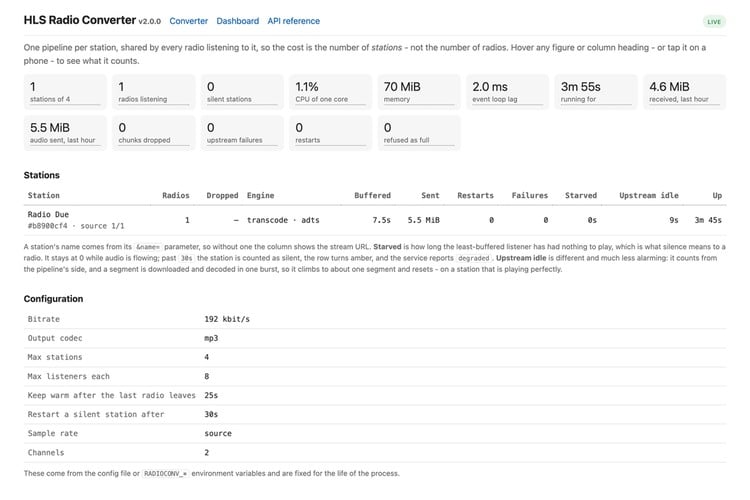
Plenty of perfectly good internet radios, including many built on Frontier Silicon modules, can play a plain MP3 stream over HTTP but have no idea what to do with an HLS (.m3u8) playlist. When a favourite station moves to HLS, the radio simply goes quiet. Clifford Farrugia built HLS Radio Converter to fix that. It runs on a Raspberry Pi on your home network, pulls the HLS stream, and hands the radio the continuous MP3 stream it expects. Version 2.3.2 was released on 22 October.
How it works
There is nothing to configure. You take the station's .m3u8 address, percent-encode it, and put it after the Pi's address on port 8123, for example http://192.168.1.50:8123/https%3A%2F%2Fexample.com%2Flive%2Findex.m3u8. That URL goes into the radio as a custom station. The format is byte for byte the same as version 1, so radios that are already set up keep working. A small web page on the Pi converts any .m3u8 link into the string to paste.
Behind that URL, the converter starts one FFmpeg pipeline per station and shares it with every radio tuned to it. Ten radios on one station cost one decode, not ten.
Key details
- Requirements: Python 3.9 or newer and FFmpeg; an install script for the Raspberry Pi handles the setup
- Output: 192 kbit/s MP3 by default. Add ?br= to change the bitrate, ?name= to set the station name shown on the radio, or ?codec=aac to remux AAC without re-encoding if your radio supports it
- Encrypted streams: HLS with AES-128 (EXT-X-KEY), including key rotation in the middle of a stream
- Monitoring: a live /dashboard and a /metrics.json endpoint showing stations, listeners, CPU, memory, restarts and buffer health
- Robustness: every socket has a timeout, every buffer is bounded, and a stuck stream is restarted instead of being left hanging
- Licence: MIT
Our take: budget your CPU by station, not by radio
The most useful numbers in the README are the honest load figures. On a Raspberry Pi 3, one 192 kbit/s station takes about 165% of one core and roughly 100 MB of RAM, while six radios on that same station change nothing. So a Pi 3 can handle about two different stations at once. Nearly every HLS station sends AAC, and turning AAC into MP3 is what costs the CPU. If your radio can play AAC, the codec=aac option skips re-encoding entirely. Otherwise, a Pi 4 or 5 has far more headroom.
It is also a good small example of building a reliable streaming service: one shared upstream per resource, strict timeouts, bounded buffers and health metrics. The author says the recent 2.3.x fixes for self-repair and stream re-anchoring came from testing on a real radio, and that is the kind of detail that makes a home-network service trustworthy. Code and docs are on GitHub.
Image credit: Clifford Farrugia / HLS Radio Converter, dashboard screenshot from the GitHub repository, cropped.
About the author: Aswinth Raj is an electronics engineer and the editor of CircuitDigest, where he has published more than 150 hands-on projects and tutorials across Arduino, PIC, ESP32, Raspberry Pi and EV battery systems. He selects the stories on this page for what engineers and makers can actually learn or build from. Connect on LinkedIn

Add a comment
No account needed. Your comment appears once a moderator has reviewed it.