



 Vedhathiri
Author
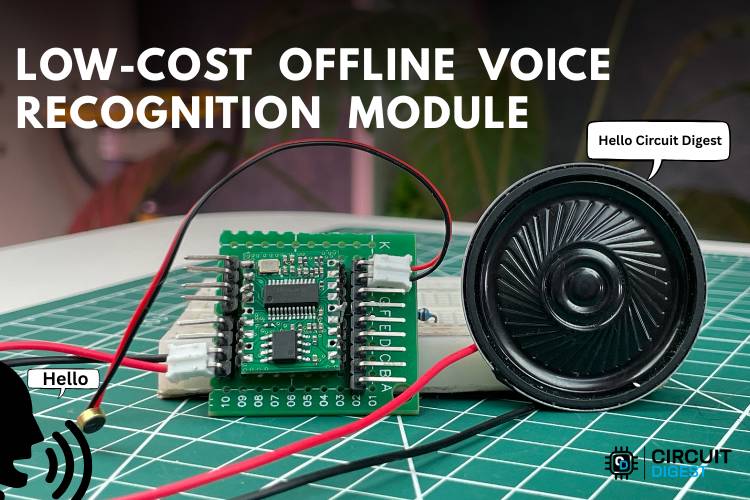
Voice control technology has become an important part of modern human-machine interaction. It allows users to control electronic devices and systems using simple spoken commands instead of traditional input methods such as buttons, switches, or touch screens. This type of interaction makes devices easier to use, more accessible, and more convenient in many applications such as smart homes, automation systems, and assistive technologies. Many existing voice recognition systems depend on cloud-based processing. In these systems, the user’s voice is recorded and sent to a remote server through the internet, where the voice is processed and converted into commands. While this method can provide powerful voice recognition capabilities, it also introduces several limitations. These systems require a constant internet connection, and if the network connection is slow or unavailable, the system may not work properly. Cloud-based processing can also cause delays (latency) in response time and may raise privacy concerns, since voice data is transmitted and processed on external servers.
To overcome these challenges, offline voice recognition modules have been developed. These modules are designed to process and recognize voice commands directly on the device without needing any internet connection. This makes the system faster, more reliable, and more secure, since the voice data remains within the local device. Offline voice recognition is especially useful in embedded systems, automation projects, and environments where internet access may not always be available.
In this project, an offline voice command system is implemented using the SU-03T Offline Voice Recognition Module. The VC-02 is an official module by Ai-Thinker, offering well-defined firmware, proper documentation, and SDK support for customizing and training voice commands, making it suitable for advanced development. In contrast, the SU-03T is a more generic module produced by various manufacturers, and it is preferred due to its low cost, making it an economical choice for simple voice control applications. In this system, when the user speaks a command, the SU-03T processes the voice input and compares it with its stored command set. If a match is detected, the module triggers the corresponding action. In this project, the recognised voice commands are used to control LEDs, turning them on or off. Also check out ESP32 Offline Voice Recognition System using Edge Impulse, which provides hands-on experience in edge AI and TinyML deployment on microcontrollers. This guide is based on hands-on testing with the SU-03T offline voice recognition module at the Circuit Digest lab. The SU-03T is used here as a practical, low-cost alternative to the VC-02 for offline voice command projects. Offline voice recognition modules solve this problem by processing and recognising voice commands entirely on-device, with no internet connection required. In this project, we implement an offline voice command system using the SU-03T Offline Voice Recognition Module, one of the cheapest alternatives to the VC-02/VC020 on the market today.
Table of Contents
Overview
Our tutorial has been created using the SU-03T Offline Voice Recognition Module at the Circuit Digest lab for real-time testing. The SU-03T is used here as a practical, low-cost alternative to the VC-02 for offline voice command projects. The offline voice command modules have been designed to allow you to use an offline voice recognition module with no requirement for an internet connection for the voice command to be processed and recognised. In this project, we implement an offline voice command system using the SU-03T Offline Voice Recognition Module, one of the cheapest alternatives to the VC-02 on the market today.
SU-03T vs VC-02 – Quick Comparison
If you're evaluating an alternative offline voice module for the VC-02 or VC020, the table below summarises the key differences to help you choose the right IC for your project:
| Feature | SU-03T | VC-02 (Ai-Thinker) |
| Internet required? | No | No |
| Price (approx.) | Very low (generic) | Low (branded) |
| SDK / Firmware tool | Ai-Thinker SDK portal | Ai-Thinker SDK portal |
| English command support | Yes (via Ai-Thinker SDK) | Yes |
| GPIO output control | Yes | Yes |
| PWM support | Yes | Yes |
| Wake-free commands | Up to 10 | Up to 10 |
| Documentation quality | Limited | Good |
| Best suited for | Budget projects, prototypes | Production, advanced dev |
Components Required
The components which are listed below are the ones required to build the complete setup. All items are widely available from electronics distributors such as DigiKey, Robu.in, and AliExpress.
| S.NO | Components | Quantity | Purpose |
| 1. | SU-03T | 1 | It is the main module used in the setup |
| 2. | Mic | 1 | Used to recognize the commands from the user |
| 3. | Speaker | 1 | Used to reply with the predefined reply words |
| 4. | USB to Serial Converter | 1 | Used to deploy the code to the module |
| 5. | LED(Green and Red) | 2(Each 1) | For observing the output |
| 6. | 100 Ohms Resistor | 2 | For resisting the current |
| 7. | Breadboard | 1 | Used for the temporary connection between components |
| 8. | Jumper Wires | Required amount | Used to connect all the components |
Circuit Diagram
The circuit diagram shows the connection of the microphone and speaker to the voice module, along with LEDs connected to its GPIO pins via resistors. It also includes the USB-to-TTL interface for firmware uploading and communication. The circuit diagram shows the complete hardware connections for this offline voice recognition project.
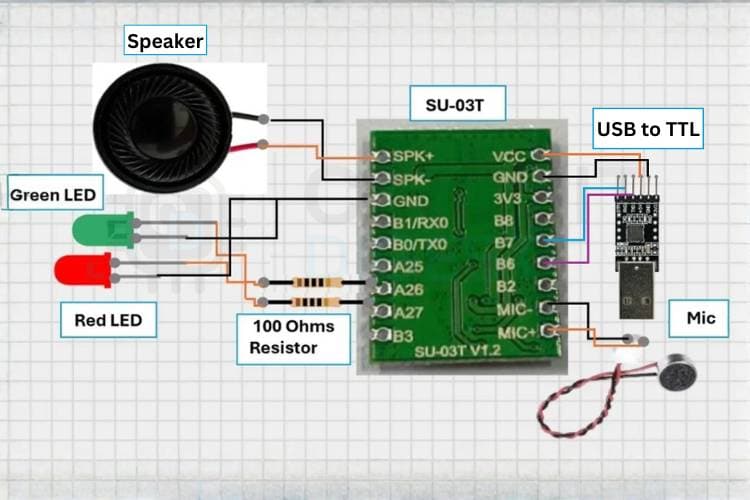
Pin Connection Summary
| SU-03T Pin | Connects To | Notes |
| VCC (3.3 V) | USB-to-TTL 3.3 V output | Do not exceed 3.3 V; module is not 5 V tolerant |
| GND | Common ground (USB-TTL) | Shared ground for all components |
| TX | USB-to-TTL RX | UART communication/firmware flashing |
| RX | USB-to-TTL TX | UART communication firmware flashing |
| MIC+ / MIC− | Electret microphone | Differential analog audio input |
| SPK+ / SPK− | 8 Ω speaker | Built-in amplifier output |
| GPIO1 | Green LED → 100 Ω → GND | Controlled by the "Turn on LED" command |
| GPIO2 | Red LED → 100 Ω → GND | Controlled by the "Turn off LED" command |
Hardware Connection for the Offline Voice Recognition Module
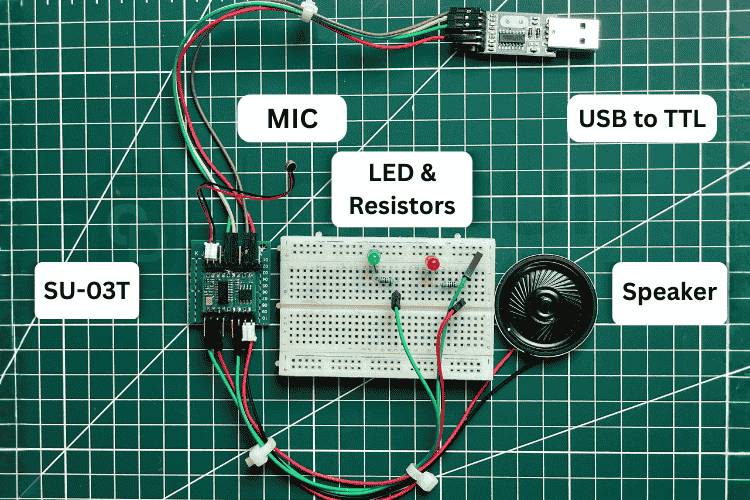
The SU-03T Offline Voice Recognition Module is connected to a USB-to-Serial converter for power supply and programming. A microphone and speaker are interfaced with the module to handle voice input and audio output. The GPIO pins of the module are connected to LEDs through current-limiting resistors to perform output actions.
How the SU-03T Offline Voice Recognition Module Works
The working of this project is based on the SU-03T Offline Voice Recognition Module, which is designed to recognize voice commands without requiring an internet connection. The module is connected to a mic, speaker and an internal processor that can analyse voice inputs and match them with predefined commands stored in its memory. Before using the module, the required voice commands must be configured and loaded into the module.
Once the commands are configured and uploaded to the module, the SU-03T continuously listens for voice input through the microphone. When a user speaks a command, the module captures the audio signal and converts it into digital data. The internal voice recognition engine then processes this signal and compares it with the stored voice command patterns. If the spoken command matches one of the predefined commands, the module identifies it and immediately triggers the corresponding action. The module then controls the GPIO output pins connected to external components such as LEDs. Actually, there is a website called https://smartpi.cn/#/ where we can flash the SU-03T. However, it has a limitation, it only accepts correct Chinese words, and English words are often ignored. So, we are using the steps and website given below to flash our module. If you have time, you can explore that page for future use.
Step-by-Step: Configure and Flash the SU-03T Offline Voice Recognition Module
This same workflow is compatible with the VC-02 and serves as the recommended offline voice recognition SDK configuration process for all Ai-Thinker-compatible modules.
Step 1: Register on the Ai-Thinker Voice SDK Portal
http://voice.ai-thinker.com/#/SdkVersionList
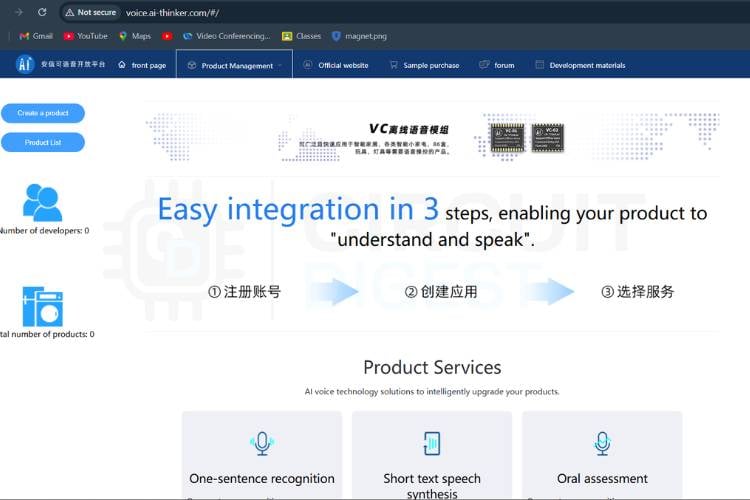
Click the website (translate it to English)and log in to the website if you don’t have an account. Register for the account after that, you can see “Create the product” in the top left corner, click that.
Step 2: Create a Pure Offline Product Profile
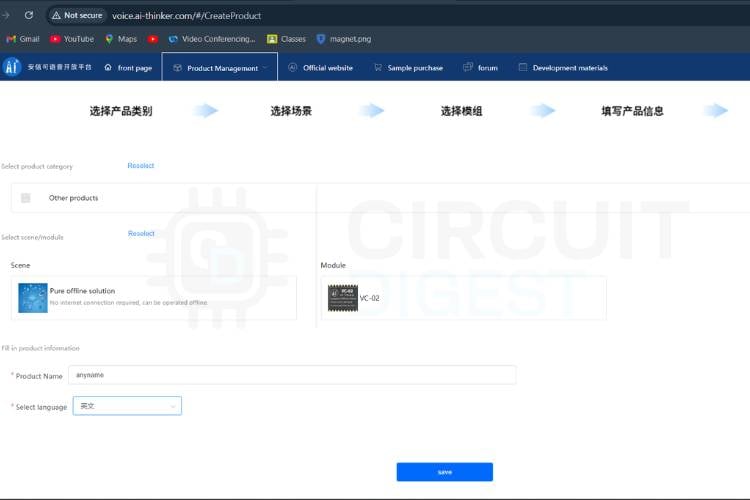
In that, click on other products and select the scene as “Pure Offline”, Module as “VC-02”, then give any name for the product and language as English, now click save.
Step 3: Review Pin and SDK Configuration
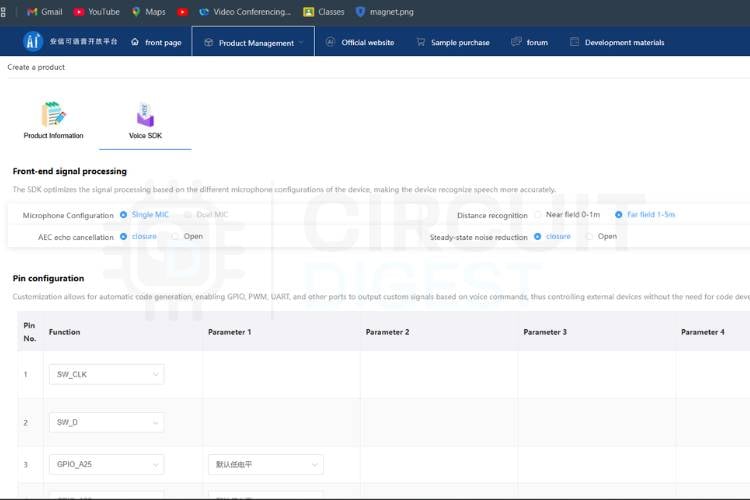
After the previous step, it will take you to the voice SDK section, where you need to set the configurations for pins and also set the commands. No need to change anything in the pin configuration section.
Step 4: Configure the Wake Word
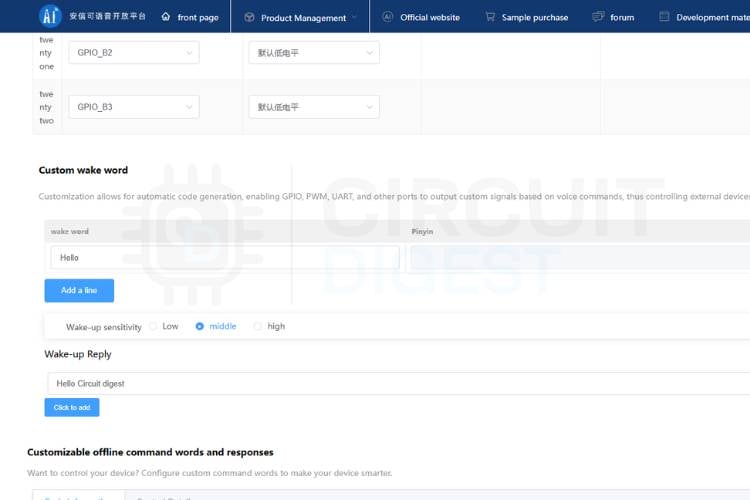
In the custom wake word section, you can set any wake word you prefer, like “Hai” or “hello”, and you also need to set the wake-up reply like “hello buddy” or “hello Circuit Digest”.
Step 5: Add Offline Voice Recognition Commands
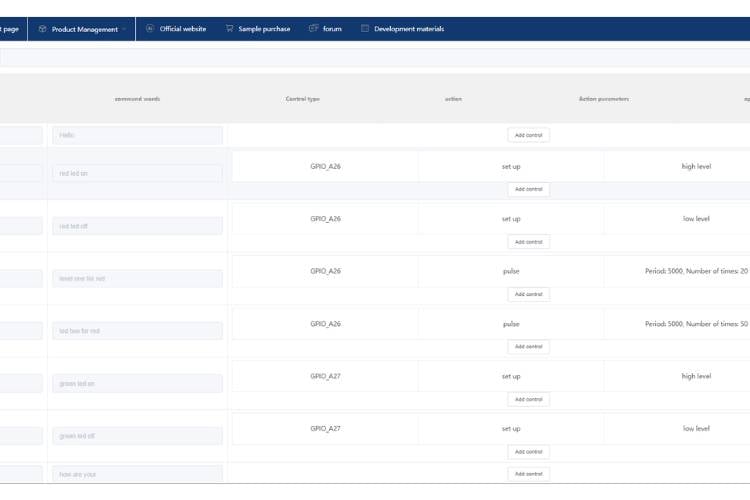
Set the behaviour words as “turnonled” or “turnoffled” like this for then for the command words give the words which you prefer like “Turn on led” or “lights on” like this also give the appropriate reply sentence like “turning on the led” or “turning lights off”. Near the basic information tab, you can see the control details tab. Click that, and see the configuration as per your requirement, like low or high. Here, you can also set the pulse.
Step 6: Configure Wake-Free Commands
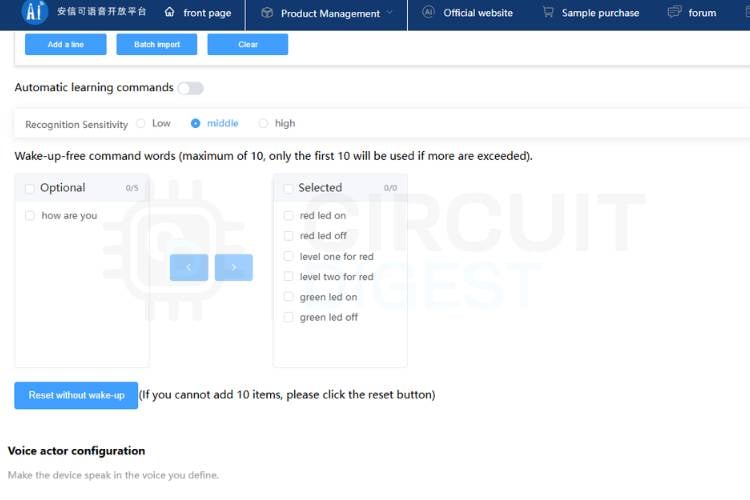
After setting all configurations, scroll down, and you can see the wake-free commands section, where we can set only 10 wake-free command words. After that, we need to tell the wake-up word first and use the command after that so we can able to select which and all commands are wake-free commands in this by selecting.
Step 7: Select Voice Actor and Audio Settings
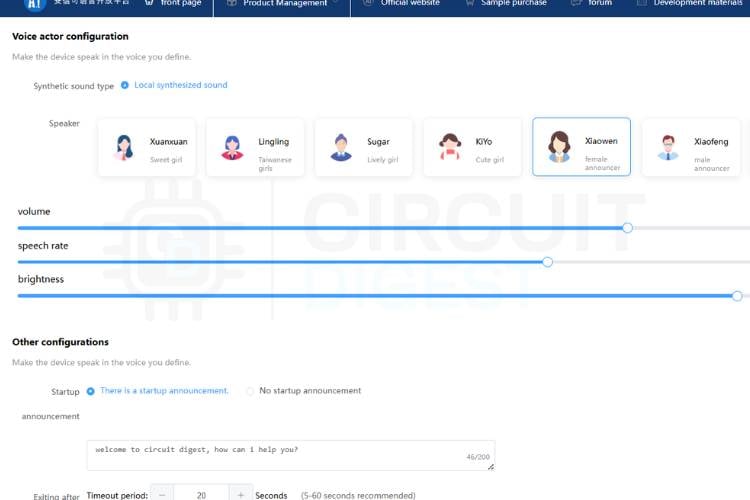
After that, you can set your preferred voice actor in the voice actor configuration section and also able to set the brightness of the voice, speed, and volume.
Step 8: Add Startup Announcement and Exit Commands
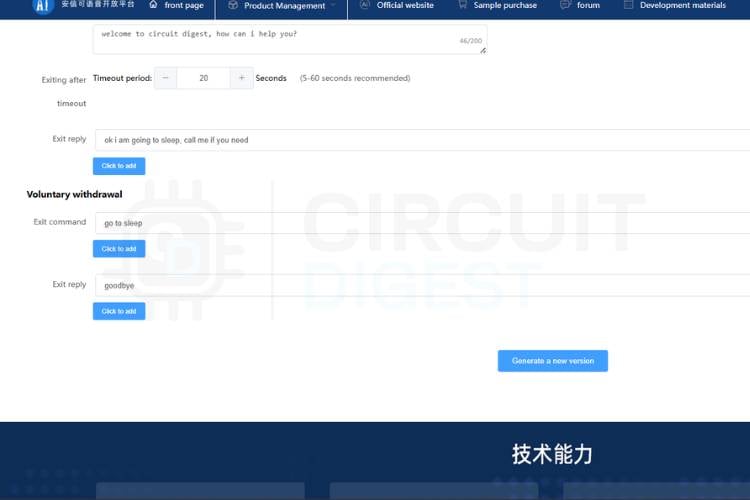
In the other configurations section, you can add the startup announcement, exit reply, voluntary withdrawal exit command and exit reply as per your need.
Step 9: Generate Firmware
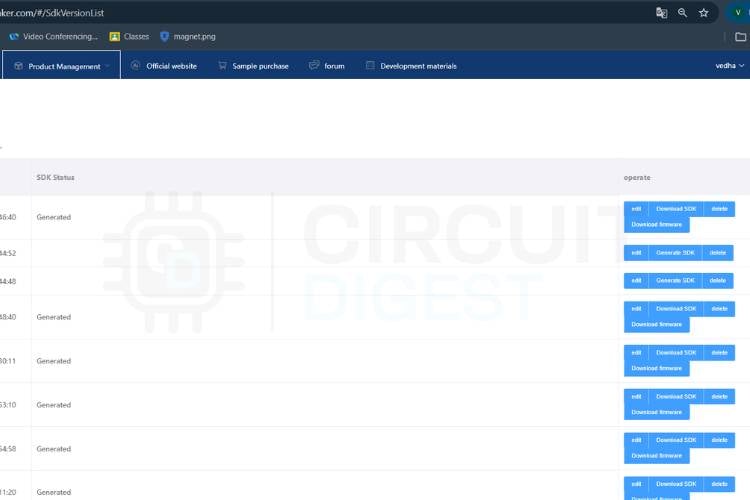
After setting all things, click the generate a new version and give a description for it. After that, it will take you to the voice SDK section, where you can see your product. Click the generate SDK " tab. It will generate your SDK or firmware within 30 to 35 minutes max. Now download the firmware it generated and extract the file.
Step 10: Download the UniOneUpdateTool Flash Utility
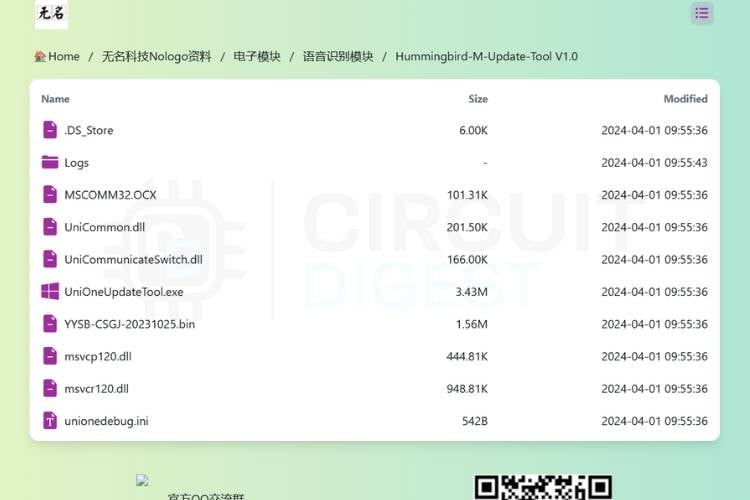
Download the Unicommon.dll, UniCommunicateSwitch.dll and UniOneUpdateTool.exe from Hummingbird-M-Update-Tool V1.0
After installing, click the UniOneUpdateTool.exe and, as per the circuit diagram, connect all the components. Then connect the USB to TTL to the USB port of the laptop. Now you can see the port COM appear in the window of the UniOneUpdateTool.
Step 11: Flash Firmware to the SU-03T Module
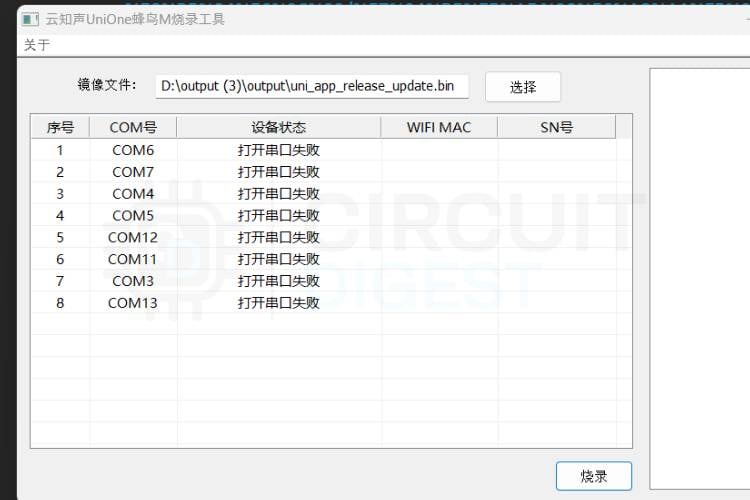
In the UniOneUpdateTool window, you can see the option like this 选择(Choose). Click this option and go to the extracted firmware folder, select the uni_app_release_update.bin file, then you can see the 烧录(Programming/Burning. Click this and wait till all ports are filled with yellow. When all is finished, remove the power pin jumper from the USBs to TTL converter, then again insert it. Now you can see the firmware is getting flashed into the module. Also, spare some time to take a look at our electronics projects to get more ideas in the field of electronics
Working Demo of Offline Voice Recognition Module
Applications of Offline Voice Recognition Modules
1. Smart Home Automation
Offline voice recognition modules can be used to control home appliances such as lights, fans, and other electronic devices using voice commands. This allows users to operate devices easily without using switches or mobile applications.
2. Assistive Technology
Voice-controlled systems can help elderly people and individuals with physical disabilities control electronic devices more conveniently. Simple voice commands can allow them to turn lights on or off without needing physical interaction.
3. Industrial Automation
In industrial environments, voice control can be used to operate certain machines or indicators where manual operation may be difficult. Offline voice systems improve reliability since they do not depend on internet connectivity.
4. Automotive Control Systems
Offline voice recognition can be integrated into vehicles to control features such as lights, music systems, or navigation functions. This allows drivers to operate systems hands-free, improving safety and convenience. Low-cost
5. Educational and Embedded System Projects
Offline voice modules are widely used in educational projects and research to demonstrate voice-based human-machine interaction
| Application | How Offline Voice Recognition Helps | Devices Controlled |
| Smart Home Automation | Local control without cloud dependency; works during internet outages | Lights, fans, curtains, sockets |
| Assistive Technology | Enables hands-free device control for elderly and differently-abled users | Lamps, TV, door locks |
| Industrial Automation | Reliable in offline factory environments; no latency from cloud calls | Indicators, alarms, and conveyors |
| Automotive Systems | In-car voice control without mobile data; instant response | Lighting, HVAC, infotainment |
| Educational & Maker Projects | Low-cost entry point for voice HMI projects; no API keys needed | LEDs, servos, buzzers, displays |
Troubleshooting the SU-03T Offline Voice Recognition Module
Issue 1: Voice command is not recognised
Solution:
This may occur if the spoken command does not exactly match the predefined command stored in the module. Ensure that the command is spoken clearly and with proper pronunciation. Also, check whether the correct voice command dataset has been uploaded to the module using the official configuration tool.
Issue 2: The LED does not turn ON or OFF
Solution:
Check the wiring between the SU-03T module and the LED. Make sure the LED is connected to the correct GPIO pin with a current-limiting resistor. Also, verify that the output pin configuration in the software matches the actual hardware connection.
Issue 3: Module is not responding to voice input
Solution:
This can happen if the microphone is not detecting sound properly or if the module is not powered correctly. Ensure that the module receives the required power supply and that the microphone area is not blocked. Speaking closer to the module can also improve detection.
Issue 4: PWM control is not working properly
Solution:
If the LED brightness or motor speed does not change, verify that the PWM pin is correctly configured in the software. Check whether the PWM output pin is properly connected to the device and confirm that the duty cycle settings are correctly applied.
Issue 5: Module not detected while configuring through the computer
Solution:
Ensure that the USB-to-Serial converter or programming interface is properly connected. Install the correct drivers and verify that the correct COM port is selected in the configuration software. Restarting the software or reconnecting the module may also resolve the issue.
Future Enhancements
Multi-Device Control
The system can be expanded to control multiple devices such as fans, motors, and home appliances using different voice commands.communication/firmware Smartcommunication/firmware Home Integration
It can be integrated with a complete smart home system to control lighting, security systems, and other automation devices.Mobile Application Interface
A mobile application can be added to monitor and control devices along with voice commands.Motor and Appliance Control
The system can be enhanced to control motors, pumps, and other electrical appliances using voice commands.Custom Voice Command Expansion
More voice commands can be added to increase the functionality and control more operations in the system.
Conclusion
This project demonstrates the implementation of a simple offline voice-controlled system using the SU-03T voice recognition module. The system shows how voice commands can be used to control electronic devices without requiring an internet connection. It highlights the advantages of offline voice recognition, such as faster response, improved reliability, and better privacy. By configuring voice commands through the Ai-Thinker offline voice recognition SDK and flashing the firmware with UniOneUpdateTool, you get a reliable, private, low-latency voice control system that requires zero internet connectivity. The project also shows how GPIO and PWM outputs can be used to control devices like LEDs through voice commands. Overall, the system provides a practical example of voice-based human-machine interaction in embedded systems. Such systems can be further expanded for automation and smart control applications in the future. We invite you to look into our projects like “Building a Voice Controlled Home Automation System with Arduino”, which focuses on voice-based appliance control, and “Voice Controlled Lights using Raspberry Pi”, which demonstrates smart lighting automation using speech commands and GPIO interfacing.
Frequently Asked Questions
⇥ Does the module require an internet connection to work?
No, the module works completely offline. All voice commands are processed inside the module, which makes the system faster and more reliable.
⇥ How are voice commands added to the module?
Voice commands can be configured and uploaded using the official configuration tools and SDK available on the platform provided by Ai-Thinker.
⇥ What are the main advantages of using an offline voice recognition module?
Offline voice recognition provides faster response time, improved privacy, and better reliability since it does not depend on internet connectivity.
⇥ Can the module control devices other than LEDs?
Yes, the module can control various devices such as motors, relays, fans, and other appliances through its GPIO pins, depending on the circuit design.
⇥ Is it possible to change or update the voice commands later?
Yes, voice commands can be modified or updated by reconfiguring the settings in the SDK platform and uploading the new firmware to the module.
⇥ How long does it take for the Ai-Thinker SDK portal to generate new firmware for the SU-03T?
After you click 'Generate New Version', the firmware will compile on an Ai-Thinker cloud server in about 30-35 minutes. At this point, you will be able to download the ZIP file (which contains the compiled firmware) in the SDK version list. After downloading the ZIP file, unzip it and locate the uni_app_release_update.bin file for the flashing process.
⇥ What's the recommended flashing tool for the SU-03T voice module?
The recommended flashing tool for the SU-03T is the UniOneUpdateTool (part of the Hummingbird M Update Tool V1.0 package). Connect your SU-03T to your computer through a USB to TTL converter, select the firmware .bin file in the tool, click Burn, wait for all ports to be yellow and then power cycle the SU-03T after the process completes.
Voice-Controlled Projects
Previously, we have explored several voice-controlled projects using platforms like Amazon Alexa and hardware such as ESP8266 and Raspberry Pi. If you want to learn more about these implementations, the links are provided below.
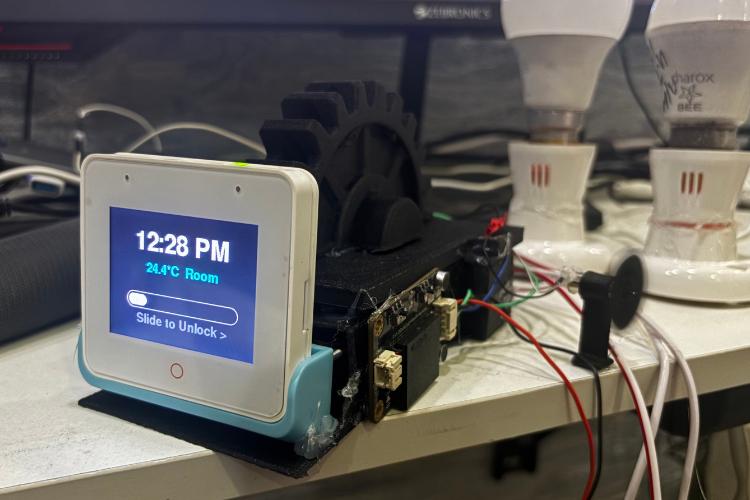
HomePod S3 - A Smart Desk companion
Offline smart desk companion with touch, voice, timer, to-do, medicine reminders and local web control powered by ESP32-S3.
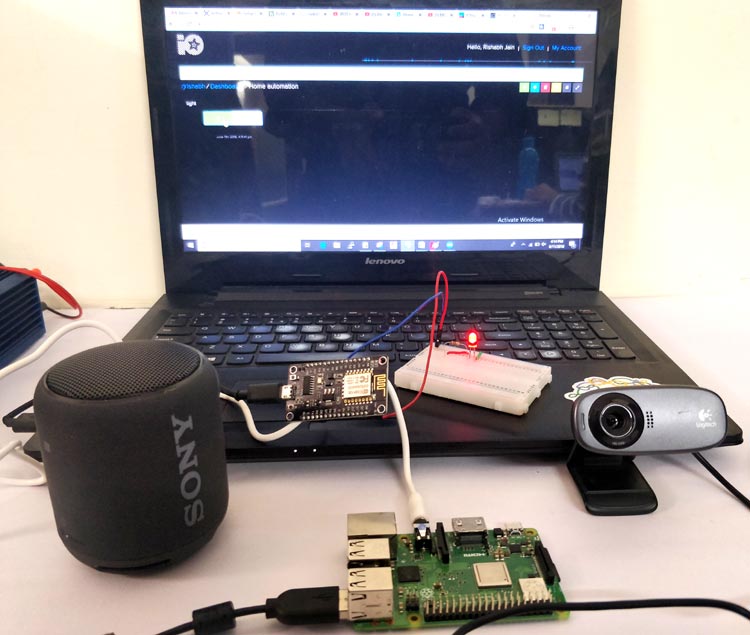
Alexa Voice Controlled LED using Raspberry Pi and ESP12
In this DIY tutorial, we are making an IoT project to control home appliances from anywhere in the world using AlexaPi and ESP12E.
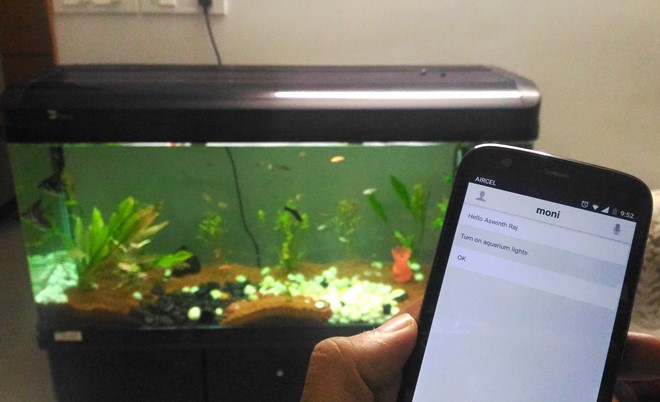
IOT-based Voice Controlled Home Automation using ESP8266 and Android App
Voice-controlled home automation using an ESP8266 Wi-Fi module, where you can control your Home AC appliances using your voice through an Android App from anywhere in the world.





Excellent article on grounding and earthing solutions. Copper bonded rods play a vital role in ensuring electrical safety and long-term performance in industrial and commercial applications. If anyone is looking for reliable Copper Bonded Rods Manufacturers, SG Power offers high-quality earthing solutions designed to meet industry standards. Their products are known for durability, corrosion resistance, and excellent conductivity. Highly recommended for effective grounding systems.