



 Vedhathiri
Author
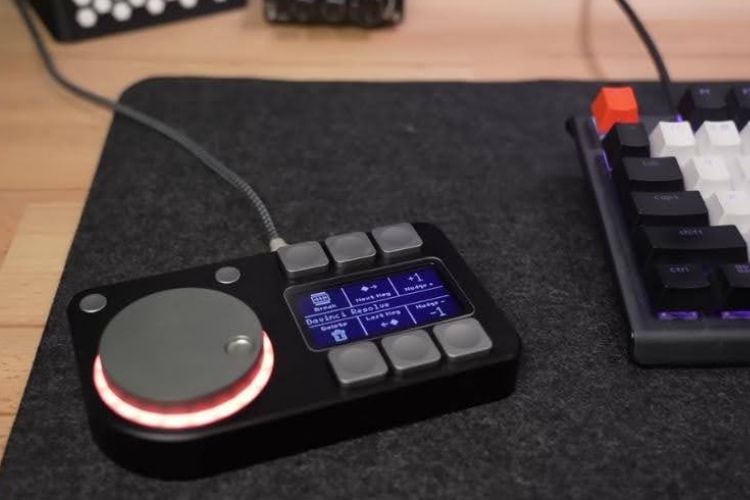
Ever thought of controlling your computer using buttons and a knob that actually feel different when you use them? Most input devices, like keyboards and mice, only give visual feedback on the screen and do not provide any physical sensation to indicate how an action feels. The Macropad changes this experience by adding the sense of touch to everyday computer controls. This is a six-button macro pad with a display for button labels and a mouse-style knob that provides haptic feedback. This project was built by a YouTuber named CNCDan.
The Macropad includes six programmable macro buttons and a 128×64 OLED display that clearly shows button names and icons, making it easy to understand their functions. It uses a Raspberry Pi Pico microcontroller, which is compact, powerful, and efficient. The device supports up to 256 profiles, allowing a total of 1536 macros, and it can be configured easily using simple XML files without the need for special drivers. The buttons can be programmed to perform multiple actions, either at the same time or in sequence, with adjustable delays. All configurations and display labels are stored on a micro SD card, so the settings are saved even after power is turned off.
The device also features a haptic feedback knob with three modes: Clicky, Twist, and Momentum, which provide different tactile sensations while turning the knob. An RGB light ring with multiple lighting effects enhances the visual appearance of the device. Switching between profiles is simple, and the last used profile is automatically remembered when the device is restarted. Since the Macropad project is open-source, anyone can study, modify, and build it. It is a learning project for students and hobbyists, and clearly shows how hardware and software can work together to create more interactive and user-friendly tools using haptic technology.
