

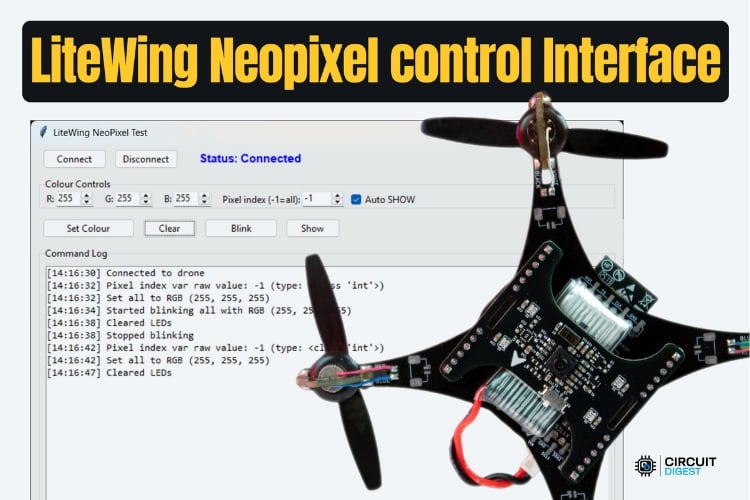
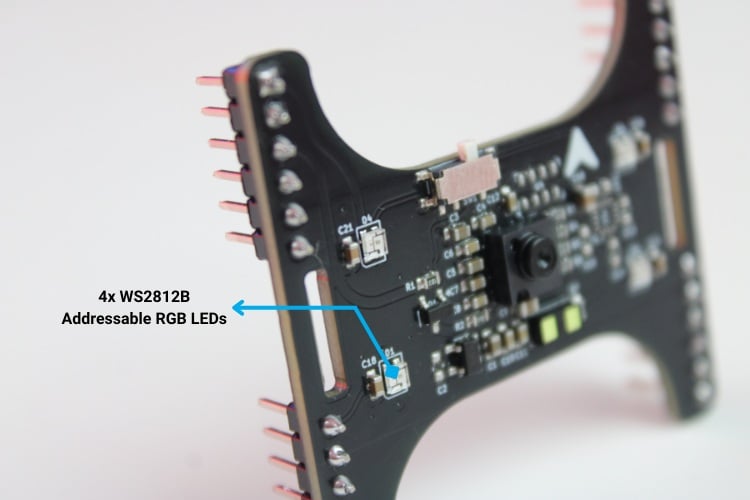
In this guide, we focus on the WS2812B addressable RGB LEDs on the LiteWing Flight Positioning Module. The module includes four NeoPixel-compatible LEDs, each independently controllable via software. These LEDs are useful for flight status indication and visual debugging during development. A curated collection of hands-on drone projects with guides showing how to build and program quadcopters using boards like ESP32 and sensors for features like position hold and gesture control
By the end of this guide, you will understand how addressable LEDs such as WS2812B operate and how they are driven using a single data line, how LiteWing exposes LED control through CRTP command packets, including pixel indexing and color formatting and how to use the core LED commands (SET, SHOW, CLEAR, and BLINK) to construct patterns and perform synchronized updates
Table of Contents
- Hardware Setup
- Software Setup
- Understanding WS2812B LEDs
- └ LiteWing NeoPixel Color and Indexing Overview
- CRTP NeoPixel Port and Channels
- Packet Format
- NeoPixel Commands Overview
- Code Explanation (test_neopixel.py)
- └ Multi-Version CRTP Packet Sender
- └ GUI Application Class (NeoPixelApp)
- Testing the Script Output
Hardware Setup
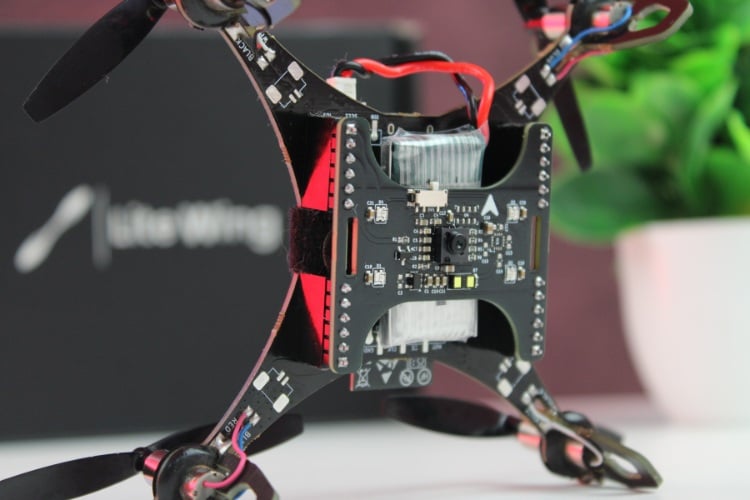
If you have not yet installed the LiteWing Drone Flight Positioning Module or updated the drone’s firmware to support the module, refer to the Flight Positioning Module User Guide. That document covers hardware installation and firmware flashing steps. Make sure your drone is running the Module-compatible firmware before continuing.
Software Setup
Before proceeding with any coding examples, your development environment must be properly set up. This includes installing Python, configuring the required libraries, and ensuring that your PC can establish a CRTP link with the LiteWing. Since cflib has a few prerequisites that must be met, refer to the LiteWing Python SDK Programming Guide. That document provides detailed instructions for installing dependencies, setting up cflib, connecting to the LiteWing Wi-Fi interface, and validating communication with a simple test script. Completing that setup is necessary before interacting with any sensor on the Flight Positioning Module.
Once the Python environment is ready and the connection to the drone is verified, we can move on to controlling those Neopixel LEDs on the Module.
Understanding WS2812B LEDs
WS2812B addressable LEDs (commonly known as NeoPixels) are RGB LEDs with a tiny controller embedded inside each pixel. Unlike traditional LEDs, which all display the same color unless driven individually, each WS2812B can receive its own specific color over a shared single-wire serial protocol.
What Makes Them Addressable?
Each pixel is linked in a chain. When the controller sends data:
Controller → Pixel 0 → Pixel 1 → Pixel 2 → Pixel 3The first pixel in the chain consumes the first 3 bytes (R, G, B) intended for itself and passes the remaining bytes downstream. Each subsequent pixel repeats the same process, so a single command stream can control all four LEDs independently.
LiteWing NeoPixel Color and Indexing Overview
Color is represented using standard RGB values, where each LED internally stores three components, red, green, and blue, each ranging from 0 to 255. Together, these values define the final color of the pixel. The Flight Positioning Module provides four NeoPixels that are indexed from Pixel 0 to Pixel 3, and the firmware additionally supports a broadcast index of −1, which applies a color update to all pixels at once.
CRTP Communication for NeoPixel Control
NeoPixel control is performed using CRTP command packets, not log streaming.
This is an important distinction within LiteWing:
| Aspect | Log Streaming (Sensors) | Command Packets (LEDs) |
| Direction | Drone => Computer | Computer => Drone |
| Purpose | Telemetry (read sensor data) | Control (send commands) |
| Frequency | Periodic, buffered | Immediate |
NeoPixels require commands sent outward from your Python script to the drone. Unlike sensors, the drone does not “push” LED states back to the PC.
CRTP NeoPixel Port and Channels
NeoPixel control uses a dedicated CRTP port:
Port 0x09 - NeoPixel Control
Inside this port, commands are divided into channels:
| Channel | Channel Name | Details |
| 0 | SET_PIXEL | Sets the RGB color of a specific pixel (or all pixels when using index -1). |
| 1 | SHOW | Updates the LED strip to display all pixel color changes currently stored in memory. |
| 2 | CLEAR | Resets all pixels to off (0,0,0) without immediately pushing the update. |
| 3 | BLINK | Toggles pixel(s) on and off based on a configured interval or blink pattern. |
This keeps LED commands isolated and lightweight, ensuring reliable timing even when telemetry is active.
Packet Format
All NeoPixel commands use the following structure:
[Header] [Port=0x09] [Channel] [Payload...]Where:
| Header | packet type (0xF3 for CRTP command) |
| Port | 0x09 (NeoPixel) |
| Channel | LED action (0-3) |
| Payload | Arguments for that action |
Example (SET_PIXEL)
| Field | Value / Description |
| Header | 0xF3 |
| Port | 0x09 |
| Channel | 0x00 (SET_PIXEL) |
| Payload[0] | Pixel index (-1 = all pixels, 0-3 = single pixel) |
| Payload[1] | Red component (0-255) |
| Payload[2] | Green component (0-255) |
| Payload[3] | Blue component (0-255) |
NeoPixel Commands Overview
The LiteWing firmware defines four core commands for NeoPixel control.
SET_PIXEL (Channel 0)
Assigns a color to one or more pixels.
[Header=0xF3] [Port=0x09] [Channel=0x00] [Payload=[pixel_index, R, G, B]]Examples:
| [0, 255, 0, 0] | Pixel 0 = Red |
| [1, 0, 255, 0] | Pixel 1 = Green |
| [-1, 255, 255, 255] | All pixels = White |
This command does not force LEDs to update immediately unless auto-show is enabled.
SHOW (Channel 1)
Pushes all buffered color updates to the LEDs.
[Header=0xF3] [Port=0x09] [Channel=0x01] [Payload=[]]Use this approach when you need to update multiple pixels simultaneously, are creating patterns that depend on synchronized transitions, or want to prevent the cascading update effect in which pixels appear to shift sequentially rather than changing together.
CLEAR (Channel 2)
Turn all NeoPixels off.
[Header=0xF3] [Port=0x09] [Channel=0x02] [Payload=[]]This is useful for resetting animations, displaying error indication patterns, and providing a visual acknowledgement that a command has been received.
BLINK (Channel 3)
[Header=0xF3] [Port=0x09] [Channel=0x03] [Payload=[[0],[1],[2],[3],[4]]]The command requests a blinking pattern that is executed entirely by the drone’s firmware. It is sent as a CRTP packet with header 0xF3, using port 0x09 and channel 0x03, and carries a five-byte payload. The first byte enables or disables blinking, while the next two bytes specify the ON duration and the final two bytes specify the OFF duration. Each duration is encoded in milliseconds using a big-endian format, where the firmware reconstructs the value as (high << 8) | low. For example, an ON time of 500 ms and an OFF time of 500 ms are both encoded as 0x01F4, resulting in the payload [1, 0x01, 0xF4, 0x01, 0xF4]. Because the blinking is handled on the firmware side, the timing remains stable and accurate even if the PC or the wireless link drops frames.
Code Explanation (test_neopixel.py)
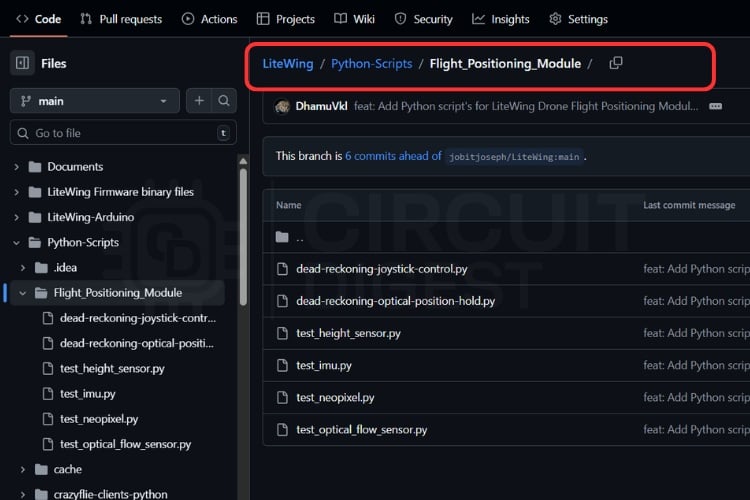
The test_neopixel.py script is a small desktop GUI that talks to the LiteWing drone and sends CRTP NeoPixel commands. You can get the script on our LiteWing GitHub repository under LiteWing/Python-Scripts/Flight_Positioning_Module/


The architecture can be summarised as:
GUI Application
- Connection Management (SyncCrazyflie context)
- CRTP Command Builder Functions
- np_set_pixel()
- np_set_all()
- np_show()
- np_clear()
- np_start/stop_blink()
- Multi-Version Packet Sender (_send_crtp_with_fallback)
- Interactive Controls (RGB spinboxes, buttons)
NeoPixel CRTP Command Builder Functions
At the top of the module, the script defines the port and channel mappings that must match the firmware:
CRTP_PORT_NEOPIXEL = 0x09
NEOPIXEL_CHANNEL_SET_PIXEL = 0x00
NEOPIXEL_CHANNEL_SHOW = 0x01
NEOPIXEL_CHANNEL_CLEAR = 0x02
NEOPIXEL_CHANNEL_BLINK = 0x03
NP_SEND_RETRIES = 3
NP_PACKET_DELAY = 0.02
NP_LINK_SETUP_DELAY = 0.1
Then a set of small helper functions wraps each command:
def np_set_pixel(cf: Crazyflie, index: int, r: int, g: int, b: int) -> None:
   # Build SET_PIXEL payload (index, R, G, B)
   # The index is a single byte, 0..N-1 for addressable pixels; 0xFF is a broadcast
   # value used by `set_all` to set a single color across all pixels.
   payload = bytes([index & 0xFF, r & 0xFF, g & 0xFF, b & 0xFF])
   print(f"[NeoPixel] Sending SET_PIXEL payload: {list(payload)}")
   _send_crtp_with_fallback(cf, CRTP_PORT_NEOPIXEL, NEOPIXEL_CHANNEL_SET_PIXEL, payload)
def np_set_all(cf: Crazyflie, r: int, g: int, b: int) -> None:
   # Build SET_ALL payload: index=0xFF signals the firmware to set all pixels.
   # This is how the firmware distinguishes between setting a specific pixel
   # and a broadcast 'set all' operation using the same channel value.
   payload = bytes([0xFF, r & 0xFF, g & 0xFF, b & 0xFF])
   print(f"[NeoPixel] Sending SET_ALL payload: {list(payload)}")
   _send_crtp_with_fallback(cf, CRTP_PORT_NEOPIXEL, NEOPIXEL_CHANNEL_SET_PIXEL, payload)
def np_clear(cf: Crazyflie) -> None:
   # Send the CLEAR command which zeros the buffer and commits (calls neopixelShow())
   _send_crtp_with_fallback(cf, CRTP_PORT_NEOPIXEL, NEOPIXEL_CHANNEL_CLEAR, b"")
def np_show(cf: Crazyflie) -> None:
   """Tell the NeoPixel controller to commit previously set/pending colours.
   Some implementations require SET_PIXEL to be followed by SHOW to update the LEDs
   (this is how `neopixel_control.py` and other scripts use it). Blink commands
   generally act as an effect and may update without SHOW, but SET/SET_ALL
   requires SHOW to take effect.
   """
   print("[NeoPixel] Sending SHOW command")
   # SHOW tells the firmware to build the low-level RMT items from the current
   # pixel buffer and send them over the RMT (timed output) driver onto the
   # GPIO pin. Without SHOW the pixel buffer is just updated in RAM and not
   # reflected on the LEDs until a SHOW occurs.
   _send_crtp_with_fallback(cf, CRTP_PORT_NEOPIXEL, NEOPIXEL_CHANNEL_SHOW, b"")
def np_start_blink(cf: Crazyflie, on_ms: int = 500, off_ms: int = 500) -> None:
   payload = bytes([
       1,
       (on_ms >> 8) & 0xFF,
       on_ms & 0xFF,
       (off_ms >> 8) & 0xFF,
       off_ms & 0xFF,
   ])
   print(f"[NeoPixel] Sending BLINK payload: {list(payload)}")
   # BLINK uses a 5-bytes payload: enable (1/0), on_ms (2-bytes big-endian), off_ms (2-bytes big-endian)
   # The firmware will start a FreeRTOS timer to toggle output on/off as appropriate.
   _send_crtp_with_fallback(cf, CRTP_PORT_NEOPIXEL, NEOPIXEL_CHANNEL_BLINK, payload)
def np_stop_blink(cf: Crazyflie) -> None:
   print("[NeoPixel] Sending STOP BLINK command")
   _send_crtp_with_fallback(cf, CRTP_PORT_NEOPIXEL, NEOPIXEL_CHANNEL_BLINK, bytes([0, 0, 0, 0, 0]))
Key points include that the index ranges from 0 to 3 for addressing individual pixels, while 0xFF is used as a broadcast value to target all pixels. The np_set_all() function is simply a convenience wrapper that leverages the 0xFF broadcast mechanism. Blink durations are encoded as 16-bit values, split into high and low bytes, allowing the firmware to interpret them directly as milliseconds. These helper functions are intentionally decoupled from any GUI state; their sole responsibility is to construct the appropriate payloads and invoke the generic sender.
Multi-Version CRTP Packet Sender
cflib has changed over time, and the low-level send API isn’t the same in all versions. To make the script work across different setups, _send_crtp_with_fallback() tries several methods in sequence.
def _send_crtp_with_fallback(cf: Crazyflie, port: int, channel: int, payload: bytes) -> None:
   header = ((port & 0x0F) << 4) | (channel & 0x0F)class _Packet:
       def __init__(self, header_value: int, data: bytes):
           self.header = header_value
           self.data = data
           try:
               self.datat = tuple(data)
           except Exception:
               self.datat = tuple()
       def is_data_size_valid(self) -> bool:
           return len(self.data) <= 30
       @property
       def size(self) -> int:
           return len(self.data)
       def raw(self) -> bytes:
           return bytes([self.header]) + self.data
   # Build a packet-like object that adapts to different cflib/crazyflie API versions.
   # Some cflib versions expect a packet object with fields `header` and `data` and
   # a `datat` tuple; others expect raw bytes. This wrapper tries the different
   # send methods in turn to maximize compatibility across platforms and cflib
   # versions used by the LiteWing project.
   packet = _Packet(header, payload)
   # 1) Try Crazyflie.send_packet (some cflib versions provide this on Crazyflie instance)
   try:
       send_packet = getattr(cf, "send_packet", None)
       if callable(send_packet):
           send_packet(packet)
           return
   except Exception:  # noqa: BLE001
       pass
   # 2) Try the low-level link object (some cflib versions put send_packet on cf._link/link)
   try:
       link = getattr(cf, "_link", None) or getattr(cf, "link", None)
       if link is not None and callable(getattr(link, "send_packet", None)):
           link.send_packet(packet)
           return
   except Exception:  # noqa: BLE001
       pass
   # 3) Fallback: cflib.crtp.send_packet (try object first, then raw bytes)
   try:
       from cflib import crtp as _crtp  # Local import to avoid global dependency
       sendp = getattr(_crtp, "send_packet", None)
       if callable(sendp):
           # cflib expects either packets with .raw() or raw bytes
           try:
               sendp(packet)
               return
           except Exception:
               try:
                   sendp(packet.raw())
                   return
               except Exception:
                   pass
   except Exception:  # noqa: BLE001
       pass
   raise RuntimeError("Unable to send CRTP NeoPixel packet")
This function packs the CRTP header by combining the port and channel into a single byte, wraps the payload in a lightweight _Packet object that conforms to the expectations of different cflib versions, and attempts transmission using three distinct sending APIs, falling back gracefully if a given method is unavailable.
On top of this, we also defined a retry wrapper to handle occasional wireless drops:
def _try_send_with_retries(cf: Crazyflie, func, *args, retries: int = NP_SEND_RETRIES, logger=None) -> bool:
   last_exc: Exception | None = None
   # Reliability: try sending packets multiple times to handle transient link issues.
   for attempt in range(1, retries + 1):
       try:
           func(cf, *args)
           time.sleep(NP_PACKET_DELAY)
           return True
       except Exception as exc:  # noqa: BLE001
           last_exc = exc
           if logger:
               logger(f"Attempt {attempt} failed: {exc}")
           time.sleep(NP_PACKET_DELAY)
   if logger:
       logger(f"Command failed after {retries} retries: {last_exc}")
   return False
This isn’t required for correctness, but it improves reliability over UDP/Wi-Fi.
GUI Application Class (NeoPixelApp)
This class wraps the already-explained NeoPixel protocol in a small desktop application that lets a user interact with the LEDs in real time without touching low-level packets. It builds a Tkinter-based GUI with controls for connecting to the drone, selecting RGB values, choosing a pixel index or broadcasting to all pixels, and issuing high-level actions such as setting colors, clearing LEDs, committing changes, or starting a blink effect. The class also manages the Crazyflie connection lifecycle using a background thread so the GUI stays responsive, keeps track of connection and blinking state, and provides status updates and a timestamped command log for visibility and debugging. Each user action translates into calls to the previously defined helper functions that send the appropriate NeoPixel commands to the firmware, while the class itself focuses on user interaction, state management, and safe coordination between the GUI and the drone.
class NeoPixelApp:
   def __init__(self, root):
       # Initialize GUI state, connection state, and build the UI
       ...
   # -------------------------
   # UI construction
   # -------------------------
   def _build_ui(self):
       # Create frames, buttons, spinboxes, and log area
       ...
   # -------------------------
   # Connection management
   # -------------------------
   def connect(self):
       # Connect to the Crazyflie in a background thread
       ...
   def disconnect(self):
       # Stop blinking if active and close the link safely
       ...
   # -------------------------
   # NeoPixel commands
   # -------------------------
   def set_colour(self):
       # Set RGB values on one pixel or all pixels
       ...
   def clear_leds(self):
       # Clear LED buffer and stop blinking if needed
       ...
   def start_blink(self):
       # Apply colour, commit it, and start firmware-side blinking
       ...
   def _manual_show(self):
       # Explicitly commit buffered LED changes
       ...
   # -------------------------
   # Utilities and helpers
   # -------------------------
   def _clamp_rgb(self):
       # Ensure RGB values stay within valid range
       ...
   def _set_status(self, text):
       # Update connection status text in the UI
       ...
   def _log(self, message):
       # Append a timestamped entry to the command log
       ...
   def _on_close(self):
       # Gracefully disconnect before closing the application
       ...
def main():
   # Create the Tk root, initialize the app, and start the event loop
   ...
if __name__ == "__main__":
   main()
Testing the Script Output
After running test_neopixel.py, a desktop GUI window opens and initialises a CRTP connection to the LiteWing drone. Once the connection is successful, the status indicator in the application updates to show that the link is active and ready to accept NeoPixel commands.
Using the GUI controls, selecting an RGB color and applying it to a specific pixel immediately changes the corresponding LED on the shield. For example, setting Pixel 0 to red results in only the first LED lighting up red, while the remaining LEDs stay unchanged. This confirms correct pixel indexing and command delivery.
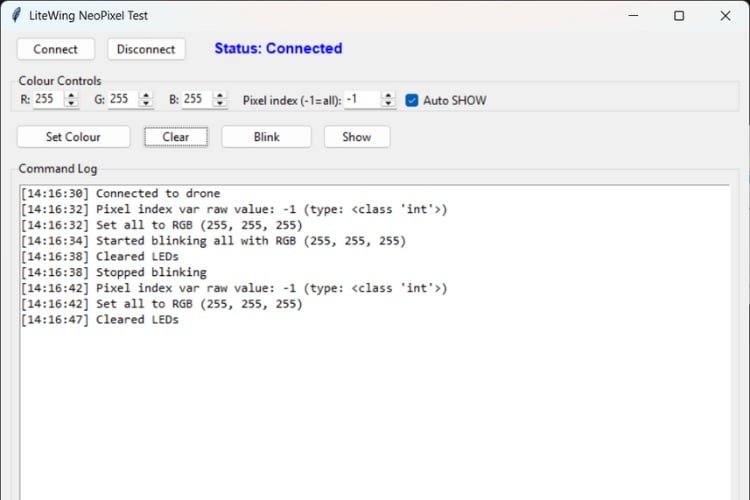
When pixel index -1 (all pixels) is selected, applying a color causes all four LEDs to update simultaneously. This is useful for global status indications such as “armed,” “error,” or “ready” states. Pressing the SHOW action commits any pending color changes at once, producing a synchronized update across all LEDs without visible cascading.
Triggering the CLEAR action turns all LEDs off, providing immediate visual confirmation that the command has been received and executed by the firmware. This is especially helpful when resetting patterns or transitioning between different visual states.
Activating the BLINK function causes the LEDs to toggle on and off at the configured interval. The blinking continues autonomously on the drone, even if no further commands are sent from the PC.
Throughout testing, the command log in the GUI updates with timestamped entries for each action, making it easy to verify which commands were sent and in what order. By experimenting with individual pixels, broadcast colors, clears, and blinking patterns, the script provides immediate visual feedback that confirms correct NeoPixel control over CRTP and serves as a practical foundation for using LEDs as flight status indicators or debugging aids in more advanced LiteWing applications.
Document Index
Complete Project Code
"""Standalone NeoPixel LED test for the LiteWing Drone Flight Positioning Module.
Provides a small GUI to connect to the drone, set colours, clear LEDs, and toggle
blinking. All commands are echoed to both the console and the GUI log window.
"""
import threading
import time
import tkinter as tk
from tkinter import ttk
import cflib.crtp
from cflib.crazyflie import Crazyflie
from cflib.crazyflie.syncCrazyflie import SyncCrazyflie
# UDP URI for the drone. Change this if your drone's IP is different.
DRONE_URI = "udp://192.168.43.42"
# NeoPixel CRTP port & channels
# CRTP port 0x09 (9) is used for NeoPixel commands on LiteWing
# Channels defined here match the firmware's `neopixel_crtp.c` implementation:
#  - 0: SET_PIXEL (payload: idx,r,g,b) - index 0..N-1 for a single pixel. 0xFF = broadcast / "set all".
#  - 1: SHOW (payload: none) - commit the current buffer to the LEDs (build RMT items and send).
#  - 2: CLEAR (payload: none) - zero-out the buffer and clear LEDs.
#  - 3: BLINK (payload: enable, on_ms_hi, on_ms_lo, off_ms_hi, off_ms_lo) - start/stop blink.
CRTP_PORT_NEOPIXEL = 0x09
NEOPIXEL_CHANNEL_SET_PIXEL = 0x00
NEOPIXEL_CHANNEL_SHOW = 0x01
NEOPIXEL_CHANNEL_CLEAR = 0x02
NEOPIXEL_CHANNEL_BLINK = 0x03
NP_SEND_RETRIES = 3
NP_PACKET_DELAY = 0.02
NP_LINK_SETUP_DELAY = 0.
def _send_crtp_with_fallback(cf: Crazyflie, port: int, channel: int, payload: bytes) -> None:
   header = ((port & 0x0F) << 4) | (channel & 0x0F)
   class _Packet:
       def __init__(self, header_value: int, data: bytes):
           self.header = header_value
           self.data = data
           try:
               self.datat = tuple(data)
           except Exception:
               self.datat = tuple()
       def is_data_size_valid(self) -> bool:
           return len(self.data) <= 30
       @property
       def size(self) -> int:
           return len(self.data)
       def raw(self) -> bytes:
           return bytes([self.header]) + self.data
   # Build a packet-like object that adapts to different cflib/crazyflie API versions.
   # Some cflib versions expect a packet object with fields `header` and `data` and
   # a `datat` tuple; others expect raw bytes. This wrapper tries the different
   # send methods in turn to maximize compatibility across platforms and cflib
   # versions used by the LiteWing project.
   packet = _Packet(header, payload)
   # 1) Try Crazyflie.send_packet (some cflib versions provide this on Crazyflie instance)
   try:
       send_packet = getattr(cf, "send_packet", None)
       if callable(send_packet):
           send_packet(packet)
           return
   except Exception:  # noqa: BLE001
       pass
   # 2) Try the low-level link object (some cflib versions put send_packet on cf._link/link)
   try:
       link = getattr(cf, "_link", None) or getattr(cf, "link", None)
       if link is not None and callable(getattr(link, "send_packet", None)):
           link.send_packet(packet)
           return
   except Exception:  # noqa: BLE001
       pass
   # 3) Fallback: cflib.crtp.send_packet (try object first, then raw bytes)
   try:
       from cflib import crtp as _crtp  # Local import to avoid global dependency
       sendp = getattr(_crtp, "send_packet", None)
       if callable(sendp):
           # cflib expects either packets with .raw() or raw bytes
           try:
               sendp(packet)
               return
           except Exception:
               try:
                   sendp(packet.raw())
                   return
               except Exception:
                   pass
   except Exception:  # noqa: BLE001
       pass
   raise RuntimeError("Unable to send CRTP NeoPixel packet")
def np_set_pixel(cf: Crazyflie, index: int, r: int, g: int, b: int) -> None:
   # Build SET_PIXEL payload (index, R, G, B)
   # The index is a single byte, 0..N-1 for addressable pixels; 0xFF is a broadcast
   # value used by `set_all` to set a single color across all pixels.
   payload = bytes([index & 0xFF, r & 0xFF, g & 0xFF, b & 0xFF])
   print(f"[NeoPixel] Sending SET_PIXEL payload: {list(payload)}")
   _send_crtp_with_fallback(cf, CRTP_PORT_NEOPIXEL, NEOPIXEL_CHANNEL_SET_PIXEL, payload)
def np_set_all(cf: Crazyflie, r: int, g: int, b: int) -> None:
   # Build SET_ALL payload: index=0xFF signals the firmware to set all pixels.
   # This is how the firmware distinguishes between setting a specific pixel
   # and a broadcast 'set all' operation using the same channel value.
   payload = bytes([0xFF, r & 0xFF, g & 0xFF, b & 0xFF])
   print(f"[NeoPixel] Sending SET_ALL payload: {list(payload)}")
   _send_crtp_with_fallback(cf, CRTP_PORT_NEOPIXEL, NEOPIXEL_CHANNEL_SET_PIXEL, payload)
def np_clear(cf: Crazyflie) -> None:
   # Send the CLEAR command which zeros the buffer and commits (calls neopixelShow())
   _send_crtp_with_fallback(cf, CRTP_PORT_NEOPIXEL, NEOPIXEL_CHANNEL_CLEAR, b"")
def np_show(cf: Crazyflie) -> None:
   """Tell the NeoPixel controller to commit previously set/pending colours.
   Some implementations require SET_PIXEL to be followed by SHOW to update the LEDs
   (this is how `neopixel_control.py` and other scripts use it). Blink commands
   generally act as an effect and may update without SHOW, but SET/SET_ALL
   requires SHOW to take effect.
   """
   print("[NeoPixel] Sending SHOW command")
   # SHOW tells the firmware to build the low-level RMT items from the current
   # pixel buffer and send them over the RMT (timed output) driver onto the
   # GPIO pin. Without SHOW the pixel buffer is just updated in RAM and not
   # reflected on the LEDs until a SHOW occurs.
   _send_crtp_with_fallback(cf, CRTP_PORT_NEOPIXEL, NEOPIXEL_CHANNEL_SHOW, b"")
def np_start_blink(cf: Crazyflie, on_ms: int = 500, off_ms: int = 500) -> None:
   payload = bytes([
       1,
       (on_ms >> 8) & 0xFF,
       on_ms & 0xFF,
       (off_ms >> 8) & 0xFF,
       off_ms & 0xFF,
   ])
   print(f"[NeoPixel] Sending BLINK payload: {list(payload)}")
   # BLINK uses a 5-bytes payload: enable (1/0), on_ms (2-bytes big-endian), off_ms (2-bytes big-endian)
   # The firmware will start a FreeRTOS timer to toggle output on/off as appropriate.
   _send_crtp_with_fallback(cf, CRTP_PORT_NEOPIXEL, NEOPIXEL_CHANNEL_BLINK, payload)
def np_stop_blink(cf: Crazyflie) -> None:
   print("[NeoPixel] Sending STOP BLINK command")
   _send_crtp_with_fallback(cf, CRTP_PORT_NEOPIXEL, NEOPIXEL_CHANNEL_BLINK, bytes([0, 0, 0, 0, 0]))
def _try_send_with_retries(cf: Crazyflie, func, *args, retries: int = NP_SEND_RETRIES, logger=None) -> bool:
   last_exc: Exception | None = None
   # Reliability: try sending packets multiple times to handle transient link issues.
   for attempt in range(1, retries + 1):
       try:
           func(cf, *args)
           time.sleep(NP_PACKET_DELAY)
           return True
       except Exception as exc:  # noqa: BLE001
           last_exc = exc
           if logger:
               logger(f"Attempt {attempt} failed: {exc}")
           time.sleep(NP_PACKET_DELAY)
   if logger:
       logger(f"Command failed after {retries} retries: {last_exc}")
   return False
class NeoPixelApp:
   def __init__(self, root: tk.Tk):
       self.root = root
       self.root.title("LiteWing NeoPixel Test")
       self.root.geometry("760x520")
       self.status_var = tk.StringVar(value="Status: Disconnected")
       self.blinking = False
       self.scf: SyncCrazyflie | None = None
       self.cf: Crazyflie | None = None
       self._build_ui()
       self.root.protocol("WM_DELETE_WINDOW", self._on_close)
   def _build_ui(self) -> None:
       control_frame = tk.Frame(self.root)
       control_frame.pack(fill=tk.X, padx=10, pady=6)
       ttk.Button(control_frame, text="Connect", command=self.connect, width=12).pack(side=tk.LEFT, padx=5)
       ttk.Button(control_frame, text="Disconnect", command=self.disconnect, width=12).pack(side=tk.LEFT, padx=5)
       ttk.Label(control_frame, textvariable=self.status_var, font=("Arial", 11, "bold"), foreground="blue").pack(side=tk.LEFT, padx=20)
       # Colour controls: three spinboxes for RGB values, plus a spinbox for
       # the pixel index (use -1 for broadcast to all pixels). An Auto SHOW
       # checkbox and a manual Show button let you control when the buffer
       # gets committed to the LEDs.
       spin_frame = ttk.LabelFrame(self.root, text="Colour Controls")
       spin_frame.pack(fill=tk.X, padx=10, pady=6)
       self.r_var = tk.IntVar(value=255)
       self.g_var = tk.IntVar(value=255)
       self.b_var = tk.IntVar(value=255)
       self.pixel_index_var = tk.IntVar(value=-1)
       self.auto_show_var = tk.BooleanVar(value=True)
       for label_text, var in (("R", self.r_var), ("G", self.g_var), ("B", self.b_var)):
           frame = tk.Frame(spin_frame)
           frame.pack(side=tk.LEFT, padx=6)
           ttk.Label(frame, text=f"{label_text}:").pack(side=tk.LEFT)
           ttk.Spinbox(frame, from_=0, to=255, textvariable=var, width=5).pack(side=tk.LEFT)
       index_frame = tk.Frame(spin_frame)
       index_frame.pack(side=tk.LEFT, padx=6)
       ttk.Label(index_frame, text="Pixel index (-1=all):").pack(side=tk.LEFT)
       ttk.Spinbox(index_frame, from_=-1, to=255, textvariable=self.pixel_index_var, width=6).pack(side=tk.LEFT)
       ttk.Checkbutton(index_frame, text="Auto SHOW", variable=self.auto_show_var).pack(side=tk.LEFT, padx=6)
       button_frame = ttk.Frame(self.root)
       button_frame.pack(fill=tk.X, padx=10, pady=6)
       # Buttons: Set Colour sets the selected pixel or all pixels; Clear clears
       # the buffer; Blink starts a blink effect; Show will commit pending changes.
       ttk.Button(button_frame, text="Set Colour", command=self.set_colour, width=18).pack(side=tk.LEFT, padx=5)
       ttk.Button(button_frame, text="Clear", command=self.clear_leds, width=10).pack(side=tk.LEFT, padx=5)
       ttk.Button(button_frame, text="Blink", command=self.start_blink, width=14).pack(side=tk.LEFT, padx=5)
       ttk.Button(button_frame, text="Show", command=self._manual_show, width=10).pack(side=tk.LEFT, padx=5)
       log_frame = ttk.LabelFrame(self.root, text="Command Log")
       log_frame.pack(fill=tk.BOTH, expand=True, padx=10, pady=6)
       self.log_list = tk.Listbox(log_frame, font=("Consolas", 10))
       self.log_list.pack(fill=tk.BOTH, expand=True, padx=6, pady=6)
   def connect(self) -> None:
       if self.cf is not None:
           self._log("Already connected")
           return
       def worker() -> None:
           self._set_status("Status: Connecting...")
           try:
               cflib.crtp.init_drivers(enable_debug_driver=False)
               # Use SyncCrazyflie to open and manage the Crazyflie link in a
               # worker thread — this avoids blocking the GUI main loop.
               scf = SyncCrazyflie(DRONE_URI, cf=Crazyflie(rw_cache="./cache"))
               scf.open_link()
               time.sleep(NP_LINK_SETUP_DELAY)
               self.scf = scf
               self.cf = scf.cf
               self._set_status("Status: Connected")
               self._log("Connected to drone")
           except Exception as exc:  # noqa: BLE001
               self._set_status("Status: Error - see console")
               self._log(f"Connection failed: {exc}")
               print(f"[NeoPixel] Connection failed: {exc}")
               self.scf = None
               self.cf = None
       threading.Thread(target=worker, daemon=True).start()
   def disconnect(self) -> None:
       if self.scf is None:
           self._log("Not connected")
           return
       def worker() -> None:
           try:
               if self.cf is not None and self.blinking:
                   _try_send_with_retries(self.cf, np_stop_blink, logger=self._log)
               if self.scf is not None:
                   self.scf.close_link()
           except Exception as exc:  # noqa: BLE001
               self._log(f"Disconnect error: {exc}")
           finally:
               self.scf = None
               self.cf = None
               self.blinking = False
               self._set_status("Status: Disconnected")
               self._log("Disconnected")
       threading.Thread(target=worker, daemon=True).start()
   def set_colour(self) -> None:
       cf = self.cf
       if cf is None:
           self._log("Set colour requested without connection")
           return
       # Get RGB values clamped to 0..255 and pack them into a bytes payload
       # via the helper functions defined earlier.
       r, g, b = self._clamp_rgb()
       pixel_index = self.pixel_index_var.get()
       self._log(f"Pixel index var raw value: {pixel_index} (type: {type(pixel_index)})")
       # If index < 0 use SET_ALL, otherwise use SET_PIXEL.
       if pixel_index < 0:
           ok = _try_send_with_retries(cf, np_set_all, r, g, b, logger=self._log)
           command = "Set all"
           if ok:
               # Commit the pixel updates (SHOW) if Auto SHOW is enabled.
               if self.auto_show_var.get():
                   _try_send_with_retries(cf, np_show, logger=self._log)
       else:
           ok = _try_send_with_retries(cf, np_set_pixel, pixel_index, r, g, b, logger=self._log)
           if ok:
               # Commit the pixel updates (SHOW) if Auto SHOW is enabled.
               if self.auto_show_var.get():
                   _try_send_with_retries(cf, np_show, logger=self._log)
           command = f"Set pixel {pixel_index}"
       if ok:
           self._log(f"{command} to RGB ({r}, {g}, {b})")
   def clear_leds(self) -> None:
       cf = self.cf
       if cf is None:
           self._log("Clear requested without connection")
           return
       if _try_send_with_retries(cf, np_clear, logger=self._log):
           self._log("Cleared LEDs")
       if self.blinking:
           if _try_send_with_retries(cf, np_stop_blink, logger=self._log):
               self._log("Stopped blinking")
           self.blinking = False
   def _manual_show(self) -> None:
       cf = self.cf
       if cf is None:
           self._log("Show requested without connection")
           return
       if _try_send_with_retries(cf, np_show, logger=self._log):
           self._log("Show (commit) sent")
   def start_blink(self) -> None:
       cf = self.cf
       if cf is None:
           self._log("Blink requested without connection")
           return
       r, g, b = self._clamp_rgb()
       pixel_index = self.pixel_index_var.get()
       if pixel_index < 0:
           if _try_send_with_retries(cf, np_set_all, r, g, b, logger=self._log):
               # Commit the pixel updates before starting the blink effect
               _try_send_with_retries(cf, np_show, logger=self._log)
               if _try_send_with_retries(cf, np_start_blink, logger=self._log):
                   self._log(f"Started blinking all with RGB ({r}, {g}, {b})")
                   self.blinking = True
       else:
           if _try_send_with_retries(cf, np_set_pixel, pixel_index, r, g, b, logger=self._log):
               # Commit the pixel updates before starting the blink effect
               _try_send_with_retries(cf, np_show, logger=self._log)
               if _try_send_with_retries(cf, np_start_blink, logger=self._log):
                   self._log(f"Started blinking pixel {pixel_index} with RGB ({r}, {g}, {b})")
                   self.blinking = True
   def _clamp_rgb(self) -> tuple[int, int, int]:
       r = max(0, min(255, self.r_var.get()))
       g = max(0, min(255, self.g_var.get()))
       b = max(0, min(255, self.b_var.get()))
       self.r_var.set(r)
       self.g_var.set(g)
       self.b_var.set(b)
       return r, g, b
   def _set_status(self, text: str) -> None:
       self.status_var.set(text)
   def _log(self, message: str) -> None:
       timestamp = time.strftime("%H:%M:%S")
       entry = f"[{timestamp}] {message}"
       print(f"[NeoPixel] {message}")
       self.log_list.insert(tk.END, entry)
       self.log_list.yview_moveto(1.0)
   def _on_close(self) -> None:
       self.disconnect()
       self.root.after(300, self.root.destroy)
def main() -> None:
   root = tk.Tk()
   app = NeoPixelApp(root)
   root.mainloop()if __name__ == "__main__":
   main()

Add a comment
No account needed. Your comment appears once a moderator has reviewed it.