
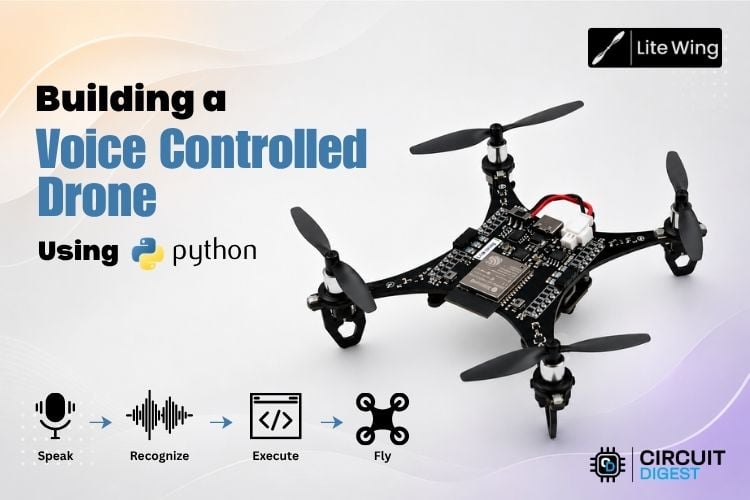
Drones are amazing little machines, but most of the time they are controlled using remotes filled with buttons and joysticks. While experimenting with our LiteWing drone, we started wondering, wouldn’t it be cool if the drone could simply listen to what we say? That idea eventually turned into this project. We built a voice controlled drone using ESP32 for the LiteWing drone using Python and speech recognition tools.
The system listens to voice input through a microphone, converts the spoken words into text, and then translates those commands into actions for the drone. Instead of pressing buttons on a controller, we can simply say commands like “takeoff,” “forward,” or “land,” and the drone responds instantly. It’s a simple idea, but it makes flying the drone feel much more natural, interactive, and fun. This ESP32 drone voice control project is designed to be practical and approachable, whether you are a student exploring drone programming, a maker experimenting with speech interfaces, or an engineer evaluating human–machine interaction for embedded systems.
If you're interested in drones and want to explore more projects, check out the “Drone projects” section on Circuit Digest.
| Quick Overview | Details |
| Drone Platform | LiteWing (ESP32-based open-source drone) |
| Programming Language | Python 3 |
| Speech Recognition | Vosk (offline, Indian English model) |
| Audio Input | PyAudio (16 kHz, mono) |
| Communication | Wi-Fi (laptop connects to drone AP) |
| Internet Required? | No — fully offline speech recognition |
| Difficulty Level | Intermediate |
Table of Contents
Hardware Requirements
The hardware setup for this ESP32 voice command drone project is simple and minimal. It includes a LiteWing drone, which performs all flight operations, and a laptop or PC, which runs the voice control program. A microphone (Optional) is used to capture the user’s voice commands.
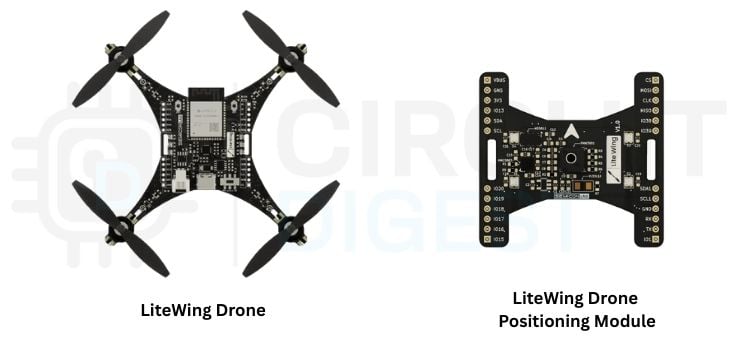
The laptop connects directly to the drone through its Wi-Fi access point (AP), enabling wireless communication between the system and the drone. Additionally, the LiteWing positioning module is used to provide stable flight and accurate position control, which helps the drone maintain balance and respond smoothly to voice commands.
Software Requirements
The software part of this ESP32 drone with voice control project is responsible for handling voice recognition, processing commands, and controlling the drone. It is mainly developed using Python and includes libraries for speech processing, audio input, and drone communication. These tools work together to convert voice commands into real-time actions performed by the drone.
| Software / Tool | Description |
| LiteWing Library | The library used to communicate with and control the LiteWing drone system |
| Python | The main programming language used to develop the voice control system |
| PyAudio | Used to capture real-time audio input from the microphone |
| Vosk (Speech Recognition) | Used for offline voice recognition to convert speech into text without the internet |
*NOTE
- Before running the project, make sure that the LiteWing drone is updated with the latest firmware, as outdated firmware may cause connection issues or unexpected behavior during flight.
- It is also important to use the latest version of the LiteWing Python library, since newer updates often include bug fixes, performance improvements, and better compatibility with the drone.
Keeping both the firmware and library up to date ensures smooth operation and reliable performance of the system.
Positioning Module Installation Checklist
Before using the voice control system and advanced flight features, the LiteWing Positioning Module must be installed correctly on the drone. The module provides the additional sensors required for stable flight, position hold, and smooth movement control. While installing the module, make sure the orientation arrow printed on the module is facing toward the drone’s USB Type-C port. Carefully align the module with the LiteWing expansion header pins and press it down evenly until it is fully seated and firmly connected to the board. Also, ensure that the module is not tilted and that all header pins are properly aligned.
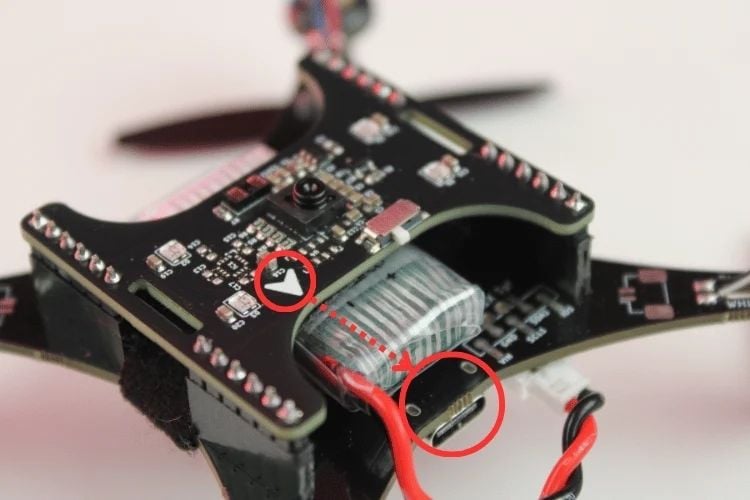
After installation, check that the battery and other wires are routed safely and do not interfere with the propellers during flight. Once the drone is powered on, verify that the module LEDs briefly flash during startup, indicating a proper connection.
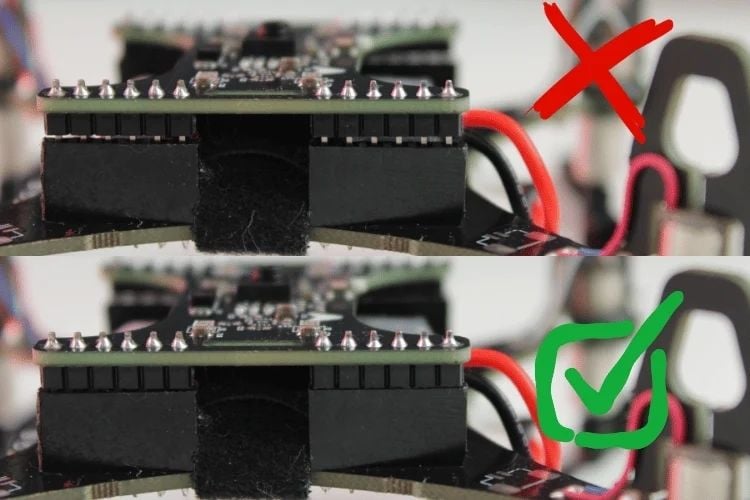
If the drone does not boot correctly or the module fails to power on, disconnect the battery immediately and recheck the alignment and connection of the positioning module. Proper installation is important for reliable flight performance and accurate voice-controlled operation.
System Architecture Overview
The system begins by capturing the user’s voice command through a microphone, which acts as the primary input interface. The captured audio is processed by the speech recognition module, where the Vosk model converts the speech into text in real time. This offline processing ensures low latency and reliable performance without requiring an internet connection. The recognized text is then forwarded to the control system for further processing. Understanding the end-to-end data flow is important for troubleshooting and extending this ESP32 voice controlled drone project.
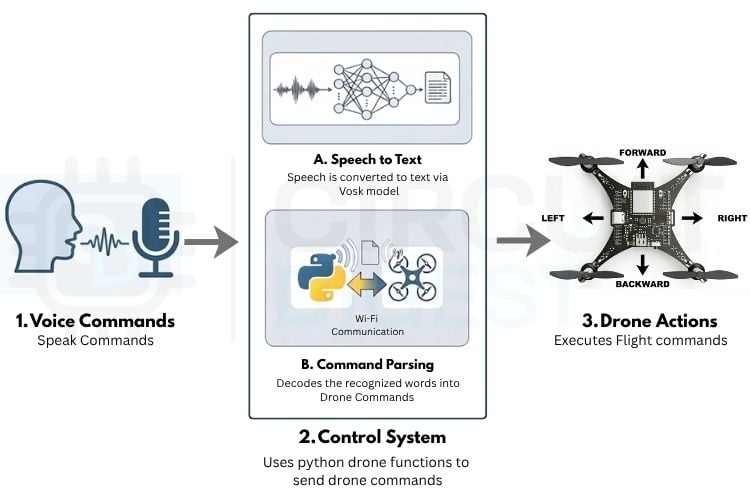
Within the control system, the converted text is processed to identify simple keywords like “takeoff,” “forward,” or “land.” These keywords are then matched to specific drone actions. The commands are sent to the drone through Wi-Fi using Python. In our project, we used the LiteWing library, which makes it easy to control the drone by providing ready-made functions for actions like takeoff, landing, movement, and LED control. Once the command is received, the drone performs the required action. This makes the whole system simple, fast, and easy to use for real-time voice control.
Speech Recognition Model - How Vosk Works in This Project
The speech recognition layer is the core of this ESP32 voice command drone project. We used Vosk, a Python-based offline speech recognition framework. The microphone captures voice input in real-time, which is processed locally using a pre-trained Indian English model stored in the model/ folder. This model converts speech to text with low latency for fast performance. Since the laptop connects directly to the drone's Wi-Fi access point without internet access, offline speech recognition is essential. This setup ensures reliable, continuous operation without requiring an internet connection.
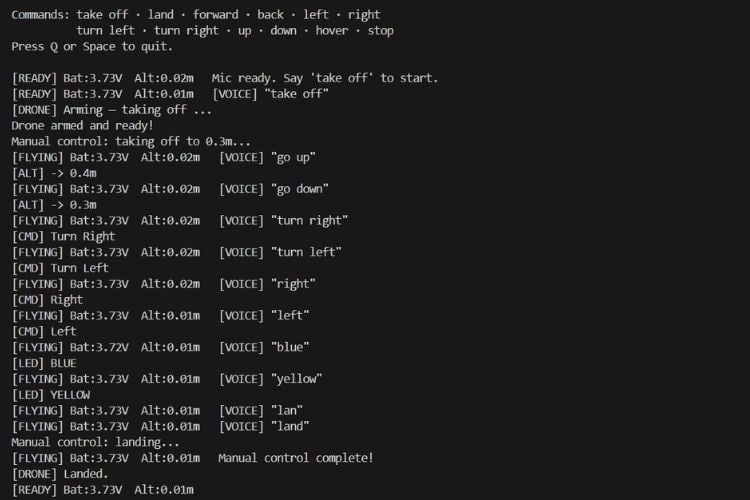
Once the speech is converted into text, the system uses a keyword-based matching approach to identify commands such as “takeoff”, “forward”, or “land”. These commands are then mapped to specific drone actions, allowing real-time control of the voice-operated drone. Additional features, such as microphone-noise calibration and a response-timeout mechanism, help improve accuracy and prevent unintended movements. Overall, this setup enables fast, reliable, and intuitive voice-based interaction, making the drone easier and more interactive to operate.
Supported Voice Commands
To make the drone easy to control, we designed a set of simple, clear voice commands that the system can quickly recognise. These commands allow the user to perform different actions like takeoff, movement, altitude adjustment, and emergency stop just by speaking. The system listens continuously, processes the spoken words, and triggers the corresponding drone function in real time. The table below lists all the supported voice commands and what each command does.
| Command (Voice Input) | Action Performed |
| Take off / Takeoff / Arm | The drone takes off and starts flying |
| Land | Drone lands safely |
| Forward / Front | Moves the drone forward |
| Backwards / Back | Moves drone backward |
| Left | Moves the drone left |
| Right | Moves the drone right |
| Turn left | Rotates the drone left |
| Turn right | Rotates the drone right |
| Up / Higher | Increases altitude |
| Down / Lower | Decreases altitude |
| Red / Green / Blue / Yellow / Purple / Orange / White | Changes LED color |
Working demo
The following demo shows the LiteWing voice control drone project being operated completely through voice commands in real time. The video below shows the complete ESP32 voice controlled drone being operated in real time using only spoken commands. Instead of using a traditional remote controller, the drone responds directly to spoken instructions such as “takeoff,” “land,” “go left,” “go right,” “up,” and even LED color change commands. As each command is spoken, the system quickly recognizes the voice input using the offline Vosk speech model and instantly sends the action to the drone through the LiteWing control library. Watching the drone react to simple spoken commands makes the entire flying experience feel much more interactive, futuristic, and fun.
You can also build and customise this project by adding your own voice commands and features, making the drone even more interactive and exciting to experiment with.
Code Explanation
This section walks through the key parts of the Python script that powers the ESP32 drone voice control system. Each block handles a distinct responsibility.
This section explains how the system is implemented in code, breaking it down into simple parts for better understanding. Each block of the program handles a specific task, such as setting up libraries, configuring parameters, processing voice input, and controlling the drone. By going through the code step by step, it becomes easier to understand how voice commands are converted into real-time drone actions.
DRONE_IP     = "192.168.43.42"  # IP address of the LiteWing drone
DEBUG_MODE   = 0                # 1 = Test without flying (simulated), 0 = Normal flight
MIC_INDEX    = 1                # Microphone input device index (0, 1, 2...)
MODEL_PATH   = "model"          # Folder containing the Vosk voice recognition model
MAX_HEIGHT   = 0.6              # Maximum allowable altitude (meters)
MIN_HEIGHT   = 0.2              # Minimum allowable altitude (meters)
SENSITIVITY = 0.4 # Movement speed/response sensitivity- DRONE_IP – Specifies the IP address used to connect to the drone.
- MIC_INDEX – Selects which microphone device is used for capturing voice input.
- MODEL_PATH – Defines the location of the Vosk speech recognition model (stored in the model/ folder).
- MAX_HEIGHT – Sets the maximum altitude limit for the drone.
- MIN_HEIGHT – Sets the minimum altitude limit for safe operation.
- SENSITIVITY – Controls how fast or responsive the drone movement is.
- DEBUG_MODE – Used to test the code without actually flying the drone.
import os, json, time, threading, msvcrt, io, sys
import pyaudio
from vosk import Model, KaldiRecognizer
from litewing import LiteWing
from litewing.manual_control import run_manual_control
Library Imports - The first part of the code includes all the required libraries needed for the system to work. Standard Python libraries like os, json, time, threading, and sys are used for basic operations, timing, and multi-threading. The pyaudio library is used to capture real-time audio from the microphone, while Vosk is used for offline speech recognition to convert voice into text. The LiteWing library is used to control the drone, providing functions for takeoff, landing, movement, and LED control. Additionally, the manual_control module from LiteWing is used to handle continuous flight control in the background.
def __init__(self):
   self.drone = LiteWing(DRONE_IP)
   self.drone.debug_mode  = bool(DEBUG_MODE)
   self.drone.sensitivity = SENSITIVITY
   self.drone.target_height = 0.3
   self.drone.enable_sensor_check = False
   self._running     = True
   self._key_timer   = 0.0
   print(f"Loading Vosk model from '{MODEL_PATH}' ...")
   self._rec = KaldiRecognizer(Model(MODEL_PATH), 16000)
   self._pa  = pyaudio.PyAudio()
   print("Model loaded.")
Initializes the drone controller by connecting to the LiteWing drone, loading the Vosk speech recognition model, and configuring PyAudio for microphone input. Sets up key parameters like sensitivity, target height, and debug mode.
def process(self, text):
   t = text.lower().strip()
   print(f'[VOICE] "{t}"')
   if any(w in t for w in ["take off", "takeoff", "arm"]):
       if not self.drone.is_flying:
           threading.Thread(target=self._flight_loop, daemon=True).start()
           # _flight_loop prints "[DRONE] Arming..." immediately
   elif "land" in t:
       self._clear_keys()
       self.drone._manual_active = False
   elif any(w in t for w in ["stop", "emergency"]):
       self._clear_keys()
       self.drone._manual_active = False
       self.drone.emergency_stop()
   elif "forward" in t or "front" in t: self._set_key("w")
   elif "backward" in t or "back" in t: self._set_key("s")
   elif "turn left" in t:  self._set_key("q")
   elif "turn right" in t: self._set_key("e")
   elif "left" in t:       self._set_key("a")
   elif "right" in t:      self._set_key("d")
   elif "higher" in t or "up" in t:
       self.drone.target_height = min(self.drone.target_height + 0.1, MAX_HEIGHT)
       print(f"[ALT] -> {self.drone.target_height:.1f}m")
   elif "lower" in t or "down" in t:
       self.drone.target_height = max(self.drone.target_height - 0.1, MIN_HEIGHT)
       print(f"[ALT] -> {self.drone.target_height:.1f}m")
   elif any(w in t for w in ["hover"]):
       self._clear_keys()
   else:
       if "off" in t or "light off" in t:
           self.drone.clear_leds()
           print("[LED] OFF")
       else:
           for name, rgb in LED_COLORS.items():
               if name in t:
                   self.drone.set_led_color(*rgb)
                   print(f"[LED] {name.upper()}")
                   break
The command dispatcher that interprets voice commands and executes corresponding drone actions. It parses recognized text for keywords like "take off", "land", "forward", "left", etc., and triggers the appropriate drone movements, altitude adjustments, or LED color changes. This is the brain of the ESP32 voice command drone control system.
def _listen(self):
   stream = self._pa.open(
       format=pyaudio.paInt16, channels=1, rate=16000,
       input=True, frames_per_buffer=8000,
       input_device_index=MIC_INDEX
   )
   stream.start_stream()
   print("Mic ready. Say 'take off' to start.")
   while self._running:
       data = stream.read(4000, exception_on_overflow=False)
       if data and self._rec.AcceptWaveform(data):
           text = json.loads(self._rec.Result()).get("text", "").strip()
           if text:
               self.process(text)
   stream.stop_stream()
   stream.close()
Continuously monitors the microphone for voice input. It captures audio data at 16kHz, feeds it to the Vosk recognizer, and calls process() whenever a complete voice command is recognized, enabling real-time voice control of the drone.
Troubleshooting
The most common issue in building an ESP32 drone with voice control is poor speech recognition. During the development of this project, one of the main issues faced was related to speech recognition accuracy. Initially, we used an American English Vosk model, but it had difficulty recognizing commands correctly due to differences in accent and pronunciation. This resulted in incorrect or missed command detection during testing.
To solve this, we switched to an Indian English Vosk model, which is better suited for our accent and speaking style. After making this change, the system showed a significant improvement in recognizing voice commands accurately and consistently. This adjustment made the overall interaction smoother and more reliable for real-time drone control. This voice controlled drone project using ESP32 demonstrates how accessible speech-controlled robotics has become.
Frequently Asked Questions on ESP32 Voice Controlled Drone
⇥ Why does my drone drift or struggle to maintain a stable hover position?
If position hold is unstable, or the drone drifts significantly during hover commands, the issue is likely related to outdated firmware. Flash your LiteWing drone with the latest firmware to resolve stability issues. Updated firmware includes improvements to the flight controller's PID tuning and sensor fusion algorithms, which are critical for stable hovering. Visit the LiteWing documentation for step-by-step firmware flashing instructions.
⇥ Why isn't the system recognizing my voice commands?
Ensure you're speaking clearly and close to the microphone. Check that the correct microphone is selected (MIC_INDEX). Try downloading a better Vosk model for improved accuracy.
⇥ Can I use commands in other languages?
Yes, but you need to download a Vosk model for your language from https://alphacephei.com/vosk/models and update the command keywords in the process() function to match your language.
⇥ How do I download and install the Vosk model?
Visit https://alphacephei.com/vosk/models, download a model (vosk-model-small-en-us-0.15 recommended for English), extract it, and place the folder named 'model' in your project directory.
⇥ How accurate is the voice recognition?
Vosk works offline with good accuracy for clear speech. Larger models provide better recognition but require more resources. Quiet environments work best.
⇥ How do I stop the drone in an emergency?
Say "stop" or "emergency" to immediately halt all movements and land, or press Q/Space on your keyboard.
⇥ Can I control the drone with a keyboard while using voice?
No, this script is designed for voice-only control during flight. The keyboard is only used to quit the program (Q or Space).
⇥ How do I adjust flight sensitivity?
Change the SENSITIVITY value (0.0 to 1.0). Lower values = slower, smoother movements. Higher values = faster, more responsive control.


LiteWing Drone Projects with Joystick, Gesture & Python Control
Explore LiteWing drone projects with joystick control, gesture flying, and Python programming using ESP32, Crazyflie SDK, and wireless control.
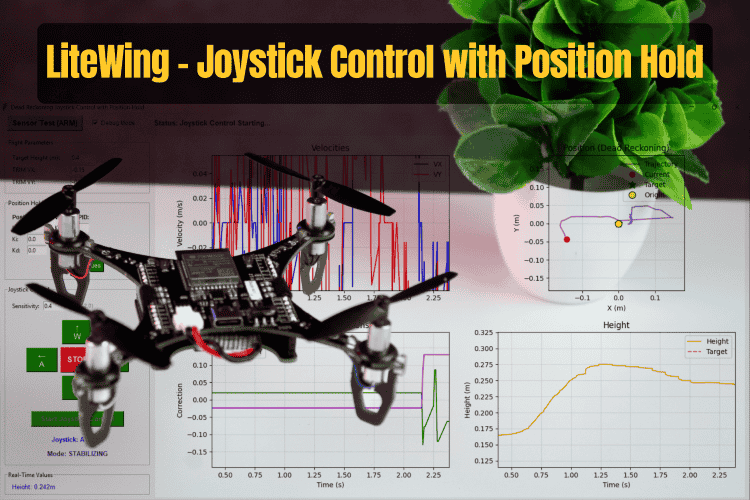
Build a smart drone positioning system with LiteWing using joystick control, optical flow sensing, and automatic position hold for stable indoor flight.
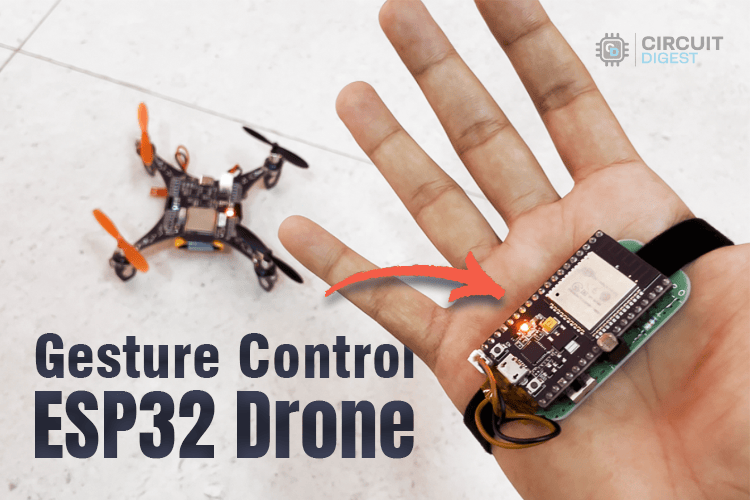
DIY Gesture Control Drone using Python with LiteWing and ESP32
Create a DIY gesture-controlled drone using ESP32, Python, and LiteWing for hands-free flight with real-time motion tracking and wireless control.
How to Program the LiteWing Drone using Python with Crazyflie Cflib Python SDK
Learn how to program the LiteWing drone using Python and Crazyflie cflib SDK for wireless flight control, automation, and custom drone projects.
Complete Project Code
# Workflow: Connects to drone -> Loads Vosk AI model -> Initializes PyAudio stream ->
# Recognizes voice keywords -> Delivers LiteWing flight and LED commands.
# LiteWing Voice Control System (Vosk Offline)
# This script allows controlling a LiteWing drone using voice commands.
#
# Required Libraries:
#   vosk        (pip install vosk)
#   pyaudio     (pip install pyaudio)
#   litewing    (pip install litewing)
#
# Model Setup:
#   Download Vosk model from: https://alphacephei.com/vosk/models
#   Extract to a folder named 'model/' in the project root or script directory.
import os, json, time, threading, msvcrt, io, sys
import pyaudio
from vosk import Model, KaldiRecognizer
from litewing import LiteWing
from litewing.manual_control import run_manual_control
# ── Config ────────────────────────────────────────────
DRONE_IP     = "192.168.43.42"    # IP address of the LiteWing drone
DEBUG_MODE   = 1             # 1 = simulate flight (no motors), 0 = real flight
MIC_INDEX    = 1                  # Index of the microphone to use (System dependent)
MAX_HEIGHT   = 0.5               # Maximum allowed fly altitude in meters
MIN_HEIGHT   = 0.2               # Minimum allowed fly altitude in meters
SENSITIVITY  = 0.2             # Speed and responsiveness of movement (0.0 - 1.0)

# Check for model in current dir, then in parent (root)
SCRIPT_DIR   = os.path.dirname(os.path.abspath(__file__))
MODEL_PATH   = os.path.join(SCRIPT_DIR, "model")
if not os.path.isdir(MODEL_PATH):
   MODEL_PATH = os.path.join(os.path.dirname(SCRIPT_DIR), "model")

LED_COLORS = {
   "red": (255,0,0), "green": (0,255,0), "blue": (0,0,255),
   "yellow": (255,255,0), "purple": (255,0,255),
   "orange": (255,165,0), "white": (255,255,255), "off": (0,0,0),
}

# ── Controller ────────────────────────────────────────
class VoiceDrone:
   def __init__(self):
       self.drone = LiteWing(DRONE_IP)
       self.drone.debug_mode  = bool(DEBUG_MODE)
       self.drone.sensitivity = SENSITIVITY
       self.drone.target_height = 0.3
       self.drone.enable_sensor_check = False
       self._running     = True
       self._key_timer   = 0.0
       print(f"Loading Vosk model from '{MODEL_PATH}' ...")
       self._rec = KaldiRecognizer(Model(MODEL_PATH), 16000)
       self._pa  = pyaudio.PyAudio()
       print("Model loaded.")
   # ── Key helpers ───────────────────────────────────
   KEY_LABELS = {
       "w": "Forward", "s": "Backward",
       "a": "Left",    "d": "Right",
       "q": "Turn Left", "e": "Turn Right",
   }
   def _set_key(self, key, duration=1.0):
       self._clear_keys()
       if key in self.drone._manual_keys:
           self.drone._manual_keys[key] = True
           self._key_timer = time.time() + duration
           print(f"[CMD] {self.KEY_LABELS.get(key, key.upper())}")
   def _clear_keys(self):
       if hasattr(self.drone, "_manual_keys"):
           for k in self.drone._manual_keys:
               self.drone._manual_keys[k] = False
       self._key_timer = 0.0
   def _key_watchdog(self):
       while self._running:
           if self._key_timer and time.time() > self._key_timer:
               self._clear_keys()
           time.sleep(0.05)
   # ── Flight loop with shape queue ──────────────────
   def _flight_loop(self):
       """Starts manual control on takeoff command."""
       print("[DRONE] Arming — taking off ...")
       self.drone._manual_active = True
       # Suppress the library's "Manual control: WASD=..." key-hint line
       _orig_logger = self.drone._logger_fn
       _suppressed  = "Manual control: WASD=Move, Q/E=Yaw, R/F=Up/Down, SPACE=Land"
       self.drone._logger_fn = lambda msg, _o=_orig_logger, _s=_suppressed: (
           _o(msg) if msg != _s else None
       )
       try:
           run_manual_control(self.drone)   # blocks until landed
       except Exception as e:
           print(f"\n[DRONE] Error during flight: {e}")
       finally:
           self.drone._manual_active = False
       print("[DRONE] Landed.")

   # ── Command dispatcher ────────────────────────────
   def process(self, text):
       t = text.lower().strip()
       print(f'[VOICE] "{t}"')
       if any(w in t for w in ["take off", "takeoff", "arm"]):
           if not self.drone.is_flying:
               threading.Thread(target=self._flight_loop, daemon=True).start()
               # _flight_loop prints "[DRONE] Arming..." immediately
       elif "land" in t:
           self._clear_keys()
           self.drone._manual_active = False
       elif any(w in t for w in ["stop", "emergency"]):
           self._clear_keys()
           self.drone._manual_active = False
           self.drone.emergency_stop()
       elif "forward" in t or "front" in t: self._set_key("w")
       elif "backward" in t or "back" in t: self._set_key("s")
       elif "turn left" in t:  self._set_key("q")
       elif "turn right" in t: self._set_key("e")
       elif "left" in t:       self._set_key("a")
       elif "right" in t:      self._set_key("d")
       elif "higher" in t or "up" in t:
           self.drone.target_height = min(self.drone.target_height + 0.1, MAX_HEIGHT)
           print(f"[ALT] -> {self.drone.target_height:.1f}m")
       elif "lower" in t or "down" in t:
           self.drone.target_height = max(self.drone.target_height - 0.1, MIN_HEIGHT)
           print(f"[ALT] -> {self.drone.target_height:.1f}m")
       elif any(w in t for w in ["hover"]):
           self._clear_keys()
       else:
           if "off" in t or "light off" in t:
               self.drone.clear_leds()
               print("[LED] OFF")
           else:
               for name, rgb in LED_COLORS.items():
                   if name in t:
                       self.drone.set_led_color(*rgb)
                       print(f"[LED] {name.upper()}")
                       break
   # ── Mic listen loop ───────────────────────────────
   def _listen(self):
       stream = self._pa.open(
           format=pyaudio.paInt16, channels=1, rate=16000,
           input=True, frames_per_buffer=8000,
           input_device_index=MIC_INDEX
       )
       stream.start_stream()
       print("Mic ready. Say 'take off' to start.")
       while self._running:
           data = stream.read(4000, exception_on_overflow=False)
           if data and self._rec.AcceptWaveform(data):
               text = json.loads(self._rec.Result()).get("text", "").strip()
               if text:
                   self.process(text)
       stream.stop_stream()
       stream.close()
   # ── Entry point ───────────────────────────────────
   def run(self):
       print(f"Connecting to {DRONE_IP} ...")
       try:
           self.drone.connect()
       except Exception as e:
           print(f"[ERROR] {e}"); return
       print("Ready. Say 'take off' to fly.")
       self.drone.set_led_color(255, 255, 255)
       threading.Thread(target=self._key_watchdog, daemon=True).start()
       threading.Thread(target=self._listen,       daemon=True).start()
       print("\nCommands: take off · land · forward · back · left · right")
       print("          turn left · turn right · up · down · hover · stop")
       print("Press Q or Space to quit.\n")
       try:
           while self._running:
               if msvcrt.kbhit() and msvcrt.getch() in (b'q', b'Q', b' '):
                   break
               label = "FLYING" if self.drone.is_flying else "READY"
               print(f"\r[{label}] Bat:{self.drone.battery:.2f}V  Alt:{self.drone.height:.2f}m   ", end="", flush=True)
               time.sleep(0.1)
       except KeyboardInterrupt:
           pass
       finally:
           self._running = False
           self._clear_keys()
           if self.drone.is_flying:
               self.drone.land(0.0, 0.1)
           self.drone.clear_leds()
           print("\nDone.")

if __name__ == "__main__":
   VoiceDrone().run()

Add a comment
No account needed. Your comment appears once a moderator has reviewed it.