



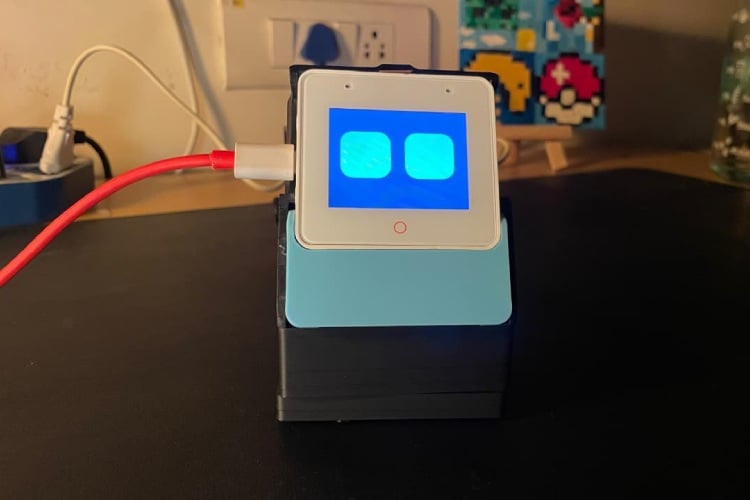
By Mohammed Akramuddin
Sentio is a project that reimagines the smart home assistant as an interactive digital pet rather than a lifeless tool. While most smart speakers look boring and static, Sentio is an emotive, privacy-focused robot that loves pets and interactions. Crucially, it serves as a central "Guardian" for the home: it integrates a custom Smart Video Doorbell for secure local streaming and supports Emergency Pagers for elderly care. This combines the engagement of a companion robot with the feautres of a secure, offline home automation hub.
Components Required
| Component Name | Quantity | Datasheet/Link |
| esp32-s3-box-3 | 1 | View Datasheet |
| esp32 cam (with base board) | 1 | - |
| 433Mhz receiver (RX480-E) | 1 | - |
| 433Mhz transmitter (remote) | 1 | - |
| TTP223 touch sensor module | 1 | - |
| mg90 micro servo | 1 | - |
| accelerometer (mpu6050) | 1 | - |
| jumper wires (as required) | 1 | - |
| pla (150g) | 1 | - |
| 3.7V li-po | 1 | - |
| 477uF capacitor | 1 | - |
| rectifying diode | 1 | - |
Circuit Diagram

Hardware Assembly
Step 1: Print the stl files
Go to the github repo and download and print top.stl, middle.stl, bottom.stl and esp32cam_case.stl. Default print settings will suffice but supports must be turned on.
Step 2: Prepare the Case
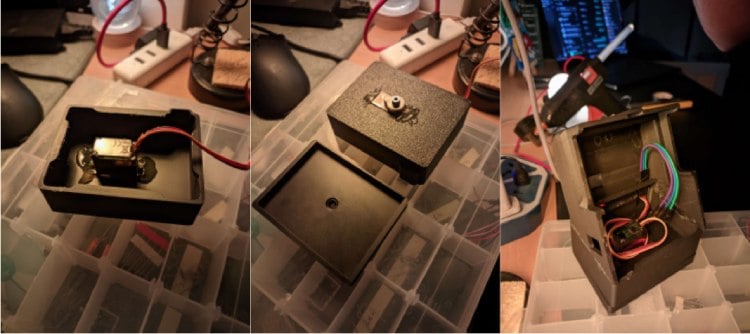
Take the servo motor that controls the neck movement and screw it into middle.stl ; make sure that the shaft is centered and pointing downards. Place the shaft into the hole present on bottom.stl and screw in the x-shaped shaft attachment from the opposite side. Finally, glue top.stl to middle.stl to complete the casing.
Step 3: Connect the Servo Motor (MG90)
Plug the signal wire into GPIO 39 on the dock. Plug the power and ground wire into a 3.7V li-po and create a common ground with one of the GND ports on the dock. Also add the flyback diode and decoupling capacitor as shown in the schematic.
Step 4: Connect the Pet Sensor (TTP223)
Connect the signal pin to GPIO 38. Connect the power pin to a 3.3V pin on the dock and the ground pin to a GND pin. Stick/place it near the top of top.stl.
Step 5: Connect the Motion Sensor (mpu6050)
Connect the SDA pin to GPIO 13 and the SCL pin to GPIO 14. Connect the VCC pin to a 3.3V pin and the GND pin to a GND pin on the dock. If problems arise, the AD0 pin can be connected to ground, otherwise the rest of the pins can be left floating.
Step 6: Connect the Pager Receiver (RX480-E)
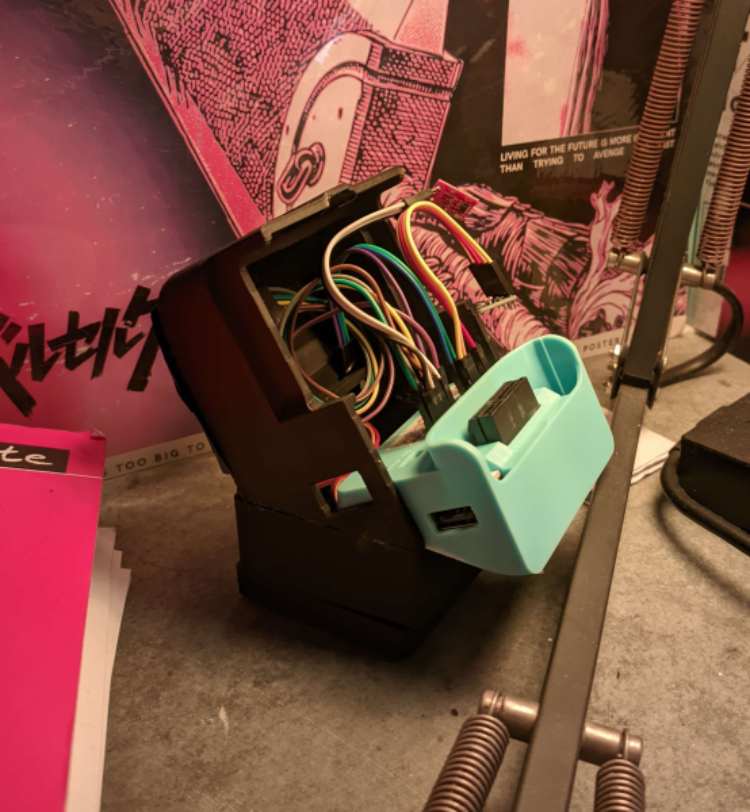
Connect the D0 pin to GPIO 40, the D1 pin to GPIO 41, and the D2 pin to GPIO 42. Connect the VCC pin to the last remaining 3.3V pin and the GND pin to a GND pin. If you wish to program the 4th button on the pager remote, the D3 pin would have to be connected to a GPIO pin on the dock as well. The VT pin can be left floating as it just goes high when any button is pressed and we do not need that. (The following picture shows what it looks like with everything connected and the main board removed for visibility)
Step 7: Flash the code
To flash the Sentio.yaml code onto Sentio, use a USB-C cable that supports data transfer and connect it to the port on its side. Next, go to https://web.esphome.io/?dashboard_install ,connect the USB-C cable to your computer, click connect on the screen and choose the USB port that you are connected to. Then, click install and choose file. You can get this file from my github repo in the "install folder." Once done, unplug it and use the hole on the back of top.stl to power Sentio from the dock (this port only supports power and not data transfer).
Step 8: Set up the Doorbell (ESP32-CAM)
Insert the ESP32-CAM module directly into the custom back board mount. Connect a USB cable to the unit to provide power and place the whole unit in esp32cam_case.stl. Finally, flash the doorbell.yaml (from my github repo) onto the esp32-cam using https://web.esphome.io/?dashboard_install. Ideally, the doorbell should be powered directly by the house's doorbell power cables that are usually present near the main door, but it can alternatively be connected to a wall socket.
Sentio: Project Documentation & Code Explanation
1. Project Overview
Sentio is a smart AI pet robot based on the ESP32-S3-BOX-3. It is designed to be an emotional companion that reacts to touch and movement, but it also doubles as a security device with a video doorbell and an emergency pager system. The code is built using ESPHome, which allows us to easily connect sensors, screens, and audio.
2. The "Brain" (State Machine)
Sentio works like a flowchart. It has a variable called current_state that remembers what mood the robot is in (Happy, Sad, Sleeping, etc.). The screen draws a different face depending on this number.
How it works:
- State 0: Neutral Face
- State 2: Happy Face
- State 99: Doorbell Video Feed
Code Example:
globals:
 - id: current_state
   type: int
   initial_value: '0'
display:
 lambda: |-
   int state = id(current_state);

   // Draw the face based on the number
   if (state == 0) { it.image(0, 0, id(img_neutral)); }
   else if (state == 2) { it.image(0, 0, id(img_happy)); }
   else if (state == 6) { it.image(0, 0, id(img_angry)); }
3. Emotions & Interactions
Sentio has a personality. It reacts to different physical inputs using sensors.
A. Happy (Petting)
When you touch the capacitive sensor on Sentio's head, it becomes happy. It plays a sound, wiggles its servo motor (neck), and shows "Happy Eyes."
- Trigger: Touch Sensor (GPIO 38)
Code Example:
binary_sensor:
 - platform: gpio
   pin: GPIO38
   name: "Pet Sensor"
   on_press:
     - script.execute: mood_happy
B. Angry (Poking)
If you tap the touchscreen (poking its face), Sentio gets annoyed. It plays an angry sound and jerks its head away.
- Trigger: Touchscreen Tap
Code Example:
touchscreen:
 on_touch:
   - script.execute: mood_angry
C. Dizzy (Shaking)
Sentio has a gyroscope inside. If you shake the robot or tilt it too fast, it gets dizzy. We use a filter in the code so it doesn't get dizzy from small movements, only big ones.
- Trigger: Gyroscope (MPU6050) movement > 30 degrees/sec.
Code Example:
sensor:
 - platform: mpu6050
   gyro_z:
     filters:
       - lambda: |-
           // If shaken hard, get dizzy
           if (abs(x) > 30.0) { id(mood_dizzy).execute(); }
           return x;
D. Bored & Sleeping (Idle)
If you leave Sentio alone, a timer runs in the background. It it gets Curious (looks around), and it falls asleep (showing Z-Z-Z animations).
Code Example:
script:
 - id: idle_watchdog
   then:
     - delay: 15s
     - script.execute: mood_curious
     - delay: 10s
     - script.execute: enter_sleep
4. Audio System
Sentio plays high-quality audio. Instead of storing large files on the chip, it downloads them from the internet (GitHub) instantly when needed. To make Sentio feel alive, the code randomly picks between different versions of a sound (like happy1.wav or happy2.wav).
Code Example:
media_player.play_media:
 id: sentio_speaker
 media_url: !lambda |-
   // Randomly pick sound 1 or 2
   return (rand() % 2 == 0) ?
   "https://.../happy1.wav" :
   "https://.../happy2.wav";
5. Servo Movement (The Neck)
The servo motor gives Sentio physical expression. We use scripts to create specific movements for each emotion.
- Wiggle: Smooth left-right (Happy).
- Shake: Fast vibration (Dizzy).
- Jerk: Sharp turn (Angry).
Code Example:
script:
 - id: servo_wiggle
   then:
     - servo.write: { id: head_servo, level: -0.5 }
     - delay: 100ms
     - servo.write: { id: head_servo, level: 0.5 }
6. Doorbell Mode (Video Feed)
Sentio connects to a separate camera unit (ESP32-CAM).
How to activate: Hold the Home Button (Red Circle) for 1.5 seconds.
What happens: Sentio stops all "Pet" behaviors (so it doesn't fall asleep while you are watching) and switches the screen to show the camera feed.
The Code: We use a custom C++ driver to fetch images from the camera very fast, creating a video effect.
Code Example:
script:
 - id: enter_doorbell_mode
   then:
     # 1. Stop pet behaviors
     - script.execute: stop_all_behaviors
     # 2. Switch screen to video mode (99)
     - lambda: 'id(current_state) = 99;'
7. Pager System (Emergency)
Sentio has a 433MHz radio receiver. This allows a small remote control to send alerts to the robot. This system has Highest Priority—it overrides the pet mode and the doorbell mode.
Button 1 (Ping): Turns screen Blue and plays a "Ding".
Button 2 (Emergency): Turns screen Red and plays a loud alarm.
Button 3 (Dismiss): Clears the alert and goes back to whatever Sentio was doing before.
Code Example:
binary_sensor:
 - platform: gpio
   name: "Pager Button 2"
   on_press:
     - script.execute: pager_emergency
script:
 - id: pager_emergency
   then:
     # Turn screen Red (State 101)
     - lambda: 'id(current_state) = 101;'
     # Play Alarm
     - media_player.play_media: "https://.../emergency.wav"
8. Smart Home Integration
Because Sentio uses ESPHome, it automatically connects to Home Assistant.
- Sensors: You can see if Sentio is "Sleeping" or "Awake" on your phone dashboard.
- Camera: The doorbell camera feed can be recorded by your smart home server.
- Automation: You could set up a rule: "If Sentio is Happy (petting), turn on the living room lights."
GitHub Repository


Complete Project Code
substitutions:
 name: sentio-pet
 friendly_name: Sentio
esphome:
 name: ${name}
 friendly_name: ${friendly_name}
 min_version: 2024.6.0
 name_add_mac_suffix: true
 project:
   name: "Sentio.PetBot"
   version: "135.0" # Fix Suicide Bug

 platformio_options:
   board_build.partitions: partitions.csv

 # --- INCLUDE DRIVER ---
 includes:
   - web_image.h

 libraries:
   - "Bodmer/TJpg_Decoder"
 on_boot:
   priority: 600
   then:
     - light.turn_on: backlight
     - switch.turn_on: speaker_amp
     - servo.write: { id: head_servo, level: 0.0 }

     - delay: 1s
     - media_player.volume_set: { id: sentio_speaker, volume: 1.0 }

     # --- START IN PET MODE ---
     - lambda: 'id(is_doorbell_mode) = false;'
     - lambda: 'id(is_paged) = false;'
     - script.execute: random_blink
     - script.execute: idle_watchdog
     - script.execute: engine_tick

     # Startup Sound
     - media_player.play_media:
         id: sentio_speaker
         media_url: "https://raw.githubusercontent.com/Akram1966/sentio-sounds/main/happy1.w…"
esp32:
 board: esp32s3box
 flash_size: 16MB
 framework:
   type: arduino
psram:
 mode: octal
 speed: 80MHz
logger:
 hardware_uart: USB_SERIAL_JTAG
 level: ERROR
api:
 services:
   - service: start_doorbell
     then:
       - script.execute: enter_doorbell_mode
ota:
 - platform: esphome
wifi:
 id: wifi_component
 ssid: "AngryBird"
 password: "123454321"
 ap:
   ssid: "Sentio-Fallback"
# ---------------------------------------------------------
# WEB SERVER
# ---------------------------------------------------------
web_server:
 port: 80
# ---------------------------------------------------------
#  IMAGE ASSETS
# ---------------------------------------------------------
image:
 - file: "images/eyes_neutral.png"
   id: img_neutral
   resize: 320x240
   type: RGB565
 - file: "images/eyes_blink.png"
   id: img_blink
   resize: 320x240
   type: RGB565
 - file: "images/eyes_happy.png"
   id: img_happy
   resize: 320x240
   type: RGB565
 - file: "images/eyes_sad.png"
   id: img_sad
   resize: 320x240
   type: RGB565
 - file: "images/eyes_curious.png"
   id: img_curious
   resize: 320x240
   type: RGB565
 - file: "images/eyes_angry.png"
   id: img_angry
   resize: 320x240
   type: RGB565
 - file: "images/eyes_sleepy.png"
   id: img_sleepy
   resize: 320x240
   type: RGB565
 - file: "images/eyes_sleep_z.png"
   id: img_sleep_z
   resize: 320x240
   type: RGB565
 - file: "images/eyes_sleep_zz.png"
   id: img_sleep_zz
   resize: 320x240
   type: RGB565
 - file: "images/eyes_sleep_zzz.png"
   id: img_sleep_zzz
   resize: 320x240
   type: RGB565
 - file: "images/eyes_dizzy.png"
   id: img_dizzy
   resize: 320x240
   type: RGB565
 - file: "images/eyes_shy.png"
   id: img_shy
   resize: 320x240
   type: RGB565
 - file: "images/touch_left.png"
   id: img_touch_left
   resize: 320x240
   type: RGB565
 - file: "images/touch_right.png"
   id: img_touch_right
   resize: 320x240
   type: RGB565
font:
 - file: "VT323-Regular.ttf"
   id: debug_font
   size: 30
 - file: "VT323-Regular.ttf"
   id: alert_font
   size: 60
globals:
 - id: current_state
   type: int
   initial_value: '0'
 - id: last_drawn_state
   type: int
   initial_value: '-1'

 # --- LOGIC FLAGS ---
 - id: is_doorbell_mode
   type: bool
   initial_value: 'false'
 - id: is_paged
   type: bool
   initial_value: 'false'

 - id: ignore_next_release
   type: bool
   initial_value: 'false'
 - id: is_sleeping
   type: bool
   initial_value: 'false'
 - id: is_servo_moving
   type: bool
   initial_value: 'false'
 - id: fps
   type: int
   initial_value: '0'
script:
 # --- 1. ENGINE ---
 - id: engine_tick
   mode: restart
   then:
     - delay: 200ms
     - lambda: 'id(is_servo_moving) = false;'
     - script.execute: engine_tick
 # --- 2. IDLE ---
 - id: idle_watchdog
   mode: restart
   then:
     - delay: 15s
     - script.execute: mood_curious
     - delay: 10s
     - script.execute: mood_sad
     - delay: 5s
     - script.execute: mood_sleepy
     - delay: 5s
     - script.execute: enter_sleep
 # --- 3. TRANSITION HELPERS ---
 - id: return_to_neutral
   then:
     # If in doorbell mode or paged, DO NOT return to neutral face
     - if:
         condition:
           lambda: 'return id(is_doorbell_mode) || id(is_paged);'
         then:
           - script.stop: return_to_neutral

     - lambda: 'id(current_state) = 1;' # Blink
     - delay: 30ms
     - lambda: 'id(current_state) = 0;' # Neutral
     - script.execute: random_blink
     - script.execute: idle_watchdog
 - id: stop_all_behaviors
   then:
     - script.stop: random_blink
     - script.stop: anim_sleep
     - script.stop: idle_watchdog
     # We REMOVED the mood stops here so moods don't kill themselves
 - id: force_stop_moods
   then:
     # This is called by Pager/Doorbell to forcibly kill emotions
     - script.stop: mood_happy
     - script.stop: mood_sad
     - script.stop: mood_angry
     - script.stop: mood_dizzy
     - script.stop: mood_shy
     - script.stop: mood_curious
 # --- 4. DOORBELL LOGIC ---
 - id: home_button_timer
   then:
     - delay: 1.5s
     - lambda: 'id(ignore_next_release) = true;'
     - script.execute: toggle_doorbell_mode
 - id: toggle_doorbell_mode
   then:
     # BLOCKED BY PAGER
     - if:
         condition:
           lambda: 'return id(is_paged);'
         then:
           - script.stop: toggle_doorbell_mode

     - if:
         condition:
            lambda: 'return id(is_doorbell_mode);'
         then:
            - script.execute: exit_doorbell_mode
         else:
            - script.execute: enter_doorbell_mode
 - id: enter_doorbell_mode
   then:
     - lambda: 'id(is_doorbell_mode) = true;'
     - script.execute: stop_all_behaviors
     - script.execute: force_stop_moods
     - script.execute: wake_up
     - media_player.play_media:
         id: sentio_speaker
         media_url: "https://raw.githubusercontent.com/esphome/esphome-docs/current/static/a…"
     - lambda: 'id(current_state) = 99;'
 - id: exit_doorbell_mode
   then:
     - lambda: 'id(is_doorbell_mode) = false;'
     - lambda: 'id(current_state) = 0;'
     - script.execute: return_to_neutral
 # --- 5. PAGER SYSTEM ---
 - id: pager_ping
   mode: restart
   then:
     - lambda: 'id(is_paged) = true;'
     - script.execute: stop_all_behaviors
     - script.execute: force_stop_moods

     # BLUE screen
     - lambda: 'id(current_state) = 100;'

     # Clear previous audio & Buffer
     - media_player.stop: sentio_speaker
     - delay: 100ms

     # Play PING Sound
     - media_player.play_media:
         id: sentio_speaker
         media_url: "https://raw.githubusercontent.com/Akram1966/sentio-sounds/main/ping.wav"
 - id: pager_emergency
   mode: restart
   then:
     - lambda: 'id(is_paged) = true;'
     - script.execute: stop_all_behaviors
     - script.execute: force_stop_moods

     # RED screen
     - lambda: 'id(current_state) = 101;'

     # Clear previous audio & Buffer
     - media_player.stop: sentio_speaker
     - delay: 100ms

     # Play EMERGENCY Sound
     - media_player.play_media:
         id: sentio_speaker
         media_url: "https://raw.githubusercontent.com/Akram1966/sentio-sounds/main/emergenc…"
 - id: pager_dismiss
   then:
     - lambda: 'id(is_paged) = false;'

     # Return to previous state logic
     - if:
         condition:
           lambda: 'return id(is_doorbell_mode);'
         then:
           # Go back to doorbell
           - lambda: 'id(current_state) = 99;'
         else:
           # Go back to pet mode
           - lambda: 'id(current_state) = 0;'
           - script.execute: return_to_neutral
 # --- 6. BEHAVIORS ---

 - id: mood_happy
   mode: restart
   then:
     # Blocked by Doorbell AND Pager
     - if:
         condition:
           lambda: 'return id(is_doorbell_mode) || id(is_paged);'
         then:
           - script.stop: mood_happy

     - script.execute: stop_all_behaviors
     - media_player.play_media:
         id: sentio_speaker
         media_url: !lambda |-
           return (rand() % 2 == 0) ?
           "https://raw.githubusercontent.com/Akram1966/sentio-sounds/main/happy1.w…" :
           "https://raw.githubusercontent.com/Akram1966/sentio-sounds/main/happy2.w…";
     - lambda: 'id(current_state) = 2;'
     - script.execute: servo_wiggle
     - delay: 2s
     - script.execute: return_to_neutral
 - id: mood_dizzy
   mode: restart
   then:
     - if:
         condition:
           lambda: 'return id(is_doorbell_mode) || id(is_paged);'
         then:
           - script.stop: mood_dizzy
     - script.execute: stop_all_behaviors
     - media_player.play_media:
         id: sentio_speaker
         media_url: "https://raw.githubusercontent.com/Akram1966/sentio-sounds/main/dizzy.wav"

     - lambda: 'id(current_state) = 7;'
     - script.execute: servo_shake
     - delay: 3s
     - script.execute: return_to_neutral
 - id: mood_angry
   mode: restart
   then:
     - if:
         condition:
           lambda: 'return id(is_doorbell_mode) || id(is_paged);'
         then:
           - script.stop: mood_angry
     - script.execute: stop_all_behaviors
     - media_player.play_media:
         id: sentio_speaker
         media_url: !lambda |-
           return (rand() % 2 == 0) ?
           "https://raw.githubusercontent.com/Akram1966/sentio-sounds/main/angry1.w…" :
           "https://raw.githubusercontent.com/Akram1966/sentio-sounds/main/angry2.w…";

     - lambda: 'id(current_state) = 6;'
     - script.execute: servo_jerk_away
     - delay: 2s
     - script.execute: return_to_neutral
 - id: mood_curious
   then:
     - script.execute: stop_all_behaviors
     - media_player.play_media:
         id: sentio_speaker
         media_url: "https://raw.githubusercontent.com/Akram1966/sentio-sounds/main/curious…"

     - lambda: 'id(current_state) = 1;'
     - delay: 30ms
     - lambda: 'id(current_state) = 4;'
     - script.execute: random_blink
 - id: mood_sad
   then:
     - script.execute: stop_all_behaviors
     - media_player.play_media:
         id: sentio_speaker
         media_url: "https://raw.githubusercontent.com/Akram1966/sentio-sounds/main/sad.wav"

     - lambda: 'id(current_state) = 1;'
     - delay: 30ms
     - lambda: 'id(current_state) = 3;'
 - id: mood_sleepy
   then:
     - script.execute: stop_all_behaviors
     - lambda: 'id(current_state) = 1;'
     - delay: 30ms
     - lambda: 'id(current_state) = 11;'
 - id: enter_sleep
   then:
     - script.execute: stop_all_behaviors
     - lambda: 'id(current_state) = 1;'
     - delay: 30ms
     - script.execute: anim_sleep
 - id: anim_sleep
   mode: restart
   then:
     - while:
         condition:
           lambda: 'return id(is_sleeping);'
         then:
           - lambda: 'id(current_state) = 50;'
           - delay: 500ms
           - lambda: 'id(current_state) = 51;'
           - delay: 500ms
           - lambda: 'id(current_state) = 52;'
           - delay: 500ms
           - lambda: 'id(current_state) = 51;'
           - delay: 500ms
 - id: random_blink
   mode: restart
   then:
     - delay: !lambda "return (esphome::random_uint32() % 3000) + 1500;"
     - lambda: 'id(current_state) = 1;'
     - delay: 15ms
     - lambda: 'id(current_state) = 0;'

     - if:
         condition:
           lambda: 'return (rand() % 100) < 30;'
         then:
           - delay: 100ms
           - lambda: 'id(current_state) = 1;'
           - delay: 15ms
           - lambda: 'id(current_state) = 0;'

     - script.execute: random_blink
 - id: mood_shy
   mode: restart
   then:
     - if:
         condition:
           lambda: 'return id(is_doorbell_mode) || id(is_paged);'
         then:
           - script.stop: mood_shy
     - script.execute: stop_all_behaviors
     - media_player.play_media:
         id: sentio_speaker
         media_url: !lambda |-
           return (rand() % 2 == 0) ?
           "https://raw.githubusercontent.com/Akram1966/sentio-sounds/main/shy1.wav" :
           "https://raw.githubusercontent.com/Akram1966/sentio-sounds/main/shy2.wav";
     - lambda: 'id(current_state) = 8;' # Shy
     - delay: 2s
     - script.execute: return_to_neutral
 # --- 7. PHYSICAL ACTIONS ---
 - id: servo_wiggle
   mode: restart
   then:
     - lambda: 'id(is_servo_moving) = true;'
     - servo.write: { id: head_servo, level: -0.5 }
     - delay: 100ms
     - servo.write: { id: head_servo, level: 0.5 }
     - delay: 100ms
     - servo.write: { id: head_servo, level: 0.0 }
     - lambda: 'id(is_servo_moving) = false;'
 - id: servo_shake
   mode: restart
   then:
     - lambda: 'id(is_servo_moving) = true;'
     - repeat:
         count: 5
         then:
           - servo.write: { id: head_servo, level: -0.16 }
           - delay: 30ms
           - servo.write: { id: head_servo, level: 0.16 }
           - delay: 30ms
     - servo.write: { id: head_servo, level: 0.0 }
     - lambda: 'id(is_servo_moving) = false;'
 - id: servo_jerk_away
   mode: restart
   then:
     - lambda: 'id(is_servo_moving) = true;'
     - servo.write: { id: head_servo, level: 0.5 }
     - delay: 200ms
     - servo.write: { id: head_servo, level: 0.0 }
     - lambda: 'id(is_servo_moving) = false;'
 - id: wake_up
   then:
     - if:
         condition:
           lambda: 'return id(is_sleeping);'
         then:
           - lambda: 'id(is_sleeping) = false;'
           - script.stop: anim_sleep
           - lambda: 'id(current_state) = 7;'
           - servo.write: { id: head_servo, level: -0.16 }
           - delay: 20ms
           - servo.write: { id: head_servo, level: 0.16 }
           - delay: 20ms
           - servo.write: { id: head_servo, level: 0.0 }
           - lambda: 'id(current_state) = 1;'
           - delay: 15ms
           - lambda: 'id(current_state) = 0;'
         else:
           - lambda: 'id(is_sleeping) = false;'

     # Resume idle ONLY if Safe (Not Doorbell, Not Paged)
     - if:
         condition:
            lambda: 'return !id(is_doorbell_mode) && !id(is_paged);'
         then:
            - script.execute: random_blink
            - script.execute: idle_watchdog
# --- HARDWARE ---
i2c:
 # Internal Bus (Screen + IMU)
 - id: bus_a
   sda: GPIO8
   scl: GPIO18
   frequency: 400kHz
   scan: true
 # External (MPU6050)
 - id: bus_b
   sda: GPIO13
   scl: GPIO14
   frequency: 100kHz
   scan: true
   sda_pullup_enabled: true
   scl_pullup_enabled: true
spi:
 clk_pin: GPIO7
 mosi_pin: GPIO6
# PAGER RECEIVER (RX480-E)
binary_sensor:
 # Button 1 (PING) -> D0 -> GPIO40
 - platform: gpio
   pin: GPIO40
   name: "Pager Button 1"
   on_press:
     - script.execute: pager_ping

 # Button 2 (EMERGENCY) -> D1 -> GPIO41
 - platform: gpio
   pin: GPIO41
   name: "Pager Button 2"
   on_press:
     - script.execute: pager_emergency

 # Button 3 (DISMISS) -> D2 -> GPIO42
 - platform: gpio
   pin: GPIO42
   name: "Pager Button 3"
   on_press:
     - script.execute: pager_dismiss
 # TOUCH SENSOR (TTP223) -> HAPPY
 - platform: gpio
   pin:
     number: GPIO38
     mode: INPUT
   name: "TTP223"
   on_press:
     # Block if Doorbell OR Pager
     - if:
         condition:
           lambda: 'return id(is_doorbell_mode) || id(is_paged);'
         then:
           - script.stop: mood_happy
         else:
           - script.execute: mood_happy

 # HOME BUTTON (Red Circle)
 - platform: gt911
   name: "Home Button"
   index: 0
   on_press:
     # BLOCKED BY PAGER
     - if:
         condition:
           lambda: 'return id(is_paged);'
         then:
            # Do Nothing
         else:
           - lambda: 'id(ignore_next_release) = false;'
           - script.execute: home_button_timer
   on_release:
     - script.stop: home_button_timer
     - if:
         condition:
           lambda: 'return !id(ignore_next_release) && !id(is_doorbell_mode) && !id(is_paged);'
         then:
           - script.execute: mood_shy
# TOUCHSCREEN -> ANGRY (Poke)
touchscreen:
 - platform: gt911
   id: my_touch
   i2c_id: bus_a
   interrupt_pin: GPIO3
   on_touch:
     - if:
         condition:
            lambda: 'return id(is_doorbell_mode) || id(is_paged);'
         then:
            # Do nothing
         else:
            - script.execute: mood_angry
            - script.execute: idle_watchdog
# ACCELEROMETER -> DIZZY (SLAM/LIFT DETECT)
sensor:
 - platform: mpu6050
   i2c_id: bus_b
   address: 0x68
   update_interval: 0.1s
   accel_z:
     name: "Accel Z"
     filters:
       - lambda: |-
           // If servo moving, doorbell, or paged -> ignore
           if (id(is_servo_moving) || id(is_doorbell_mode) || id(is_paged)) return x;

           // LIFT DETECTION:
           if (abs(x) > 13.0 || abs(x) < 6.0) {
              id(mood_dizzy).execute();
           }
           return x;
# --- AUDIO ---
audio_dac:
 - platform: es8311
   id: dac_chip
   i2c_id: bus_a
media_player:
 - platform: i2s_audio
   name: "Sentio Speaker"
   id: sentio_speaker
   dac_type: external
   i2s_dout_pin: GPIO15
   mode: mono
i2s_audio:
 - id: i2s_audio_bus
   i2s_lrclk_pin: GPIO45
   i2s_bclk_pin: GPIO17
   i2s_mclk_pin: GPIO2
switch:
 - platform: gpio
   name: "Speaker Amp Power"
   id: speaker_amp
   pin:
     number: GPIO46
     ignore_strapping_warning: true
   restore_mode: ALWAYS_ON
output:
 - platform: ledc
   pin: GPIO47
   id: backlight_pwm
 - platform: ledc
   pin: GPIO39
   id: servo_pwm
   frequency: 50Hz
servo:
 - id: head_servo
   output: servo_pwm
   min_level: 2.5%
   max_level: 12.5%
   idle_level: 7.5%
light:
 - platform: monochromatic
   output: backlight_pwm
   name: "Sentio Backlight"
   id: backlight
   restore_mode: ALWAYS_ON
display:
 - platform: ili9xxx
   model: S3BOX
   id: sentio_display
   cs_pin: GPIO5
   dc_pin: GPIO4
   reset_pin:
     number: GPIO48
     inverted: true
   data_rate: 40MHz
   invert_colors: false
   auto_clear_enabled: false # Smart Render
   update_interval: 33ms # 30 FPS Lock
   lambda: |-
     static int last_ms = 0;
     static int frames = 0;
     int now = millis();
     frames++;
     if (now - last_ms > 1000) {
       id(fps) = frames;
       frames = 0;
       last_ms = now;
       // Clear FPS area
       it.filled_rectangle(5, 5, 80, 40, Color::BLACK);
     }

     int state = id(current_state);

     // VIDEO FEED (State 99)
     if (state == 99) {
        sentio_video::draw_doorbell_feed(&it, "http://192.168.137.156/");
        return;
     }

     // SMART RENDER (APPLIES TO ALL STATIC STATES NOW)
     if (state != id(last_drawn_state)) {

       // --- 1. PAGER OVERRIDE ---
       if (state == 100) { // PING
          it.filled_rectangle(0, 0, 320, 240, Color(0, 0, 255)); // Blue
          it.print(160, 120, id(alert_font), Color(255, 255, 255), TextAlign::CENTER, "PING");
       }
       else if (state == 101) { // EMERGENCY
          it.filled_rectangle(0, 0, 320, 240, Color(255, 0, 0)); // Red
          it.print(160, 120, id(alert_font), Color(255, 255, 255), TextAlign::CENTER, "EMERGENCY");
       }

       // --- 2. PET FACES ---
       else if (state == 0) { it.image(0, 0, id(img_neutral)); }
       else if (state == 1) { it.image(0, 0, id(img_blink)); }
       else if (state == 2) { it.image(0, 0, id(img_happy)); }
       else if (state == 3) { it.image(0, 0, id(img_sad)); }
       else if (state == 4) { it.image(0, 0, id(img_curious)); }
       else if (state == 7) { it.image(0, 0, id(img_dizzy)); }
       else if (state == 11) { it.image(0, 0, id(img_sleepy)); }
       else if (state == 6) { it.image(0, 0, id(img_angry)); }
       else if (state == 8) { it.image(0, 0, id(img_shy)); }
       else if (state == 9) { it.image(0, 0, id(img_touch_left)); }
       else if (state == 10) { it.image(0, 0, id(img_touch_right)); }

       else if (state == 50) { it.image(0, 0, id(img_sleep_z)); }
       else if (state == 51) { it.image(0, 0, id(img_sleep_zz)); }
       else if (state == 52) { it.image(0, 0, id(img_sleep_zzz)); }
       id(last_drawn_state) = state;
     }
     // FPS Debug (Yellow)
     it.printf(5, 5, id(debug_font), Color(255, 255, 0), "%d FPS", id(fps));




