

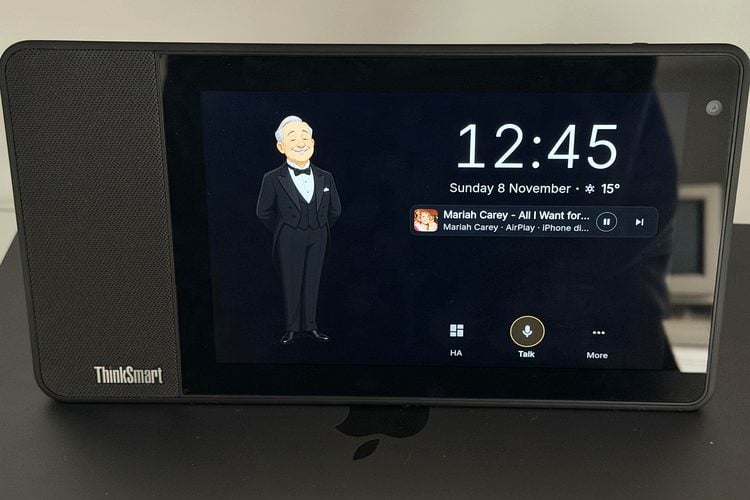
Thousands of Lenovo ThinkSmart View displays were built for Microsoft Teams calls and are now turning up second-hand for very little money. They have no battery, decent microphones and a speaker, and they are designed to stay switched on. Reddit maker m_s_ik turned one into a dedicated Home Assistant voice assistant and wall panel by replacing Android with a minimal Debian and a single program written from scratch in Rust. It answers as Alfred, an animated butler on the screen.
Why ditch Android
The first attempt used Android and the official Home Assistant app, but with 2 GB of RAM and a phone-class processor everything struggled. The rewrite keeps only what is needed. The maker says the whole system now uses about 190 MB of RAM and boots in about 24 seconds, with the voice front end, timers, AirPlay and the dashboard living in one native program.
What runs on the device
The wake word "Okay Alfred" is detected on the device, so no audio leaves it before that. The question then goes through the user's own Home Assistant voice pipeline, with whatever AI is already set up there; there is no API key on the device. Time, timers, alarms, volume and music are handled locally and keep working even with Wi-Fi down. The Home Assistant dashboard is preloaded full screen in a WebKit view, and AirPlay gives music with cover art plus screen mirroring from iPhone and Mac.
There are sensible safety gates: covers and valves only move after a spoken "yes", and locks, alarms and gates are never controlled by voice. Setup is done from the screen, which finds Home Assistant on the network and shows a QR code. It uses only standard Home Assistant pieces (Wyoming, the built-in MCP client and the WebSocket API), with no add-ons. A separate repository holds the Debian build for the device; installing it needs EDL flashing, so expect some tinkering.
Our take
Old conference-room hardware is a cheap way to get good microphones, a speaker and a screen in one box, and moving the wake word and simple commands onto the device is exactly the right split for privacy and speed. Version 0.1.0 is GPL-3.0 and supports Italian and English.
Image credit: m_s_ik / Reddit, cropped and resized.
About the author: Aswinth Raj is an electronics engineer and the editor of CircuitDigest, where he has published more than 150 hands-on projects and tutorials across Arduino, PIC, ESP32, Raspberry Pi and EV battery systems. He selects the stories on this page for what engineers and makers can actually learn or build from. Connect on LinkedIn

Add a comment
No account needed. Your comment appears once a moderator has reviewed it.