

A compact DIY FIDO2 security key can be built around Nordic Semiconductor’s nRF52840, which provides the processing, native USB connectivity, and hardware-accelerated cryptography needed for secure authentication. The nRF52840-QIAA features an Arm Cortex-M4 processor with 1 MB Flash and 256 KB RAM, along with the CryptoCell-310 security subsystem for AES, SHA, HMAC, RSA, ECC, and true random number generation. The custom board uses an USB-C connector for host connectivity, while the SP0503BAHTG TVS diode protects the USB lines from ESD and transient voltage spikes. A 32 MHz Murata crystal/resonator provides the required clock source, with supporting capacitors and multiple decoupling capacitors keeping the power and clock signals stable.
For physical user presence detection, the design replaces a conventional login button with the Microchip AT42QT1010 capacitive touch sensor, connected to a dedicated touch pad, allowing the user to simply touch the security key to approve authentication. A tactile button is included separately for entering DFU mode during firmware updates, while an RGB LED provides visual status feedback. The complete circuit is built on a compact 26.5 mm × 11 mm two-layer PCB, with the components arranged for a small USB-dongle form factor.
On the firmware side, the nRF52840 runs Google’s OpenSK, an open-source implementation for building FIDO2 security authenticators. The device communicates with a computer over USB HID, while authentication credentials and cryptographic operations are handled directly on the nRF52840. The custom bootloader supports UF2-based firmware updates over USB, while initial programming can be performed through the SWD interface using a DAPLink/CMSIS-DAP programmer or J-Link. Together, the nRF52840, AT42QT1010 touch interface, USB-C connector, protection circuitry, RGB status LED, and OpenSK firmware form a compact hardware-backed FIDO2 security key that can be built and programmed using open-source tools.
Code File


PCB Gerber File

| Value | Manufacturer | DigiKey Part Number | Datasheet Link | Quantity |
|---|---|---|---|---|
| 4.7uF 0402 | Murata Electronics | 490-GRM155R61A475MEAAJCT-ND |  | 3 |
| 100pF 0402 | Murata Electronics | 490-5922-1-ND | | 1 |
| 1uF 0402 | Murata Electronics | 490-10017-1-ND | | 2 |
| 8pF 0402 | Murata Electronics | 490-13294-1-ND | | 2 |
| 100nF 0402 | Murata Electronics | 490-10700-1-ND | | 5 |
| 10nF 0402 | Murata Electronics | 490-1313-1-ND | | 1 |
| 820pF 0402 | Murata Electronics | 490-11407-1-ND | | 1 |
| 0R 0402 | YAGEO | 311-0.0JRCT-ND | | 1 |
| 5.1K 0402 | YAGEO | 311-5.10KLRCT-ND | | 2 |
| 220R 0402 | YAGEO | 311-220LRCT-ND | | 3 |
| 10K 0402 | YAGEO | 311-10.0KLRCT-ND | | 1 |
| SP0503BAHTG | Littelfuse | F2715CT-ND | | 1 |
| A-USBC-32M1-EG-K | Assmann WSW Components | 123-A-USBC-32M1-EG-KST01-ND | | 1 |
| TL3315NF160Q | E-Switch | EG4621CT-ND | | 1 |
| NRF52840-QIAA | Nordic Semiconductor | 4823-NRF52840-QIAA-R7CT-ND | | 1 |
| AT42QT1010-TSHR | Microchip Technology | AT42QT1010-TSHRCT-ND | | 1 |
| XL-1615RGBC-YG | XINGLIGHT | 5962-XL-1615RGBC-YGTR-ND | | 1 |
| XRCGB32M000F2P01R0 | Murata Electronics | 490-18340-1-ND | | 1 |
Imagine someone gets hold of your password. In theory, they could now access your email, your social media, even your bank account. Scary thought, right? Now imagine that even with your password in hand, they still can't log in - because your account also requires a tiny USB device to be physically present. That's the idea behind hardware security keys. At first glance, it just looks like a small USB dongle. But inside, it's a dedicated piece of hardware built for one purpose: proving that you are the one logging in. Modern websites support open standards called FIDO2 and WebAuthn, which let you authenticate using a physical security key instead of relying on passwords alone.
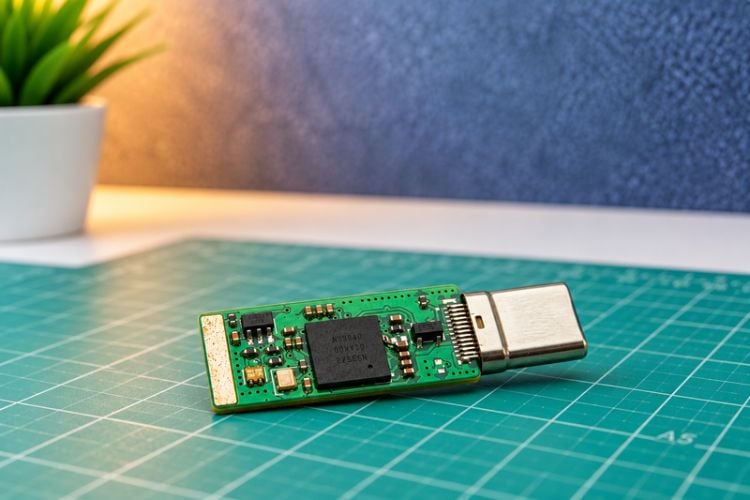
Here's how it works: every time you log in, the website asks the device to cryptographically prove your identity. The device only responds after you physically touch or press a button on it - confirming that a real person, not a script or a remote attacker, is initiating the login. This means that even if someone steals your password, they still can't get into your account without physically holding this key. Essentially, it acts as a phishing-resistant form of two-factor authentication. The best part? OpenSK - Google's open-source security key firmware - means you don't have to buy an expensive commercial key. Anyone with the right hardware and a bit of patience can build their own.
For this project, we are using the Nordic nRF52840, a microcontroller that is particularly well suited to building a compact USB security key. The nRF52840 includes a dedicated cryptographic hardware accelerator that supports commonly used algorithms such as AES, SHA-1/SHA-2, and ECC, allowing cryptographic operations to be performed efficiently without having to implement everything in software
How Does the nRF52840 Perform FIDO2 Authentication?
The nRF52840 isn't just acting as a simple USB interface here - with OpenSK running on it, the chip itself becomes a full FIDO2 authenticator, handling all the cryptographic heavy lifting on-device.
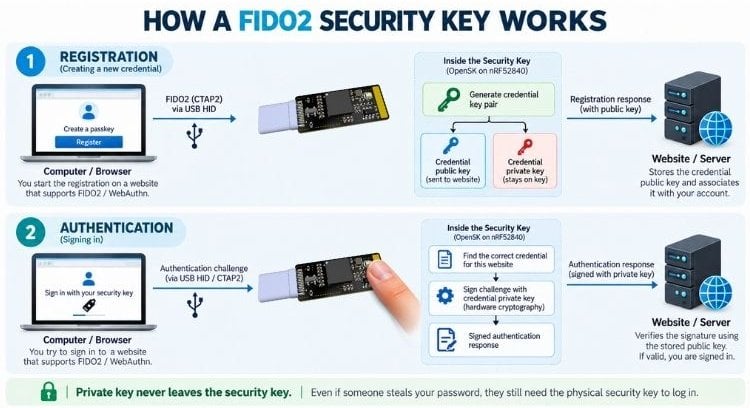
The process starts the moment you try to sign in to a website that supports FIDO2 or WebAuthn. The browser detects that the site wants hardware-based authentication and reaches out to the security key over USB. In our case, since we're using a custom board, USB HID is used as the FIDO2 transport layer - meaning the key communicates over the same protocol class typically used by keyboards and mice. This request is received by OpenSK running on the nRF52840, which implements the authenticator-side logic defined by the FIDO2 specification. From here, the microcontroller is responsible for everything the protocol requires on the device side.
During the registration phase - i.e., the first time you set up the key with a website - the authenticator generates a unique cryptographic key pair for that specific account. It shares the public key with the website, while the private key never leaves the device. This is the core security guarantee of FIDO2: your private credential is generated, stored, and used entirely within the hardware key, and it's never exposed to the browser, the operating system, or the website itself.
On subsequent logins, the website sends a cryptographic challenge to the key, relayed through the browser. OpenSK processes this challenge and performs the required cryptographic operation, typically signing the challenge using the private key associated with that credential. The nRF52840's onboard crypto capabilities handle this signing operation, producing a signed authentication response. This signed response travels back through the browser to the website, which verifies it using the public key it stored during registration. If the signature checks out, the website knows two things: this is the correct credential, and it's backed by the physical key - not a copied password or intercepted token.
Why This Matters
The key security benefit here is that the private credential never leaves the device. Unlike a password, which has to be typed and transmitted (and can be phished, leaked, or reused), the private key used in FIDO2 authentication is generated on the nRF52840, stored in its secure memory, and used internally to sign challenges - never transmitted anywhere, not even to the computer it's plugged into. This is what makes hardware-backed FIDO2 authentication resistant to phishing and credential theft: even if an attacker fully compromises your computer or intercepts network traffic, there's no private key for them to steal, because it was never there to begin with.
Why Did We Choose the Nordic nRF52840?
When picking a microcontroller for this project, one of the biggest factors was finding a chip that could handle almost everything a FIDO2 authenticator needs - without stitching together a dozen external components. The nRF52840 stood out because it packs a capable processor, generous memory, hardware-accelerated cryptography, native USB, dedicated security features, and wireless connectivity all into a single SoC.
The nRF52840 is a 32-bit Arm Cortex-M4 processor with a floating-point unit (FPU), clocked at up to 64 MHz. While that might sound modest compared to application processors, it's more than enough to run OpenSK's firmware stack - handling the FIDO2 protocol logic, managing USB communication, and performing cryptographic operations - all while staying power-efficient and compact enough for a device that's meant to live on your keychain. The chip offers 1 MB of Flash and 256 KB of RAM. For a project like this, memory headroom isn't just a nice-to-have - the firmware needs space for the OpenSK codebase, the FIDO2 protocol implementation, cryptographic routines, and runtime data all coexisting on the same chip. Having this much onboard memory also means we don't need to bolt on an external flash chip, which keeps the hardware design simpler and more reliable.
The nRF52840 includes a built-in Arm CryptoCell-310 security subsystem. This isn't just a fast math coprocessor - it's a dedicated hardware block that accelerates and secures cryptographic operations, including AES, SHA, HMAC, RSA, and elliptic-curve cryptography (ECC). It also provides a hardware true random number generator (TRNG).
Why does this matter so much for FIDO2? Because credential creation depends entirely on strong cryptography and unpredictable randomness. Every key pair generated during registration, every signature produced during login, relies on this hardware - offloading it from software makes the process both faster and more resistant to certain classes of attacks (like weak or predictable random number generation, which has historically been a real-world vulnerability in other systems).
The nRF52840 also has a built-in USB 2.0 Full-Speed device controller, which turned out to be a major convenience for our project. Since USB is our chosen transport for FIDO2 communication, having it natively on-chip means the security key can talk directly to a computer without needing a separate USB-to-UART bridge or external USB controller. It keeps the bill of materials shorter, the PCB simpler, and ensures compatibility with the USB HID interface that modern browsers and operating systems already know how to handle.
Beyond raw cryptographic horsepower, the nRF52840 also includes several hardware-level security mechanisms - including access protection features that can help safeguard firmware and restrict unauthorised access to sensitive device resources. Combined with CryptoCell-310 and the protections built into OpenSK itself, this gives the chip a solid security foundation for experimenting with hardware-based authentication, rather than relying solely on software-level protections.
It's worth being upfront here: our current custom board doesn't include the circuitry for Bluetooth or NFC - this version is built specifically around USB. The chip includes a 2.4 GHz multiprotocol radio, supporting Bluetooth Low Energy (BLE), Thread, Zigbee, IEEE 802.15.4, and other 2.4 GHz-based protocols. It also has a built-in NFC-A interface. With the right antenna design, matching circuitry, and firmware support, a future revision of this board could explore wireless or NFC-based authentication - similar to how commercial keys let you simply tap your phone to authenticate, rather than plugging in a USB connector. The nRF52840 was also engineered with low-power embedded applications in mind, with power-management features that suit compact, portable devices. While power consumption isn't a primary concern for a USB-powered key (since it draws power directly from the host device), this efficiency becomes far more relevant for potential future designs - like a battery-powered or wireless authentication device that isn't tethered to USB at all.
Circuit Diagram of NRF52840 OpenSK
The Brain of the Circuit is this Nordic nRF52840 microcontroller. This chip is responsible for everything the security key does. The USB-C connector J1 is used to connect our custom key to the computer. Right after J1, there's a SP0503BAHTG TVS diode used to protect the USB data and power lines from transient voltage spikes and ESD. Next, we have Y1, a 32 MHz crystal, sitting close to the microcontroller.
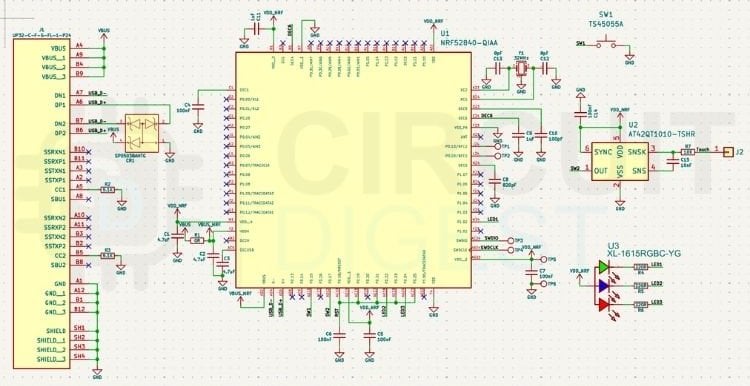
The crystal provides the clock pulse to the NR52840, which is necessary for it to function when the clock source is selected as external. The load capacitors right next to Y1, C12 and C13, help it oscillate correctly. Spread across the board, you'll also see a bunch of small capacitors- those power-filtering capacitors, keeping the supply clean and stable so the chip always gets smooth, reliable power. Now here's the interesting part: instead of a normal push button for login approval, our design uses U2, the AT42QT1010 touch sensor chip. It connects to J2, which is the connector for the actual touch pad on the PCB. So instead of physically pressing a button to approve a login, we can simply touch the pad, and U2 detects it.
There's also SW1, a tactile push button on the board. It is used to put the board into DFU mode for firmware programming or updating. We have also included an RGB LED on the board for visual feedback.
DIY FIDO2 Security Key PCB
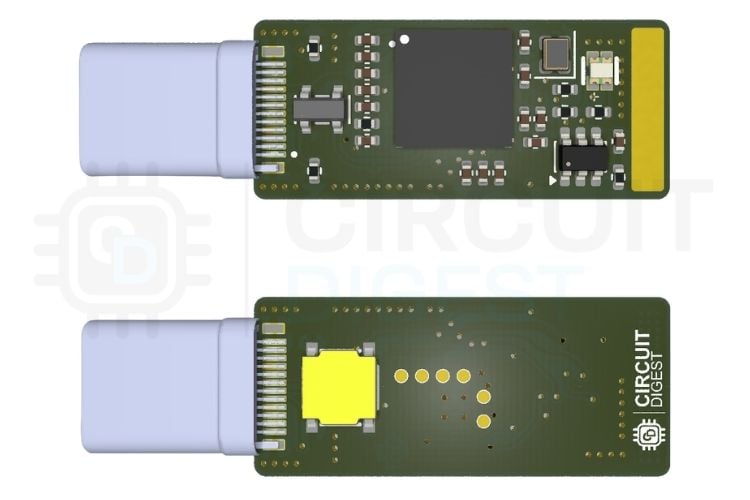
To make the security key compact and easy to use, we have decided to create a custom PCB for it. To keep the PCB cost to a minimum, we have decided to go for a 2-layer PCB design. The PCB measures 26.5mm in length and 11mm in width. You can get the full PCB files and the Gerber file required to build your own FIDO2 security key from the link above.
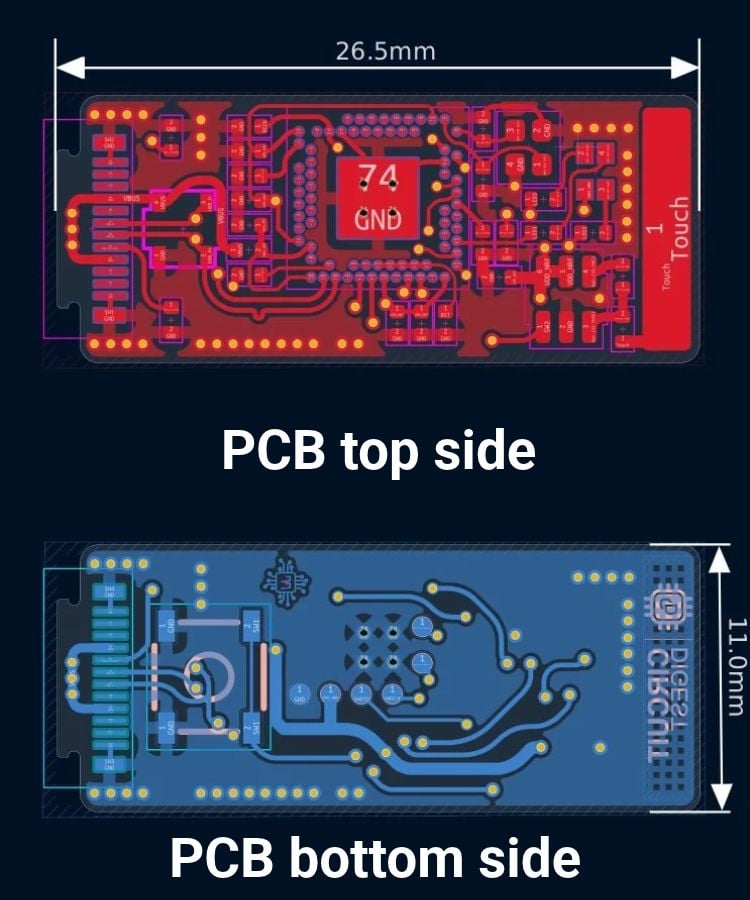
So, after designing the circuit, we have converted the design into a PCB and arranged all components except the boot switch on the top side. Here is the 3D render of our custom PCB.
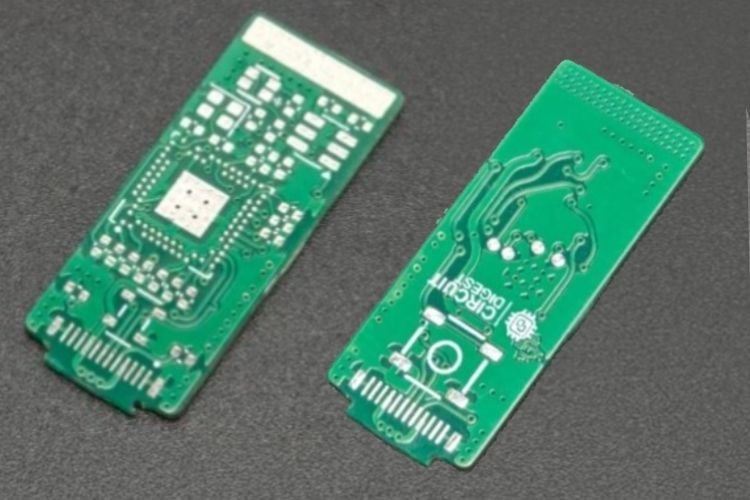
Once the desgin in verified, the next step is to send the gerber files for fabrication. After fabrication, here are the PCBs.
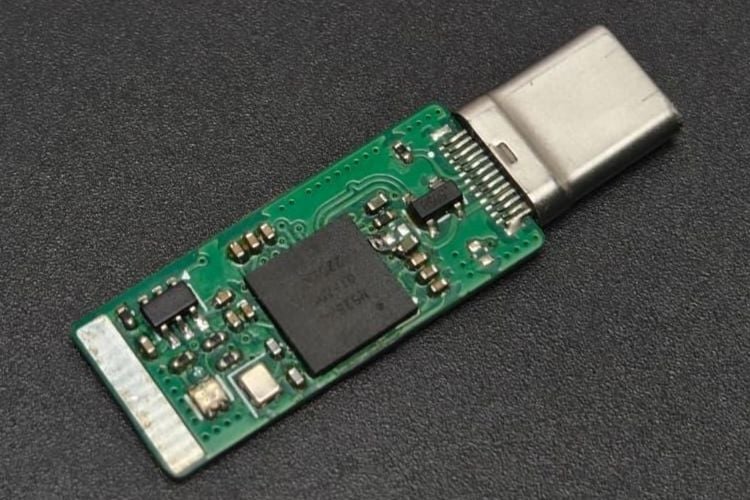
And here is the fully assembled PCB, which was assembled by hand using an SMD stencil and a hot plate.
Firmware for OpenSK USB Dongle
For the firmware, we’ll be using OpenSK, an open-source security-key implementation from Google. As you can see here on the GitHub repository, OpenSK is written in Rust and provides the software implementation needed for FIDO2 security keys. However, we’re not going to use the OpenSK firmware completely as-is. Since we’re building our own custom hardware, we’ll make some small modifications to the firmware to adapt it to our specific hardware and peripherals. To make development easier, and also to allow us to update the firmware more conveniently in the future, we’ll also be flashing a USB bootloader onto the device. The bootloader, along with the precompiled binaries, is available in the project GitHub repo.
Flashing the FIDO2 Key Firmware
As already mentioned, before the FIDO2 key can be used, the bootloader must be programmed to the nRF52840. This is required only for the initial setup and is performed through the SWD interface using a debug programmer. A DAPLink/CMSIS-DAP programmer, such as an RP2040-based Picoprobe, can be used for this process. A SEGGER J-Link can also be used as an alternative.
The flashing procedure uses OpenOCD and can be performed from Windows, macOS, or Linux. On Windows, OpenOCD can be installed and used directly, or it can be run through WSL2 with the debug probe passed through to the Linux environment.
First-Time Bootloader Flashing
Connect the programmer to the nRF52840 through the SWD interface. The required connections are SWDIO, SWCLK, GND, and the target-voltage reference (VTref). Make sure the target is powered before starting the programming process.
Install OpenOCD on the computer and verify the installation from a terminal. For example, on macOS, it can be installed using Homebrew:
brew install openocdOn Debian- or Ubuntu-based Linux systems, use:
sudo apt update
sudo apt install openocd
On Windows, install a Windows build of OpenOCD and make sure the OpenOCD executable is available from PowerShell or Command Prompt. The installation can be checked with:
openocd --versionWith a DAPLink or other CMSIS-DAP-compatible programmer connected, use the following to program the bootloader to the NRF52840 So. Make sure to replace xxx_bootloader-xxxx.hex with the actual bootloader HEX filename.
For DAPLink/CMSIS-DAP:
openocd -f interface/cmsis-dap.cfg -f target/nrf52.cfg -c "init" -c "nrf52_recover" -c "nrf5 mass_erase" -c "flash write_image xxx_bootloader-xxxx.hex" -c "flash verify_image xxx_bootloader-xxxx.hex" -c "reset run" -c "shutdown"For J-Link:
openocd -f interface/jlink.cfg -f target/nrf52.cfg -c "init" -c "nrf52_recover" -c "nrf5 mass_erase" -c "flash write_image xxx_bootloader-xxxx.hex" -c "flash verify_image xxx_bootloader-xxxx.hex" -c "reset run" -c "shutdown"Flashing the OpenSK Firmware
Once the bootloader has been programmed successfully, the debug programmer is no longer required for normal firmware updates. The modified bootloader supports UF2 firmware updates through USB using the DFU mode. To enter DFU mode, press and hold the DFU button while connecting the device to the computer. The LED should show a breathing pattern, and the device should appear as a USB mass-storage drive.
Copy the appropriate OpenSK .uf2 file to the DFU drive. After the file transfer is complete, the device will reboot and start the new firmware.
Building the Firmware from Source
The supplied firmware can normally be used without compiling the source code. However, developers who need to modify the bootloader or OpenSK firmware can build the projects from source. To build OpenSK, clone the OpenSK repository and run its setup script:
git clone -b 2.1 https://github.com/google/OpenSK.git
cd OpenSK
./setup.sh
Install the UF2 conversion tools:
wget -P tools https://github.com/microsoft/uf2/raw/master/utils/uf2conv.py
wget -P tools https://github.com/microsoft/uf2/raw/master/utils/uf2families.json
chmod a+x tools/uf2conv.py
Apply the supplied OpenSK patch and copy the Nordic board files:
git apply OpenSK_xxxx.patch
cp -r boards/nordic/. third_party/tock/boards/nordic
Build the OpenSK firmware:
./deploy.py --board=nrf52840_dongle_dfu --programmer=none --openskThe generated HEX file can then be converted to UF2 using:
./tools/uf2conv.py -c -f 0xada52840 \
   -o target/nrf52840_dongle_dfu_merged.uf2 \
   target/nrf52840_dongle_dfu_merged.hex
The generated firmware files are stored in the target directory and can be transferred to the device through DFU mode.
Conclusion
Building this FIDO2 security key shows that strong, hardware-backed authentication does not necessarily require a proprietary security device. With the nRF52840 and Google's open-source OpenSK firmware, we can build a compact USB security key that handles FIDO2 authentication and performs the required cryptographic operations directly on the device. The nRF52840 makes a particularly good platform for this project because it combines native USB connectivity, sufficient processing and memory, and hardware-assisted cryptography through its CryptoCell-310 security subsystem. This allows the key-generation and authentication operations to be handled locally while keeping the credential's private key away from the computer and the website. In the end, this project is not just about building another USB dongle. It is about seeing how modern passwordless authentication works at the hardware and firmware level.
