
By Keshav Padia
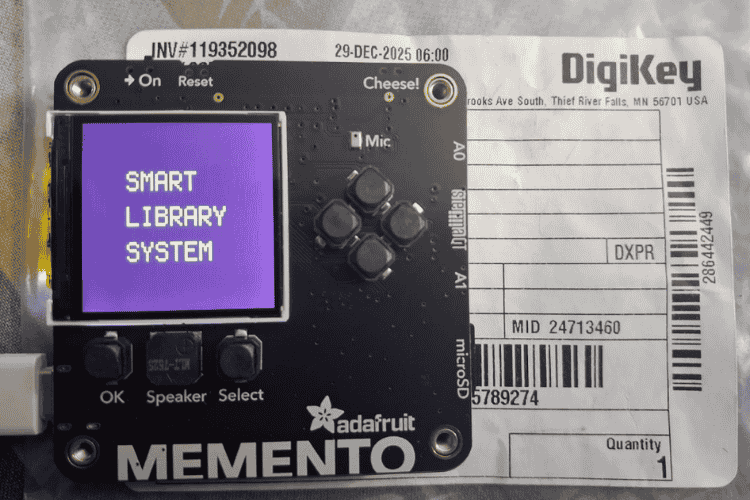
Hi everyone!, my project is a standalone Smart Library Kiosk designed to replace the traditional librarian counter with a self-service system. Built on the Adafruit Memento Development Board (from DigiKey) with an ESP32-S3 chip, it runs independently-currently powered via laptop but easily adaptable to a 3.7V LiPo battery for wireless use. Users log in with ID/PIN, select books manually from a list for issue/return (we can add camera scanning too but due to startup issues, I've included this manual option for reliability) with automatic inventory updates, due dates, fines, transaction logs and even UPI QR for payments-all offline on a compact TFT display with button navigation.
Components Required
| Component Name | Quantity | Datasheet/Link |
| Memento development board | 1 | View Datasheet |
Circuit Diagram

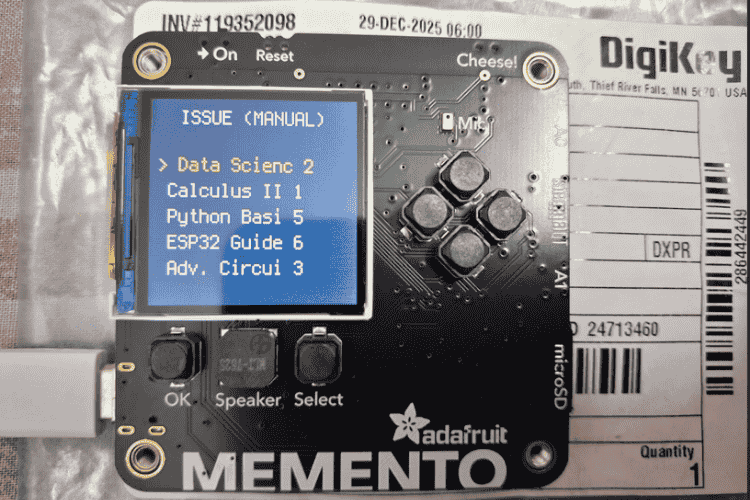
User selecting the book which he/she wants to issue:-
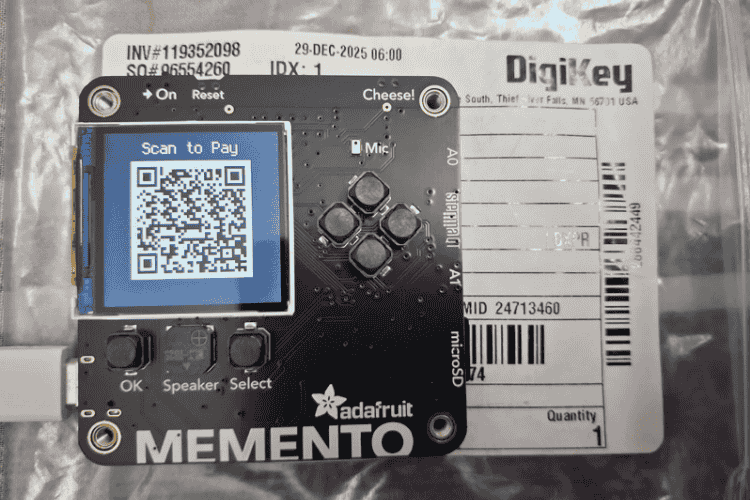
To pay fines:-
Hardware Assembly
The project is built entirely around the Adafruit Memento Development Board. This board integrates an ESP32-S3 microcontroller.
- The device runs on CircuitPython. To set this up, the board was first put into bootloader mode (by double-pressing the reset button) which mounts it as a Memento boot drive
- The latest .uf2 file for the Memento board was downloaded from the official CircuitPython.org website and dragged onto this drive.
- The board then automatically reset, appearing as a CIRCUITPY drive.
- The code relies on several external libraries. To provide these, the corresponding CircuitPython Library Bundle (for version 9.x) was downloaded from circuitpython.org/libraries
- The required library folders-specifically adafruit_display_text, adafruit_aw9523, adafruit_miniqr and the required dependencies for espcamera and qriowere copied from the bundle into the lib folder on the CIRCUITPY drive.
- This ensures all necessary drivers for the display, buttons, camera and QR code operations are available to the main program.
- Finally, the main application logic which handles the user interface, database and scanning workflow was saved as a file named code.pydirectly onto the root of the CIRCUITPY drive. Upon saving CircuitPython automatically reloads and runs this file launching the Smart Library interface.
Code Explanation
1. Imports:-
The code starts by importing necessary libraries from CircuitPython. These are pre-installed on the Adafruit board so no external downloads are needed:
- board: Accesses the board's pins and hardware (e.g., display, camera pins).
- displayio and adafruit_display_text.label: For creating and showing graphics/text on the 240x240 TFT display.
- terminalio: Provides a basic font for text labels.
- digitalio: Handles input/output pins used for buttons.
- adafruit_aw9523: Controls the AW9523 chip on the board for reading button presses (pins 11-15 for OK, left, right, up, down).
- adafruit_miniqr: Generates QR codes (e.g., for payment).
- time: Manages timestamps for dates, fines and delays.
- espcamera: Controls the built-in ESP32 camera for QR scanning (supports RGB565 format, 240x240 frame size).
- qrio: Decodes QR codes from camera images.
- struct: Packs data (e.g., coordinates for display windows during scanning).
These imports keep the code lightweight, focusing on hardware interaction without needing internet or extra storage.
2. Testing Config:-
This sets up variables for easy testing:
- now_time: A fixed date/time (February 6, 2026, 8:30 PM) as a struct_time object. This simulates the current time instead of using the real clock, making it easier to test time-based features like due dates.
- test_delay_seconds: Adds 17 days (in seconds: 17 * 86400) to simulate overdue books. For example when calculating fines, it pretends time has passed without waiting in real life.
This config helps debug without hardware dependencies, like faking overdue fines by adding seconds to timestamps.
3. The Database
The system uses simple Python dictionaries and lists to store data in memory (no files or external database, so data resets on reboot):
- users_db: A dictionary where keys are user IDs (e.g., "01") and values are details like name, role ("Student") and password (simple 4-digit PIN).
- books_db: A dictionary where keys are ISBNs (e.g., "978-1") and values include title, total copies and available copies.
- book_keys: A list of all ISBNs for easy iteration (e.g., when showing book lists).
- transactions_log: An empty list (not used in this code, but could log actions later).
- borrowings: A dictionary tracking what users have borrowed, with user ID as key and list of books (with ISBN and issue time) as value.
This keeps everything offline and fast—ideal for a small kiosk. Data is hardcoded for the contest demo.
4. Logic Functions
These are the core functions that handle library operations without UI (pure logic):
- get_timestamp(): Formats the current time as "DD/MM/YYYY HH:MM" using now_time. Used for logs or displays.
- wrap_text(text, max_chars=20): Breaks long text into lines (splits at spaces or max length) to fit the small display. Prevents text overflow.
- calculate_days(issue_time): Computes days since a book was issued by converting times to seconds (time.mktime), adding the test delay and dividing by 86400 (seconds in a day). Used for fine calculations.
- issue_book_logic(user_id, isbn): Checks if user and book exist. If available copies > 0, decreases availability, records borrowing with issue time, calculates due date (15 days later) and returns a success message with remaining copies. Errors if not found or unavailable.
- return_book_logic(user_id, isbn): Checks if user has the book. If yes, increases availability, calculates days overdue (using calculate_days), computes fine (15 Rs per day after 15 days), removes borrowing record and returns a message with fine details.
- These functions are modular easy to test separately. Fines are simple: max(0, days - 15) * 15.
5. Camera & QR Setup
Initializes the camera for scanning book QR codes (ISBNs):
- cam: Set up with espcamera.Camera using board pins (e.g., data_pins, pixel_clock_pin). Format: RGB565 (16-bit color), size: 240x240 pixels, frequency: 20 MHz. Flips/mirrors image for correct orientation. Framebuffer reduced to 1 to save memory.
- qrdecoder: A qrio.QRDecoder for decoding QR from camera frames.
- If setup fails (e.g., hardware issue), it prints an error but continues system falls back to manual input without crashing.
6. Display Setup
Configures the 240x240 TFT display using displayio:
- Background: A navy blue (0x001F3F) bitmap covering the whole screen for a calm theme.
- Groups: Separate displayio.Group for each screen (e.g., welcome_group, main_group) to switch UIs easily. Each includes the background.
- Labels: Text elements using label.Label with terminalio font. Examples:
- Welcome/greeting: Centered, scale=3, white text (0xFFFFFF).
- Menu options: Scale=2, gold (0xFFD700) for selected, white for normal.
- Scan status: Top-aligned, with instructions at bottom.
- Book list: 5 rows, left-aligned, shows title (shortened) + availability.
- Input fields: Digits for ID (2 digits) and PIN (4 digits), with gold cursor (^).
- Confirm/Result: Headers in scale=3/2, red (0xFF0000) for errors.
- QR header: Top, scale=2.
Anchoring positions center elements for clean layout. Display is refreshed manually in some cases (e.g., during scanning) for performance.
7. Button Setup
Uses I2C and AW9523 chip to read buttons:
- Pins: Up (13), Down (15), OK (11), Left (12), Right (14) set as inputs.
- No pull-ups needed; buttons are active-low (value=False when pressed).
These control navigation: Up/down for selection, left/right for cursor, OK to confirm.
8. Animation & Update Functions
Helpers for dynamic UI:
- run_welcome_animation(): Typewriter effect for "SMART LIBRARY SYSTEM" (adds chars with 0.1s delay), pauses 1s.
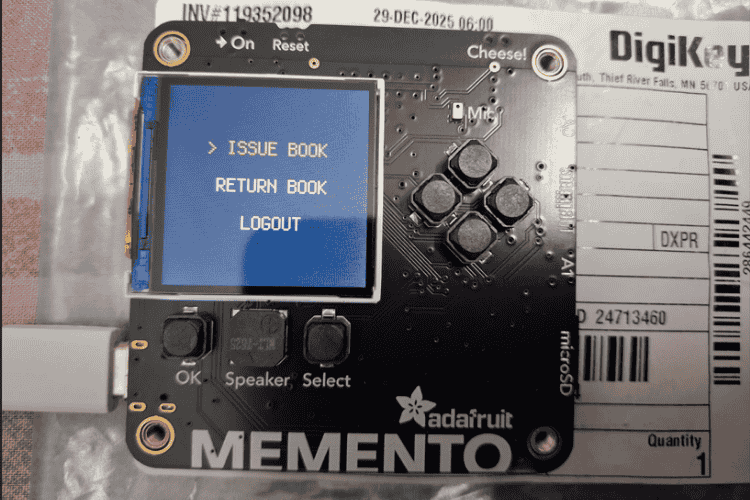
- Update functions (e.g., update_main_menu_ui(idx)): Change text/color to highlight selected item (adds ">" and gold color).
- update_book_list_ui(selected_idx): Updates 5 book rows with ">" and colors.
- Cursor updates: Move "^" under current digit.
- generate_qr(fine): Creates UPI payment QR using adafruit_miniqr (type=5, low error correction). Scales to 4x, black/white palette, centers on screen.
- perform_scan(): Captures frames, crops/previews on display (160px height to avoid overwriting UI), decodes QR. If found, extracts ISBN; else, falls back. Uses manual refresh for smooth preview.
These make the UI interactive and user-friendly, with debouncing (time.sleep(0.2)) to prevent rapid presses.
9. Main Program
Starts with welcome animation, sets initial state to 3 (ID inputs and enters an infinite loop as a state machine:
- States:
- 3/4: Login (ID/PIN entry with digits 0-9, validate against DB, show errors in red).
- 0: Main menu (issue/return/logout, navigate with up/down).
- 6: Scan (calls perform_scan(), proceeds if QR found, else manual).
- 1: Manual book list (scroll 5 books, select with OK).
- 5: Confirm (Yes/No for action, calls logic functions).
- 2: Show result (success/error/fine, press OK to proceed).
- 7: Show QR for fine payment (press OK to back).
- Button checks in each state handle input, with 0.2s sleep for debounce.
- Loop ends with time.sleep(0.01) for responsiveness.



Add a comment
No account needed. Your comment appears once a moderator has reviewed it.