




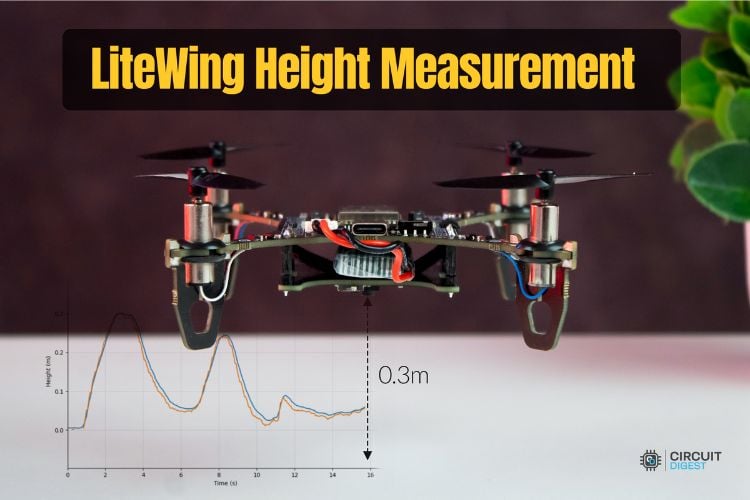
In this section, we focus on one of the most immediately useful capabilities of the LiteWing Flight Stabilisation Module: precise height measurement using the VL53L1X Time-of-Flight (ToF) sensor. Before implementing any control logic, it is essential to understand both the fundamentals of how the sensor measures distance and how the flight controller exposes this information through the CRTP telemetry system.
By the end of this guide, you will be able to understand how Time-of-Flight ranging works, read continuous height telemetry from the drone using CRTP log streaming via cflib, and work with two distinct sources of height data: the internal state estimator’s height and the raw VL53L1X measurement. You will also be able to visualise both data streams in real time to diagnose noise, latency, or sensor anomalies, and identify common measurement issues to determine when each data source should be trusted.
Hardware Setup
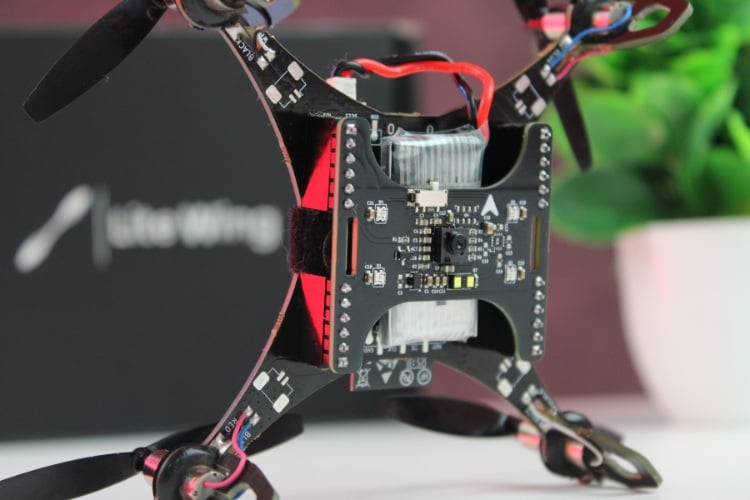
If you have not yet installed the shield or updated the drone’s firmware to support the shield, refer to the Flight Stabilisation Module User Guide. That document covers hardware installation and firmware flashing steps. Make sure your drone is running the Shield-compatible firmware before continuing.
Software Setup
Before proceeding with any coding examples, it is important that your development environment is properly set up. This includes installing Python, configuring the required libraries, and ensuring that your PC can establish a CRTP link with the LiteWing. Since cflib has a few prerequisites that must be met, refer to the LiteWing Python SDK Programming Guide. That document provides detailed instructions for installing dependencies, setting up cflib, connecting to the LiteWing Wi-Fi interface, and validating communication with a simple test script. Completing that setup is necessary before attempting to stream height telemetry or interact with any sensor on the Flight Stabiliser Module.
Once the Python environment is ready and the connection to the drone is verified, we can move on to reading height data and comparing the fused and raw measurements in real time.
VL53L1X Height Data Types
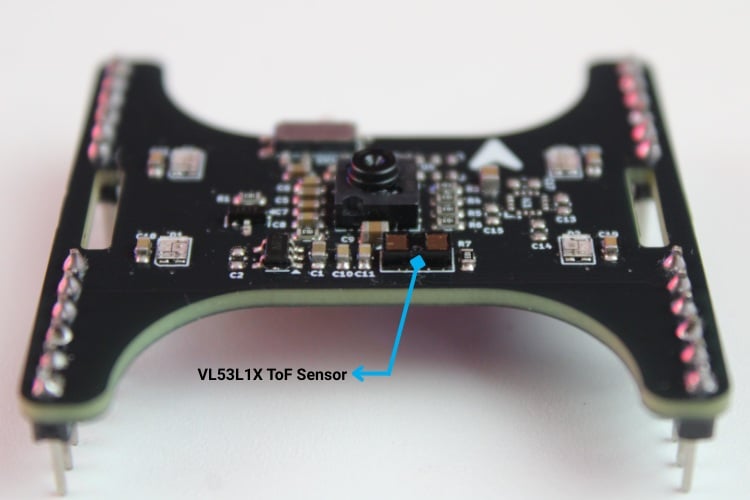
The LiteWing firmware provides two distinct height measurements. Both are useful, but they serve different purposes depending on the flight behaviour you are building.
Height from State Estimator
The stateEstimate.z value comes from the drone’s onboard estimator, which combines multiple sensor sources into a single, stable height estimate.
| Property | Description |
| Source | Fused estimate from estimator (ToF + IMU) |
| Units | Meters |
| Behavior | Smooth, filtered, physically consistent |
| Delay | Slight lag during rapid height changes |
| Usage | Height hold, smooth control loops, autonomous flight modes |
This value is generally the most stable and usable for control algorithms because the estimator applies filtering, gravity compensation, and consistency checks.
Raw VL53L1X Measurement
The range.zrange value is the direct, unfiltered output of the VL53L1X ToF sensor.
| Property | Description |
| Source | VL53L1X raw distance measurement |
| Units | Millimeters |
| Behavior | Immediate response, higher noise |
| Noise Characteristics | Sensitive to surfaces, reflectivity, and fast movement |
| Usage | Landing detection, obstacle detection, sensor diagnostics |
Raw distance data reacts instantly to surface changes, which makes it valuable when detecting contact with the ground or sudden height shifts.
Why Both Matter
Using both data streams together gives a more complete understanding of height behaviour:
| Scenario | Use |
| Hovering / stable flight | stateEstimate.z (smooth, robust) |
| Detecting ground during landing | range.z range (instantaneous) |
| Sensor debugging | Compare both streams side-by-side |
| Drop detection / impact detection | range.z range spikes reveal fast changes |
CRTP Communication Structure for Height Data
The LiteWing drone exposes height information over CRTP using log variables. For height work, we are interested in two variables: the fused height estimate from the state estimator and the raw distance measurement from the VL53L1X Time-of-Flight sensor.
# Log variables available on LiteWing:
stateEstimate.z        # Fused height estimate (meters)
range.zrange           # Raw ToF sensor reading (millimeters)
These two variables are streamed via the logging subsystem in cflib. The table below summarises their roles:
| Variable | Units | Source | Typical Use |
| stateEstimate.z | m | State estimator (sensor fusion) | Control loops,height hold |
| range.zrange | mm | VL53L1X raw Time-of-Flight sensor | Landing detection, diagnostics |
Before logging any variable, the script checks the Log Table of Contents (TOC) to make sure the variable actually exists in the current firmware build. This avoids runtime errors if the firmware is missing a field.
# Check available variables
toc = cf.log.toc# Verify our variables exist
if 'stateEstimate' in dir(toc) and 'z' in toc.stateEstimate:
   print("stateEstimate.z is available")
else:
   print("Variable not found - check drone firmware")
To start streaming, we create a log configuration, register a callback, and add it to the Crazyflie object:
| Create a log configuration | lg_stab = LogConfig(name='Height', period_in_ms=50) lg_stab.add_variable('stateEstimate.z') lg_stab.add_variable('range.zrange') |
| Register callback function | def height_callback(timestamp, data, logconf): z_estimate = data['stateEstimate.z'] z_raw = data['range.zrange'] print(f"Estimator: {z_estimate:.2f} m, Raw: {z_raw:.0f} mm") lg_stab.add_callback(height_callback) |
| Add configuration and start logging | cf.log.add_config(lg_stab) lg_stab.start() |
| Data Structure | { 'stateEstimate.z': 0.42, # Height in meters (float) 'range.zrange': 420 # Distance in mm (integer) } |
Height Sensor Test Application (test_height_sensor.py)
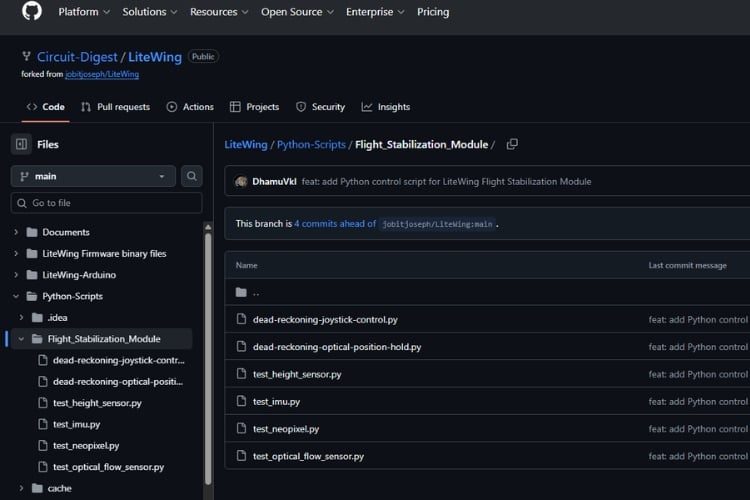
To make this easier to work with in practice, we use a standalone test script called test_height_sensor.py. This script connects to the LiteWing and displays both height variables in a simple GUI with real-time plotting. You can get the script on our LiteWing GitHub repository under LiteWing/Python-Scripts/Flight_Stabilization_Module/


Imports and Configuration
The script starts with the required imports and some constants:
import threading
import time
from collections import deque
import tkinter as tk
import matplotlib
matplotlib.use("TkAgg")
from matplotlib.backends.backend_tkagg import FigureCanvasTkAgg
from matplotlib.figure import Figure
import cflib.crtp
from cflib.crazyflie import Crazyflie
from cflib.crazyflie.log import LogConfig
from cflib.crazyflie.syncCrazyflie import SyncCrazyflie
DRONE_URI = "udp://192.168.43.42"
LOG_PERIOD_MS = 50
# Number of samples to retain for plotting history. Deques with maxlen are
# used to bound memory usage while keeping recent state visible.
HISTORY_LENGTH = 400
The table below summarises the main modules and why they are included:
| Module / Class | Purpose |
| cflib.crtp | Initializes CRTP drivers for communication |
| Crazyflie / SyncCrazyflie | Connection and link lifecycle management |
| LogConfig | Defines which variables to log and at what rate |
| tkinter | GUI framework for controls and labels |
| matplotlib + FigureCanvasTkAgg | Real-time plotting inside the Tk GUI |
| threading, Event, Lock | Background connection worker and safe data sharing |
| deque | Fixed-length history buffer for plotting |
Application Class
The GUI and communication logic are wrapped in a single class:
class HeightSensorApp:
   """Simple GUI to display height data from state estimator and range sensor."""

   def __init__(self, root: tk.Tk):
       self.root = root
       self.root.title("LiteWing Height Sensor Test")
       self.root.geometry("1000x700")

       # UI state variables
       self.status_var = tk.StringVar(value="Status: Idle")
       self.est_height_var = tk.StringVar(value="Estimator Height: 0.000 m")
       self.range_height_var = tk.StringVar(value="Range Sensor: 0.000 m")

       # Build GUI controls and plotting area
       self._build_controls()
       self._build_plot()

       # Threading primitives
       self.stop_event = threading.Event()
       self.connection_thread = None

       # Data containers (protected by lock)
       self.data_lock = threading.Lock()
       self.timestamps = deque(maxlen=HISTORY_LENGTH)
       self.est_history = deque(maxlen=HISTORY_LENGTH)
       self.range_history = deque(maxlen=HISTORY_LENGTH)
       self.last_console_print = 0.0
The constructor sets up the main window, initialises status variables, builds the UI, and prepares data structures. Height values and timestamps are stored in deques, so the history is always bound to a fixed time window.
Controls and Layout
The _build_controls method creates the buttons and readout labels:
def _build_controls(self) -> None:
   top_frame = tk.Frame(self.root)
   top_frame.pack(fill=tk.X, padx=10, pady=6)

   # Start/Stop buttons for non-blocking connection control
   tk.Button(top_frame, text="Start", command=self.start,
             bg="#28a745", fg="white", width=12).pack(side=tk.LEFT, padx=5)
   tk.Button(top_frame, text="Stop", command=self.stop,
             bg="#dc3545", fg="white", width=12).pack(side=tk.LEFT, padx=5)

   # Status label shows connection state
   tk.Label(top_frame, textvariable=self.status_var,
            font=("Arial", 11, "bold"), fg="blue").pack(side=tk.LEFT, padx=20)

   # Value display frame
   value_frame = tk.Frame(self.root)
   value_frame.pack(fill=tk.X, padx=10, pady=6)

   tk.Label(value_frame, textvariable=self.est_height_var,
            font=("Arial", 12)).pack(side=tk.LEFT, padx=10)
   tk.Label(value_frame, textvariable=self.range_height_var,
            font=("Arial", 12)).pack(side=tk.LEFT, padx=10)
The GUI is intentionally simple: a row with Start and Stop buttons, a status line, and a separate row showing the latest numerical values for estimator height and range sensor height.
Plot Setup
The plot is created with Matplotlib and embedded into the Tk window:
def _build_plot(self) -> None:
   self.figure = Figure(figsize=(10, 6), dpi=100)
   self.axis = self.figure.add_subplot(1, 1, 1)

   # Configure plot appearance
   self.axis.set_title("Height vs Time")
   self.axis.set_xlabel("Time (s)")
   self.axis.set_ylabel("Height (m)")
   self.axis.grid(True, alpha=0.3)

   # Create line objects (data updated later)
   (self.est_line,) = self.axis.plot([], [], label="Estimator", color="tab:blue")
   (self.range_line,) = self.axis.plot([], [], label="Range", color="tab:orange")
   self.axis.legend(loc="upper right")

   # Embed matplotlib canvas in tkinter
   canvas = FigureCanvasTkAgg(self.figure, master=self.root)
   canvas.draw()
   canvas.get_tk_widget().pack(fill=tk.BOTH, expand=True, padx=10, pady=10)
   self.canvas = canvas
Two line objects are created: one for stateEstimate.z and one for the converted range.zrange value in meters. Only the data arrays are updated later; the line instances remain the same throughout execution.
Background Connection Worker
CRTP communication runs in a background thread so that the GUI event loop remains responsive:
def _connection_worker(self) -> None:
   """Background worker for CRTP connection and log streaming."""
   self._set_status("Status: Connecting...")
   try:
       # Initialize CRTP drivers
       cflib.crtp.init_drivers(enable_debug_driver=False)

       # Use SyncCrazyflie context manager for clean resource management
       with SyncCrazyflie(DRONE_URI, cf=Crazyflie(rw_cache="./cache")) as scf:
           cf = scf.cf
           self._set_status("Status: Connected")

           # Configure logging
           log_config = LogConfig(name="HeightSensor", period_in_ms=LOG_PERIOD_MS)
           variables = [
               ("stateEstimate.z", "float"),
               ("range.zrange", "uint16_t"),
           ]

           # Verify variables exist in firmware TOC
           if not self._add_variables_if_available(cf, log_config, variables):
               self._set_status("Status: Height variables unavailable")
               return

           # Register callback and start logging
           log_config.data_received_cb.add_callback(self._log_callback)
           cf.log.add_config(log_config)
           log_config.start()
           print("[Height] Logging started")

           # Keep worker alive until stop requested
           while not self.stop_event.is_set():
               time.sleep(0.1)

           log_config.stop()
           print("[Height] Logging stopped")

   except Exception as exc:
       print(f"[Height] Connection error: {exc}")
       self._set_status("Status: Error - check console")
   finally:
       self._set_status("Status: Idle")
The worker initialises CRTP, opens the link using SyncCrazyflie, sets up the log configuration, and keeps running until stop_event is set. All log data is handled through a callback.
TOC-Based Variable Check
To keep the script robust against firmware changes, _add_variables_if_available checks the firmware TOC before adding variables:
def _add_variables_if_available(self, cf: Crazyflie, log_config: LogConfig,
                                candidates: list[tuple[str, str]]) -> bool:
   """Check firmware TOC and add only available variables."""
   toc = cf.log.toc.toc  # Firmware's log variable registry
   added = 0

   for full_name, var_type in candidates:
       group, name = full_name.split(".", maxsplit=1)

       # Check if group.variable exists in TOC
       if group in toc and name in toc[group]:
           log_config.add_variable(full_name, var_type)
           print(f"[Height] Logging {full_name}")
           added += 1
       else:
           print(f"[Height] Missing {full_name}")

   return added > 0  # At least one variable found
If neither variable exists, the script reports this and returns to the idle state instead of failing.
Log Callback and Data Storage
The log callback converts and stores the values into the history buffers:
def _log_callback(self, timestamp: int, data: dict, _: LogConfig) -> None:
   """Receive log packet and store values in history buffers."""

   # Extract values from CRTP log packet
   estimator_height = data.get("stateEstimate.z", 0.0)  # meters
   range_raw_mm = data.get("range.zrange", 0)  # millimeters

   # Convert range to meters (0 indicates invalid/no reading)
   range_height = range_raw_mm / 1000.0 if range_raw_mm else 0.0

   # Thread-safe update of shared history buffers
   with self.data_lock:
       now = time.time()
       self.timestamps.append(now)
       self.est_history.append(estimator_height)

       # Store None for invalid readings (prevents plotting artifacts)
       self.range_history.append(range_height if range_raw_mm else None)

       # Cache latest values for GUI display
       self.latest_values = (estimator_height, range_height, bool(range_raw_mm))

   # Console output (rate-limited to 1 Hz)
   if time.time() - self.last_console_print >= 1.0:
       self.last_console_print = time.time()
       status = 'valid' if range_raw_mm else 'invalid'
       print(f"[Height] Estimator={estimator_height:.3f} m, "
             f"Range={range_height:.3f} m ({status})")
Invalid readings from the ToF sensor are represented as zero in the raw data. The script converts those to None internally, so the plot shows a break rather than a misleading flat line.
GUI Refresh Loop
A timer in the Tk event loop periodically updates the GUI and plot:
def _refresh_gui(self) -> None:
   """Periodically update GUI elements and plot from history buffers."""

   with self.data_lock:
       # Update text displays
       if getattr(self, "latest_values", None):
           estimator_height, range_height, range_valid = self.latest_values
           self.est_height_var.set(f"Estimator Height: {estimator_height:.3f} m")

           if range_valid:
               self.range_height_var.set(f"Range Sensor: {range_height:.3f} m")
           else:
               self.range_height_var.set("Range Sensor: no reading")

           # Copy history for plotting (releases lock quickly)
           times = list(self.timestamps)
           if times:
               t0 = times[0]
               rel_times = [t - t0 for t in times]  # Relative time axis

               # Convert None → NaN for matplotlib (breaks line at invalid points)
               est_vals = list(self.est_history)
               range_vals = [val if val is not None else float("nan")
                             for val in self.range_history]

               # Update plot data in-place (efficient)
               self.est_line.set_data(rel_times, est_vals)
               self.range_line.set_data(rel_times, range_vals)

               # Auto-scale axes (keep last 20 seconds visible)
               last_time = rel_times[-1] if rel_times[-1] > 1 else 1
               self.axis.set_xlim(max(0, last_time - 20), last_time + 1)

               # Compute Y-axis limits from visible data
               combined = [v for v in est_vals + range_vals if not (v != v)]  # Filter NaN
               if combined:
                   vmin, vmax = min(combined), max(combined)
                   margin = max(0.1, (vmax - vmin) * 0.2)
                   self.axis.set_ylim(vmin - margin, vmax + margin)

               self.canvas.draw_idle()  # Redraw canvas

   # Schedule next refresh (10 Hz GUI update rate)
   self.root.after(100, self._refresh_gui)
The GUI refreshes at about 10 Hz, while the data arrives at 20 Hz. This is a practical compromise between responsiveness and CPU usage.
Start/Stop and Main Entry Point
To wrap up, here's the implementation for initiating and halting the connection worker thread, along with the main entry point for the application:
def start(self) -> None:
   """Start connection worker thread (non-blocking)."""
   if self.connection_thread and self.connection_thread.is_alive():
       return  # Already running

   self.stop_event.clear()
   self.connection_thread = threading.Thread(target=self._connection_worker, daemon=True)
   self.connection_thread.start()
def stop(self) -> None:
   """Signal worker thread to stop logging and disconnect."""
   self.stop_event.set()
def _on_close(self) -> None:
   """Handle window close event (cleanup)."""
   self.stop()
   self.root.after(200, self.root.destroy)  # Delay to allow graceful shutdown
def main() -> None:
   root = tk.Tk()
   app = HeightSensorApp(root)
   root.mainloop()  # Enter Tkinter event loop
if __name__ == "__main__":
   main()
This ensures the worker thread starts asynchronously without blocking the UI, stops cleanly on demand, and performs necessary cleanup during window closure. The main() function initialises the Tkinter root window, creates the app instance, and launches the event loop for interactive operation.
Data Interpretation
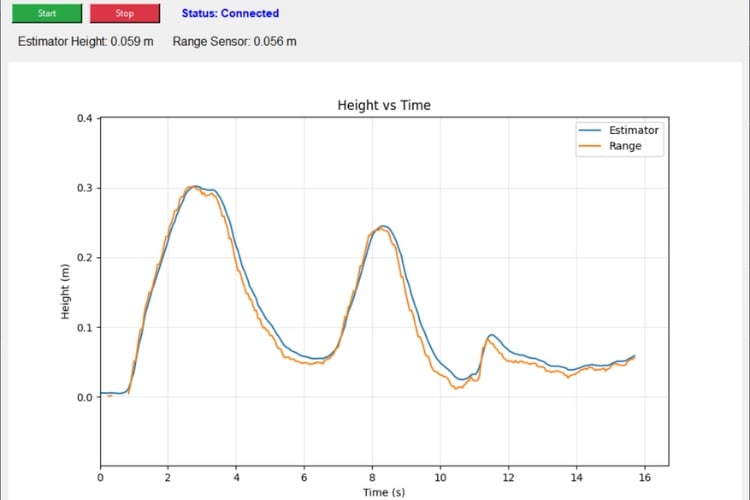
Once the script is running, you will see both the estimator height and raw range values plotted over time. Understanding how they behave is important for using them correctly in control algorithms.
State Estimator Height (stateEstimate.z)
The stateEstimate.z value is the fused height estimate in meters. The estimator takes into account the ToF readings, barometer (if present), and IMU data to produce a physically consistent height.
In practice, this value is smooth and continuous, typically covering the range from zero to a few meters in normal indoor test flights. The estimator intentionally filters noise and enforces physically plausible motion, so rapid step changes are reduced. This can introduce a small lag during fast climbs or descents, but it gives a much cleaner signal for control loops.
Raw Sensor Reading (range.zrange)
The range.zrange value is the direct VL53L1X measurement in millimetres. The sensor responds immediately to changes in ground distance and does not apply any filtering. As a result, the value is noisier and may vary by tens of millimetres even when the drone is stationary. You will typically see ±50 mm or so of variation, depending on the surface reflectivity and angle.
Comparison
The table below summarises the main differences:
| Aspect | StateEstimate.z | Range.zrange |
| Units | Meters | Millimeters |
| Source | Sensor fusion (ToF + IMU + others) | Direct VL53L1X measurement |
| Noise level | Low (filtered) | Higher (unfiltered) |
| Response speed | Slightly delayed | Immediate |
| Typical usage | Height hold, general control | Landing detection, debugging, edges |
In our plots, it is normal to observe range.zrange responds first, followed by stateEstimate.z after a short delay, and it is also expected that the estimator will ignore spikes in raw data that are clearly inconsistent with the drone’s current motion. When developing custom flight modes, stateEstimate.z should be used as the primary height input for stable closed-loop control, while range.zrange is better suited for events that depend on immediate contact or proximity, such as ground detection or terrain edges; during testing, both signals should be used together to diagnose sensor issues, data fusion problems, or unexpected estimator behaviour.
Document Index
| Document | Description |
| Height Measurement Guide | Understanding VL53L1X Time-of-Flight height sensing, data acquisition, and CRTP telemetry integration. |
| Optical Flow Tracking Guide | Using the PMW3901MB sensor for horizontal motion tracking, velocity estimation, and ground-referenced positioning |
| IMU Sensor Guide | Overview of LiteWing’s onboard IMU, including orientation, angular rate, and acceleration data essential for stabilization and control. |
| NeoPixel Status Control Guide | Controlling WS2812B RGB LEDs on the stabilization shield for flight status display and visual debugging |
| Joystick Control Guide | Implementing joystick-based manual control and mapping inputs to LiteWing stabilization behaviors. |
| Position Hold Guide | Sensor fusion and control strategies enabling the LiteWing drone to maintain a fixed position using onboard stabilization sensors. |
| Maneuver Control Guide | Configuring and executing stabilized drone maneuvers using height, flow, and IMU feedback loops. |
Complete Project Code
"""Standalone height sensor test for the LiteWing flight stabilization module.
Streams height data (state estimator + range sensor) to the console and a
simple Tk GUI with a live plot to verify the correct behaviour of the height inputs.
"""
import threading
import time
from collections import deque
import tkinter as tk
import matplotlib
matplotlib.use("TkAgg")
from matplotlib.backends.backend_tkagg import FigureCanvasTkAgg
from matplotlib.figure import Figure
import cflib.crtp
from cflib.crazyflie import Crazyflie
from cflib.crazyflie.log import LogConfig
from cflib.crazyflie.syncCrazyflie import SyncCrazyflie
DRONE_URI = "udp://192.168.43.42"
LOG_PERIOD_MS = 50
# Number of samples to retain for plotting history. Deques with maxlen are
# used to bound memory usage while keeping recent state visible.
HISTORY_LENGTH = 400

class HeightSensorApp:
   """
   Simple GUI to display the aircraft's height as reported by the state
   estimator and a direct range sensor (e.g. ToF / laser rangefinder).
   This application connects to a Crazyflie (via CF client) and registers a
   LogConfig that streams `stateEstimate.z` (estimator height) and `range.zrange`
   (range sensor in millimeters). It then updates the GUI and a live plot
   with the sampled values at a periodic rate given by LOG_PERIOD_MS.
   """
   def __init__(self, root: tk.Tk):
       self.root = root
       self.root.title("LiteWing Height Sensor Test")
       self.root.geometry("1000x700")
       # UI state variables for the top status/value bar
       self.status_var = tk.StringVar(value="Status: Idle")
       # Display strings for estimator and range height values
       self.est_height_var = tk.StringVar(value="Estimator Height: 0.000 m")
       self.range_height_var = tk.StringVar(value="Range Sensor: 0.000 m")
       # Build GUI controls and plotting area
       self._build_controls()
       self._build_plot()
       # Thread and synchronization primitives: stop_event indicates the
       # background logging thread should terminate; connection_thread is the
       # worker thread that manages the CF connection and log subscription.
       self.stop_event = threading.Event()
       self.connection_thread: threading.Thread | None = None
       # Data containers (protected by data_lock) used both by the worker and
       # the GUI for displaying/plotting recent samples.
       self.data_lock = threading.Lock()
       self.timestamps = deque(maxlen=HISTORY_LENGTH)
       self.est_history = deque(maxlen=HISTORY_LENGTH)
       self.range_history = deque(maxlen=HISTORY_LENGTH)
       self.last_console_print = 0.0
       # Schedule a periodic GUI refresh that runs on the main Tk thread
       self.root.after(100, self._refresh_gui)
       self.root.protocol("WM_DELETE_WINDOW", self._on_close)
   def _build_controls(self) -> None:
       top_frame = tk.Frame(self.root)
       top_frame.pack(fill=tk.X, padx=10, pady=6)
       # Buttons to start/stop background logging — these are non-blocking
       # since the logging is executed in a separate daemon thread.
       tk.Button(top_frame, text="Start", command=self.start, bg="#28a745", fg="white", width=12).pack(side=tk.LEFT, padx=5)
       tk.Button(top_frame, text="Stop", command=self.stop, bg="#dc3545", fg="white", width=12).pack(side=tk.LEFT, padx=5)
       tk.Label(top_frame, textvariable=self.status_var, font=("Arial", 11, "bold"), fg="blue").pack(side=tk.LEFT, padx=20)
       value_frame = tk.Frame(self.root)
       value_frame.pack(fill=tk.X, padx=10, pady=6)
       tk.Label(value_frame, textvariable=self.est_height_var, font=("Arial", 12)).pack(side=tk.LEFT, padx=10)
       tk.Label(value_frame, textvariable=self.range_height_var, font=("Arial", 12)).pack(side=tk.LEFT, padx=10)
   def _build_plot(self) -> None:
       self.figure = Figure(figsize=(10, 6), dpi=100)
       self.axis = self.figure.add_subplot(1, 1, 1)
       # Single-plot showing estimator and range values against time
       self.axis.set_title("Height vs Time")
       self.axis.set_xlabel("Time (s)")
       self.axis.set_ylabel("Height (m)")
       self.axis.grid(True, alpha=0.3)
       (self.est_line,) = self.axis.plot([], [], label="Estimator", color="tab:blue")
       (self.range_line,) = self.axis.plot([], [], label="Range", color="tab:orange")
       self.axis.legend(loc="upper right")
       canvas = FigureCanvasTkAgg(self.figure, master=self.root)
       canvas.draw()
       canvas.get_tk_widget().pack(fill=tk.BOTH, expand=True, padx=10, pady=10)
       self.canvas = canvas
   def start(self) -> None:
       # No-op if worker is already running
       if self.connection_thread and self.connection_thread.is_alive():
           return
       self.stop_event.clear()
       # Spawn background thread that connects to the aircraft and registers
       # a log consumer that will call _log_callback() on each sample.
       self.connection_thread = threading.Thread(target=self._connection_worker, daemon=True)
       self.connection_thread.start()
   def stop(self) -> None:
       self.stop_event.set()
   def _connection_worker(self) -> None:
       # Background worker responsible for creating/closing the CF client,
       # subscribing to logged variables, and cleanly stopping when the GUI
       # requests shutdown.
       self._set_status("Status: Connecting...")
       try:
           # Initialize the Crazyradio drivers (no debug radio by default)
           cflib.crtp.init_drivers(enable_debug_driver=False)
           with SyncCrazyflie(DRONE_URI, cf=Crazyflie(rw_cache="./cache")) as scf:
               cf = scf.cf
               self._set_status("Status: Connected")
               # Log config requests estimator and range variables at a
               # fixed period — see LOG_PERIOD_MS above for the sampling rate.
               log_config = LogConfig(name="HeightSensor", period_in_ms=LOG_PERIOD_MS)
               variables = [
                   ("stateEstimate.z", "float"),
                   ("range.zrange", "uint16_t"),
               ]
               # Ensure that the variables exist on the running firmware
               # (TOC) before attempting to add them to the LogConfig.
               if not self._add_variables_if_available(cf, log_config, variables):
                   self._set_status("Status: Height variables unavailable")
                   return
               # Register callback to receive streaming log messages
               log_config.data_received_cb.add_callback(self._log_callback)
               cf.log.add_config(log_config)
               log_config.start()
               print("[Height] Logging started")
               # Small sleep loop to keep the worker alive until signaled
               # to stop. The CF log handler executes callbacks on this
               # thread (so _log_callback() runs on the worker thread).
               while not self.stop_event.is_set():
                   time.sleep(0.1)
               log_config.stop()
               print("[Height] Logging stopped")
       except Exception as exc:  # noqa: BLE001
           print(f"[Height] Connection error: {exc}")
           self._set_status("Status: Error - check console")
       finally:
           self._set_status("Status: Idle")
   def _add_variables_if_available(self, cf: Crazyflie, log_config: LogConfig, candidates: list[tuple[str, str]]) -> bool:
       # Fetch the Crazyflie client's Log TOC that lists available log groups
       # and variables in the currently running firmware image.
       toc = cf.log.toc.toc
       added = 0
       # Iterate over requested variables and add them if present
       for full_name, var_type in candidates:
           group, name = full_name.split(".", maxsplit=1)
           if group in toc and name in toc[group]:
               log_config.add_variable(full_name, var_type)
               print(f"[Height] Logging {full_name}")
               added += 1
           else:
               print(f"[Height] Missing {full_name}")
       return added > 0
   def _log_callback(self, timestamp: int, data: dict, _: LogConfig) -> None:
       # Retrieve values from log packet: estimator height is in meters,
       # range sensor reports millimeters (0 if no valid reading).
       estimator_height = data.get("stateEstimate.z", 0.0)
       range_raw_mm = data.get("range.zrange", 0)
       # Convert range to meters (0 -> invalid/no reading)
       range_height = range_raw_mm / 1000.0 if range_raw_mm else 0.0
       # Save readings into the histories used for display and plotting. When
       # the range sensor does not return a valid reading, we store ``None``
       # to later be converted to NaN for plotting so that the line isn't
       # drawn for invalid points.
       with self.data_lock:
           now = time.time()
           self.timestamps.append(now)
           self.est_history.append(estimator_height)
           self.range_history.append(range_height if range_raw_mm else None)
           # Store a boolean indicating if the range reading was valid
           self.latest_values = (estimator_height, range_height, bool(range_raw_mm))
       # Print a compact debug message every second so logs are easier to
       # read while testing without needing the GUI.
       if time.time() - self.last_console_print >= 1.0:
           self.last_console_print = time.time()
           print(
               f"[Height] Estimator={estimator_height:.3f} m, "
               f"Range={range_height:.3f} m ({'valid' if range_raw_mm else 'invalid'})"
           )
   def _refresh_gui(self) -> None:
       # Periodically refresh the GUI from the history buffers. This runs on
       # the Tk main thread, so we only copy/format values while holding the
       # data_lock for a small amount of time to avoid contention.
       with self.data_lock:
           if getattr(self, "latest_values", None):
               estimator_height, range_height, range_valid = self.latest_values
               self.est_height_var.set(f"Estimator Height: {estimator_height:.3f} m")
               if range_valid:
                   self.range_height_var.set(f"Range Sensor: {range_height:.3f} m")
               else:
                   self.range_height_var.set("Range Sensor: no reading")
               times = list(self.timestamps)
               if times:
                   t0 = times[0]
                   rel_times = [t - t0 for t in times]
                   # Range history uses None for invalid samples; change
                   # these to NaN to prevent plotting lines connecting invalid
                   # points while preserving their timestamps.
                   est_vals = list(self.est_history)
                   range_vals = [val if val is not None else float("nan") for val in self.range_history]
                   self.est_line.set_data(rel_times, est_vals)
                   self.range_line.set_data(rel_times, range_vals)
                   # Keep the right-most 20 seconds visible for context
                   last_time = rel_times[-1] if rel_times[-1] > 1 else 1
                   self.axis.set_xlim(max(0, last_time - 20), last_time + 1)
                   # Compute combined visible min/max ignoring NaN entries
                   combined = [v for v in est_vals + range_vals if not (v != v)]  # filter NaN
                   if combined:
                       vmin = min(combined)
                       vmax = max(combined)
                   else:
                       vmin, vmax = 0.0, 1.0
                   margin = max(0.1, (vmax - vmin) * 0.2)
                   self.axis.set_ylim(vmin - margin, vmax + margin)
                   self.canvas.draw_idle()
       self.root.after(100, self._refresh_gui)
   def _set_status(self, text: str) -> None:
       self.status_var.set(text)
   def _on_close(self) -> None:
       self.stop()
       self.root.after(200, self.root.destroy)

def main() -> None:
   root = tk.Tk()
   app = HeightSensorApp(root)
   root.mainloop()

if __name__ == "__main__":
   main()




