
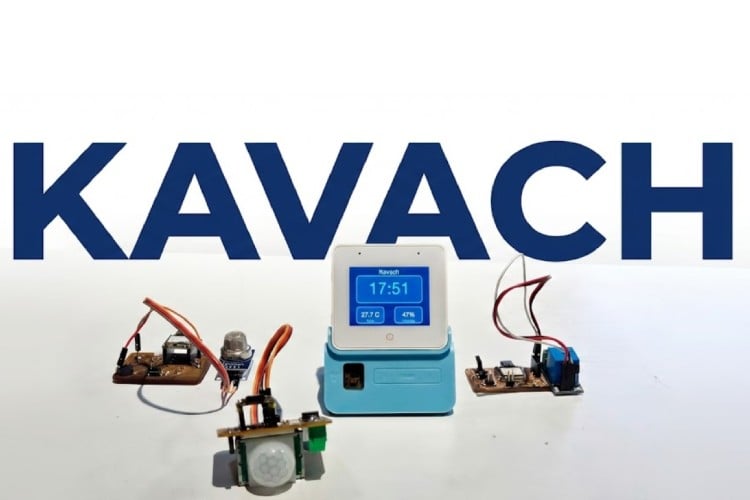
By Ashish Joy
Kavach is a desktop AI-assisted communication and smart-home support device designed specifically for elderly users who struggle with smartphones or modern digital interfaces. Inspired by the challenges faced by my own grandparents, who live alone and are digitally illiterate, this project aims to provide them with a safe, simple, and reliable way to communicate with their loved ones without depending on others.
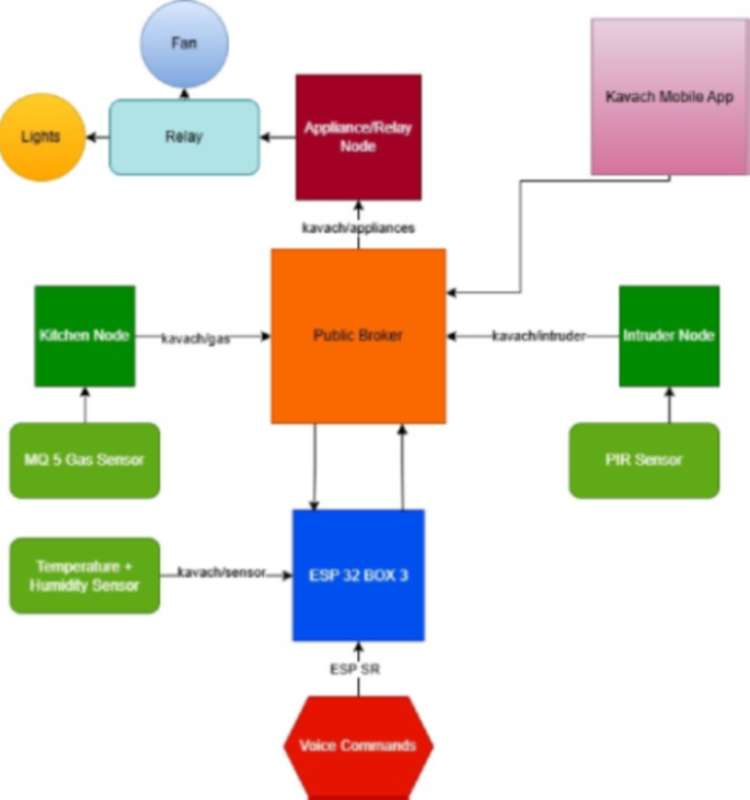
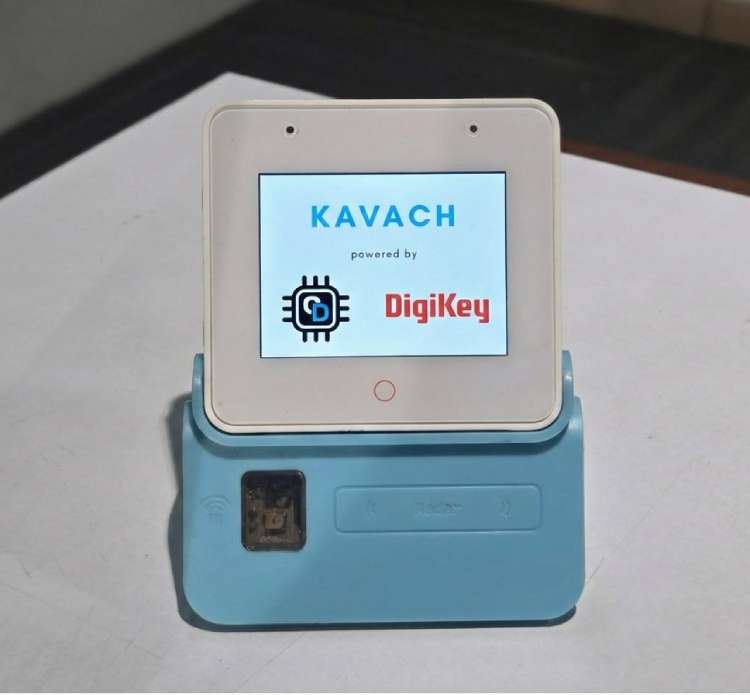
Using the ESP32-S3 Box-3 AIoT Kit, Kavach enables hands-free interaction through voice commands, allowing seniors to alert family members, send emergency alerts, and control essential home appliances effortlessly. The main control unit of Kavach is the ESP32 S3 Box 3 with the sensor dock, the system also integrates further ESP32 home IoT nodes for control and sensing. The kitchen node alerts the elders and the caregivers when there is a gas leakage. The PIR Sensor detects any intrusion at night and alerts the elders and caregivers. The system also continuously monitors temperature and humidity levels, automatically notifying emergency contacts if the environment becomes unsafe.
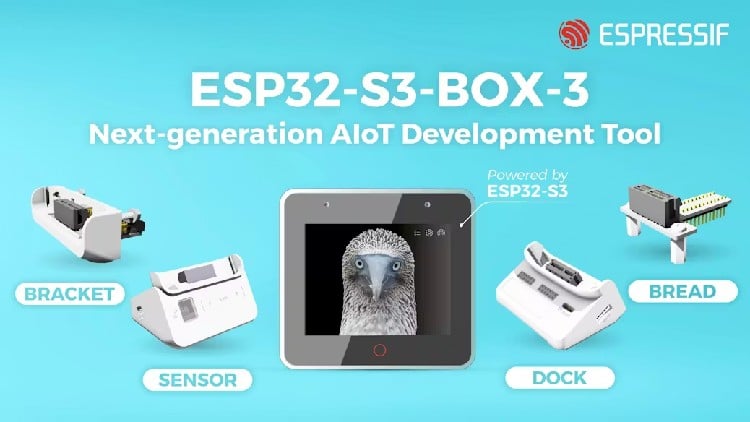
Hardware:
Main Voice Hub:
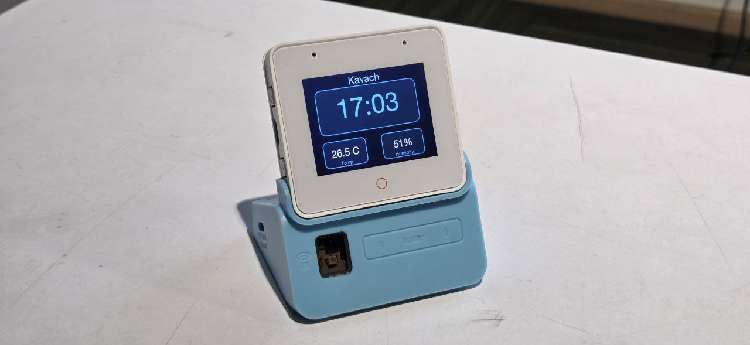
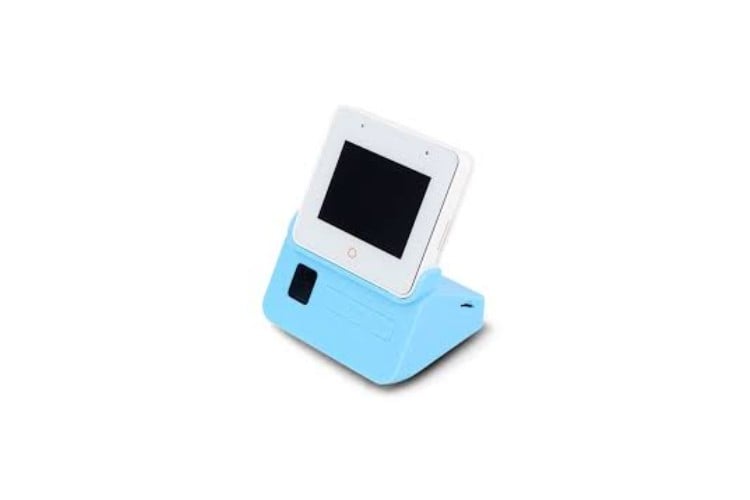
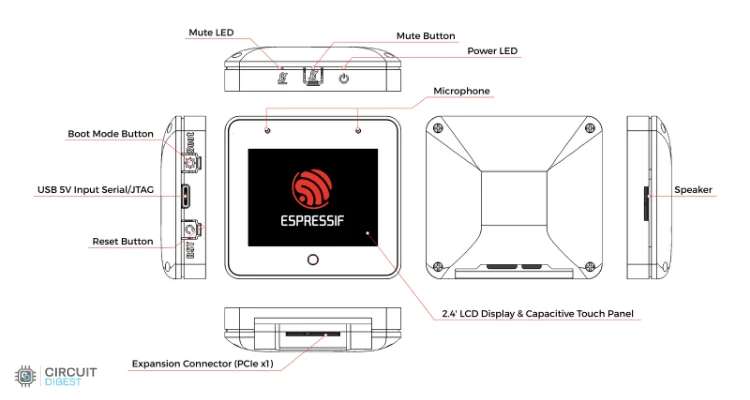
ESP32-S3 BOX 3: ESP32 S3, 2 x Microphones, Speaker, 2.4-inch Touchscreen TFT LCD, Touch Button
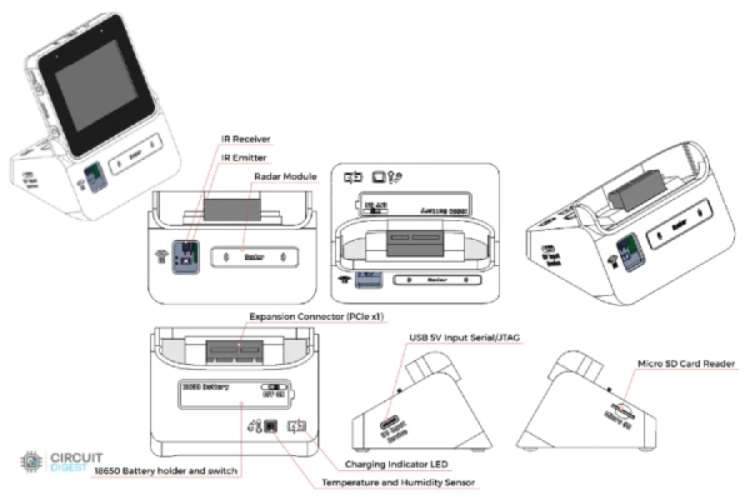
Sensor Dock: Temperature + Humidity Sensor, IR Emitter-Receiver, Radar
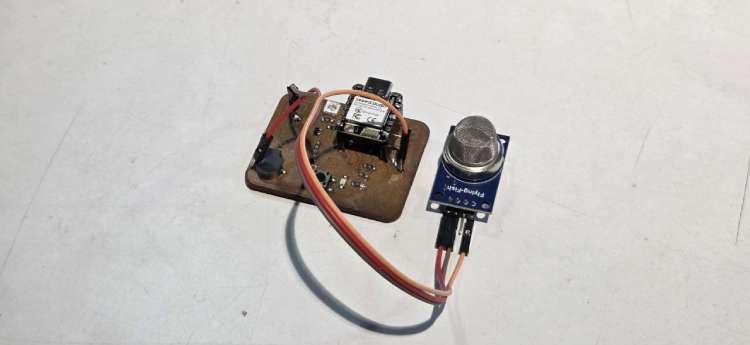
Gas Sensor Node:
ESP32 Dev Module, MQ-5 Gas Sensor
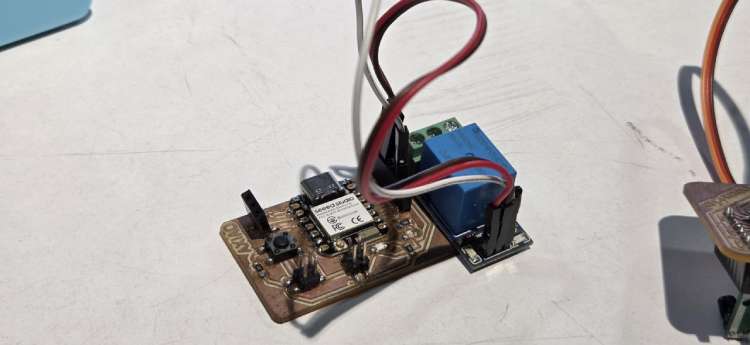
Relay Node:
XIAO ESP32C6, 5V Relay Module
Intruder Node:
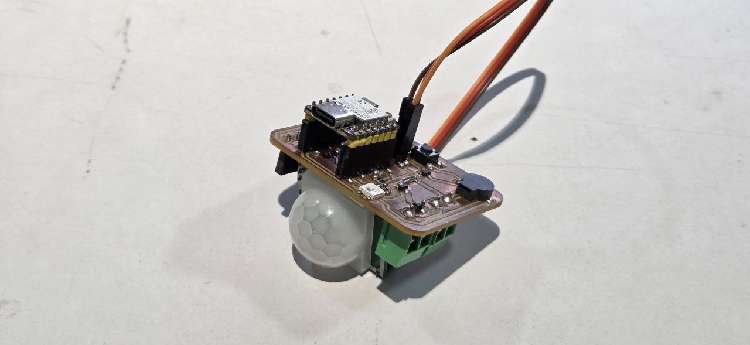
XIAO ESP32C6, PIR Sensor Module
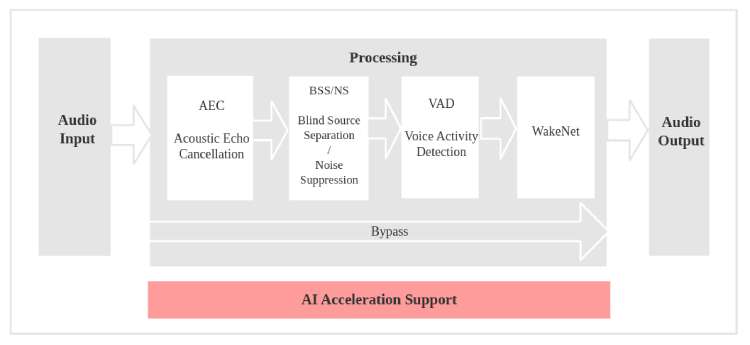
Offline keyword spotting using the ESP32-S3’s neural network acceleration to detect commands using the ESP-SR. The built-in dual microphones and ES8311 audio codec will ensure accurate speech detection even in noisy environments.
ESP-SR (Espressif Speech Recognition)
ESP-SR is Espressif’s offline speech framework for ESP chips. It runs on the device (no cloud) and does:
- Wake word detection – “Is the user saying the wake phrase?”
- Command recognition – “Which command phrase did they say?”
Audio goes through an AFE (Audio Front-End) for processing, then into WakeNet and MultiNet models that are stored in the model SPIFFS partition (about 8.6 MB) and loaded at runtime.
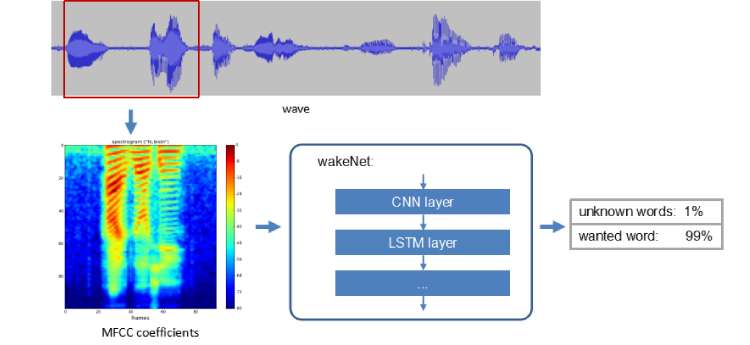
WakeNet
WakeNet is the model that detects the wake word (e.g. “Hi ESP” or “Alexa”). When it fires, the device switches to listening for a command and runs MultiNet. Until then, it only checks for the wake word to save CPU and power.
In this project the wake word is chosen in menuconfig (Kavach Configuration → Wake word). The code then picks one of these from the model partition:
- Hi ESP – WakeNet 9 multi-word model: SR_WN_WN9_HIESP_MULTI
- Alexa – WakeNet 9: SR_WN_WN9_* with “alexa”
- Hi ESP and Alexa – Multi-wake model (e.g. hiesp_alexa / alexa_hiesp), or fallback to Hi ESP
sdkconfig.defaults also enables Hi Lexin (Chinese-style wake): SR_WN_WN9_HILEXIN_MULTI. So the models used for wake are WakeNet 9 (WN9) variants: HIESP, Alexa, and/or HILEXIN, depending on Kconfig.
MultiNet
MultiNet is the model that recognizes command phrases after the wake word. It turns the next few seconds of speech into a command ID that the app maps to actions (help, light, fan, AC, etc.).
In Kavach:
- English commands → MultiNet English model
- Chinese commands → MultiNet Chinese model
Language is set in settings (NVS). The code loads the matching MultiNet from the model partition by name (e.g. ESP_MN_ENGLISH / ESP_MN_CHINESE). The build is set up for MultiNet 6 quantized:
- English: SR_MN_EN_MULTINET6_QUANT
- Chinese: SR_MN_CN_MULTINET6_QUANT
So the models used for commands are MultiNet 6 quantized (mn6, English and Chinese). The code also supports mn7 by name (e.g. strstr(mn_name, "mn6") || strstr(mn_name, "mn7")), but the default config is MultiNet 6.
Wake word
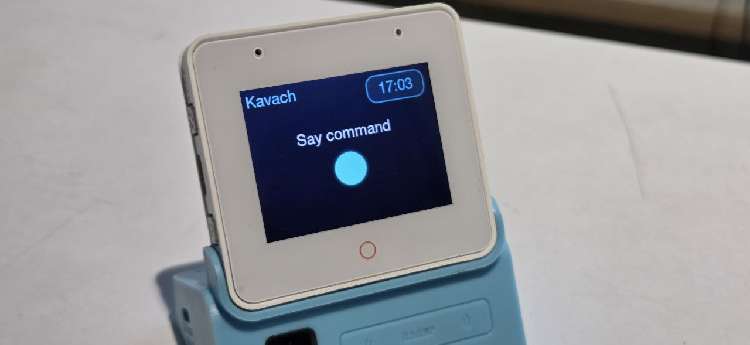
Start with "Alexa". The device beeps and enters voice mode. Say your command within a few seconds.
Voice commands (English)
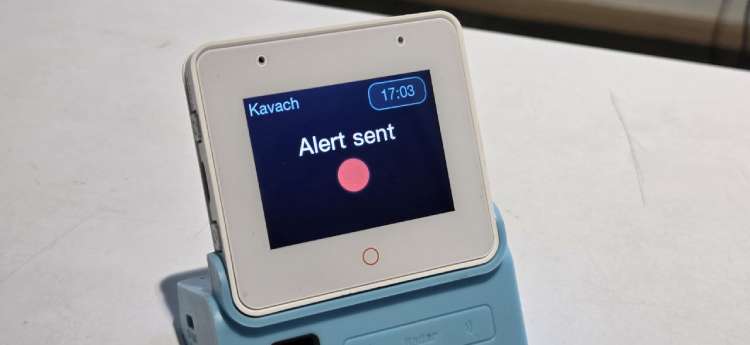
Help / emergency (→ MQTT kavach/help)
- I need help - Sends alert to emergency contacts
- Send alert - Sends alert
- Emergency - Sends alert
- Call family - Sends “Call family”
- Call my son - Sends “Call my son”
- Call home - Sends “Call home”
- Call - Sends “Call”
- Help - Sends help request
- What can you do - Sends “What can you do”
Appliances (→ MQTT kavach/appliances or IR for AC if learned)
- Turn on the Light / Light on / Light -Publishes light ON
- Turn off the Light / Light off - Publishes light OFF
- Fan on / Fan - Publishes fan ON
- Fan off - Publishes fan OFF
- Turn on the Air / AC on / AC - Sends IR AC-on (if learned) or publishes AC ON
- Turn off the Air / AC off - Sends IR AC-off (if learned) or publishes AC OFF
What is MQTT?
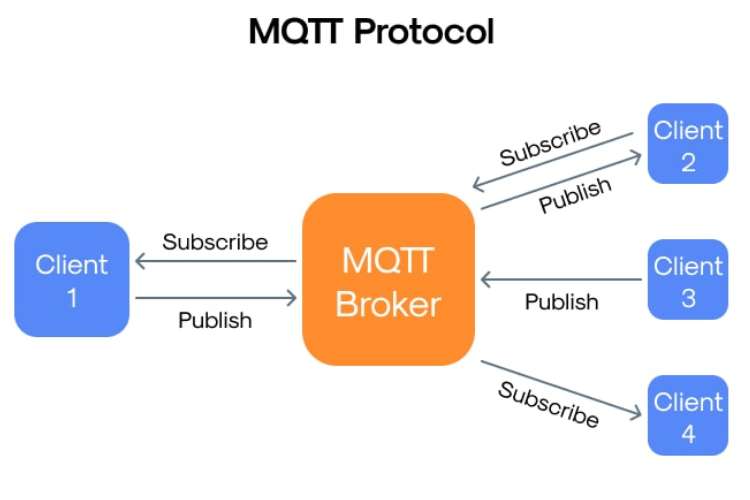
MQTT (Message Queuing Telemetry Transport) is a lightweight publish/subscribe messaging protocol. Devices connect to a central broker (server). They publish messages to named topics and subscribe to topics to receive messages. Only the broker needs to know who is connected; publishers and subscribers don’t need to know each other.
In Kavach, the ESP32 connects to an MQTT broker (e.g. Mosquitto on a PC or a cloud broker). The device publishes voice commands and sensor data so other apps can react (notify contacts, control lights, etc.), and it subscribes to a few topics so external systems can trigger alerts (gas, intruder) or check if the device is online (ping/pong).
How MQTT is used in Kavach
- Broker: Configured via Kavach Configuration in menuconfig: MQTT Broker URI (e.g. mqtt://192.168.1.100:1883). Optional MQTT username and MQTT password for authenticated brokers.
- Start: The MQTT client is started in main.c after WiFi connects. It runs in the background and reconnects if the link drops.
- Publish: The device publishes to configurable topics (help, appliances, sensor).
- Subscribe: The device subscribes to fixed topics (ping, gas, intruder) so external systems can send it commands or alerts.
Topic names for help, appliances, and sensor can be changed in menuconfig (Kavach Configuration). The ping, pong, gas, and intruder topic names are fixed in code.
1. Help — CONFIG_KAVACH_MQTT_TOPIC_HELP (default: fabacademy/kavach/help)
- When: User says a help/emergency phrase (“I need help”, “Send alert”, “Call family”, “Help”, etc.) or presses the Home button (emergency).
2. Appliances — CONFIG_KAVACH_MQTT_TOPIC_APPLIANCES (default: fabacademy/kavach/appliances)
- When: User says an appliance command (light on/off, fan, AC, play/pause/next, color).
3. Sensor — CONFIG_KAVACH_MQTT_TOPIC_SENSOR (default: fabacademy/kavach/sensor)
- When: Periodically after MQTT connect (interval set by Sensor publish interval in menuconfig, default 30 seconds). Only if the board has a temperature/humidity sensor and the driver returns data.
4. Pong — fixed topic fabacademy/kavach/pong
- When: Only when the device receives a message on fabacademy/kavach/ping.
Topics the device subscribes to
1. Ping — fixed topic fabacademy/kavach/ping
- Who publishes: Your app or any client.
2. Gas — fixed topic fabacademy/kavach/gas
- Who publishes: Your gas sensor or gateway (when a leak is detected).
3. Intruder — fixed topic fabacademy/kavach/intruder
- Who publishes: Your PIR/motion sensor or gateway.
End-to-end flow
- Device boots, connects to WiFi, then starts the MQTT client and connects to the broker.
- On connect, it subscribes to fabacademy/kavach/ping, fabacademy/kavach/gas, and fabacademy/kavach/intruder, and starts the sensor timer (if applicable).
- When the user speaks:
- Help/emergency phrases → publish to help (and show alert on screen).
- Appliance phrases → publish to appliances (and, for AC, send IR if codes are learned).
- Every N seconds (e.g. 30), if sensor is present, device publishes to sensor.
- When someone publishes to ping, device publishes pong.
- When someone publishes a gas message containing LEAK, device shows gas alert and plays alarm.
- When someone publishes an intruder message containing "motion", device shows intruder alert.
Flutter App
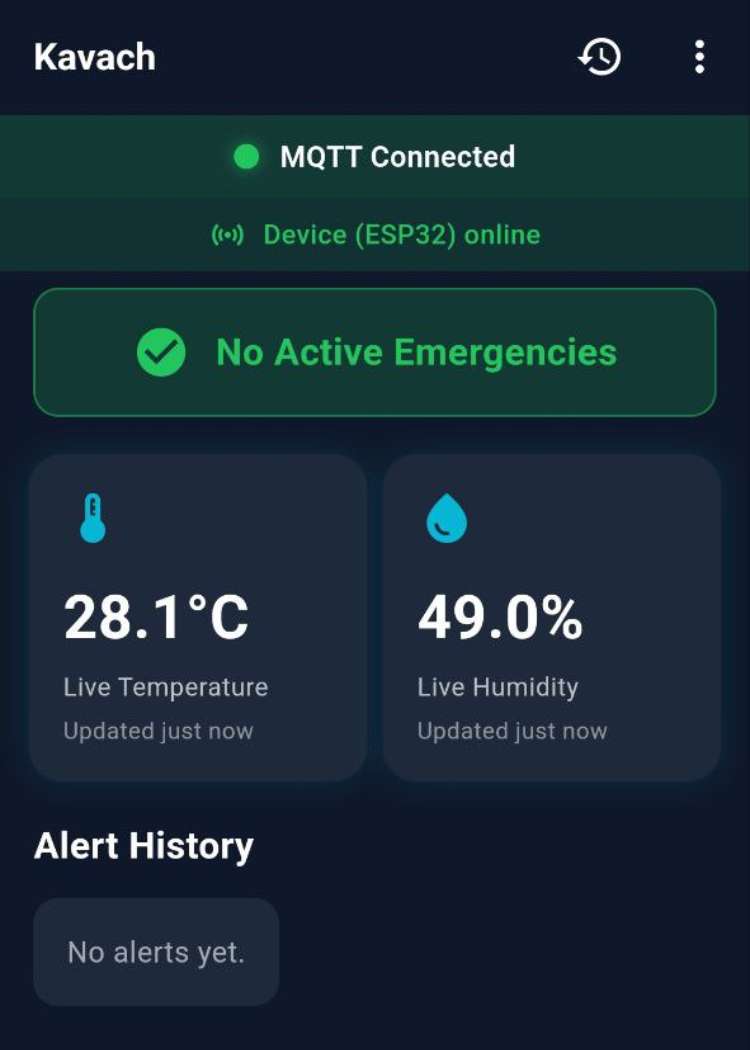
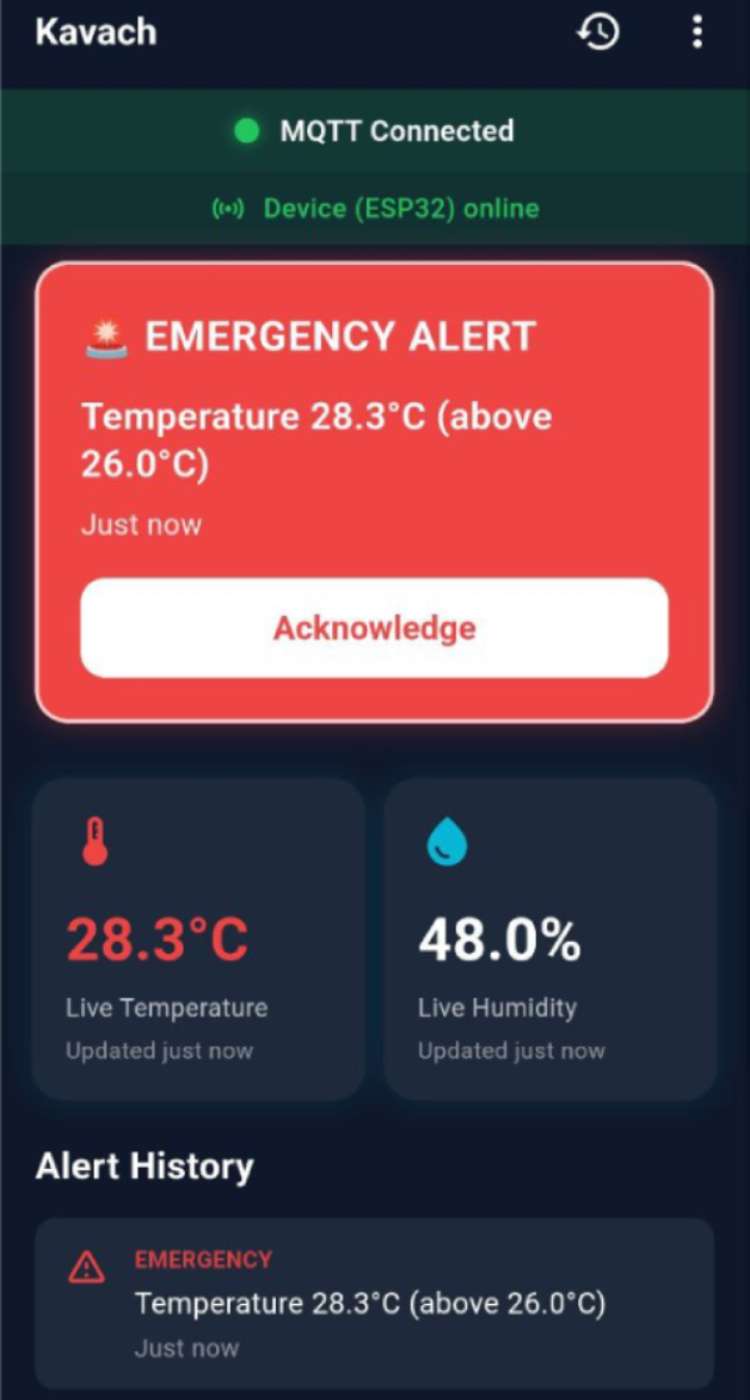
The flutter App is for the care Giver to get alert messages in time of emergencies and during alerts of gas leakage, temperature rise and intruder alerts. It also logs the alert messages and records their frequency.
Kavach brings together voice AI, IoT connectivity, and user-friendly interaction to support elderly individuals who are not comfortable with smartphones or digital devices. By leveraging the ESP32-S3 Box-3’s audio, AI, and connectivity features, the system provides a reliable way to communicate, control home appliances, and stay safe; using only voice. The project is a complete, real-world application of embedded AI and IoT to improve independence, security, and quality of life for seniors living alone.
Components Required
| Component Name | Quantity | Datasheet/Link |
| ESP32 S3 BOX 3 | 1 | View Datasheet |
| Seeed Studio XIAO ESP32 C6 | 3 | - |
| MQ-5 Gas Sensor | 1 | - |
| 5V Relay Module | 1 | - |
| PIR Sensor | 1 | - |
Circuit Diagram
The board has everything integrted into it therefore doesn't require a circuit diagram still
Code Explanation
1. Overview
Kavach is an elderly-focused AI assistant built for Espressif ESP32-S3 Box boards (ESP32-S3-BOX, ESP32-S3-BOX-Lite, ESP32-S3-BOX-3). It provides offline voice recognition, a simple UI, and MQTT-based connectivity for emergency alerts and appliance control. The software is organized into application modules, a GUI layer, hardware abstraction (BSP), and supporting libraries.
The Kavach demo is built with ESP-IDF (Espressif IoT Development Framework). The build uses the standard CMake/component setup and is driven by idf.py (build, flash, monitor). FreeRTOS is used for tasks, queues, and event groups; NVS stores settings. Connectivity is handled by the ESP-IDF WiFi (STA), MQTT client, and SNTP components. Hardware is accessed via IDF drivers: I2S for microphone and audio playback, I2C for the codec and sensors, RMT for IR transmit/receive, and SPIFFS for the storage partition. The UI runs on LVGL, and board support (display, codec, buttons, sensors) comes from the BSP component that wraps the esp-box-3 board package. Project options (WiFi credentials, MQTT broker, wake word, timezone, etc.) are configured with Kconfig via idf.py menuconfig (Kavach Configuration) or sdkconfig.defaults.
2. Application Entry and Initialization Flow
Execution starts in app_main() in main/main.c. The firmware:
- Initializes NVS – Flash-based non-volatile storage for parameters and WiFi credentials. If the NVS partition layout changes or is corrupted, it may erase and reinitialize.
- Loads system parameters – Calls settings_read_parameter_from_nvs() to restore language (EN/CN), volume, and related options from the sys_param namespace.
- Starts WiFi – Uses app_wifi_simple_start() to connect to the configured AP. This blocks for up to 30 seconds. If connection fails, MQTT is not started, but the rest of the app continues to run.
- Starts SNTP and MQTT – On successful WiFi connection, NTP is used to set the system clock for the UI, and the MQTT client is started.
- Mounts SPIFFS and initializes I2C – SPIFFS provides voice feedback WAVs and IR configuration files. I2C is used for sensors, display, and codec.
- Starts the display – Configures LVGL and the LCD driver, including DMA buffers, and starts the LVGL task. The backlight is turned on after a short delay.
- Initializes the Kavach UI – Calls kavach_ui_start() to create the clock view and voice mode layout.
- Initializes IR control – Sets up the IR TX task and queue for sending learned AC codes.
- Registers button callbacks – On boards with a Home button (e.g., ESP32-S3-BOX-3): short press triggers emergency, long press starts IR learning. These callbacks are skipped on ESP32-S3-BOX-Lite.
- Starts speech recognition – Finally calls app_sr_start(false) to begin wake word and command detection.
3. Core Software Components
3.1 WiFi Connectivity
app_wifi_simple implements a basic STA connection flow. It uses CONFIG_KAVACH_WIFI_SSID and CONFIG_KAVACH_WIFI_PASSWORD from Kconfig. There is no WiFi provisioning UI; credentials must be set in menuconfig or sdkconfig.defaults.
The module uses the ESP-IDF WiFi and event APIs. On WIFI_EVENT_STA_START, it connects; on WIFI_EVENT_STA_DISCONNECTED, it retries up to 20 times; on IP_EVENT_STA_GOT_IP, it signals success. app_wifi_simple_start() blocks until connection or timeout. app_wifi_simple_connected() reports current connectivity.
3.2 MQTT Connectivity
app_mqtt acts as both publisher and subscriber over MQTT. It connects to the broker specified by CONFIG_KAVACH_MQTT_BROKER_URI (e.g., mqtt://192.168.1.100:1883). If the config omits the scheme, it prepends mqtt:// and port 1883. Optional CONFIG_KAVACH_MQTT_USERNAME and CONFIG_KAVACH_MQTT_PASSWORD are used for authenticated brokers.
Publish topics:
- fabacademy/kavach/help – Emergency-related commands: “I need help”, “Send alert”, “Call family”, etc.
- fabacademy/kavach/appliances – Appliance commands as JSON, e.g. {"device":"light1","state":"ON"}.
- fabacademy/kavach/sensor – Temperature and humidity (for boards with sensors), published periodically.
Subscribe topics:
- fabacademy/kavach/ping – The device replies with "pong" to fabacademy/kavach/pong to show it is online.
- fabacademy/kavach/gas – Gas leak alerts. Payloads containing "LEAK" trigger a full-screen alert and playback of gas_alarm.wav.
- fabacademy/kavach/intruder – Motion/intruder alerts. Payloads containing "motion" trigger a full-screen intruder alert.
On connect, the client subscribes to these topics and starts a periodic timer for sensor publishing. The timer interval is controlled by CONFIG_KAVACH_MQTT_SENSOR_INTERVAL_SEC.
3.3 Speech Recognition (ESP-SR)
app_sr integrates Espressif ESP-SR for wake word and command recognition. It uses:
- Audio Front-End (AFE) – esp_afe_sr_iface_t for microphone input.
- WakeNet – Detects wake words (“Hi ESP”, “Alexa”, or both, depending on Kconfig).
- MultiNet – Command recognition in English or Chinese.
Three tasks run in parallel: an audio feed task reads I2S samples and feeds the AFE; a detect task processes AFE output and detects wake words and commands; a handler task receives results and takes action. Results are passed via a FreeRTOS queue. The feed task respects mute, sleep mode, and IR learning (audio capture is paused during IR learn).
app_sr_handler consumes SR results. On wake word detection it plays a beep and switches the UI to voice mode. On command detection it updates the UI, plays confirmation WAVs, publishes to MQTT, and, for AC commands, sends IR when learned codes are available. Help-related commands are published to fabacademy/kavach/help; appliance commands to fabacademy/kavach/appliances.
3.4 IR Remote Control
app_ir implements IR learning and transmission. IR learning is started by long-pressing the Home button. The user points the AC remote at the device and presses On, then Off. The module records IR signals on BSP_IR_RX_GPIO using RMT and saves them to /spiffs/ir_ac_on.cfg and /spiffs/ir_ac_off.cfg. When voice AC on/off is recognized and learned codes exist, app_ir_send_ac_on() or app_ir_send_ac_off() sends the stored codes via BSP_IR_TX_GPIO using RMT and a 38 kHz carrier. Transmission runs in a dedicated task. IR learning is implemented with the ir_learn component and ir_encoder for NEC-like encoding.
3.5 SNTP Time Synchronization
app_sntp keeps the system clock accurate for the UI clock. After WiFi connects, app_sntp_init() sets the timezone via setenv("TZ", COINFG_KAVACH_TIMEZONE, 1) and, if the system time is still at epoch, obtains time from NTP. It uses NTP servers such as ntp.aliyun.com, time.asia.apple.com, and pool.ntp.org. A time sync callback updates the system clock with settimeofday(). The Kavach clock uses time() and localtime_r(), so correct timezone and NTP sync are required for accurate display.
3.6 Settings and Configuration
settings manages persistent parameters in NVS under namespace sys_param. It stores need_hint, sr_lang (EN/CN), volume (0–100%), and radar_en. settings_read_parameter_from_nvs() loads these at boot; settings_write_parameter_to_nvs() saves them when changed.
Kconfig.projbuild defines the Kavach Configuration menu, including WiFi SSID/password, MQTT broker URI and credentials, topic names, sensor publish interval, timezone, and wake word choice.
3.7 Stub Modules
sensor_stub and mute_stub provide placeholders when full sensor or mute logic is not used. sensor_stub always returns false for sensor_ir_learn_enable(). mute_stub always returns true for get_mute_play_flag(), so playback is allowed. These keep app_sr compatible with builds that omit sensor or mute features.
4. User Interface (LVGL)
ui_kavach implements the Kavach GUI using LVGL. It has two modes:
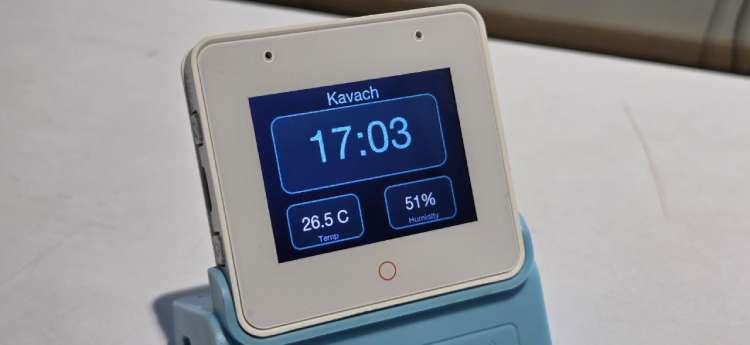
Clock mode (idle): Large center time (font_en_64), title “Kavach”, and temperature and humidity cards when sensors are available. Colors use a dark theme with teal accents.
Voice mode (after wake word): Time moves to the top-right and shrinks; a status line and circular indicator appear in the center. The indicator color reflects state: idle (grey), listening (teal-green), command OK (cyan-blue), alert (red).
The UI uses custom fonts (font_en_12, font_en_24, font_en_64, font_en_bold_36). Status and light state can be updated from other tasks via async APIs; a periodic LVGL timer applies these updates safely on the LVGL task.
For alerts, full-screen overlays are shown:
- Emergency / alert flash – Red overlay when the Home button is pressed.
- Gas leak – Red overlay with “GAS LEAK!” and instructions; gas_alarm.wav plays.
- Intruder – Red overlay for motion detection.
Overlays auto-dismiss after a delay, and gas alarm playback stops when the gas overlay is dismissed.
5. Dependencies
5.1 ESP-IDF Components
The main component pulls in:
- driver – I2S, I2C, GPIO, RMT
- nvs_flash – Non-volatile storage
- esp_wifi, esp_event, esp_netif – WiFi
- mqtt – MQTT client
- esp_sntp – NTP
- esp_codec_dev – Audio codec
- esp-box, esp-box-lite, or esp-box-3 – Board support (via BSP)
- esp-sr – Wake word and command models
5.2 BSP (Board Support Package)
The BSP component (components/bsp) abstracts hardware for different ESP32-S3 Box boards. It depends on esp_codec_dev, button, and board-specific packages (espressif/esp-box, espressif/esp-box-lite, espressif/esp-box-3). For Kavach on ESP32-S3-BOX-3, it also uses aht20 (temperature/humidity) and at581x (radar). The BSP provides:
- Display (LCD, LVGL port)
- I2S for audio input/output
- I2C for codec and sensors
- SPIFFS mount
- IR TX/RX GPIO
- Button handling (Home, etc.)
5.3 External Storage
SPIFFS stores:
- Voice feedback WAVs: beep.wav, echo_en_ok.wav, echo_en_alerted.wav, echo_en_calling.wav, echo_en_help.wav, gas_alarm.wav
- IR configuration: ir_ac_on.cfg, ir_ac_off.cfg
WAVs must be 16 kHz, 16-bit mono/stereo to avoid conflicts with the voice pipeline. The SR handler up-samples 16 kHz to 48 kHz for playback when the codec runs at 48 kHz.
6. Connectivity Summary
WiFi: STA mode; connects to a configurable AP for NTP and MQTT.
MQTT: Connects to a configurable broker. Publishes help, appliance commands, and sensor data; subscribes to ping, gas, and intruder topics.
NTP: Uses standard NTP servers to keep the system clock correct for the UI.
IR: Receives learned codes via RMT on the IR RX GPIO; sends them via RMT with 38 kHz carrier on the IR TX GPIO.
I2S: Mic input for speech recognition; codec output for WAV playback.
I2C: Audio codec and sensors (on supported boards).
7. Build Configuration
sdkconfig.defaults configures:
- Target: esp32s3
- 16 MB flash, QIO
- SPIRAM (8 MB octal)
- Power saving and CPU frequency options
- ESP-SR multi-word wake (Hi ESP, Alexa)
- WiFi, FreeRTOS, mbedTLS options
- LVGL and BSP LCD buffer settings
- Kavach WiFi, MQTT, and topic settings
The project uses a custom partition table with a SPIFFS partition for voice and IR data.
GitHub Repository



Add a comment
No account needed. Your comment appears once a moderator has reviewed it.