

Have you ever set an important reminder on your phone only to miss it because the device was in silent mode, left in another room, or buried under tons of notifications? While smartphones have made reminders convenient, they are not always used in every situation, especially for elderly people, students, or professionals with busy schedules.
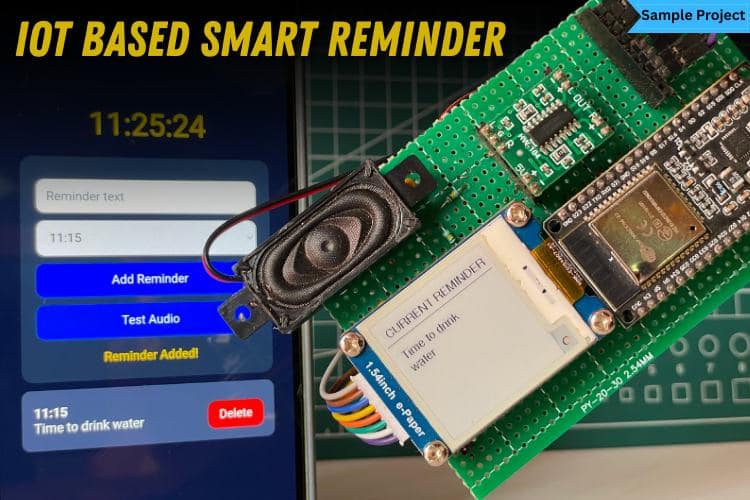
To solve this problem, we have developed an IoT-based smart Reminder System that acts as a dedicated personal reminder assistant. Instead of relying solely on a mobile phone, the system provides both visual and voice notifications through dedicated hardware. Users can easily create reminders from a web browser over Wi-Fi. At the scheduled time, the ESP32 automatically displays the message on an e-paper display and announces it through a speaker. Also, the system will retain the last displayed content even when power is removed. This means that if a power outage occurs after a reminder has been announced, the most recently displayed reminder will remain visible on the screen without consuming any power. Let's dive in and see how to do it.
Table of Contents
Components Required for Smart Reminder
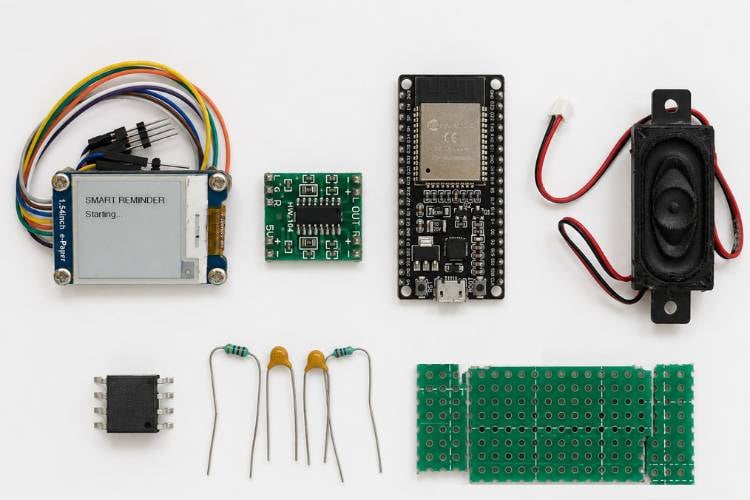
The components below are the ones that we use to complete the ESP32-based smart reminder project.
| S.No | Components | Quantity | Purpose |
| 1. | ESP32 | 1 | Acts as the main controller for processing, Wi-Fi connectivity, and overall system operation. |
| 2. | Speaker | 1 | Announces the reminder message through audio output. |
| 3. | Pam 8403 | 1 | Amplifies the audio signal generated by the ESP32 to drive the speaker. |
| 4. | E-paper | 1 | Displays the reminder text visually. |
| 5. | Dot board | 1 | Provides a convenient platform for assembling and soldering the circuit components. |
| 6. | 1uF capacitor | 2 | Used as DC blocking (coupling) capacitors in the audio circuit to remove DC offset. |
| 7. | 1nF capacitor | 3 | Forms part of the low-pass filter to reduce high-frequency noise in the audio signal. |
| 8. | 100k Ohms resistor | 3 | Creates the biasing network and assists in the active filter circuit |
| 9. | 47k Ohms resistor | 1 | Used in the active filter stage for proper signal conditioning. |
| 10. | ADA4841-2 Operational Amplifier | 1 | Conditions and buffers the audio signal before it is sent to the power amplifier. |
Schematic Diagram for the Smart Reminder Project
The heart of the project is the ESP32 Development Board, which acts as the main controller. It handles Wi-Fi connectivity, controls the Waveshare 1.54-inch e-paper display, and manages the overall system operation. The e-paper display communicates with the ESP32 through the SPI interface using the DIN, CLK, CS, DC, RST, and BUSY pins. For audio playback, the ESP32 generates an analog signal through its DAC pin. This signal first passes through capacitor C1, which removes the DC component. Resistors R1 and R2 create a virtual reference voltage, while R3, R4, C2, C3, and C4 form a low-pass filter that reduces unwanted high-frequency noise.
The filtered signal is then processed by the ADA4841-2 operational amplifier, which conditions and stabilises the audio for better quality. After passing through capacitor C5 to remove any remaining DC offset, the signal is fed into the PAM8403 audio amplifier, which amplifies it to drive the speaker. Finally, the speaker converts the amplified electrical signal into sound, enabling the system to play clear voice announcements or audio notifications.

Hardware Configuration For the IoT-Based Smart Reminder
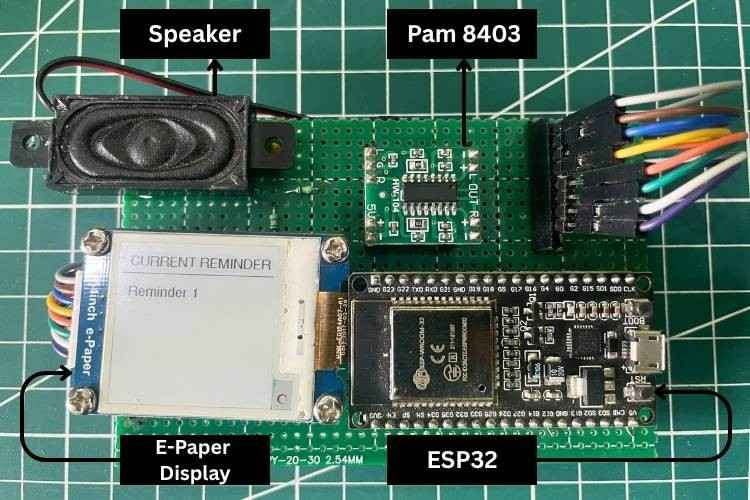
The hardware components of the Smart Reminder system are assembled on a dot board to create a compact and portable design.
Why do we use the ADA4841-2 Operational Amplifier in the Smart Reminder System?
The ADA4841-2 is a dual-channel, low-noise, low-distortion operational amplifier developed by Analog Devices for high-performance signal processing applications. It features rail-to-rail output operation, allowing it to work efficiently with low-voltage supplies such as 3.3V. The device is designed to provide accurate signal conditioning while introducing minimal noise and distortion, making it suitable for audio, sensor, and precision analog circuits. Its low power consumption and high signal fidelity enable it to process weak analog signals without significantly affecting their quality.
In this project, the ADA4841-2 is used as an audio signal conditioning stage between the ESP32 and the PAM8403 audio amplifier. The audio signal generated by the ESP32 contains unwanted switching components and is not ideal for directly driving the PAM8403. The ADA4841-2 helps stabilise and buffer the audio signal, ensuring that a clean and consistent analog waveform is delivered to the amplifier. By isolating the ESP32 from the amplifier stage and reducing signal degradation, it improves voice clarity and overall audio quality, allowing the reminder announcements to be reproduced more clearly through the speaker.
Smart Reminder using ESP32 Workflow
System Initialization
When the Smart Reminder system is powered on, the ESP32 initialises all the required hardware and software components. It connects to the configured Wi-Fi network, mounts the LittleFS file system, initialises the Waveshare 1.54-inch e-paper display, and configures the audio playback modules. The ESP32 also synchronises its internal clock with an NTP server to obtain the correct date and time for accurate reminder scheduling.
User Accesses the Web Interface
After successful initialisation, the ESP32 starts an embedded web server and displays its local IP address in the Serial Monitor. The user enters this IP address into a web browser connected to the same Wi-Fi network, opening a user-friendly interface where reminders can be added, viewed, tested, or deleted without requiring any additional application.
Creating and Storing a Reminder
The user enters the reminder message along with the scheduled date and time through the web interface. The ESP32 stores the reminder details in memory and automatically generates a corresponding text-to-speech (TTS) audio file, which is saved in the LittleFS storage for future playback. To efficiently manage memory and processing resources, the system supports a maximum of 10 reminders at a time. If the limit is reached, no additional reminders can be added until an existing one is deleted.
Continuous Time Monitoring
Once the reminders are stored, the ESP32 continuously monitors the current time and compares it with all scheduled reminders. This checking process runs repeatedly in the background while simultaneously handling incoming web requests, ensuring that reminder detection and user interaction occur smoothly without interrupting each other.
Reminder Triggering
When the current time matches a scheduled reminder, the ESP32 automatically activates the reminder event. It first updates the Waveshare e-paper display with the reminder message, allowing the user to read the notification clearly. Since e-paper technology consumes power only during refresh operations, the displayed message remains visible without continuously drawing power.
Voice Announcement
Simultaneously, the ESP32 retrieves the corresponding MP3 file from the LittleFS storage and decodes it using the integrated MP3 decoder library. The audio signal passes through the ADA4841-2 signal conditioning circuit and is then amplified by the PAM8403 audio amplifier before being sent to the speaker. This produces a clear and audible voice announcement of the reminder.
Reminder Completion and System Reset
After displaying the reminder and completing the voice announcement, the ESP32 marks the reminder as completed to prevent repeated playback. The system then returns to its monitoring state and continues checking the remaining scheduled reminders. This process repeats continuously, enabling the Smart Reminder system to operate automatically and reliably throughout the day.
Code Explanation for the Smart Reminder
The Smart Reminder program initialises the ESP32, connects it to a Wi-Fi network, synchronises the current time using an NTP server, and starts a web server for user interaction. It provides a browser-based interface that allows users to create, view, and delete reminders while automatically generating voice announcements using Google Text-to-Speech. The generated MP3 files are stored in LittleFS and played back through the audio output when the scheduled time is reached. At the same time, the reminder message is displayed on the e-paper display for visual notification.
#include <Arduino.h>
#include <WiFi.h>
#include <WebServer.h>
#include <HTTPClient.h>
#include <LittleFS.h>
#include <time.h>
#include "AudioFileSourceLittleFS.h"
#include "AudioGeneratorMP3.h"
#include "AudioOutputI2S.h"
#define WIFI_SSID "yourwifiname"
#define WIFI_PASSWORD "yourwifipassword"
#define NTP_SERVER "pool.ntp.org"
#define GMT_OFFSET_SEC 19800
#define MAX_REMINDERS 10
This section imports all the required libraries for the project. These libraries enable Wi-Fi communication, web server functionality, file storage, internet time synchronisation, MP3 decoding, and audio playback. It also defines important system constants such as Wi-Fi credentials, NTP server information, time zone offset, and the maximum number of reminders that can be stored. These configurations act as the foundation for the entire smart reminder system.
struct Reminder {
String text;
String file;
int hour;
int minute;
bool played;
};
Reminder reminders[MAX_REMINDERS];
int reminderCount = 0;
A custom structure named Reminder is used to store all information related to a reminder. Each reminder contains the reminder text, the path to its corresponding MP3 audio file, the scheduled hour and minute, and a flag indicating whether the reminder has already been played. An array of reminder structures is used to manage multiple reminders efficiently, while reminderCount keeps track of the total number of active reminders currently stored in memory.
const char webpage[] PROGMEM = R"rawliteral(
<html>
<body>
<h1>ESP32 Smart Reminder</h1>
<input type="text" id="text">
<input type="time" id="time">
<button onclick="addReminder()">
Add Reminder
</button>
<button onclick="testAudio()">
Test Audio
</button>
</body>
</html>
)rawliteral";
The project includes a built-in web interface hosted directly on the ESP32. This HTML page provides an easy-to-use dashboard where users can create reminders, test the audio system, and view existing reminders. Since the webpage is stored in program memory using PROGMEM, RAM usage is minimised. This browser-based interface eliminates the need for a separate mobile application and allows convenient reminder management from any device connected to the network.
void playMP3(String path) {
AudioFileSourceLittleFS *fsFile =
new AudioFileSourceLittleFS(path.c_str());
AudioGeneratorMP3 *decoder =
new AudioGeneratorMP3();
decoder->begin(fsFile, out);
while(decoder->isRunning()) {
decoder->loop();
yield();
}
delete decoder;
delete fsFile;
}
This function is responsible for playing the stored reminder audio files. The MP3 file is read from LittleFS, decoded using the MP3 decoder library, and sent to the ESP32’s internal DAC through the I2S audio interface. Continuous looping ensures smooth audio playback until the entire file has been played. This mechanism enables the reminder system to provide clear voice notifications whenever a scheduled event occurs.
void loop() {
 server.handleClient();
 if (getLocalTime(&timeinfo)) {
   for(int i=0;
       i<reminderCount;
       i++) {
     if(!reminders[i].played &&
        reminders[i].hour ==
        timeinfo.tm_hour &&
        reminders[i].minute ==
        timeinfo.tm_min) {
       reminders[i].played = true;
       showReminderOnEPD(
         reminders[i].text
       );
       playMP3(
         reminders[i].file
       );
     }
   }
 }
}
The main loop continuously handles incoming web requests and monitors the current time. Every reminder stored in memory is compared against the current NTP-synchronized time. When a matching reminder is detected, the system updates the e-paper display with the reminder text and plays the associated voice message. The played flag prevents repeated triggering within the same day, ensuring each reminder is announced only once at its scheduled time.
Working Demonstration of the Smart Reminder
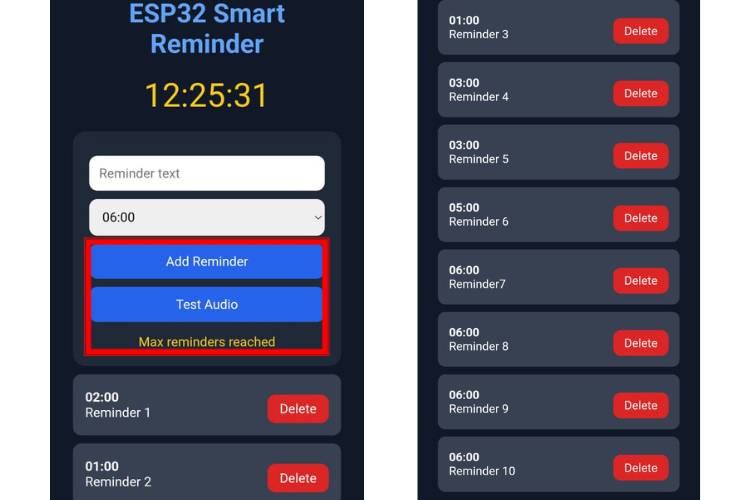
At first, we can create a reminder by entering the reminder message along with the desired date and time through the web interface, as shown in the image. After setting the reminder, we can verify the audio functionality by clicking the Test Audio button, which plays the generated voice announcement through the speaker.
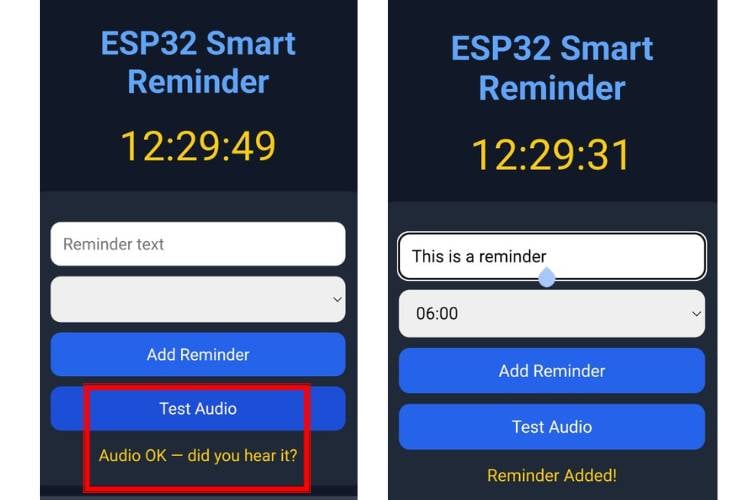
As shown in the image, the Smart Reminder system supports a maximum of 10 reminders at a time. Users can continue adding reminders until all 10 slots are occupied. Once the limit is reached, the system will not allow any additional reminders to be created. If the user attempts to add an 11th reminder, the request will be rejected, and a new reminder can only be added after deleting one of the existing reminders
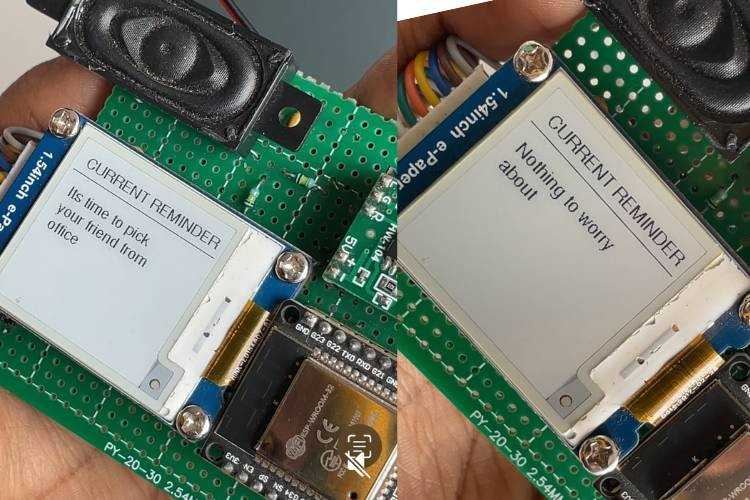
The image below shows how a reminder is displayed on the e-paper display when its scheduled time is reached. Once the reminder is triggered, the reminder message appears on the display and the corresponding voice announcement is played through the speaker. Since the project uses an e-paper display, the last displayed reminder remains visible even if the power is turned off.
Real-Time Reminder System - Live Demo
IoT Smart Reminder System GitHub
Access the complete source code, circuit design, and project files for the ESP32-based Smart Reminder System on GitHub. Clone the repository, customise the code, and build your own voice-enabled reminder device with ease.


Troubleshooting for the Smart Reminder Using ESP32
If the system is not working as expected, check the following points to troubleshoot the smart reminder.
| S.No | Problem | Possible Cause | Solution |
| 1. | The e-paper display remains blank | Incorrect SPI wiring or power connection | Check the DIN, CLK, CS, DC, RST, and BUSY connections and ensure the display is powered with 3.3V. |
| 2. | No audio output from the speaker | Wrong wiring or amplifier issue | Check the PAM8404 connections and speaker wiring, and ensure the amplifier receives a 5V supply |
| 3. | Distorted or noisy audio | Incorrect filter or op-amp connections | Verify the values and connections of C1-C5, R1-R4, and the ADA4841-2 circuit |
| 4. | Speaker output is very low | Low input signal or incorrect amplifier wiring | Check the audio path and verify the PAM8404 input and speaker connections. |
| 5. | ESP32 keeps restarting | Insufficient power supply | Use a stable power source capable of supplying adequate current. |
| 6. | Compilation or upload errors | Incorrect board or port selection | Select the correct ESP32 board and COM port in the Arduino IDE before uploading |
Frequently Asked Questions
⇥ How are reminders added to the system?
Reminders are added through a web interface hosted on the ESP32. The user simply opens the ESP32's IP address in a web browser, enters the reminder text and time, and saves it.
⇥ How many reminders can be stored at a time?
The current implementation supports a maximum of 10 reminders. If all 10 slots are occupied, the user must delete an existing reminder before adding a new one.
⇥ Does the system require an internet connection?
Yes. An internet connection is required for Wi-Fi connectivity, NTP time synchronisation, and generating Text-to-Speech (TTS) audio files. However, once the MP3 files are stored locally, they can be played from the ESP32's memory.
⇥ Why is an e-paper display used instead of an LCD?
An e-paper display consumes power only during screen updates and retains the displayed content even when power is removed, making it highly energy-efficient and easy to read.
⇥ What is the purpose of the ADA4841-2 operational amplifier?
The ADA4841-2 conditions and filters the audio signal generated by the ESP32, reducing noise and improving audio quality before it is sent to the PAM8404 amplifier.
⇥ Why is the PAM8404 amplifier required?
The ESP32 cannot directly drive a speaker with sufficient power. The PAM8404 amplifies the audio signal, enabling loud and clear voice announcements.
⇥ Can reminders be edited after they are created?
In the current implementation, reminders cannot be edited directly. To make changes, the existing reminder should be deleted and recreated with the updated information.
Conclusion
Although smartphones already offer reminder applications, they require users to keep their phones nearby and can be easily ignored among numerous notifications. But this dedicated hardware device provides clear voice announcements and visual reminders through the e-paper display, making it especially useful for elderly people, individuals with memory difficulties, workplaces, study environments, or situations where phone usage is restricted. The project demonstrates how a purpose-built embedded system can offer a more accessible and focused reminder experience than a general-purpose mobile application.
Complete Project Code
#include <Arduino.h>
#include <WiFi.h>
#include <WebServer.h>
#include <HTTPClient.h>
#include <LittleFS.h>
#include <time.h>
#include "AudioFileSourceLittleFS.h"
#include "AudioGeneratorMP3.h"
#include "AudioOutputI2S.h"
#include <SPI.h>
#include <GxEPD2_BW.h>
#include <Fonts/FreeSans9pt7b.h>
// ================= WIFI =================
#define WIFI_SSID     "yourwifiname"
#define WIFI_PASSWORD "yourwifipassword"
#define NTP_SERVER "pool.ntp.org"
#define GMT_OFFSET_SEC 19800
#define MAX_REMINDERS 10
// ================= AUDIO =================
// GPIO 25 = Internal DAC Channel 1 (Left)  → Speaker+ (via 10µF cap)
// GPIO 26 = Internal DAC Channel 2 (Right) → Speaker- (differential mode)
// GND → Speaker GND
AudioOutputI2S *out = nullptr;
// ================= EPAPER =================
#define EPD_CS   5
#define EPD_DC   17
#define EPD_RST  16
#define EPD_BUSY 4
#define EPD_MOSI 23
#define EPD_SCK  18
GxEPD2_BW<GxEPD2_154_D67, GxEPD2_154_D67::HEIGHT>
display(GxEPD2_154_D67(EPD_CS, EPD_DC, EPD_RST, EPD_BUSY));
// ================= WEB SERVER =================
WebServer server(80);
// ================= REMINDER =================
struct Reminder {
 String text;
 String file;
 int hour;
 int minute;
 bool played;
};
Reminder reminders[MAX_REMINDERS];
int reminderCount = 0;
// ================= WEBPAGE =================
const char webpage[] PROGMEM = R"rawliteral(
<!DOCTYPE html>
<html>
<head>
<meta name="viewport" content="width=device-width, initial-scale=1">
<title>ESP32 Smart Reminder</title>
<style>
body{
 background:#111827;
 font-family:Arial;
 color:white;
 padding:20px;
}
h1{
 text-align:center;
 color:#60a5fa;
}
.clock{
 font-size:40px;
 text-align:center;
 margin:20px;
 color:#facc15;
}
.card{
 background:#1f2937;
 padding:20px;
 border-radius:15px;
 margin:auto;
 max-width:500px;
}
input{
 width:100%;
 padding:12px;
 margin-top:10px;
 border:none;
 border-radius:10px;
 font-size:16px;
 box-sizing:border-box;
}
button{
 width:100%;
 padding:12px;
 margin-top:10px;
 background:#2563eb;
 border:none;
 color:white;
 border-radius:10px;
 font-size:16px;
 cursor:pointer;
}
button:hover{
 background:#1d4ed8;
}
.rem{
 background:#374151;
 padding:15px;
 border-radius:10px;
 margin-top:10px;
 display:flex;
 justify-content:space-between;
 align-items:center;
}
.del{
 background:#dc2626;
 width:auto;
 padding:8px 15px;
}
.status{
 text-align:center;
 margin-top:15px;
 color:#facc15;
}
</style>
</head>
<body>
<h1>ESP32 Smart Reminder</h1>
<div class="clock" id="clock">--:--:--</div>
<div class="card">
 <input type="text" id="text" placeholder="Reminder text">
 <input type="time" id="time">
 <button onclick="addReminder()">Add Reminder</button>
 <button onclick="testAudio()">Test Audio</button>
 <div class="status" id="status"></div>
</div>
<div id="list" style="max-width:500px;margin:auto;margin-top:10px;"></div>
<script>
function updateClock(){
 fetch('/time')
   .then(r=>r.text())
   .then(t=>{ document.getElementById('clock').innerHTML=t; });
}
setInterval(updateClock,1000);
updateClock();
function loadReminders(){
 fetch('/list')
   .then(r=>r.json())
   .then(data=>{
     let html='';
     data.forEach((r,i)=>{
       html += `<div class="rem">
         <div><b>${r.time}</b><br>${r.text}</div>
         <button class="del" onclick="delRem(${i})">Delete</button>
       </div>`;
     });
     document.getElementById('list').innerHTML=html;
   });
}
function addReminder(){
 let text=document.getElementById('text').value;
 let time=document.getElementById('time').value;
 if(text=='' || time==''){
   alert('Enter reminder text and time');
   return;
 }
 document.getElementById('status').innerHTML='Generating voice...';
 fetch('/add',{
   method:'POST',
   headers:{'Content-Type':'application/x-www-form-urlencoded'},
   body:'text='+encodeURIComponent(text)+'&time='+time
 })
 .then(r=>r.text())
 .then(d=>{
   document.getElementById('status').innerHTML=d;
   document.getElementById('text').value='';
   loadReminders();
 });
}
function delRem(i){
 fetch('/delete?id='+i).then(()=>{ loadReminders(); });
}
function testAudio(){
 document.getElementById('status').innerHTML='Testing audio...';
 fetch('/test')
   .then(r=>r.text())
   .then(d=>{ document.getElementById('status').innerHTML=d; });
}
loadReminders();
</script>
</body>
</html>
)rawliteral";
// ================= EPD DISPLAY =================
void showReminderOnEPD(String text) {
 Serial.println("Updating ePaper...");
 display.setFullWindow();
 display.firstPage();
 do {
   display.fillScreen(GxEPD_WHITE);
   display.setTextColor(GxEPD_BLACK);
   display.setFont(&FreeSans9pt7b);
   display.setCursor(10, 25);
   display.println("CURRENT REMINDER");
   display.drawLine(0, 35, 200, 35, GxEPD_BLACK);
   int y = 65;
   String word = "";
   String line = "";
   for (int i = 0; i <= (int)text.length(); i++) {
     char c = (i < (int)text.length()) ? text[i] : ' ';
     if (c == ' ' || i == (int)text.length()) {
       if ((line + word).length() > 18) {
         display.setCursor(10, y);
         display.println(line);
         y += 22;
         line = word + " ";
       } else {
         line += word + " ";
       }
       word = "";
     } else {
       word += c;
     }
   }
   if (line.length() > 0) {
     display.setCursor(10, y);
     display.println(line);
   }
 } while (display.nextPage());
 display.hibernate();
 Serial.println("ePaper updated");
}
// ================= AUDIO PLAYBACK =================
void playMP3(String path) {
 Serial.println("\n▶ playMP3: " + path);
 if (!LittleFS.exists(path)) {
   Serial.println("✗ File not found: " + path);
   return;
 }
 File check = LittleFS.open(path, "r");
 if (!check) { Serial.println("✗ Cannot open file"); return; }
 int fileSize = check.size();
 check.close();
 Serial.println("  File size: " + String(fileSize) + " bytes");
 if (fileSize < 512) {
   Serial.println("✗ File too small (" + String(fileSize) + " bytes)");
   return;
 }
 // ── Keep 'out' alive across calls — deleting/recreating the I2S driver ──
 // repeatedly causes DMA state corruption. Create once, reuse always.
 if (!out) {
   out = new AudioOutputI2S(0, AudioOutputI2S::INTERNAL_DAC);
   // ❌ DO NOT call SetOutputModeMono(true)
   //    Mono mode maps to I2S_CHANNEL_FMT_ONLY_RIGHT which drives GPIO26 (DAC2).
   //    Your speaker is on GPIO25 (DAC1 = left channel).
   //    Stereo mode (default) uses I2S_CHANNEL_FMT_RIGHT_LEFT → drives BOTH
   //    GPIO25 and GPIO26, so GPIO25 gets audio.
   out->SetGain(1.0);  // 4.0 was clipping — start at 1.0, raise if too quiet
 }
 AudioFileSourceLittleFS *fsFile = new AudioFileSourceLittleFS(path.c_str());
 AudioGeneratorMP3      *decoder = new AudioGeneratorMP3();
 Serial.println("  Starting decoder...");
 if (decoder->begin(fsFile, out)) {
   Serial.println("  Decoder started — playing...");
   // ── FIX: Push 1 second of silence to let the DAC pop/startup settle ─────
   // When the I2S DAC starts, it jumps to 1.65V DC bias, causing a pop.
   // By playing silence first, we give the speaker time to settle so the
   // first word of the voice isn't masked by the hardware transient.
   int16_t silence[2] = {0, 0};
   for (int i = 0; i < 24000; i++) { // 24000 samples @ 24kHz = 1 second
     out->ConsumeSample(silence);
   }
   // ────────────────────────────────────────────────────────────────────────
   int loopCount  = 0;
   int failCount  = 0;
   while (decoder->isRunning()) {
     bool ok = decoder->loop();
     if (ok) {
       loopCount++;
       failCount = 0;          // reset consecutive-fail counter
     } else {
       failCount++;
       Serial.println("  loop() false at loopCount=" + String(loopCount)
                      + " failCount=" + String(failCount));
       decoder->stop();
       break;
     }
     if (loopCount % 2000 == 0)
       Serial.println("  Playing... loops=" + String(loopCount));
     yield();
   }
   Serial.println("✓ MP3 done. loops=" + String(loopCount));
 } else {
   Serial.println("✗ decoder->begin() failed");
 }
 delete decoder;
 delete fsFile;
 Serial.println("  Resources freed\n");
}
// ================= TTS DOWNLOAD =================
bool downloadTTS(String text, String filename) {
 String encoded = "";
 for (int i = 0; i < (int)text.length(); i++) {
   char c = text[i];
   if (c == ' ') {
     encoded += '+';
   } else if (isalnum(c) || c == '-' || c == '_' || c == '.' || c == '~') {
     encoded += c;
   } else {
     char buf[4];
     sprintf(buf, "%%%02X", (unsigned char)c);
     encoded += buf;
   }
 }
 String url = "http://translate.google.com/translate_tts?ie=UTF-8&tl=en-US&client=tw-o…" + encoded;
 Serial.println("TTS URL: " + url);
 HTTPClient http;
 http.begin(url);
 http.addHeader("User-Agent", "Mozilla/5.0 (Windows NT 10.0; Win64; x64)");
 http.setTimeout(15000);
 int code = http.GET();
 Serial.println("HTTP Code: " + String(code));
 if (code != HTTP_CODE_OK) {
   Serial.println("TTS HTTP failed: " + String(code));
   http.end();
   return false;
 }
 Serial.println("Content-Length: " + String(http.getSize()));
 // ── KEY FIX: writeToStream() handles chunked transfer encoding ────────────
 // getStreamPtr() returns raw TCP bytes — for chunked responses Google sends,
 // this includes hex chunk-size lines (e.g. "4140\r\n") BEFORE the MP3 data.
 // writeToStream() strips those chunk headers automatically, giving clean
 // binary MP3 data to the file.
 // ──────────────────────────────────────────────────────────────────────────
 File file = LittleFS.open(filename, "w");
 if (!file) {
   Serial.println("File create failed: " + filename);
   http.end();
   return false;
 }
 int totalBytes = http.writeToStream(&file);   // handles chunked + plain
 file.close();
 http.end();
 Serial.println("Downloaded: " + String(totalBytes) + " bytes");
 if (totalBytes < 512) {
   Serial.println("✗ Too small (" + String(totalBytes) + " bytes) — invalid audio");
   LittleFS.remove(filename);
   return false;
 }
 // Verify MP3 sync word / ID3 tag in first 4 bytes
 File verify = LittleFS.open(filename, "r");
 if (verify) {
   uint8_t header[4];
   verify.readBytes((char*)header, 4);
   verify.close();
   bool isMP3 = (header[0] == 0xFF && (header[1] & 0xE0) == 0xE0);
   bool isID3 = (header[0] == 'I' && header[1] == 'D' && header[2] == '3');
   if (!isMP3 && !isID3) {
     Serial.printf("✗ Bad MP3 header: %02X %02X %02X %02X\n",
                   header[0], header[1], header[2], header[3]);
     LittleFS.remove(filename);
     return false;
   }
   Serial.println("✓ MP3 header OK");
 }
 Serial.println("TTS saved: " + filename);
 return true;
}
// ================= WEB HANDLERS =================
void handleRoot() { server.send_P(200, "text/html", webpage); }
void handleTime() {
 struct tm timeinfo;
 if (!getLocalTime(&timeinfo)) { server.send(200, "text/plain", "--:--:--"); return; }
 char buf[20];
 strftime(buf, sizeof(buf), "%H:%M:%S", &timeinfo);
 server.send(200, "text/plain", buf);
}
void handleList() {
 String json = "[";
 for (int i = 0; i < reminderCount; i++) {
   if (i > 0) json += ",";
   char t[10];
   sprintf(t, "%02d:%02d", reminders[i].hour, reminders[i].minute);
   json += "{\"time\":\""; json += t;
   json += "\",\"text\":\""; json += reminders[i].text; json += "\"}";
 }
 json += "]";
 server.send(200, "application/json", json);
}
void handleAdd() {
 if (reminderCount >= MAX_REMINDERS) {
   server.send(200, "text/plain", "Max reminders reached"); return;
 }
 String text = server.arg("text");
 String time = server.arg("time");
 if (text.length() == 0 || time.length() < 5) {
   server.send(200, "text/plain", "Invalid input"); return;
 }
 int h = time.substring(0, 2).toInt();
 int m = time.substring(3, 5).toInt();
 String fileName = "/audio/rem" + String(reminderCount) + ".mp3";
 if (LittleFS.exists(fileName)) LittleFS.remove(fileName);
 bool ok = downloadTTS(text, fileName);
 if (!ok) { server.send(200, "text/plain", "TTS Download Failed — check Serial"); return; }
 reminders[reminderCount] = { text, fileName, h, m, false };
 reminderCount++;
 server.send(200, "text/plain", "Reminder Added!");
}
void handleDelete() {
 int id = server.arg("id").toInt();
 if (id < 0 || id >= reminderCount) { server.send(200, "text/plain", "Invalid ID"); return; }
 LittleFS.remove(reminders[id].file);
 for (int i = id; i < reminderCount - 1; i++) reminders[i] = reminders[i + 1];
 reminderCount--;
 server.send(200, "text/plain", "Deleted");
}
void handleTest() {
 String path = "/audio/test.mp3";
 if (LittleFS.exists(path)) LittleFS.remove(path);
 bool ok = downloadTTS("Audio is working perfectly", path);
 if (ok) {
   playMP3(path);
   LittleFS.remove(path);
   server.send(200, "text/plain", "Audio OK — did you hear it?");
 } else {
   server.send(200, "text/plain", "TTS download failed — check WiFi and Serial");
 }
}
// ================= SETUP =================
void setup() {
 Serial.begin(115200);
 Serial.println("\n\nESP32 Smart Reminder Starting...");
 if (!LittleFS.begin(true)) { Serial.println("LittleFS mount failed!"); return; }
 if (!LittleFS.exists("/audio")) LittleFS.mkdir("/audio");
 Serial.println("LittleFS OK");
 SPI.begin(EPD_SCK, -1, EPD_MOSI, EPD_CS);
 display.init(115200, true, 2, false);
 display.setRotation(1);
 display.setTextColor(GxEPD_BLACK);
 display.setFont(&FreeSans9pt7b);
 display.setFullWindow();
 display.firstPage();
 do {
   display.fillScreen(GxEPD_WHITE);
   display.setCursor(10, 40); display.println("SMART REMINDER");
   display.setCursor(10, 70); display.println("Starting...");
 } while (display.nextPage());
 display.hibernate();
 Serial.println("ePaper OK");
 // ── AUDIO INIT ────────────────────────────────────────────────────────────
 // Created here so it persists for the entire session. The out object is
 // NOT deleted between playbacks — recreating it corrupts the I2S DMA state.
 // SetOutputModeMono(true) is intentionally OMITTED: mono mode selects
 // I2S_CHANNEL_FMT_ONLY_RIGHT (GPIO26/DAC2). Speaker is on GPIO25 (DAC1).
 // Stereo mode selects I2S_CHANNEL_FMT_RIGHT_LEFT → GPIO25 gets audio.
 // ─────────────────────────────────────────────────────────────────────────
 out = new AudioOutputI2S(0, AudioOutputI2S::INTERNAL_DAC);
 out->SetGain(1.0);  // Start conservative; increase to 2.0 if too quiet
 Serial.println("Audio init OK — GPIO25=DAC1(L)  GPIO26=DAC2(R)");
 WiFi.begin(WIFI_SSID, WIFI_PASSWORD);
 Serial.print("Connecting to WiFi");
 int tries = 0;
 while (WiFi.status() != WL_CONNECTED && tries < 30) {
   delay(500); Serial.print("."); tries++;
 }
 if (WiFi.status() == WL_CONNECTED) {
   Serial.println("\nConnected! IP: " + WiFi.localIP().toString());
 } else {
   Serial.println("\nWiFi failed!");
 }
 configTime(GMT_OFFSET_SEC, 0, NTP_SERVER);
 Serial.println("NTP configured");
 server.on("/",       handleRoot);
 server.on("/time",   handleTime);
 server.on("/list",   handleList);
 server.on("/add",    HTTP_POST, handleAdd);
 server.on("/delete", handleDelete);
 server.on("/test",   handleTest);
 server.begin();
 Serial.println("Web server started");
 Serial.println("Open: http://" + WiFi.localIP().toString());
}
// ================= LOOP =================
void loop() {
 server.handleClient();
 static unsigned long lastCheck = 0;
 if (millis() - lastCheck > 5000) {
   lastCheck = millis();
   struct tm timeinfo;
   if (getLocalTime(&timeinfo)) {
     for (int i = 0; i < reminderCount; i++) {
       if (!reminders[i].played &&
            reminders[i].hour   == timeinfo.tm_hour &&
            reminders[i].minute == timeinfo.tm_min) {
         reminders[i].played = true;
         Serial.println("=== REMINDER TRIGGERED: " + reminders[i].text);
         showReminderOnEPD(reminders[i].text);
         playMP3(reminders[i].file);
       }
     }
     if (timeinfo.tm_hour == 0 && timeinfo.tm_min == 0)
       for (int i = 0; i < reminderCount; i++) reminders[i].played = false;
   }
 }
}

Add a comment
No account needed. Your comment appears once a moderator has reviewed it.