



By Akash A S
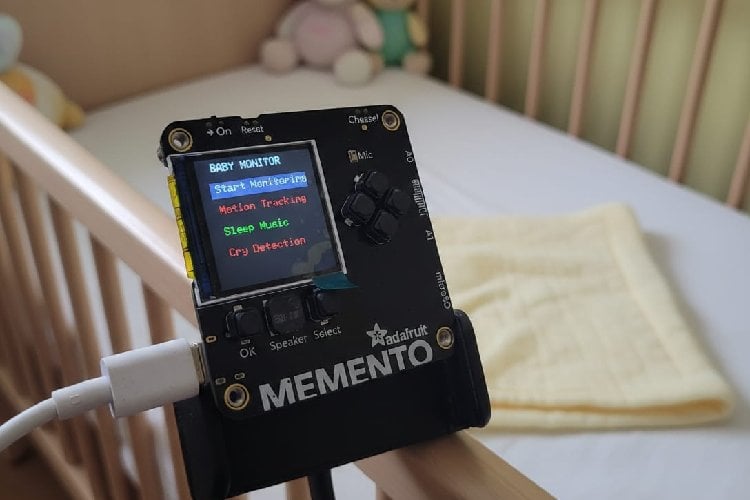
The iBIGS (Infant Behavior Intelligent Guardian System) is a smart baby monitoring and sleep-aid device built using the Adafruit MEMENTO (ESP32-S3) platform. The system is designed to help parents monitor infants, detect crying or movement, and provide soothing sounds to help babies sleep.
Infants often wake multiple times during the night due to hunger, discomfort, or irregular sleep cycles. This can lead to fatigue and stress for parents and may delay responses to the baby’s needs. iBIGS aims to simplify monitoring and improve safety by providing real-time alerts and remote access.
System Overview
The device uses:
- Camera for motion detection
- Microphone for cry detection
- Speaker for sleep music
- TFT display for alerts and menus
- Wi-Fi for remote monitoring through a local web page
The system continuously monitors audio and video. When significant motion or crying is detected, alerts are displayed on the device and updated on the web interface.
Software Architecture
The system software is divided into modules:
1) Motion Detection Module
Motion detection works by:
- Capturing consecutive frames
- Converting pixels to grayscale
- Comparing pixel differences
- Triggering alerts when changes exceed a threshold
To reduce false positives, a minimum pixel change filter is applied.
2) Cry Detection Module
Cry detection is based on:
- Peak-to-peak audio amplitude
- Sustained loudness detection (500 ms duration)
- Adjustable sensitivity threshold
This allows filtering out short noises while detecting continuous crying.
3) Sleep Assistance Module
The system plays:
- Lullabies or calming tones
- Low-frequency sounds that promote relaxation
Audio playback is controlled in software and can be toggled from the menu.
4) User Interface
The device includes a graphical menu with:
- Start Monitoring
- Motion Tracking toggle
- Sleep Music toggle
- Cry Detection toggle
Color indicators:
- Green = Enabled
- Red = Disabled
During monitoring, alerts are shown directly on the screen.
5) Web Monitoring Module
The ESP32 hosts a local web server that displays:
- Monitoring status
- Motion detection status
- Cry detection status
- Live camera snapshots
Parents can access the interface from any device connected to the same Wi-Fi network.
Code Explanation
1. Initialization
The system initializes the camera, Wi-Fi, and web server in the setup() function.
pycamera.begin(); WiFi.begin(ssid, password); server.begin(); This prepares the device to capture images, connect to the network, and host the monitoring webpage.
2. Menu System
A simple menu allows the user to enable or disable features such as motion detection, cry detection, and sleep music.
if(pycamera.justPressed(AWEXP_BUTTON_OK)) { startMonitoring(); } Buttons are read through the PyCamera library, and selections control system behavior.
3. Motion Detection
Motion detection works by comparing consecutive camera frames.
int diff = abs(gray - prevFrame[i]); if(diff > MOTION_THRESHOLD) { changedPixels++; } If enough pixels change between frames, motion is detected and an alert is displayed.
4. Cry Detection
The microphone reads sound levels and checks if loud sound persists for a set duration.
if(level > noiseThreshold) { if(millis() - loudStart > cryDuration) { cryDetected = true; } } This prevents short noises from triggering false alerts.
5. Sleep Music
A simple melody is played using the onboard speaker.
pycamera.speaker_tone(frequency, duration); Music playback is controlled through the menu.
6. Web Monitoring
The ESP32 runs a web server to display system status and camera footage.
server.on("/", handleRoot); server.on("/frame", handleFrame); Parents can open the device IP address in a browser to view monitoring status.
7. Monitoring Loop
During monitoring, the system repeatedly:
- Captures frames
- Checks motion
- Checks sound
- Updates display and web server
checkMotion(); checkCry(); server.handleClient(); This loop keeps the system running in real time.


Complete Project Code
#include "Adafruit_PyCamera.h"
#include <Arduino.h>
#include <WiFi.h>
#include <WebServer.h>
#include "esp_camera.h"
Adafruit_PyCamera pycamera;
// WIFI
const char* ssid = "asbro";
const char* password = "123456789";
WebServer server(80);
bool monitoringActive = false;
// MENU
enum MenuItem {
MENU_START,
MENU_MOTION,
MENU_SLEEP,
MENU_ALERT,
MENU_COUNT
};
int currentMenu = 0;
bool motionEnabled = true;
bool sleepEnabled = false;
bool alertEnabled = true;
// Motion detection
#define W 160
#define H 120
#define MOTION_THRESHOLD 25
#define MIN_CHANGED_PIXELS 300
uint8_t prevFrame[W * H];
bool firstFrame = true;
bool motionDetected = false;
// Cry detection
const int micPin = 2;
const int sampleWindow = 100;
const int noiseThreshold = 30;
const int cryDuration = 500;
unsigned long loudStart = 0;
bool cryDetected = false;
// Sleep Melody
int melody[] = {262,262,392,392,440,440,392,
349,349,330,330,294,294,262};
int durations[] = {400,400,400,400,400,400,700,
400,400,400,400,400,400,700};
int melodyLength = 14;
int melodyIndex = 0;
unsigned long noteTimer = 0;
// ===== WEB PAGE =====
String getStatusPage() {
String page = "";
page += "";
page += "";
page += "<style>";
page += "body{font-family:Arial;text-align:center;background:#111;color:white}";
page += ".box{padding:18px;margin:18px;border-radius:12px;font-size:20px}";
page += ".ok{background:#2ecc71}";
page += ".alert{background:#e74c3c}";
page += ".warn{background:#f39c12}";
page += "</style>";
page += "
Baby Monitor
";
page += monitoringActive ?
"
Monitoring: ON
" :
"
Monitoring: OFF
";
page += motionDetected ?
"
Motion Detected
" :
"
No Motion
";
page += cryDetected ?
"
Cry Detected
" :
"
No Cry
";
page += "
Live View
";
page += "

";
page += "";
return page;
}
void handleRoot() {
server.send(200, "text/html", getStatusPage());
}
// ===== CAMERA STREAM WITHOUT SD =====
void handleFrame() {
camera_fb_t *fb = esp_camera_fb_get();
if (!fb) {
server.send(500, "text/plain", "Camera capture failed");
return;
}
server.send_P(200, "image/jpeg", (const char *)fb->buf, fb->len);
esp_camera_fb_return(fb);
}
// RGB565 → Gray
uint8_t rgb565_to_gray(uint16_t c) {
uint8_t r = (c >> 11) & 0x1F;
uint8_t g = (c >> 5) & 0x3F;
uint8_t b = c & 0x1F;
return (r * 8 + g * 4 + b * 8) / 3;
}
// Noise level
int readNoiseLevel() {
unsigned long startMillis = millis();
int signalMax = 0;
int signalMin = 4095;
while (millis() - startMillis < sampleWindow) {
int sample = analogRead(micPin);
if (sample > signalMax) signalMax = sample;
if (sample < signalMin) signalMin = sample;
}
return signalMax - signalMin;
}
// Cry detection
void checkCry() {
if (!alertEnabled) {
cryDetected = false;
return;
}
int level = readNoiseLevel();
if (level > noiseThreshold) {
if (loudStart == 0) loudStart = millis();
if (millis() - loudStart > cryDuration) {
cryDetected = true;
}
} else {
loudStart = 0;
cryDetected = false;
}
}
// Sleep music
void playSleepMusic() {
if(!sleepEnabled) return;
if(millis() - noteTimer >= durations[melodyIndex] + 50) {
pycamera.speaker_tone(melody[melodyIndex], durations[melodyIndex]);
noteTimer = millis();
melodyIndex++;
if(melodyIndex >= melodyLength) melodyIndex = 0;
}
}
// Motion detection
void checkMotion(uint16_t *pixels) {
if(!motionEnabled){
motionDetected = false;
return;
}
int changedPixels = 0;
for (int i=0; i<W*H; i++) {
uint8_t gray = rgb565_to_gray(pixels[i]);
if(!firstFrame){
 int diff = abs(gray - prevFrame[i]);
 if(diff > MOTION_THRESHOLD){
   changedPixels++;
 }
}
prevFrame[i] = gray;
}
firstFrame = false;
motionDetected = (changedPixels > MIN_CHANGED_PIXELS);
}
// Alert banner
void drawAlert(const char* text, uint16_t color) {
pycamera.fb->fillRect(0, 200, 240, 40, color);
pycamera.fb->setCursor(30, 210);
pycamera.fb->setTextSize(2);
pycamera.fb->setTextColor(pycamera.color565(255,255,255));
pycamera.fb->print(text);
}
// Monitoring
void startMonitoring() {
monitoringActive = true;
firstFrame = true;
melodyIndex = 0;
noteTimer = 0;
loudStart = 0;
while(true){
server.handleClient();
pycamera.captureFrame();
uint16_t *pixels = (uint16_t*)pycamera.fb->getBuffer();
checkMotion(pixels);
checkCry();
playSleepMusic();
if(motionDetected)
 drawAlert("MOTION DETECTED", pycamera.color565(255,140,0));
if(cryDetected)
 drawAlert("CRY DETECTED", pycamera.color565(255,0,0));
pycamera.blitFrame();
pycamera.readButtons();
if(pycamera.justPressed(AWEXP_BUTTON_SEL)){
 delay(400);
 break;
}
delay(40);
}
monitoringActive = false;
}
// Menu UI
void drawMenu() {
pycamera.fb->fillScreen(0);
pycamera.fb->setTextSize(2);
pycamera.fb->setTextColor(pycamera.color565(255,255,255));
pycamera.fb->setCursor(30, 10);
pycamera.fb->print("BABY MONITOR");
const char* items[MENU_COUNT] = {
"Start Monitoring",
"Motion Tracking",
"Sleep Music",
"Cry Detection"
};
for (int i=0; i<MENU_COUNT; i++) {
int y = 50 + i*40;
if(i == currentMenu)
 pycamera.fb->fillRect(20, y-5, 200, 30, pycamera.color565(40,40,80));
pycamera.fb->setCursor(30, y);
uint16_t color = pycamera.color565(255,255,255);
if(i == MENU_MOTION)
 color = motionEnabled ? pycamera.color565(0,255,0) : pycamera.color565(255,0,0);
if(i == MENU_SLEEP)
 color = sleepEnabled ? pycamera.color565(0,255,0) : pycamera.color565(255,0,0);
if(i == MENU_ALERT)
 color = alertEnabled ? pycamera.color565(0,255,0) : pycamera.color565(255,0,0);
pycamera.fb->setTextColor(color);
pycamera.fb->print(items[i]);
}
pycamera.blitFrame();
}
// Buttons
void handleMenuButtons(){
pycamera.readButtons();
if(pycamera.justPressed(AWEXP_BUTTON_UP)){
currentMenu--;
if(currentMenu<0) currentMenu=MENU_COUNT-1;
}
if(pycamera.justPressed(AWEXP_BUTTON_DOWN)){
currentMenu++;
if(currentMenu>=MENU_COUNT) currentMenu=0;
}
if(pycamera.justPressed(AWEXP_BUTTON_OK)){
switch(currentMenu){
case MENU_START: startMonitoring(); break;
case MENU_MOTION: motionEnabled = !motionEnabled; break;
case MENU_SLEEP: sleepEnabled = !sleepEnabled; break;
case MENU_ALERT: alertEnabled = !alertEnabled; break;
}
}
}
// Setup
void setup(){
Serial.begin(115200);
if(!pycamera.begin()){
Serial.println("Camera failed");
while(1);
}
pinMode(SPEAKER, OUTPUT);
pycamera.photoSize = FRAMESIZE_QQVGA;
WiFi.begin(ssid, password);
while (WiFi.status() != WL_CONNECTED) {
delay(500);
Serial.print(".");
}
Serial.println("");
Serial.print("IP Address: ");
Serial.println(WiFi.localIP());
server.on("/", handleRoot);
server.on("/frame", handleFrame);
server.begin();
}
// Loop
void loop(){
server.handleClient();
pycamera.captureFrame();
drawMenu();
handleMenuButtons();
delay(80);
}




