



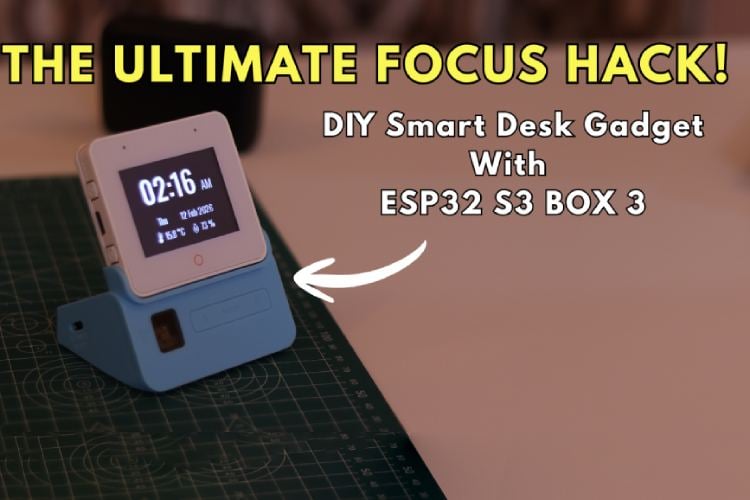
By Ameya Angadi
In an era of endless notifications and remote work, our greatest challenge isn't a lack of tools, it’s a lack of focus. We often turn to our smartphones for a simple timer or a to-do list, only to find ourselves sucked into social media ten minutes later. This "Digital Fatigue" is a real problem, I faced similar problems while studying for my exams. I realized that using a Pomodoro timer and a clear task list was one of the only way I could manage my workload, but I needed a device that lived on my desk, not on my phone.
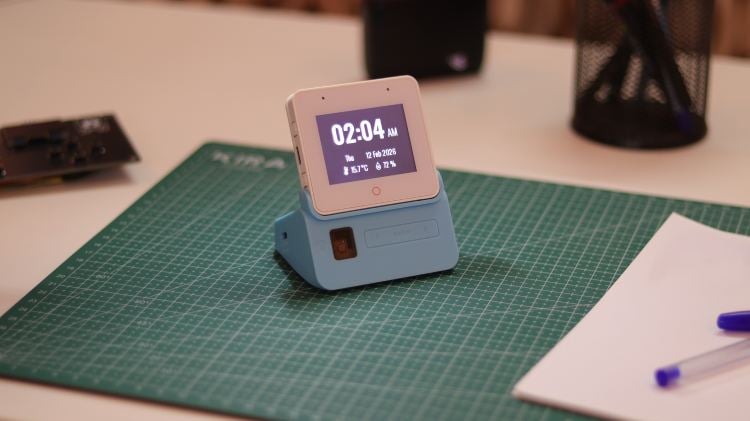
Desk32 was my solution to this problem. It is a standalone productivity accessory designed to act as a "Focus Anchor". Built using the ESP32-S3-BOX-3, it provides essential tools: a specialized Pomodoro timer, a Dynamic task manager, and health reminders, all of which have been integrated into a sleek, professional interface. It isn't just a table clock; it’s a dedicated device in a smart home designed to reclaim your attention.
Components Required
| Component Name | Quantity | Datasheet/Link |
| ESP32-S3-BOX-3 | 1 | View Datasheet |
| 18650 Battery (2000-3000 mAh) | 1 | View Datasheet |
Circuit Diagram
The core innovation of Desk32 lies in its integrated hardware architecture, which completely eliminates the "spaghetti wiring" typically found in hobby projects and prototypes. Instead of using messy jumper wires and breadboards, the ESP32-S3-BOX-3 communicates with the Sensor Dock via a high-speed, internal PCIe x1 expansion connector. This single, high-density header manages the entire interface for the LCD, the I2C bus for environmental sensors, and a robust power delivery path from the 18650 Li-ion battery. By utilizing this professional-grade interconnect, the device achieves a level of signal integrity and physical reliability impossible to reach with traditional wiring, resulting in a project that functions as a single, cohesive unit.
By docking the display module into the sensor base, we instantly establish a robust electrical path for both data and power without a single external cable.
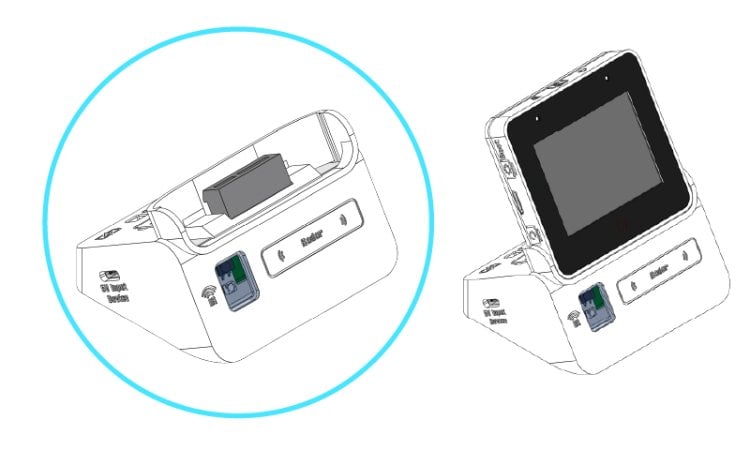
Internal Architecture & Connections

The above image provides a detailed technical reference for the internal connections and component layout of the sensor dock, highlighting the integrated power path and expansion headers. (Credit: Espressif Systems GitHub)
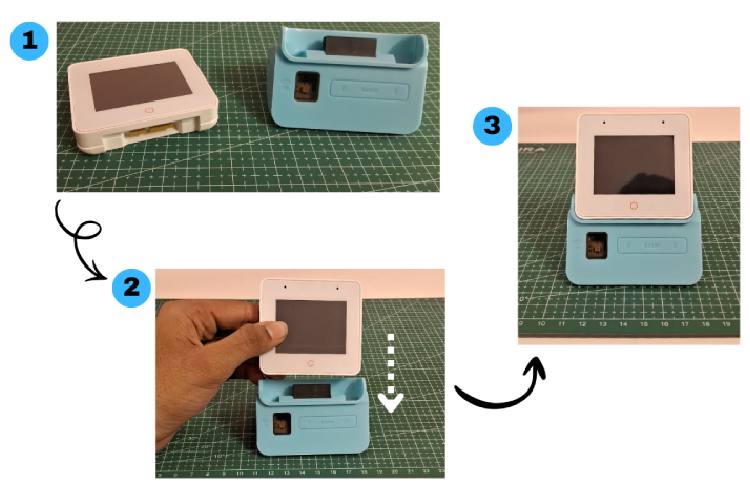
Modular Hardware Integration
The above image demonstrates the plug-and-play nature of the Desk32, where the display module is simply slotted into the sensor dock to establish a secure, wire-free hardware connection. (Credit: Espressif Systems GitHub)
Hardware Assembly
Step 1: Preparing the Sensor Dock Base
The first step involves preparing the ESP32-S3-BOX-3-SENSOR dock. This dock serves as the electrical and physical foundation for the "Focus Anchor". Familiarize yourself with the layout, specifically the high-density expansion connector at the top and the battery compartment at the bottom. This dock is what enables the device to be completely wire-free, housing all the necessary power management and environmental sensors in one unit.
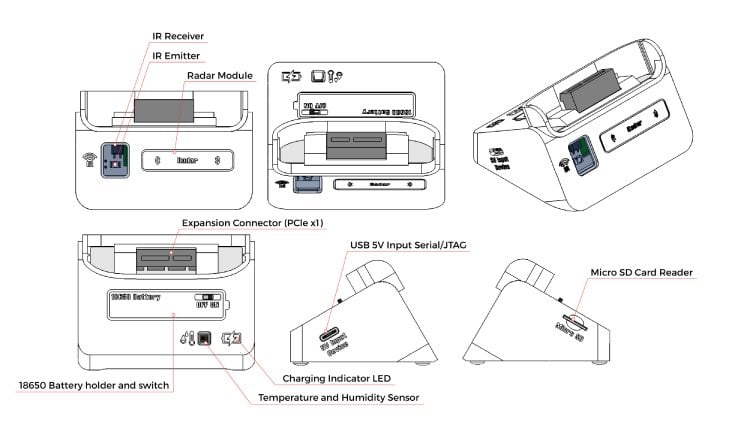
A technical overview of the sensor dock base, highlighting the integrated 18650 battery holder and the PCIe x1 expansion header. (Credit: Espressif Systems GitHub)
Step 2: Battery Installation for Portability
To achieve true portability, insert a high-quality 18650 Li-ion battery (2000-3000 mAh) into the holder located on the underside of the dock. This specific choice of hardware is what gives Desk32 its impressive 8-10 hour battery life. The onboard charging circuit allows you to keep the device plugged into USB-C while working, but the battery ensures that your Pomodoro cycle isn't broken if you need to move to a different room or a cafe.
CAUTION: Always double-check that the positive (+) and negative (-) terminals of your battery match the markings inside the sensor dock holder before switching the device on.
It was tested that
At 100% Brightness - 8 hours runtime
At 50% Brightness - 10 hours runtime
Step 3: Snap-Fit Module Integration
This is where the "magic" of the integrated architecture happens. Align the main ESP32-S3-BOX-3 display module with the expansion connector on the top of the sensor dock. Ensure the pins are centered and press down firmly but gently. This single "docking" action replaces dozens of jumper wires. This seamless connection is vital for maintaining the smooth UI experience we designed.
Step 4: Upload code using the instructions in Code explanation section
Step 5: Power-Up and Calibration
Once docked, toggle the physical power switch to the "ON" position. You should see the custom "Desk32" loading screen appear.
NOTE: If the device does not turn on instantly, don't worry this is a safety feature of the Power Management IC. Simply toggle the switch Off and then back On to turn on the device. (This happens when you are using a 18650 battery)
Code Explanation
1. Library Integration & System Porting
The code begins by including essential drivers for the display and touch interface. We utilize lvgl_v8_port.h to bridge the LVGL graphics library with the ESP32-S3's hardware.
You must also install the following libraries via the Library Manager with all dependencies:
LVGL (v8.3.x) (by Kisvegabor) - The core graphics engine.
ArduinoJson (by Benoit Blanchon) - For parsing weather data.
ESP Panel (by Espressif)- For hardware-specific display and touch drivers.
NTP Client (by Fabrice Weinberg) - For updating time via NTP servers.
Also you need to have the following delete the lvgl, ui folders and lv_conf.h file located at Documents\Arduino\libraries\ and paste the lvgl, ui folders and lv_conf.h file from the github page (Link).
2. WiFi and Time Synchronization
The project relies on a stable internet connection to fetch real-time data. We use the WiFi.h and time.h libraries to connect to your local network and synchronize with NTP (Network Time Protocol) servers.
This ensures the Desk32 clock remains accurate to the second, which is also critical for the Pomodoro engine and the integrated calendar.
3. Real-Time Weather via JSON Parsing
To display environmental data, the device performs an HTTP GET request to the OpenWeatherMap API. We use ArduinoJson to parse the incoming data stream and extract temperature and humidity values.
The fetchWeather() function is executed every 15 minutes to prevent unnecessary network traffic and save battery power.
4. Dynamic Task Management
The Task List is highly interactive. When a user enters text, addTaskToUI() dynamically creates new LVGL objects (checkboxes and buttons) and attaches them to a scrollable container.
5. The Pomodoro Engine
The main loop monitors the pomoRunning state. If active, it decrements the timeLeft variable every 1000ms and updates the visual arc and labels.
Once the timer hits zero, the code automatically switches from "Focus Mode" to "Break Mode," cycling the totalTime between 25 and 5 minutes respectively.
Designing the UI with Squareline Studio
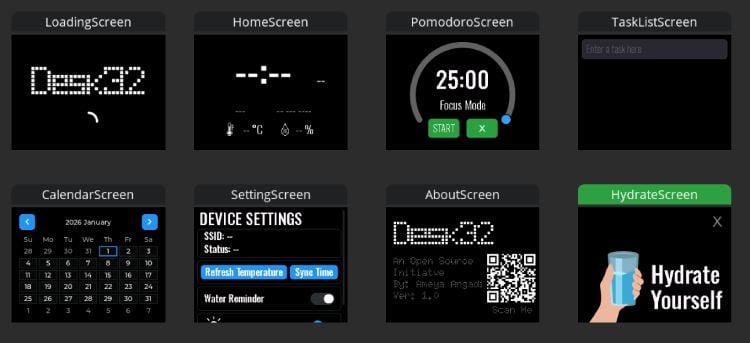
To bridge the gap between high-level design and embedded C code, I utilized SquareLine Studio, a professional visual drag-and-drop UI editor specifically optimized for LVGL. This tool allowed me to focus on the Design Thinking aspect of the project—ensuring the "Focus Anchor" felt intuitive and minimalist—without getting bogged down in the manual coordinate-mapping of hundreds of UI elements. Once the design was finalized, SquareLine Studio generated the highly optimized C files that drive the animations on the ESP32-S3-BOX-3. All these generated UI files, along with the main project logic, are available for review in the Desk32 GitHub Repository
Future Improvements & Scalability
While the current version of Desk32 is a fully functional "Focus Anchor", the ESP32-S3-BOX-3 architecture provides a massive amount of untapped potential.
The current Arduino IDE based setup is good for quick and rapid development but by using ESP-IDF more features can be implemented. The hardware is designed to scale, and I have several planned upgrades to further enhance the user experience:
- Local Voice Control: Utilizing the integrated dual-microphone array and the ESP-SR framework, I aim to implement hands-free controls. This would allow users to start a Pomodoro session or add a task simply by speaking, keeping them in a "flow state" without needing to touch the screen.
- SD-Card Persistence: To ensure that your goals aren't lost during a reboot, I plan to leverage the Micro-SD slot on the sensor dock. This will allow the Task List to be saved into a local CSV or JSON file, providing non-volatile storage that survives power cycles.
- Context-Aware Environmental Logic: The onboard sensors for temperature and humidity offer a unique opportunity for indoor weather monitoring. Future firmware could automatically trigger a "Health Break" or "Ventilation Alert" if ambient air quality drops to levels that impair cognitive focus, truly making Desk32 an intelligent guardian of your workspace.
Conclusion
Building Desk32 was more than just a technical exercise; it was a personal mission to reclaim my focus. By moving away from a "distraction-first" workflow centered around smartphones and towards an "intent-first" workflow centered around this dedicated hardware anchor, I found a significant boost in my own productivity during my exam season. The physical presence of the device on my desk serves as a constant, silent reminder of my current goals.
This project is an Open Source Initiative released under the GPL v3 license. I believe that tools for self-improvement should be accessible to everyone. I invite fellow students, developers, and makers to visit the GitHub repository, and adapt Desk32 to their own unique study habits. Together, we can build better tools to navigate our increasingly distracted digital world.
GitHub Repository


Complete Project Code
/*
* Project Name: Desk32
* Designed For: ESP32 S3 BOX 3
*
*
* License: GPL3+
* This project is licensed under the GNU General Public License v3.0 or later.
* You are free to use, modify, and distribute this software under the terms
* of the GPL, as long as you preserve the original license and credit the original
* author. For more details, see <https://www.gnu.org/licenses/gpl-3.0.en.html>.
*
* Copyright (C) 2026 Ameya Angadi
*
* Code Created And Maintained By: Ameya Angadi
* Last Modified On: February 10, 2026
* Version: 1.0.0
*
*/
#include <Arduino.h>
#include <WiFi.h>
#include <HTTPClient.h>
#include <ArduinoJson.h>
#include <time.h>
#include <esp_display_panel.hpp>
#include <lvgl.h>
#include <ui.h>
#include "lvgl_v8_port.h"
using namespace esp_panel::drivers;
using namespace esp_panel::board;
// --- USER CONFIGURATION (Update These) ---
const char* ssid = ""; // Update: Your WiFi SSID
const char* password = ""; // Update: Your WiFi Password
const char* apiKey = ""; // Update: OpenWeatherMap API Key
const char* city = ""; // Update: Your City
const char* country = ""; // Update: Your Country Code
// Timezone Settings (India)
const long gmtOffset_sec = 19800;
const int daylightOffset_sec = 0;
// Global Timers and State
Board* board = nullptr;
unsigned long lastWeatherTime = 0;
const unsigned long weatherInterval = 900000; // 15 Minutes
// Weather Variables
String temperature = "--";
String humidity = "--";
// Pomodoro Globals
bool pomoRunning = false;
bool pomoPaused = false;
bool isBreakMode = false;
int totalTime = 1500;
int timeLeft = 1500;
unsigned long lastPomoTick = 0;
const char* breakMessages[] = { "Good Job!", "Take a Walk", "Drink Water", "Meditate", "Stretch Now" };
// Keyboard and UI State Trackers
bool isKeyboardActive = false;
int prevDay = -1;
bool isWaterReminderEnabled = true; // Default to ON
unsigned long lastWaterAlertTime = 0;
const unsigned long waterAlertInterval = 1800000; // 30 Minutes
unsigned long lastWifiCheckTime = 0;
// Brightness Tracker (Default 100)
int currentBrightness = 100;
// --- EVENT HANDLERS ---
// Updates backlight level based on settings slider
void onBrightnessChange(lv_event_t * e) {
lv_obj_t * slider = lv_event_get_target(e);
int val = lv_slider_get_value(slider);
// Ensure we don't go below 10 or above 100
if (val < 10) val = 10;
if (val > 100) val = 100;
currentBrightness = val;
board->getBacklight()->setBrightness(currentBrightness);
}
// Toggles the hydration alert system
void onWaterSwitchToggle(lv_event_t * e) {
lv_obj_t * sw = lv_event_get_target(e);
if (lv_obj_has_state(sw, LV_STATE_CHECKED)) {
isWaterReminderEnabled = true;
lastWaterAlertTime = millis();
Serial.println("Water Reminder: ON");
} else {
isWaterReminderEnabled = false;
Serial.println("Water Reminder: OFF");
}
}
// Triggers a manual weather API fetch
void onUpdateWeatherClick(lv_event_t * e) {
lv_obj_t * btn = lv_event_get_target(e);
lv_obj_t * label = lv_obj_get_child(btn, 0);
fetchWeather();
}
// Forces a resync with NTP time servers
void onSyncTimeClick(lv_event_t * e) {
lv_obj_t * btn = lv_event_get_target(e);
lv_obj_t * label = lv_obj_get_child(btn, 0);
configTime(gmtOffset_sec, daylightOffset_sec, "pool.ntp.org");
delay(300);
}
// Throttled UI update for WiFi signal/status
void updateSettingsScreenUI() {
if (lv_scr_act() != ui_SettingScreen) return;
if (millis() - lastWifiCheckTime > 2000) {
lastWifiCheckTime = millis();
String ssidStr = WiFi.SSID();
if(ssidStr.isEmpty()) ssidStr = "No Network";
lv_label_set_text(ui_LabelWifiSSID, ("SSID: " + ssidStr).c_str());
if (WiFi.status() == WL_CONNECTED) {
lv_label_set_text(ui_LabelWifiStatus, "Status: Connected");
lv_obj_set_style_text_color(ui_LabelWifiStatus, lv_color_hex(0x00FF00), LV_PART_MAIN);
} else {
lv_label_set_text(ui_LabelWifiStatus, "Status: Disconnected");
lv_obj_set_style_text_color(ui_LabelWifiStatus, lv_color_hex(0xFF0000), LV_PART_MAIN);
}
}
}
// Dismisses health alert and returns to Home
void onHydrateCloseClick(lv_event_t * e) {
lv_scr_load_anim(ui_HomeScreen, LV_SCR_LOAD_ANIM_FADE_ON, 500, 0, false);
}
// Task Manager Handlers
static void textAreaFocusHandler(lv_event_t * e) {
lv_event_code_t code = lv_event_get_code(e);
if(code == LV_EVENT_FOCUSED || code == LV_EVENT_CLICKED) {
isKeyboardActive = true;
lv_obj_clear_flag(ui_Keyboard1, LV_OBJ_FLAG_HIDDEN);
}
}
// Manages keyboard visibility
static void dismissKeyboardHandler(lv_event_t * e) {
lv_event_code_t code = lv_event_get_code(e);
if(code == LV_EVENT_CLICKED) {
lv_obj_add_flag(ui_Keyboard1, LV_OBJ_FLAG_HIDDEN);
lv_obj_clear_state(ui_TextAreaTaskInput, LV_STATE_FOCUSED);
isKeyboardActive = false;
}
}
// Handles task completion styling and keyboard conflict
static void taskToggleHandler(lv_event_t * e) {
lv_event_code_t code = lv_event_get_code(e);
lv_obj_t * cb = lv_event_get_target(e);
if(code == LV_EVENT_VALUE_CHANGED) {
if (isKeyboardActive) {
lv_obj_add_flag(ui_Keyboard1, LV_OBJ_FLAG_HIDDEN);
lv_obj_clear_state(ui_TextAreaTaskInput, LV_STATE_FOCUSED);
isKeyboardActive = false;
// Undo click
if(lv_obj_has_state(cb, LV_STATE_CHECKED)) lv_obj_clear_state(cb, LV_STATE_CHECKED);
else lv_obj_add_state(cb, LV_STATE_CHECKED);
return;
}
// Normal toggle style
if(lv_obj_has_state(cb, LV_STATE_CHECKED)) {
lv_obj_set_style_text_color(cb, lv_color_hex(0x4c4d52), LV_PART_MAIN);
lv_obj_set_style_text_decor(cb, LV_TEXT_DECOR_STRIKETHROUGH, LV_PART_MAIN);
} else {
lv_obj_set_style_text_color(cb, lv_color_hex(0xFFFFFF), LV_PART_MAIN);
lv_obj_set_style_text_decor(cb, LV_TEXT_DECOR_NONE, LV_PART_MAIN);
}
}
}
// Deletes a task row from the list
static void deleteTaskHandler(lv_event_t * e) {
lv_event_code_t code = lv_event_get_code(e);
if(code == LV_EVENT_CLICKED) {
if (isKeyboardActive) {
lv_obj_add_flag(ui_Keyboard1, LV_OBJ_FLAG_HIDDEN);
lv_obj_clear_state(ui_TextAreaTaskInput, LV_STATE_FOCUSED);
isKeyboardActive = false;
}
lv_obj_t* row_container = (lv_obj_t*)lv_event_get_user_data(e);
if(row_container) lv_obj_del(row_container);
}
}
// Dynamically creates a new task entry in the UI
void addTaskToUI(const char* text) {
if (strlen(text) == 0) return;
lvgl_port_lock(-1);
lv_obj_t* row = lv_obj_create(ui_ContainerTaskList);
lv_obj_set_width(row, LV_PCT(100));
lv_obj_set_height(row, LV_SIZE_CONTENT);
lv_obj_set_style_pad_all(row, 2, 0);
lv_obj_set_style_border_width(row, 0, 0);
lv_obj_set_style_bg_opa(row, LV_OPA_TRANSP, 0);
lv_obj_set_flex_flow(row, LV_FLEX_FLOW_ROW);
lv_obj_set_flex_align(row, LV_FLEX_ALIGN_SPACE_BETWEEN, LV_FLEX_ALIGN_CENTER, LV_FLEX_ALIGN_CENTER);
lv_obj_add_flag(row, LV_OBJ_FLAG_CLICKABLE);
lv_obj_add_event_cb(row, dismissKeyboardHandler, LV_EVENT_CLICKED, NULL);
lv_obj_t* cb = lv_checkbox_create(row);
lv_checkbox_set_text(cb, text);
lv_obj_set_flex_grow(cb, 1);
lv_obj_set_style_text_font(cb, &ui_font_OswaldLight20, LV_PART_MAIN);
lv_obj_set_style_width(cb, 20, LV_PART_INDICATOR);
lv_obj_set_style_height(cb, 20, LV_PART_INDICATOR);
lv_obj_set_style_text_font(cb, &lv_font_montserrat_14, LV_PART_INDICATOR);
lv_obj_set_style_pad_column(cb, 5, LV_PART_MAIN);
lv_obj_set_style_pad_top(cb, 0, LV_PART_MAIN);
lv_obj_set_style_pad_bottom(cb, 0, LV_PART_MAIN);
lv_obj_add_event_cb(cb, taskToggleHandler, LV_EVENT_VALUE_CHANGED, NULL);
lv_obj_t* btn_del = lv_btn_create(row);
lv_obj_set_size(btn_del, 35, 35);
lv_obj_set_style_bg_opa(btn_del, LV_OPA_TRANSP, 0);
lv_obj_set_style_shadow_width(btn_del, 0, 0);
lv_obj_t* lbl = lv_label_create(btn_del);
lv_label_set_text(lbl, "X");
lv_obj_center(lbl);
lv_obj_set_style_text_font(lbl, &lv_font_montserrat_14, 0);
lv_obj_set_style_text_color(lbl, lv_color_hex(0xFF0000), 0);
lv_obj_add_event_cb(btn_del, deleteTaskHandler, LV_EVENT_CLICKED, row);
lvgl_port_unlock();
}
// Processes "Enter" key from the task keyboard
void onKeyboardReady(lv_event_t* e) {
lv_obj_t* kb = lv_event_get_target(e);
uint32_t code = lv_event_get_code(e);
if (code == LV_EVENT_READY) {
const char* txt = lv_textarea_get_text(ui_TextAreaTaskInput);
addTaskToUI(txt);
lv_textarea_set_text(ui_TextAreaTaskInput, "");
lv_obj_add_flag(ui_Keyboard1, LV_OBJ_FLAG_HIDDEN);
lv_obj_clear_state(ui_TextAreaTaskInput, LV_STATE_FOCUSED);
isKeyboardActive = false;
}
}
// --- POMODORO AND WEATHER CORE ---
// Updates Pomodoro countdown and progress arc
void updatePomoUI() {
lvgl_port_lock(-1);
char buf[10];
sprintf(buf, "%02d:%02d", timeLeft / 60, timeLeft % 60);
lv_label_set_text(ui_LabelPomoTime, buf);
if (totalTime > 0) {
int progress = (timeLeft * 100) / totalTime;
lv_arc_set_value(ui_ArcPomo, progress);
}
lvgl_port_unlock();
}
// Handles Pomodoro Start/Pause/Resume states
void startPomodoro(lv_event_t * e) {
if (!pomoRunning) {
pomoRunning = true;
pomoPaused = false;
lv_label_set_text(ui_LabelStart, "PAUSE");
if (!isBreakMode) lv_label_set_text(ui_LabelPomoStatus, "Focus Mode");
} else {
pomoPaused = !pomoPaused;
if (pomoPaused) {
lv_label_set_text(ui_LabelStart, "RESUME");
lv_label_set_text(ui_LabelPomoStatus, "Paused");
} else {
lv_label_set_text(ui_LabelStart, "PAUSE");
lv_label_set_text(ui_LabelPomoStatus, isBreakMode ? "Relaxing..." : "Focus Mode");
}
}
}
// Resets Pomodoro to initial state
void stopPomodoro(lv_event_t * e) {
pomoRunning = false;
pomoPaused = false;
isBreakMode = false;
totalTime = 1500;
timeLeft = 1500;
lv_label_set_text(ui_LabelStart, "START");
lv_label_set_text(ui_LabelPomoStatus, "Focus Mode");
updatePomoUI();
}
// Fetches real-time JSON weather data from OpenWeatherMap
void fetchWeather() {
if (WiFi.status() == WL_CONNECTED) {
HTTPClient http;
String url = "http://api.openweathermap.org/data/2.5/weather?q=" + String(city) + "," + String(country) + "&units=metric&appid=" + String(apiKey);
http.begin(url);
int httpResponseCode = http.GET();
if (httpResponseCode == 200) {
String payload = http.getString();
DynamicJsonDocument doc(1024);
DeserializationError error = deserializeJson(doc, payload);
if (!error) {
float temp_val = doc["main"]["temp"];
int hum_val = doc["main"]["humidity"];
char temp_buf[16];
sprintf(temp_buf, "%.1f °C", temp_val);
temperature = String(temp_buf);
humidity = String(hum_val) + " %";
Serial.println("Weather Updated: " + temperature);
}
}
http.end();
}
}
// --- SYSTEM SETUP ---
void setup() {
Serial.begin(115200);
// Initialize Hardware
board = new Board();
board->init();
assert(board->begin());
lvgl_port_init(board->getLCD(), board->getTouch());
lvgl_port_lock(-1);
ui_init();
// Dynamic Event Attachments
lv_obj_add_event_cb(ui_Keyboard1, onKeyboardReady, LV_EVENT_READY, NULL);
lv_obj_add_event_cb(ui_TextAreaTaskInput, textAreaFocusHandler, LV_EVENT_FOCUSED, NULL);
lv_obj_add_event_cb(ui_TextAreaTaskInput, textAreaFocusHandler, LV_EVENT_CLICKED, NULL);
lv_obj_add_flag(ui_ContainerTaskList, LV_OBJ_FLAG_CLICKABLE);
lv_obj_add_event_cb(ui_ContainerTaskList, dismissKeyboardHandler, LV_EVENT_CLICKED, NULL);
lv_obj_add_event_cb(lv_scr_act(), dismissKeyboardHandler, LV_EVENT_CLICKED, NULL);
if (ui_SwitchWater) {
lv_obj_add_state(ui_SwitchWater, LV_STATE_CHECKED);
isWaterReminderEnabled = true;
}
if (ui_SliderBrightness) {
lv_slider_set_range(ui_SliderBrightness, 10, 100);
lv_slider_set_value(ui_SliderBrightness, 100, LV_ANIM_OFF);
lv_obj_clear_flag(ui_SliderBrightness, LV_OBJ_FLAG_SCROLL_CHAIN);
lv_obj_clear_flag(ui_SliderBrightness, LV_OBJ_FLAG_GESTURE_BUBBLE);
}
lv_task_handler();
lvgl_port_unlock();
// Initialization: WiFi and Time
WiFi.begin(ssid, password);
Serial.print("Connecting");
int retry = 0;
while (WiFi.status() != WL_CONNECTED && retry < 10) {
delay(400);
Serial.print(".");
retry++;
}
Serial.println("\nConnected!");
configTime(gmtOffset_sec, daylightOffset_sec, "pool.ntp.org");
fetchWeather();
lastWeatherTime = millis();
lastWaterAlertTime = millis();
}
// --- MAIN LOOP ---
void loop() {
struct tm timeinfo;
// Pomodoro Tick Logic
if (pomoRunning && !pomoPaused) {
if (millis() - lastPomoTick > 1000) {
lastPomoTick = millis();
if (timeLeft > 0) {
timeLeft--;
updatePomoUI();
} else {
if (!isBreakMode) {
isBreakMode = true;
totalTime = 300;
timeLeft = 300;
int r = random(0, 5);
lvgl_port_lock(-1);
lv_label_set_text(ui_LabelPomoStatus, breakMessages[r]);
lvgl_port_unlock();
} else {
stopPomodoro(NULL);
lvgl_port_lock(-1);
lv_label_set_text(ui_LabelPomoStatus, "Break Over!");
lvgl_port_unlock();
}
}
}
}
// Background Weather and Time Updation Every 15 Minutes
if (millis() - lastWeatherTime > weatherInterval) {
if (WiFi.status() == WL_CONNECTED) {
configTime(gmtOffset_sec, daylightOffset_sec, "pool.ntp.org");
fetchWeather();
}
lastWeatherTime = millis();
}
// Water Reminder Logic
if (isWaterReminderEnabled) {
if (millis() - lastWaterAlertTime > waterAlertInterval) {
lvgl_port_lock(-1);
if (lv_scr_act() != ui_HydrateScreen) {
lv_scr_load_anim(ui_HydrateScreen, LV_SCR_LOAD_ANIM_FADE_ON, 500, 0, false);
}
lvgl_port_unlock();
lastWaterAlertTime = millis();
}
}
// Settings Screen UI Updates
if (lv_scr_act() == ui_SettingScreen) {
lvgl_port_lock(-1);
updateSettingsScreenUI();
lvgl_port_unlock();
}
// Update Time
if (getLocalTime(&timeinfo)) {
char buf_time[6], buf_ampm[3], buf_day[4], buf_date[12];
strftime(buf_time, sizeof(buf_time), "%I:%M", &timeinfo);
strftime(buf_ampm, sizeof(buf_ampm), "%p", &timeinfo);
strftime(buf_day, sizeof(buf_day), "%a", &timeinfo);
strftime(buf_date, sizeof(buf_date), "%d %b %Y", &timeinfo);
lvgl_port_lock(-1);
lv_label_set_text(ui_LabelTime, buf_time);
lv_label_set_text(ui_LabelDay, buf_day);
lv_label_set_text(ui_LabelAMPM, buf_ampm);
lv_label_set_text(ui_LabelDate, buf_date);
if (timeinfo.tm_mday != prevDay) {
prevDay = timeinfo.tm_mday;
lv_calendar_set_today_date(ui_Calendar1, timeinfo.tm_year + 1900, timeinfo.tm_mon + 1, timeinfo.tm_mday);
lv_calendar_set_showed_date(ui_Calendar1, timeinfo.tm_year + 1900, timeinfo.tm_mon + 1);
}
lv_label_set_text(ui_LabelTemp, temperature.c_str());
lv_label_set_text(ui_LabelHum, humidity.c_str());
lvgl_port_unlock();
}
delay(200);
}




